Does the D-Link have an username and password associated with it?
Most do, so that may be your hang up.
May be a way to put them in the config of the module…
 J
Offline
J
Offline
Does the D-Link have an username and password associated with it?
Most do, so that may be your hang up.
May be a way to put them in the config of the module…
OH… and if I could get a pointer or 2 on how to fix the align-left on the email module… I feel I have tried everything I can think of (which ain’t much to go by these days!!!)
many customization’s to follow a theme (Chiefs!!!)…
local newsfeed via google news
MMM-MyCalendar
default clock
MMM-NOAA
MMM-History
MMM-GoogleFit (currently effed up ???)
email
MMM-SimpleLogo
MMM-iFrame hosting my YouTube playlist
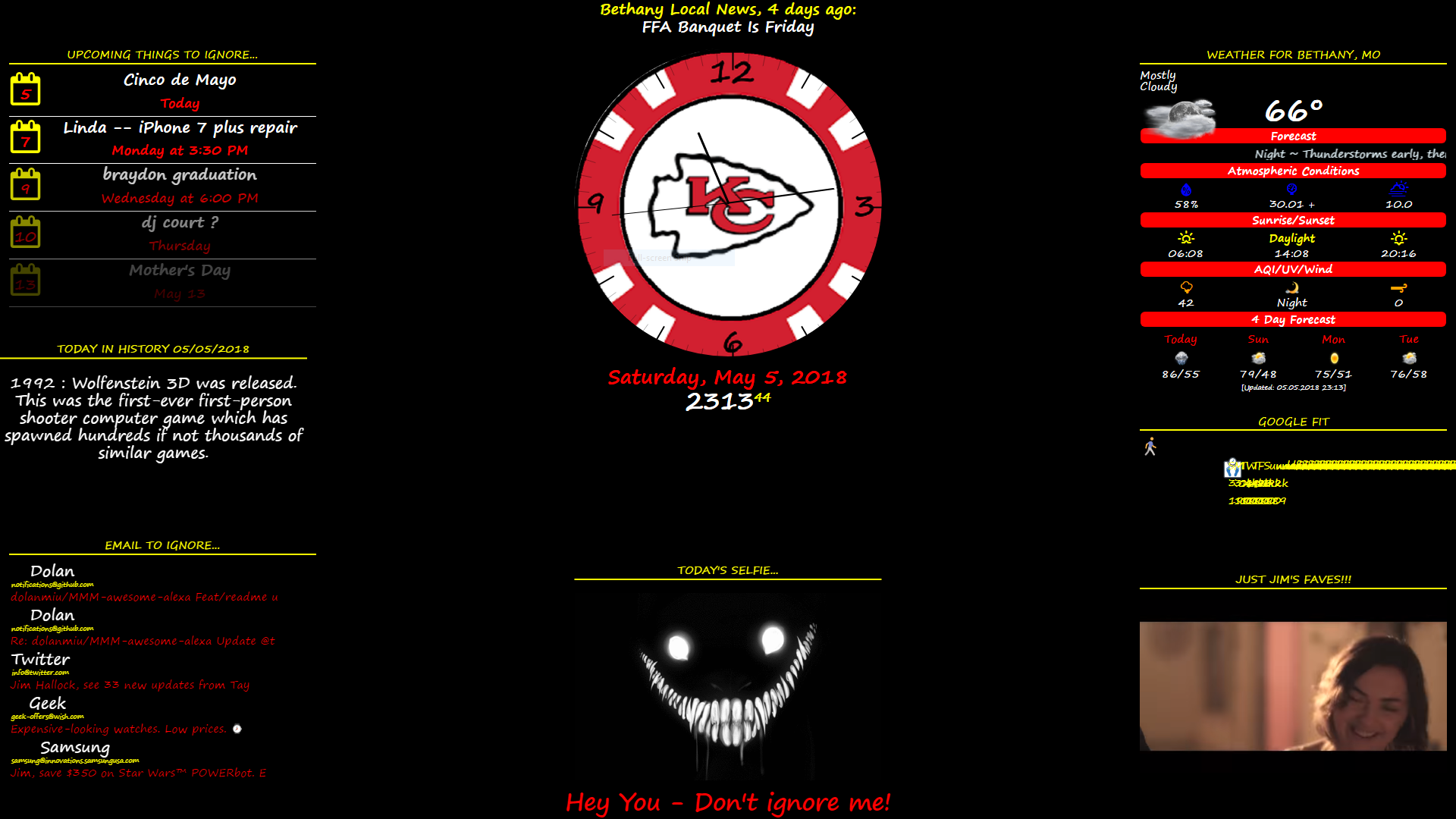
all done on an Asus N550J with Windows 10 Pro, Core i7 cpu, 16gb RAM , & 1TB HDD
things to do…
working on a RandomYouTube module (could really use some help with it!! (hint, hint…))
Working on a different Random Image module that pulls from a directory of several pics, (could use help with that as well (more hint, hint…)) the one in the 3rd party modules list just does’t work for pulling out of a local directory…
Then looking to fit it onto a 40+" TV behind some one-way glass built into a wall. And eventually be running off of a Win10 compustick…
I could seriously also use some help with developing a module…
I have code that works great in HTML…
  var playlistId = "PLl_KM23gznEAZW-INW8ty4QNaHH8JCnNW"; // playlist ID found in the URL on YouTube (starts with PLI_)
  var tag = document.createElement('script');
  tag.src = "https://www.youtube.com/iframe_api";  // needed to call iFrame API from YouTube
  var firstScriptTag = document.getElementsByTagName('script')[0];
  firstScriptTag.parentNode.insertBefore(tag, firstScriptTag);
  var player;

  function onYouTubeIframeAPIReady() {
    player = new YT.Player('player', {
      height: '411', // variable that can be changed to suit your need
      width: '548', // variable that can be changed to suit your need
      events: {
        'onReady': onPlayerReady,
        'onStateChange': onPlayerStateChange
      }
    });
  }

  // pulls the videos from the playlist and places then in an array for randomization
  var playlistArray;
  var playListArrayLength; // total number of videos in the playlist. Can be changed in the playlist on YouTube without having to change your code...
  var maxNumber; // equals to the number of videos in the playlist
  var oldNumber = 0;
  var NewNumber = 0;

  function newRandomNumber() {  // shuffles the videos and gets a random one ready to be played
    oldNumber = NewNumber;
    NewNumber = Math.floor(Math.random() * maxNumber);
    if (NewNumber = oldNumber) {
      newRandomNumber();
    } else {
      return NewNumber;
    }
  }

  function onPlayerReady(event) { // loads the playlist into the player
    player.loadPlaylist({
      'listType': 'playlist',
      'list': playlistId
    });
  }
  var firstLoad = true;

  function onPlayerStateChange(event) { // gets new random video after current one stops playing
    console.log(event.data);
    if (event.data == YT.PlayerState.ENDED) {
      player.playVideoAt(newRandomNumber());
    } else {
      if (firstLoad && event.data == YT.PlayerState.PLAYING) {
        firstLoad = false;
        playlistArray = player.getPlaylist();
        playListArrayLength = playlistArray.length;
        maxNumber = playListArrayLength;
        NewNumber = newRandomNumber();
        player.playVideoAt(newRandomNumber());
      }
    }
  }
Now, I need it to work in a module so it will work in my MagicMirror… this is what I have come up with so far and am now stuck on where to go from here…
Module.register("MMM-RandomYouTube", {
    // these parameters are defined here -- https://developers.google.com/youtube/player_parameters#Parameters
    defualts: {
        autoplay: true,
        color: "red", // can only be red or white
        controls: true,
        disablekb: false,
        fs: false,
        loop: true,
        modestbranding: false,
        rel: false,
        showinfo: false
    },

    requiresVersion: "2.1.0", // Required version of MagicMirror

    start: function () {
        var playlistId = "PLl_KM23gznEAZW-INW8ty4QNaHH8JCnNW";
        var tag = document.createElement('script');
        tag.src = "https://www.youtube.com/iframe_api";

        var firstScriptTag = document.getElementsByTagName('script')[0];
        firstScriptTag.parentNode.insertBefore(tag, firstScriptTag);

        var player;

        function onYouTubeIframeAPIReady() {
            player = new YT.Player('player', {
                height: '420',
                width: '708',
                events: {
                    'onReady': onPlayerReady,
                    'onStateChange': onPlayerStateChange
                }

            });
        }


        var playlistArray;
        var playListArrayLength;
        var maxNumber;

        var oldNumber = 0;
        var NewNumber = 0;

        function newRandomNumber() {
            oldNumber = NewNumber;
            NewNumber = Math.floor(Math.random() * maxNumber);
            if (NewNumber == oldNumber) {
                newRandomNumber();
            } else {
                return NewNumber;
            }
        },

        function onPlayerReady(event) {
            player.loadPlaylist({
                'listType': 'playlist',
                'list': playlistId
            });
        }

        var firstLoad = true;

        function onPlayerStateChange(event) {
            console.log(event.data);
            if (event.data == YT.PlayerState.ENDED) {
                player.playVideoAt(newRandomNumber());
            } else {
                if (firstLoad && event.data == YT.PlayerState.PLAYING) {
                    firstLoad = false;
                    playlistArray = player.getPlaylist();
                    playListArrayLength = playlistArray.length;
                    maxNumber = playListArrayLength;
                    NewNumber = newRandomNumber();
                    player.playVideoAt(newRandomNumber());
                }
            }

        }
    });
Any help with this will be greatly appreciated!!!
Hi, I’m Jim,
Aaand, I’m a code-aholic…
I was clean since 2003 until about a year ago,
well, now, I’m disabled, can’t work a steady scheduled job, can’t drive.
So, I can no longer be the Psych Nurse I used to be.
48-60 hours a week, with an hour commute each way.
Down to barely being able to leave the house… INSANE!!!
Well, now I spend a lot of my time relearning to code, A lot has changed over the past 15 years…
But, I’m kinda getting the gist of things again.
Ok, enough about me… Let’s here from some one else from the group!!!
Another thing to try is to rebuild the mirror…
npm rebuild
Another option is to make sure you have all the latest updates for everything… Computer OS, RasPi, The mirror, node, electron, etc.
After a full updating, reboot, rebuild. Try again.
I have found that most of the problems relating to ‘no new emails’ is because you have your email open on another device, so it appears to the mirror module that they have been read and nothing new is coming up for it to retrieve.
Do you have your Gmail account set up with any 2-step verification?
If so, that would be a problem as well.
Follow the link given in your error…
https://support.google.com/mail/answer/78754
Then follow the instructions to set your account to use less secure apps with your account…
I’m pretty sure that I had to do that to get mine to work.
There are other things to try as well.
Yes, it works for me with my Gmail, my Hotmail, and my Yahoo mail. But I have since decided to link all three to my Gmail so I use just the one to receive all of them. But, I have tested it with all three and it does work.
Also…
I have found that some modules don’t work as well with the single quotes (’ ').
Try changing them all to the double quotes (" ")
Try changing the fade to false.
Make sure your email address and password are case correct (uppercase and lowercase).
Other than that, I don’t see an issue with the syntax.
You did change the config.js.sample to config.js, correct?
@umairshah
If you add a module to the default folder, you have to make the necessary changes to the default.js file to include it.
It’s just better to put it in the modules folder.
Yes, I know about Windows 10 portability…
What I was thinking of was how to make MM portable. Yes, I figured on node. But, is there anything else I need to figure in? Is there a way to package it (MM) as an exe or msi?
Really, I feel like I’m jumping ahead of myself a little, as I have yet to get any type of voice control or interaction (Google Assistant, Alexa, Cortana, Watson, etc. Or a combination of some or all) to even work on the Windows MM. That is actually my next problem to conquer. Seems like I’ve figured out how to get any other module to work with Windows except voice. The biggest hurdle I’ve found thus far is utilizing the integrated sound, or external mic and speakers on any and every Windows PC. At this point, I have MM working within the Windows environment on every laptop and desktop and All-In-One I’ve come across. From Win 7, to 8.1 to 10. Except the sound, playback and recording, for running any type of voice control or interaction.
To be able to use one device and make changes and tweaks and test modules on, package it on a USB drive and be able to test it on any Windows device, be it a laptop, tablet, or desktop is my ultimate goal.
I am also looking at incorporating AI with the voice and a customizable Avatar into the MM. But that is taking me a while to learn. Long term goal, but in the works…
Ok, got off subject a little…
So, is there a way to install MM on a USB drive and plug it into any Windows device and run it from the USB? For instance, when I use ‘git clone…’ it automatically downloads and installs to the user directory. Is there a way to get everything I do to download and install to the USB drive? But, run (npm start) on the device the USB is plugged into?
I’m using Windows 10. Not RasPi.
I will have to try and figure it out I guess.
Thanks anyway!
I’m a bit of a newbie, can you explain in a little more detail…
Like how to run node serveronly via autostart?
I would very much be interested in the USB drive installation instructions!
Newbie here, so please be specific!!!
Thanks in advance!
My display so far…
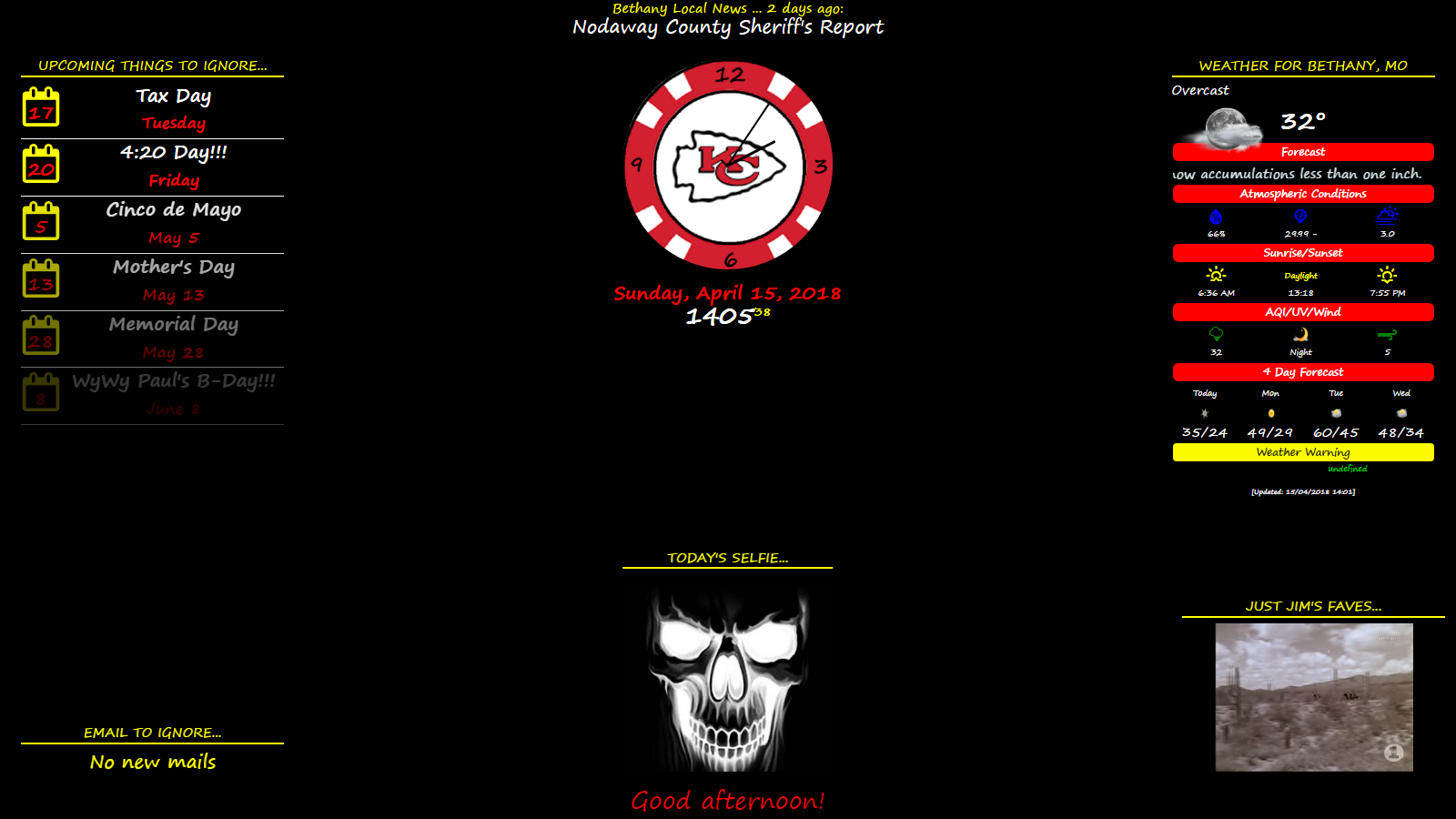
any questions, feel free to ask!
Very willing to share!
Platform: Windows 10 (Asus 15.6’ laptop)
Issues: Cannot get any type of voice control or interaction with it yet. NOT GIVING UP!!!
(but very willing to hear some ideas,)
Future Additions: >Google fit (already have it set up on one of my desktops
>change Selfie to a daily random pic (not from a website, from a file folder)
>get email to show different origins (Gmail, Yahoo, Hotmail, etc.)
>voice control/interaction/assistant (would like combo of Alexa, Google
Assistant, Watson, and Cortana)
>Interactive Avatar to utilize the previous idea
>want to know how to hide a module but it keep working in the background.
for example: have a music module or the YouTube module play without it
taking up space on the Mirror
>would also like to know how to change the code to give me 4 columns
(I’ve tried everything I could!!!)
>would also like to know how to get the email module to align left
(I’ve tried everything I could!!!)
>And, I eventually will 1 or more of the modules that would be changeable through
random display, voice control, or timed change.
If anyone out there would like to give me some hints, tips, pointers, code examples, or just collaborate on any or all of this, I would greatly appreciative!!!
Sort of the same subject…
What I’m trying to do is turn on the MM and use it like it is the screensaver.
My MM is on a Windows 10 desktop and a laptop. Ivecbeen trying to figure out how to run the mirror after 5 minutes inactivity. Like a screensaver would .
Any ideas!!???