MagicMirror Forum
    • Recent
    • Tags
    • Unsolved
    • Solved
    • MagicMirror² Repository
    • Documentation
    • 3rd-Party-Modules
    • Donate
    • Discord
    • Register
    • Login
    1. Home
    2. KirAsh4
    3. Best
    A New Chapter for MagicMirror: The Community Takes the Lead
    Read the statement by Michael Teeuw here.
    Offline
    • Profile
    • Following 0
    • Followers 26
    • Topics 32
    • Posts 773
    • Groups 1

    Posts

    Recent Best Controversial
    • RE: Really NOOB Question. Stopping Magic Mirror App

      Alternatively, rather than working ON the Raspberry Pi itself, consider using a different computer (like the one you’re sitting at now, to post questions on the forum) to remotely SSH into the Raspberry Pi. Then you don’t have to worry about needing to get back to the desktop on the rPi to do anything. You can trigger everything remotely.

      My rPi is setup so that MagicMirror will come up automatically when it reboots (please read the installation instructions on how to do this.) It does not have neither a keyboard nor mouse that are active on it (with that I mean, the wireless dongle is plugged in, but the keyboard and mouse are turned off, I don’t need them.) If I need to restart the process, or update files, from my windows machine, I use a program called SecureCRT to remotely log into the rPi with SSH. You can use something else, like PuTTY. Note that this is text-only, not a graphical interface. Once logged in, I can do anything/everything from the command line that I would do if I was logged onto the rPi itself with its keyboard and mouse.

      If you really want a desktop environment (I really don’t know why), you can setup VNC on the rPi, and use that to connect. On the Windows side, you can use a free version of RealVNC client to connect to the rPi and you have a desktop.

      Side note: having the rPi on the same network means that together with the display that’s connected on the rPi, I can also launch another instance of MagicMirror on my Windows machine simply by going to 'http://myrpi_address:MM_port', for example, 'http://10.0.0.1:8080' (assuming the rPi is at that address.) This allows me to write code and hit refresh on my browser which instantly refreshes, as opposed to constantly restarting the actual process on the rPi. It also allows me to compare. The instance running on the rPi is completely unaffected by the refreshes done on the local browser. So I can make a change, refresh locally, and compare the two, one local, and the other on the rPi’s display. Works great.

      posted in Troubleshooting
      KirAsh4K
      KirAsh4
    • RE: Where to buy good two way mirrors ?

      Yeah, the acrylic, at the monitor size (22x15), would be about $103 … But I’m putting it on a wall, a much larger piece … that’s gonna be 'spensive!

      posted in Hardware
      KirAsh4K
      KirAsh4
    • RE: Web interface for customization?

      Maybe open another socket on port :8081 and have that be the web configuration interface? Dunno, just throwing out ideas …which can always be thrown out. :)

      posted in General Discussion
      KirAsh4K
      KirAsh4
    • RE: Alternating Modules to save on real estate

      By the way, this works best if the two modules you are trying to swap are right below each other in the 'config.js' file. For example, if you’re trying to swap ModA and ModB, your 'config.js' should list them together

      modules: [
      		{
      			module: 'ModA',
      		},
      		{
      			module: 'ModB',
      		},
      ],
      

      if you have a ModC in between them, it won’t ‘swap’ properly, it’ll just turn them off in alternate fashion while keeping them in their respective location. So you’ll end up with:

      startup
      ModA
      ModC
      ModB
      
      then
      ModC
      ModB
      
      then
      ModA
      ModC
      
      alternating ...
      

      Not particularly ideal …

      posted in Requests
      KirAsh4K
      KirAsh4
    • RE: Really NOOB Question. Stopping Magic Mirror App

      LOL!! Oh this ought to be good. :)

      Seriously though, this is coming from decades of being in the field of computers, coding, working with electronics, designing my own stuff … you tend to pick up a thing or two over the years. Then you start to forget them as you start losing your hair … It’s a harsh reality.

      posted in Troubleshooting
      KirAsh4K
      KirAsh4
    • RE: Display and Connection to the Pi3

      My knee jerk answer is to find the model of the screen, and search eBay for a driver for it. The driver board will have the ribbon cable you need to connect to that, and the board will have the standard HDMI input on it. Simply typing in ‘lcd driver board’ on eBay’s search bar will get you a long list of them. By also entering the model of the screen, you can narrow that down.

      posted in Hardware
      KirAsh4K
      KirAsh4
    • RE: Email

      When in doubt, pull the plug.

      posted in Productivity
      KirAsh4K
      KirAsh4
    • RE: Analog + Digital Clock module

      @pugsly, I forgot to mention this: new code has been added to the 'develop' branch that allows you to turn off the date display when using the module in analog mode only. Options are 'top' (default) to have it displayed at the top of the clock, 'bottom' to show it on the bottom, or 'false' to completely turn it off.

      posted in Requests
      KirAsh4K
      KirAsh4
    • RE: Really NOOB Question. Stopping Magic Mirror App

      HEY! You delayed a bunch of stuff in favor of a vacation! Some people’s kids! :)

      posted in Troubleshooting
      KirAsh4K
      KirAsh4
    • RE: Display and Connection to the Pi3

      Just entering 'LTN101NT08 display board'and this was the first result:
      http://r.ebay.com/IWsZDw

      VGA, HDMI, looks like composite. Remote control, speakers, buttons panel … All the fixings for a custom built frame.

      posted in Hardware
      KirAsh4K
      KirAsh4
    • Calendar event dates enhancement

      This is a request that was made by djsunrise19 on GitHub which i will quote below:

      Hi,
      
      today I've seen another behavior. I had an event at 16 o'clock. I looked on both (MM1 and MM2) mirrors at 15 o'clock:
      
      MM1: displays in 1 hour or in 45 minutes (of course, 15minutes later)
      MM²: displays today at 16 o'clock
      
      Is it possible to put this function from MM1 in your MM² app? I know that is a personal feature. But in my opinion the MM1 solution fits way better. So you realize that the event is in the near future.
      
      Perhaps we can make that configurable.
      

      This is my current take on it. I added a timeFormat config option that allows you to set it to 'absolute' or 'relative'. When set to 'relative' the time display will look like this:
      Relative Time Display

      While in 'absolute' format, it looks like this:
      Absolute Time Display

      The current code already checks whether an event is happening within the next 48 hours and translates the event time into ‘TODAY at’ or ‘TOMORROW at’. I added another check to see if an event it within the next 6 hours, which will change the time format to ‘in x hours’ which will count down till the event happens:

      6 hours Time Display

      This is all currently being worked on locally on my fork. Once done I’ll submit a pull request. But I’d like to get feedback from others (as well as from djsunrise19 who originally requested this.) I’d like to know what other enhancements/changes people would like to see.

      One thing for me is how I like things displayed. I like the relative time, but only up to a point. For example, if I see an event that says ‘in 2 days’, that will get my attention versus if it said ‘May 4th’. Simply because I may not know what the current date is and see the absolute date won’t mean much. However, at the same time, an event that’s happening 20 days from now, I don’t need it to say ‘in 20 days’. I’m perfectly happy with it saying ‘May 22nd’ on that. So i may add another option, maybe call it 'urgency' and allow it to be configurable to what one would want. For me that would be a week, so that any event happening within a week, it would say ‘in x days’ where everything else further away would display the absolute date. It’s a combination of having both absolute as well as relative dates displayed. That’s just my preference though.

      Thoughts?

      posted in Development
      KirAsh4K
      KirAsh4
    • RE: Preference Page

      Not that I’m aware of. But then, @MichMich is always working on some aspect or another of the code, sometimes in complete secrecy, in a bunker deep underground and won’t tell us anything. He’ll just surprise all of us one day: “NEW RELEASE!”

      posted in Requests
      KirAsh4K
      KirAsh4
    • RE: NPM ERR!

      @EoF, awesome. Thanks for that. Someone should start collecting all the various keyboard shortcuts and compile them in one post, possibly even on the wiki page. I’ve seen CTRL-W posted, this ALT-F2. One can also completely switch to a virtual console and back to the GUI by hitting CTRL-ALT-F[1-7] …

      posted in Troubleshooting
      KirAsh4K
      KirAsh4
    • RE: Attach the monitor with glue to the mirror?

      Attach the mirror to the monitor, not the other way around. I know, semantics, but the monitor is what is the heaviest here, and that is what should be hanging to the wall with proper brackets, the mirror then attaches to the monitor. If you hang the mirror on the wall, the monitor will fall off of it, or break it from the weight.

      posted in Hardware
      KirAsh4K
      KirAsh4
    • RE: Calendar event dates enhancement

      Yep, when I’m done cleaning it up. I have this thing against repeating blocks of code, which I had to do here, once for an all day event and again for a timed one. So let me rewrite it first and clean it up.

      posted in Development
      KirAsh4K
      KirAsh4
    • RE: Auto on/off of the TV (not the Pi)?

      @Rtopher said in Auto on/off of the TV (not the Pi)?:

      @KirAsh4
      I had already found the link you referenced and in trying to go through it the instructions falter. I’m following the setup listed towards the bottom of this site but when I get down to sudo git clone https://github.com/Pulse-Eight/libcec.git I’m prompted to login to get hub but then just get “remote: repository not found.” Any ideas or advice?

      What are you logging in as? The 'sudo' command is local to you (your rpi), so that password is your regular user’s password (possibly the 'pi' user, in which case you should not need it as it’s already configured to be allowed to run 'sudo'.) I can run it just fine and it clones that repository as expected.

      posted in Requests
      KirAsh4K
      KirAsh4
    • RE: How to install a module?

      Each module should have installation instructions. If you can’t find them, contact the author of the module for them. They should be posted.

      As for the clock, that is dependent on your Raspberry Pi, not MM. So if the clock is off, that means you haven’t configured the Raspberry Pi for the correct timezone and city. Please read the documentation on the 'raspi-config' command on how to configure your Raspberry Pi properly.

      posted in Troubleshooting
      KirAsh4K
      KirAsh4
    • RE: Secure Wireless Home Automation

      I use RF and BLE for most of my communications in the house. I started with RF a few years ago, using cheap nRF24L01+ modules (specifically these ones), then I started changing some things to BLE (like light control) so I can trigger them from my phone. Though lately I’ve been using ESP8266 WiFi modules which can encrypt/decrypt data being transferred. They have AES encryption built-in.

      Don’t ask me for any finished (or properly working) code though. :) It’s what I call a ‘beer project’, meaning when I have time to sit and have a beer, then I will have time to work on that project.

      posted in Hardware
      KirAsh4K
      KirAsh4
    • RE: Issue with sendSocketNotification and socketNotificationReceived

      Sorry, it was funny. I’ll go back to my dark cave now. :)

      posted in Development
      KirAsh4K
      KirAsh4
    • RE: Monthly Calendar View

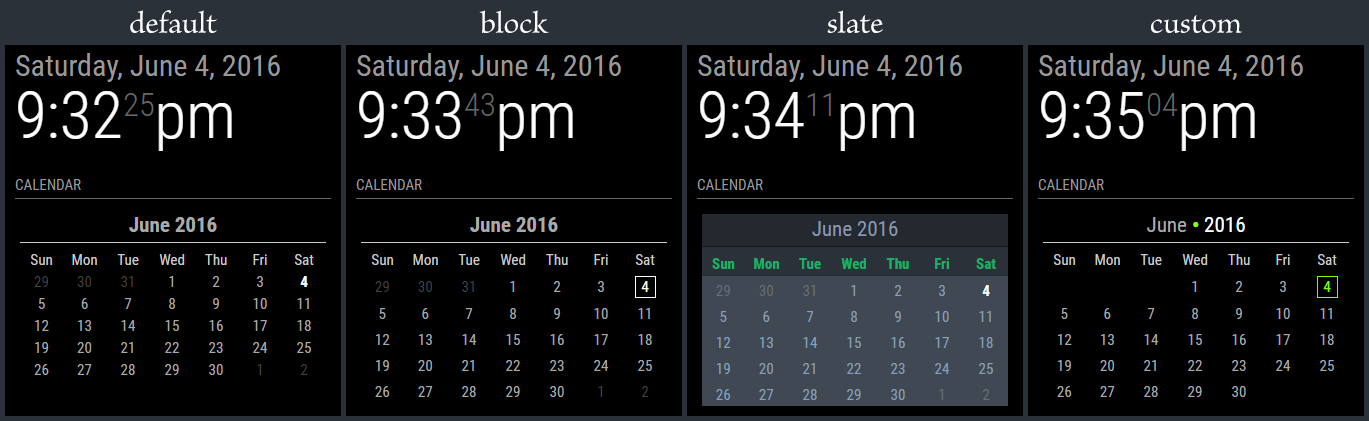
      I can spend days coming up with style ideas, but I think I’m done fiddling with this. It’s time to move on to the next step in the process. I’m cleaning up the branches on GitHub and getting ready to open the flood gates. In the mean time, here’s the 4 styles that I’m including. Note that the ‘slate’ style is really meant for people who have a mirror-less display as the colors probably won’t show very well through a 2-way mirror.

      • The calendar is language aware, meaning it will translate to your language setting.
      • The calendar will automatically start on either Monday or Sunday depending on your language setting.
      • The header (month and year) can be suppressed (not shown) if desired.
      • Customization can be done through the custom CSS file
      • Current day is highlighted through CSS styling.
      • Probably more stuff I forget at the moment … I’ll have it all written out in the README file, including the full styling tree.

      0_1465100367184_calStyles.png

      posted in Requests
      KirAsh4K
      KirAsh4
    • 1 / 1