MagicMirror Forum
    • Recent
    • Tags
    • Unsolved
    • Solved
    • MagicMirror² Repository
    • Documentation
    • 3rd-Party-Modules
    • Donate
    • Discord
    • Register
    • Login
    • Profile
    • Following 5
    • Followers 4
    • Topics 19
    • Posts 459
    • Groups 2
    KristjanESPERANTOK Offline
    1. Home
    2. KristjanESPERANTO
    3. Posts
    A New Chapter for MagicMirror: The Community Takes the Lead
    Read the statement by Michael Teeuw here.

    Posts

    Recent Best Controversial
    • RE: MMM-PublicTransportHafas from KristjanESPERANTO

      @onkelbobby

      Try it with that addition to your CSS file:

      .mmm-pth-platform-cell  {
      width: 3ch;
      }
      

      I’ve never noticed the question mark before. I assume that this is displayed when no real time data is available. I just tried it with Adunistraße and didn’t see a question mark. The problem was probably only temporary on the API side.
      posted in Troubleshooting
      KristjanESPERANTOK
      KristjanESPERANTO
    • RE: MMM-PublicTransportHafas from KristjanESPERANTO

      Hi @onkelbobby,

      nice that you use my fork :slightly_smiling_face:

      The reason why the columns have different widths is that you enabled the platform in the first module and not in the others. The simplest option would be to display the column for the second and third module as well. But maybe that doesn’t make sense with this two stops, then you could try the approach of setting the width in your custom.css like this:

      table.mmm-pth-table {
      width: fit-content;
      }
      
      .mmm-pth-time-cell {
      width: 10ch;
      }
      
      .mmm-pth-sign {
      width: 6ch;
      }
      
      posted in Troubleshooting
      KristjanESPERANTOK
      KristjanESPERANTO
    • RE: Custom modules not working

      As @sdetweil says, without more information, no one can help you. Which modules? What error messages do you get? What did you change before the problem occurred?

      posted in Troubleshooting
      KristjanESPERANTOK
      KristjanESPERANTO
    • RE: Mirror showing not all modules on all devices

      @sangroma Out of curiosity: How come you used a browser version from 4 years ago?

      posted in Troubleshooting
      KristjanESPERANTOK
      KristjanESPERANTO
    • RE: MMM-DBF suddenly does not work

      @Volkae I was able to get the ID easily. I’ll write you a direct message as it doesn’t belong here with this module.

      posted in Troubleshooting
      KristjanESPERANTOK
      KristjanESPERANTO
    • RE: MMM-DBF suddenly does not work

      Are you sure that the problem is not the data stream from DB?

      No, I’m not sure. You could contact the operator of the API and ask if he sees anything suspicious at the station.

      How long did you test the stations?

      Only 10 hours. At the moment I don’t have the possibility for longer tests.

      It would be nice if we could find and eliminate the cause of the problem. I just don’t have the capacity to delve deeper into this at the moment. An alternative would be to switch to the following module for this station: https://github.com/KristjanESPERANTO/MMM-PublicTransportHafas

      posted in Troubleshooting
      KristjanESPERANTOK
      KristjanESPERANTO
    • RE: MMM-MoonPhase

      @Anthony Contrary to the instructions, you do not need to run npm install for this module. This would only install packages for development, these are not necessary for you to use the module.

      posted in Troubleshooting
      KristjanESPERANTOK
      KristjanESPERANTO
    • RE: MMM-Rejseplanen - A departure board for Danish train and bus stations

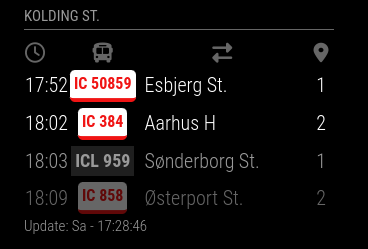
      The module has not been updated for a long time and has very old dependencies. There is a module that can also use a Rejseplanen API and is actively developed by me: https://github.com/KristjanESPERANTO/MMM-PublicTransportHafas

      It looks like this:Kolding.png

      This is the configuration of it:

          {
            module: "MMM-PublicTransportHafas",
            position: "top_left",
            config: {
              hafasProfile: "rejseplanen",
              stationID: "8600083",
              stationName: "Kolding St.",
              timeToStation: 5,
              showAbsoluteTime: false
            }
          },
      
      posted in Transport
      KristjanESPERANTOK
      KristjanESPERANTO
    • RE: MMM-DBF suddenly does not work

      A shot in the blue: Update your npm. I have version 9.6.1.

      posted in Troubleshooting
      KristjanESPERANTOK
      KristjanESPERANTO
    • RE: MMM-DBF suddenly does not work

      I have now run “Hamburg Elbgaustraße” for two hours without any problems.

      Which version of MagicMirror, which of node (node -v) and which of npm (npm -v) do you use?

      posted in Troubleshooting
      KristjanESPERANTOK
      KristjanESPERANTO
    • RE: MMM-DBF suddenly does not work

      @Volkae Please try my fork:

      git clone https://github.com/KristjanESPERANTO/MMM-DBF

      Let me know if it runs more stable.

      posted in Troubleshooting
      KristjanESPERANTOK
      KristjanESPERANTO
    • RE: This my first MagicMirror aka Dashboard

      Nice! :thumbs_up:

      posted in Show your Mirror
      KristjanESPERANTOK
      KristjanESPERANTO
    • RE: [MMM-ApexCharts] ApexCharts.js for your mirror.

      Realy nice 👏 Thank you!

      posted in Utilities
      KristjanESPERANTOK
      KristjanESPERANTO
    • RE: How to run via browser on Android 2.3

      What might work: Install Firefox 47 (this version partially supports ES6 and runs on Android 2.3).

      Another approach would be to find a custom ROM for your device. There won’t be an up-to-date version, but maybe at least one that allows you to use a somewhat newer browser.

      posted in Troubleshooting
      KristjanESPERANTOK
      KristjanESPERANTO
    • RE: No date after update

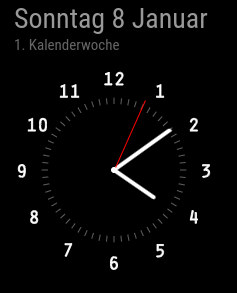
      Did you set the displayType to both?

      Screenshot-20230108160906-237x293.png

      posted in Troubleshooting
      KristjanESPERANTOK
      KristjanESPERANTO
    • RE: No date after update

      analogShowDate is obsolete. Check if this is what you want:

        {
          module: "clock",
          position: "top_left",
          config: {
              displayType: 'both',
              analogSize: '200px',
              analogFace: 'face-003',
              analogPlacement: 'bottom',
              lat: 52.389870,
              lon: 10.852678,
              showDate: true,
              showWeek: true,
              showTime: false,
              dateFormat: 'dddd D MMMM',
              secondsColor: '#FF0000',
              timezone: 'Europe/Berlin'
          }
      },
      
      posted in Troubleshooting
      KristjanESPERANTOK
      KristjanESPERANTO
    • RE: 2.22.0 but showing update available?

      @DarrenHill said in 2.22.0 but showing update available?:

      Was more curious about why that would be saying I’m up to date if there is a commit. If there is a version-up missing or something.

      There was a small fix in the README, actually totally irrelevant to the operation of the mirror.

      posted in Troubleshooting
      KristjanESPERANTOK
      KristjanESPERANTO
    • RE: No date after update

      Happy New Year to you too! :-)

      Please show the part of your configuration that affects the clock.

      posted in Troubleshooting
      KristjanESPERANTOK
      KristjanESPERANTO
    • RE: 2.22.0 but showing update available?

      There was an additional commit yesterday. I don’t work with an update script, so I don’t know what yours does. In this case just go into your MagicMirror folder and run git pull .

      posted in Troubleshooting
      KristjanESPERANTOK
      KristjanESPERANTO
    • RE: electron-rebuild problems with MagicMirror 2.22.0

      @sdetweil As a soft step, the broken modules could switch to @electron/rebuild. This should also work for docker.

      posted in Troubleshooting
      KristjanESPERANTOK
      KristjanESPERANTO
    • 1 / 1