Wow, that’s cool! I’d love to see more of that 👏
 K
Offline
K
Offline
A New Chapter for MagicMirror: The Community Takes the Lead
Read the statement by Michael Teeuw here.
Read the statement by Michael Teeuw here.
Posts
-
RE: Seymour — my modern take on the 3Com Audrey
-
RE: Github usage and module continuations
@Tigershroffr Good points. Feel free to suggest specific improvements to the documentation or the module checks (here is the result list) 😃
Some developers really pay attention to the suggestions. Others ignore them, but that’s fine too. We definitely want to encourage non-programmers to write their own modules. -
RE: MMM-PWSWeather updated for MM v2.35.0+
We already have one other weather station as a provider in the core. So I think we are open to add another one.
You could create a PR to add your provider to the core. So you don’t have to do this hack:
cp ~/MagicMirror/modules/MMM-PWSWeather/pws.js \ ~/MagicMirror/defaultmodules/weather/providers/ -
RE: FYI - Zero 2W is now pretty much useless but a 3B+ works fine
Thanks for sharing your experience! As Node.js and Electron evolve, their hardware requirements increase over time, and older or less powerful devices may eventually struggle.
Staying on older versions is unfortunately not a sustainable solution because of missing security fixes, bug fixes and new features.
-
RE: MMM-DSBDepartures — Danish public transport departures (Rejseplanen API)
@sys64738 Nice. Don’t forget to add it to the module list: https://github.com/MagicMirrorOrg/MagicMirror/wiki/3rd-party-modules
-
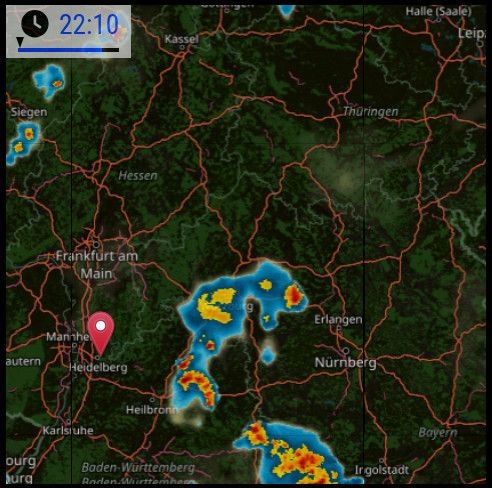
RE: MMM-RAIN-MAP (new: version 2.x)
With the new
v3.1.0release, MMM-RAIN-MAP gets two new features:- You can now choose LibreWXR (https://librewxr.net/) as an alternative provider, which can be useful in regions with limited RainViewer coverage. You can even host it yourself :)
- A new
opacityoption makes it possible to adjust the radar layer, especially when using a dark map theme. @mdiorio Thanks for the suggestion!
-
RE: MMM-Pinfo Not showing information
@plainbroke The module got an update which shout fix the issue :)
-
RE: New Module MMM-EnregyFlow
@fischi87 Thanks :)
And don’t forget to add your module to the module list.
-
RE: New Module MMM-EnregyFlow
@fischi87 Looks nice!
I noticed you marked it as
UNLICENSED.I’m not a lawyer, but in my understaning, this means ‘All Rights Reserved’ by default, so others cannot legally clone, use, or modify your code, even though it’s public.
-
RE: MMM-Bring v2 — a maintained, zero-dependency fork with app-identical category sorting
@rkorell Cool! Would be nice if you would switch on “Issues” in your repos.
-
RE: Family Command Center – Pi 5 Touch Mirror with 19 Pages, AI Comics & Presence Control
Awesome! 👏
One nitpick:
MMM-Remote-Controldoesn’t needMMM-Remote-Control-Repositoryanymore. -
RE: MMM-PWSWeather - A module and Provider for Weather Underground
@msimon360 Maybe add the URL to the repo here :)
-
RE: MMM-NowPlayingOnSpotify: surviving Spotify's 6-month refresh-token expiry (a maintained fork)
@rkorell Good work! Would be nice if you could add a screenshot :)
-
RE: Version upgrade from 2.34.0 to 2.36.0 Calendar Probs
@MyMirror We have calendar issues in v2.36.0. These have been fixed in the development branch. The new release, v2.37.0, will be released today. I would recommend waiting for it and then trying it out :)
-
RE: MMM-Tasklist
@johnster000 Great! Now all your modules are displayed with screenshots and tags :)
-
RE: MMM-Tasklist
@johnster000 Nice! You could check the “Hints For Devs” for your modules on the modules list. Some of these are just nitpicks; you can decide for yourself whether to fix them or not :)
-
RE: MMM-LibraryMonitor
@HeikoGr The repository (https://github.com/HeikoGr/MMM-LibraryMonitor) is not available :(
-
RE: Sharing a concept that I am working on for my daughter's house - MagicMirror layout
@sdetweil Yes, but not in this thread :)
My module is MMM-AtomVisualizer.