A shot in the blue: Update your npm. I have version 9.6.1.
A New Chapter for MagicMirror: The Community Takes the Lead
Read the statement by Michael Teeuw here.
Read the statement by Michael Teeuw here.
 Offline
Posts
-
RE: MMM-DBF suddenly does not work
-
RE: MMM-DBF suddenly does not work
I have now run “Hamburg Elbgaustraße” for two hours without any problems.
Which version of MagicMirror, which of node (
node -v) and which of npm (npm -v) do you use? -
RE: MMM-DBF suddenly does not work
@Volkae Please try my fork:
git clone https://github.com/KristjanESPERANTO/MMM-DBFLet me know if it runs more stable.
-
RE: How to run via browser on Android 2.3
What might work: Install Firefox 47 (this version partially supports ES6 and runs on Android 2.3).
Another approach would be to find a custom ROM for your device. There won’t be an up-to-date version, but maybe at least one that allows you to use a somewhat newer browser.
-
RE: No date after update
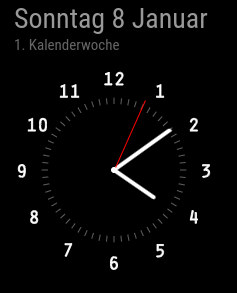
analogShowDateis obsolete. Check if this is what you want:{ module: "clock", position: "top_left", config: { displayType: 'both', analogSize: '200px', analogFace: 'face-003', analogPlacement: 'bottom', lat: 52.389870, lon: 10.852678, showDate: true, showWeek: true, showTime: false, dateFormat: 'dddd D MMMM', secondsColor: '#FF0000', timezone: 'Europe/Berlin' } }, -
RE: 2.22.0 but showing update available?
@DarrenHill said in 2.22.0 but showing update available?:
Was more curious about why that would be saying I’m up to date if there is a commit. If there is a version-up missing or something.
There was a small fix in the README, actually totally irrelevant to the operation of the mirror.
-
RE: No date after update
Happy New Year to you too! :-)
Please show the part of your configuration that affects the clock.