Hi @mirko3000 ,
How to remove the ‘>’ symbols which in front of the temperature and humidity?
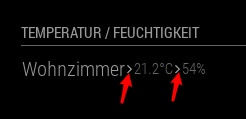
I try to set showTend: false, but it does not work.
Could you or anyone give me some suggestions? Thanks in advance.
Hi @mirko3000 ,
How to remove the ‘>’ symbols which in front of the temperature and humidity?
I try to set showTend: false, but it does not work.
Could you or anyone give me some suggestions? Thanks in advance.
Firstly, thank you for providing us this fantastic module!
I have a position question: when I set a bottom_right position for it, your module button layout is as following:
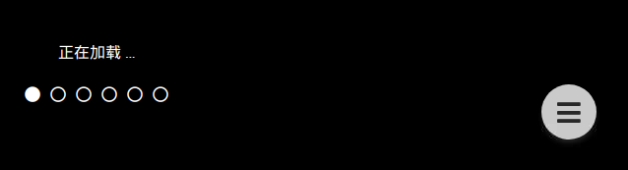
When I set a bottom_right position for another module, for example, mm-hide-all, but the layout is as following:

If I’d like to place my another module mm-hide-all at that position, which your MMM-OnScreenMenu is on, how shall I do? Could you give me some suggestions?
Thanks in advance.
Thank you for providing us this fantastic module! It’s so useful.
I have a suggestion: could you merge multiple instances of MMM-Memo into only one instance? Like the following:
{
module: ‘MMM-Memo’,
config{
{
memo1
memoTitle: XXXX
position:
},
{
memo2
memoTitle:YYYY
position:
},
…
}
Because there are six instances of MMM-Memo at least, the system performance will be affected and there are always many notifications about this module in console log when any notifications send by any modules.
Hi @Sean
Your modules are always useful and indispensable!
My raspberry 3b sound card is Respeaker 2-Mic. Does MMM-Volume module support this sound card?
Thanks!
There are many voice control modules about MagicMirror. Would anyone like to develop a voiceprint recognition modules for us?
The voiceprint recognition modules integrate with voice control modules. When you say hello to MagicMirror, the mirror can answer you “Yes, my king. You have 2 new email…”. And when my wife say hello to MagicMirror, the mirror say “Yes, my queen. You have one appointment today”.
Yes, I can add two instances in config.js file at the same time.
YOU ARE RIGHT!
It’s not necessary. According to your suggestion, I register all of my sensors on ONE gateway. I can still fulfill all my needs.
I’m stupid. I’ve made simple things complicated.
Tanks again!
Good luck.
@Sean
Hahaha, it’s my son’s school timetable. He is only ten years old. He like this timetable very much. I told him a foreign uncle coded this timetable for him. He is very pride for it…
Thank you so much for bringing much happiness to our family.
@Sean
Another problem: under the MMM-page or MMM-page-select module environment, when you start MagicMirror, sometimes you will see the following MMM-Timeable UI:
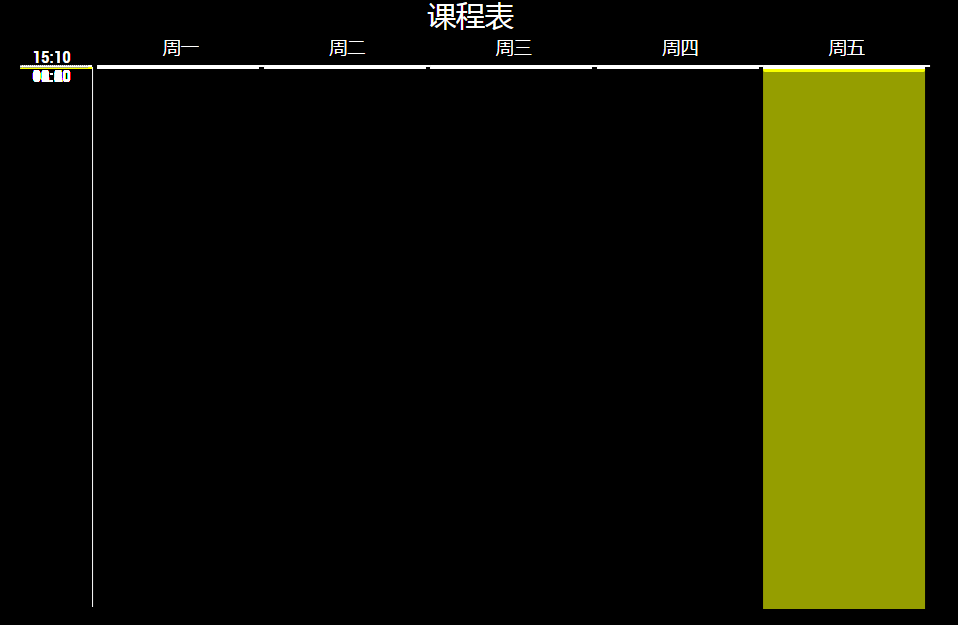
Until the modules refresh, the UI will be OK:
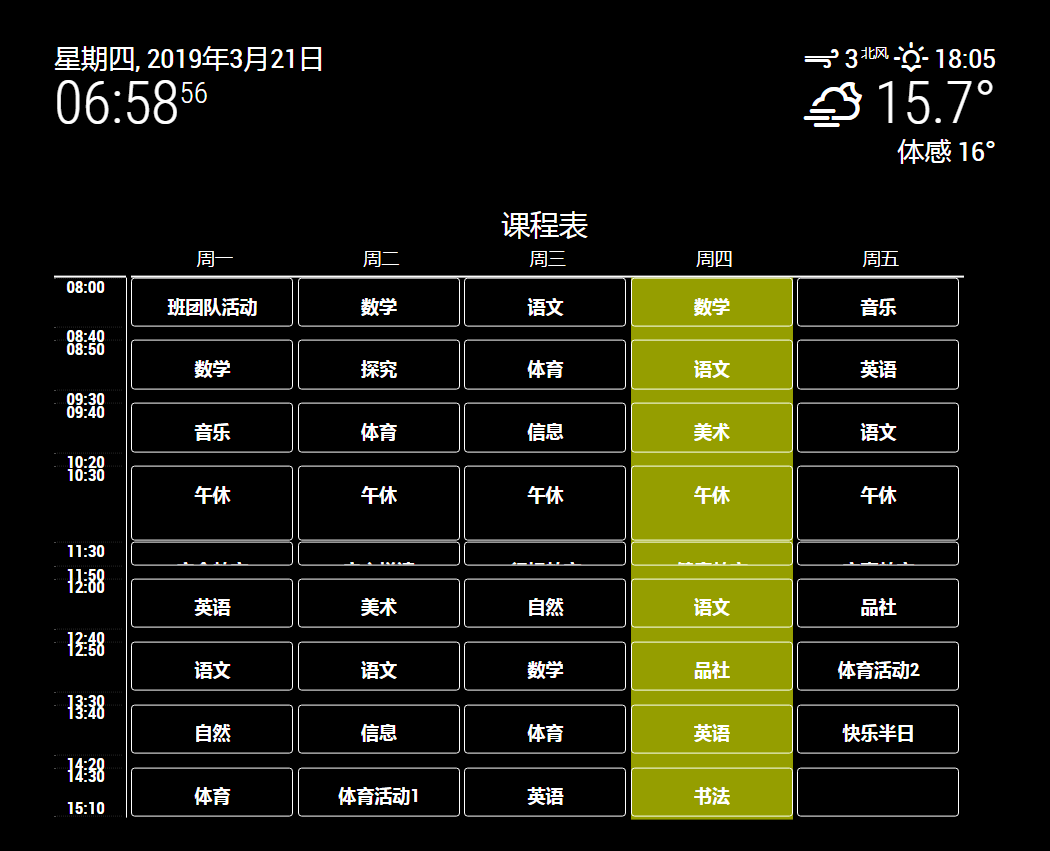
The issue only happened when Magic Mirror start. I know this is not a serious problem because you will not frequently restart Magic Mirror and switch to the MMM-Timeable page.
Do you have some suggestions about it?
@Sean
OK, I got it. Thanks for your reply.Let me try your MMM-HTMLBox.
Hahahah, I found I already become one of your fans. After trying out a module several days,I found it is coded by you,ig.,MMM-GroveGesture,MMM-CalendarExt.
I’m looking forward to next version about MMM-Timetable.
Have a good day!
@Sean
How can I redefine the rows to equal altitude, regardless of time interval? I’d like to define equal altitude for each rows.
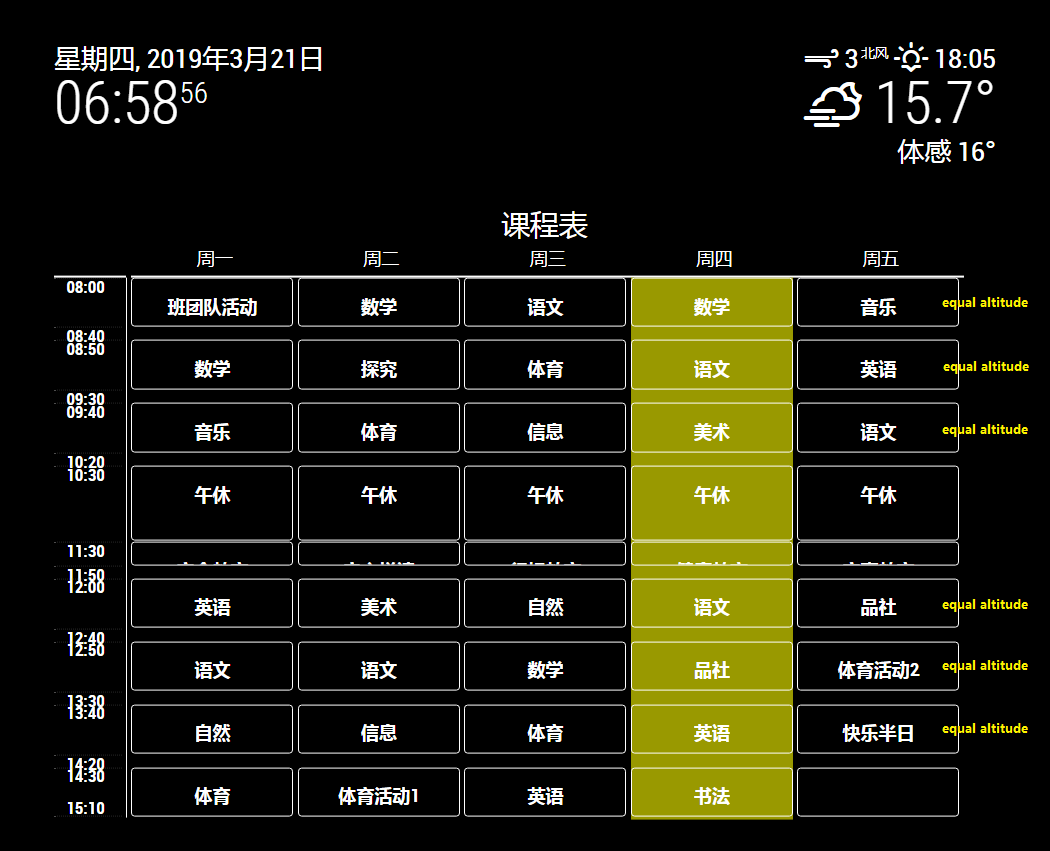
Could you or anyone give me some suggestions? Thanks in advance.
@nano79
Fist of all, thanks @MichMich @paviro and @tosti007 gave me provided these fantastic applications and modules!
Secondly, thanks for your help! According to your method, I installed python-shell 0.4.0 and resolved the issue of “PythonShell is not a constructor” .
Now I had another issue in the followed steps.
I have installed and configured MMM-Facial-Recognition-Tools, MMM-Facial-Recognition and MMM-ProfileSwitcher. I passed the facerecognition.py test:
pi@MagicMirror2:~/MagicMirror/modules/MMM-Facial-Recognition-Tools $ export FACE_ALGORITHM=1
pi@MagicMirror2:~/MagicMirror/modules/MMM-Facial-Recognition-Tools $ export FACE_USERS=
pi@MagicMirror2:~/MagicMirror/modules/MMM-Facial-Recognition-Tools $ export FACE_USERS=Xueping
pi@MagicMirror2:~/MagicMirror/modules/MMM-Facial-Recognition-Tools $
pi@MagicMirror2:~/MagicMirror/modules/MMM-Facial-Recognition-Tools $ export FACE_ALGORITHM=1
pi@MagicMirror2:~/MagicMirror/modules/MMM-Facial-Recognition-Tools $ export FACE_USERS=Xueping
pi@MagicMirror2:~/MagicMirror/modules/MMM-Facial-Recognition-Tools $ python facerecognition.py
['Xueping']
Using FACE_ALGORITM: 1
Loading training data...
Training data loaded!
Strong:Xueping
Strong:Xueping
Strong:Xueping
Strong:Xueping
Strong:Xueping
Strong:Xueping
Now I added the configuration in config.js as followings:
modules: [
		{
            module: 'MMM-Logging',
            classes: 'default everyone',
            config: {
            }
        },

		{
			module: "alert",
			classes: 'default everyone'
		},
		{
			module: "updatenotification",
			position: "top_bar",
			classes: 'default everyone'
		},

		{
			module: "compliments",
			position: "lower_third",
			classes: 'Xueping',
			config: {
				compliments: {
					anytime: [
						"Hello!THIS IS TESTING!"
					],
				}
			}
		},
		{
			module: "clock",
			position: "top_left",
			classes: 'everyone'
		},
		{
			module: 'MMM-Facial-Recognition',
			position: "top_right",
			config: {
				// 1=LBPH | 2=Fisher | 3=Eigen
				recognitionAlgorithm: 1,
				lbphThreshold: 50,
				fisherThreshold: 250,
				eigenThreshold: 3000,
				alwaysShowLeave: false,
				useUSBCam: false,
				trainingFile: '/home/pi/MagicMirror/modules/MMM-Facial-Recognition-Tools/training.xml',
				interval: 2,
				logoutDelay: 30,
				users: ['Xueping'],
				defaultClass: "default",
				everyoneClass: "everyone",
				welcomeMessage: true,
			}
		},
		{
			module: 'MMM-ProfileSwitcher',
			config: {
				// Disable the enter messages for everyone but me and Kevin
				enterMessages: {
					"Xueping": "Hello :D", // Kevin has a custom message
					"everyone": "Hello :D",
					"default": "No Users were detected"
				},
				// Everyone has a custom message
				leaveMessages: {
					// %profile% will be replaced with the correct name
					"everyone": "Hey %person%, already leaving?",
					// I have a custom and the default message
					//  this is not the same as everyone since we changed it
					"Xueping": ["Bye bye!"],
					"default": "Goodbye"
				}
			}
		},
		{
			module: "MMM-ping",
			position: "bottom_right",
			classes: 'default',
			config: {
				colored: true,
				font: "xsmall",
				updateInterval: 1,
				hosts: [
					"192.168.1.1",
					"forum.magicmirror.builders"
				]
			}
		},

	]
When I run MagicMirror, the screen layout changed from default classes mode into user classes mode. the icons, which is in default classes mode, disappeared as I want. BUT in user classes mode, the very module (compliments) did not appeared! the whole screen is still black.
The whole process log is as following:
2019-03-15T15:08:50 <log> [MMM-Facial-Recognition] Facerecognition started... (/home/pi/MagicMirror/modules/MMM-Facial-Recognition/node_helper.js:16 PythonShell.<anonymous>)
2019-03-15T15:08:50 <log> [MMM-Facial-Recognition] Loading training data... (/home/pi/MagicMirror/modules/MMM-Facial-Recognition/node_helper.js:16 PythonShell.<anonymous>)
2019-03-15T15:08:50 <log> [MMM-Facial-Recognition] ALGORITHM: LBPH (/home/pi/MagicMirror/modules/MMM-Facial-Recognition/node_helper.js:16 PythonShell.<anonymous>)
2019-03-15T15:08:55 <log> [MMM-Facial-Recognition] Training data loaded! (/home/pi/MagicMirror/modules/MMM-Facial-Recognition/node_helper.js:16 PythonShell.<anonymous>)
2019-03-15T15:08:55 <log> [MMM-Facial-Recognition] -------------------- (/home/pi/MagicMirror/modules/MMM-Facial-Recognition/node_helper.js:16 PythonShell.<anonymous>)
2019-03-15T15:08:55 <log> [MMM-Facial-Recognition] PiCam ausgewählt... (/home/pi/MagicMirror/modules/MMM-Facial-Recognition/node_helper.js:16 PythonShell.<anonymous>)


2019-03-15T15:09:07 <log> [MMM-Facial-Recognition] User Xueping with confidence 29.2076146738 logged in. (/home/pi/MagicMirror/modules/MMM-Facial-Recognition/node_helper.js:19 PythonShell.<anonymous>)
[3656:0315/150907.528143:INFO:CONSOLE(205)] "MMM-ping is resumed.", source: http://10.133.26.219:8080/js/module.js (205)
[3656:0315/150907.532130:INFO:CONSOLE(154)] "clock received a module notification: CURRENT_USER from sender: MMM-Facial-Recognition", source: http://10.133.26.219:8080/js/module.js (154)
[3656:0315/150907.533400:INFO:CONSOLE(154)] "MMM-ping received a module notification: CURRENT_USER from sender: MMM-Facial-Recognition", source: http://10.133.26.219:8080/js/module.js (154)
2019-03-15T15:09:07 <log>  payload: undefined (/home/pi/MagicMirror/modules/MMM-Logging/node_helper.js:34 Class.socketNotificationReceived)
[3656:0315/150907.543631:INFO:CONSOLE(205)] "compliments is resumed.", source: http://10.133.26.219:8080/js/module.js (205)
[3656:0315/150907.544869:INFO:CONSOLE(275)] "Will not show compliments. LockStrings active: module_6_MMM-ProfileSwitcher", source: http://10.133.26.219:8080/js/main.js (275)
[3656:0315/150907.545862:INFO:CONSOLE(154)] "clock received a module notification: CURRENT_USER from sender: MMM-Facial-Recognition", source: http://10.133.26.219:8080/js/module.js (154)
[3656:0315/150907.546709:INFO:CONSOLE(154)] "MMM-ping received a module notification: CURRENT_USER from sender: MMM-Facial-Recognition", source: http://10.133.26.219:8080/js/module.js (154)
[3656:0315/150907.552615:INFO:CONSOLE(154)] "clock received a module notification: SHOW_ALERT from sender: MMM-Facial-Recognition", source: http://10.133.26.219:8080/js/module.js (154)
[3656:0315/150907.554160:INFO:CONSOLE(154)] "MMM-ping received a module notification: SHOW_ALERT from sender: MMM-Facial-Recognition", source: http://10.133.26.219:8080/js/module.js (154)
2019-03-15T15:09:07 <log>  payload: undefined (/home/pi/MagicMirror/modules/MMM-Logging/node_helper.js:34 Class.socketNotificationReceived)
2019-03-15T15:09:07 <log>  payload: undefined (/home/pi/MagicMirror/modules/MMM-Logging/node_helper.js:34 Class.socketNotificationReceived)
[3656:0315/150908.582237:INFO:CONSOLE(198)] "MMM-ping is suspended.", source: http://10.133.26.219:8080/js/module.js (198)
[3656:0315/150908.587425:INFO:CONSOLE(60)] "MMM-ping is hidden.", source: http://10.133.26.219:8080/modules/MMM-Facial-Recognition//MMM-Facial-Recognition.js (60)


2019-03-15T15:11:08 <log> [MMM-Facial-Recognition] User Xueping logged out. (/home/pi/MagicMirror/modules/MMM-Facial-Recognition/node_helper.js:23 PythonShell.<anonymous>)
[3656:0315/151108.702056:INFO:CONSOLE(205)] "MMM-ping is resumed.", source: http://10.133.26.219:8080/js/module.js (205)
[3656:0315/151108.712169:INFO:CONSOLE(154)] "clock received a module notification: CURRENT_USER from sender: MMM-Facial-Recognition", source: http://10.133.26.219:8080/js/module.js (154)
[3656:0315/151108.712959:INFO:CONSOLE(154)] "MMM-ping received a module notification: CURRENT_USER from sender: MMM-Facial-Recognition", source: http://10.133.26.219:8080/js/module.js (154)
2019-03-15T15:11:08 <log>  payload: undefined (/home/pi/MagicMirror/modules/MMM-Logging/node_helper.js:34 Class.socketNotificationReceived)
[3656:0315/151109.703213:INFO:CONSOLE(198)] "compliments is suspended.", source: http://10.133.26.219:8080/js/module.js (198)
[3656:0315/151109.703561:INFO:CONSOLE(78)] "compliments is hidden.", source: http://10.133.26.219:8080/modules/MMM-Facial-Recognition//MMM-Facial-Recognition.js (78)
[3656:0315/151109.709930:INFO:CONSOLE(84)] "MMM-ping is shown.", source: http://10.133.26.219:8080/modules/MMM-Facial-Recognition//MMM-Facial-Recognition.js (84)


^C
pi@MagicMirror2:~/MagicMirror $
Could you or anyone give me some suggestions? Thanks in advance.
@garbleflux thank you for your discussion.
It’s difficult to explain. Let me try. Maybe my scenario is very different with yours.
There are one Xiaomi temperature sensor, one Xiaomi air conditioning companion (gateway) and one Xiaomi intelligent clock (integrated partial AI function) in EACH bedroom.
When I speak to the clock, “Hi Xiaoai, please tell me the room temperature” or “temperature”, the clock tell me the correct number of degrees via the RIGHT gateway. When I say “power on the air conditioning”, the same thing happen.
It’s unsuitable that I say "tell me CHILDROOM temperature " or “power off CHILDROOM air conditioning” when I’m in my bedroom. Although I know it is realizable.
I’m not sure I clearly explain the reason. Anyway, I need two gateways in my house.
@garbleflux First, thank you for your reply.
I have two different rooms. There are a temperature sensor and a gateway in each room! So I have to add two gateways in config.js file.
Hi guys,
I have two temperature sensors. Each sensor registers with a gateway. Could anyone tell me how to add the two gateways in config.js file?
I try to add the following codes in config.js:
{
module: ‘MMM-xiaomi’,
position: ‘top_right’,
header: ‘Temperature / Humidity’,
config: {
gatewayIP: ‘192.168.186.181’,
gatewayToken: ‘xxxxxxxx-ceec093b30b1775dc741a7’,
showWindow: true,
showVentilation: true,
showLights: false,
audioNotifications: true,
rooms: [
{
name: ‘Bedroom’,
sortOrder: 20,
devices : [‘158d000xxxx9f’]
}
],
gatewayIP: ‘192.168.186.166’,
gatewayToken: ‘xxxxxxxx–927e2d20b22c22b007194c’,
rooms: [
{
name: ‘Childroom’,
sortOrder: 30,
devices : [‘158d000xxxx4f6’]
}
]
}
}
but MagicMirror always display the last sensor, which registers with the secondary gateway in config.js file.

Could anyone give me some suggestions? Thanks in advance!