MagicMirror Forum
    • Recent
    • Tags
    • Unsolved
    • Solved
    • MagicMirror² Repository
    • Documentation
    • 3rd-Party-Modules
    • Donate
    • Discord
    • Register
    • Login
    1. Home
    2. MM-Hans
    3. Posts
    A New Chapter for MagicMirror: The Community Takes the Lead
    Read the statement by Michael Teeuw here.
    M
    Offline
    • Profile
    • Following 0
    • Followers 0
    • Topics 11
    • Posts 35
    • Groups 0

    Posts

    Recent Best Controversial
    • RE: Problem with MM-MQTT module

      In general, “\xa0” can be used to add a space to the header, which works fine with all the modules I use. Unfortunately, that causes the mentioned problem with the MMM-MQTT module.

      As soon as I remove “\xa0” the problem is solved and the module works properly. I know, it’s strange and I can’t explain it, but it’s what I see happening in my setup.

      posted in Utilities
      M
      MM-Hans
    • RE: Problem with MM-MQTT module

      @sdetweil
      I forgot to mention that my mirror runs on a Raspberry Pi CM4 (in a Waveshare Magic Mirror). In the terminal (SSH) I can view logs with “pm2 log mm” but do not see any relevant details. CTRL-Shift-I doesn’t work if the software runs on a Raspberry, or am I mistaken?

      I just got a message from Otto Paulsen, the creator of the module, and he hadn’t heard of this problem yet. That would mean it has nothing to do with the module.

      posted in Utilities
      M
      MM-Hans
    • RE: Problem with MM-MQTT module

      @sdetweil
      No Sam, both MM/Accu/ topics send every 5 minutes and Energy topic every 2.5 minute.

      posted in Utilities
      M
      MM-Hans
    • Problem with MM-MQTT module

      To receive MQTT messages I use Otto Paulsen’s MM-MQTT Module (https://github.com/ottopaulsen/MMM-MQTT) and that is nice software. Unfortunately, there is a problem, the output seems to be refreshed every 5 seconds, so that the text in question flashes briefly every time.

      I have created an issue on Paul’s GitHub page about this, but unfortunately no answer after a few months of waiting. Does anyone know what could be the cause? Please let me know.

      This is my code in config.js:

      {
          			module: 'MMM-MQTT',
          			position: 'bottom_right',
      			header: 'ELEKTRA\xa0',
          			config: {
              		logging: false,
              		useWildcards: false,
              		mqttServers: [
                  			{
                      		address: '192.168.2.155',
                      		port: '1883',
                      		subscriptions: [
                          			{
                              		topic: 'MM/Accu/Lader1',
                              		label: 'Acculader 1',
      					broadcast: false,
                         			},
                          			{
                              		topic: 'MM/Accu/Lader2',
                              		label: 'Acculader 2',
      					broadcast: false,
                         			},
      					{
                              		topic: 'Energie/power_delivered',
                              		label: 'Verbruik',
                              		suffix: 'kWh',
      					broadcast: false,
                         			}
                      		]
                  			}
              			],
          			}
      		},
      
      
      posted in Utilities
      M
      MM-Hans
    • RE: Change the way calendar presents day and time

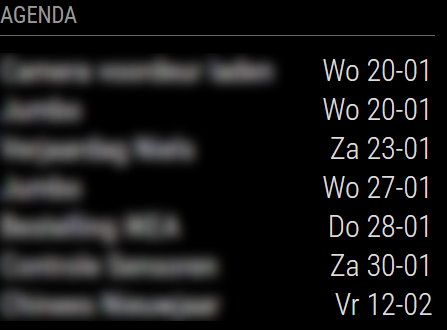
      @BKeyport Thanks for your suggestion! I now use the code below which results in what is shown in the image. Exactly what I wanted :-)

      MM.png

      			config: {
                                      fade: false,
                                      maximumEntries: 7,
                                      displaySymbol: false,
         				timeFormat: 'absolute',
         				dateFormat: 'ddd D MMM',
        				fullDayEventDateFormat: 'dd DD-MM',
       				urgency: 0,
      				calendars: [
      
      posted in Troubleshooting
      M
      MM-Hans
    • Change the way calendar presents day and time

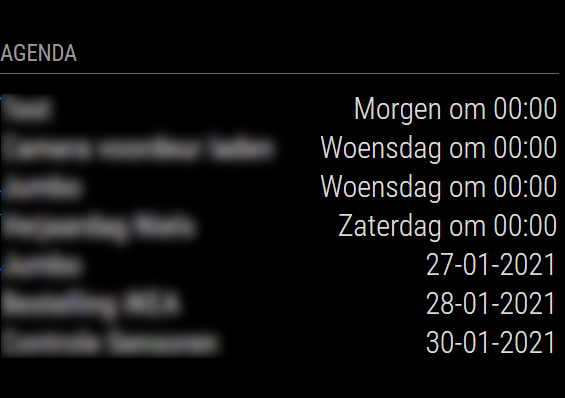
      After a new installation something goes wrong with the standard calendar module that I use with Apple calendar. As you can see in the photo, there are two different ways to present the date, namely “Wednesday at 00:00” and “27-01-2021”. I would like each calendar note to be displayed as “dd-mm-yy” or “dd-mm”.

      Unfortunately, I cannot do that, not even by changing the dateFormat in the config.js file. Can someone tell me how to change this so all dates are presented the same way?

      MM.png

      posted in Troubleshooting
      M
      MM-Hans
    • RE: Waveshare Magic Mirror touch screen

      @cyberphox

      Maybe I don’t understand you well, but it’s a one-way mirror over a touchscreen. I believe this monitor is also sold without the mirror. There is some space between the mirror and the display. I have not yet used the touch function because I will not be able to continue until I have an answer from Waveshare support.

      posted in Hardware
      M
      MM-Hans
    • RE: Waveshare Magic Mirror touch screen

      I ordered the display and my first experience is that it looks neat (not a toy) but points 1-4 above remain a concern. An additional problem is that once hung up, the buttons for the on-screen display are no longer accessible.

      The RPi desktop (OS with recommended software) is unusable slow, no idea what the reason is. However, working via SSH is good and fast.

      The installation instructions for MM on the Waveshare WiKi did not work for me. I used their monitor settings and the sound card driver and installed MM further as described in the online MagicMirror² Documentation. Thereafter MM works as expected.

      The monitor was delivered without a manual and something did not work properly with the onscreen display. I asked a question about this via the support address on the Waveshare site but never got an answer. After an email to sales it turned out that the address was no longer correct and I had to email support02@waveshare.com. I did but I’m still waiting for an answer … That seems to take way too long and until then I can’t do anything with the monitor :-(

      posted in Hardware
      M
      MM-Hans
    • RE: Waveshare Magic Mirror touch screen

      @cyberphox
      @cowboysdude

      Yes, that’s what I wrote above: “from an HA user”. But the user experience will therefore not differ on my 5 points.

      posted in Hardware
      M
      MM-Hans
    • RE: Waveshare Magic Mirror touch screen

      @Laohu
      Thanks for your kind explanation! Any idea when the new (CM4 update) version will be available?

      posted in Hardware
      M
      MM-Hans
    • RE: Waveshare Magic Mirror touch screen

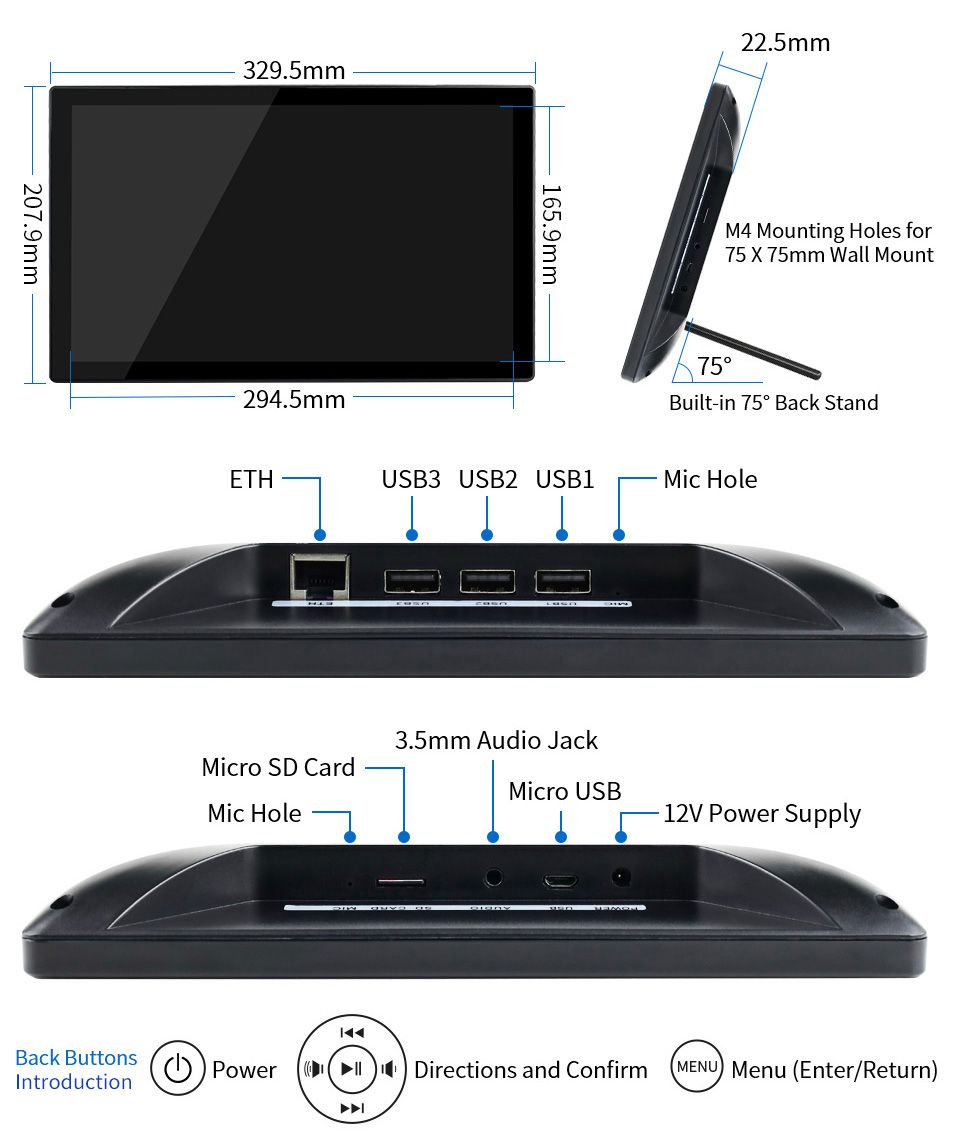
      To me it seems that only a few people use this display for Magic Mirror yet. Although it looks good in the pictures and specs, I still have my doubts:

      1. Mounting on the wall is only possible in landscape mode (with the holes in the back wall).

      2. Getting rid of the (power) cable is difficult when it is hung. In landscape mode you can look at the connections from the sides.

      3. As far as I know (see below what Waveshare wrote) the backlight cannot be controlled via software. So if the brigthness level is okay during the day, it is too light in the evening.

      4. The bezel around the display is in my opinion quite wide.

      5. On Amazon I saw a review that the housing quality is not that good and looks like a toy, not sure if this is really an issue.

      Still hope to read some comments or user experiences here.

      Waveshare support answered my email, they replied that the brightness could be controlled via software but it will be complicated. They didn’t tell me how to do that. I have notified Waveshare of this post and asked to provide more information through this forum.

      posted in Hardware
      M
      MM-Hans
    • RE: Waveshare Magic Mirror touch screen

      Correction on the above post:

      Youtube video link is https://www.youtube.com/watch?v=3GFOTMr0VGw

      posted in Hardware
      M
      MM-Hans
    • Waveshare Magic Mirror touch screen

      Waveshare sells a 13.3 inch touch screen with built-in RPi 3a+ as Magic Mirror: https://www.waveshare.com/13.3inch-magic-mirror.htm. There are complaints about the quality of the housing on Amazon and there is a nice video on YouTube (https://www.waveshare.com/13.3inch-magic-mirror.htm) from an HA user. It looks promising but unfortunately I hardly find any other reviews or videos from users.

      Does anyone have experience with this product? Especially about the lack of (automatic) brigthness regulation? How about backlight in dark environments?

      13.3inch-Magic-Mirror-Details_11.jpg

      posted in Hardware
      M
      MM-Hans
    • Two different hours within one setup

      My setup shows the correct hour when I access MM via a webbrowser but a connected HDMI monitor to the same setup shows one hour earlier…

      In config.js if have set timezone: “Europe/Amsterdam” so this should not be the problem as I suppose.

      Any help would be appreciated!

      posted in Troubleshooting
      M
      MM-Hans
    • RE: Default calendar module stopped showing iCloud events

      Following your steps it turned out you’re right, thanks for helping! All my iCloud events are back on the mirror. I did not create a complete new calendar, I only unchecked and thereafter checked “make public” and copied the new URL : webcal://p41-calendars.icloud.com/published/2/… in the config.js file.

      Again many thanks for your fast reply.

      posted in Troubleshooting
      M
      MM-Hans
    • Default calendar module stopped showing iCloud events

      After working correct (Raspberry Pi 3B) for several months the calendar module stopped displaying events from my iCloud calendar a few days ago and shows no events. There are many events within my iCloud calender and they are still visable on https://www.icloud.com/#calendar. The public webcal URL in config.js is unchanged and matches with iCloud public URL generated online by Apple. Newsfeeds and weather forecast works fine so I can exclude network issues. Please see my calendar config below. Are there issues with the module or iCloud? Any suggestions to solve this?

              {
                      module: "calendar",
                      header: "Agenda",
                      position: "top_left",
                      config: {
                              fade: false,
                              maximumEntries: 7,
                              displaySymbol: false,
                              calendars: [
                                      {
                                              symbol: "calendar-check-o ",
                                              url: "webcal://p01-calendarws.icloud.com/ca/subscribe/1/xxxxxxxxxxxxxxxxxxxxxxxxxxxxxxxxxxxxxxxxxxxxxx"
                                     }
                              ]
                      }
              },
      
      posted in Troubleshooting
      M
      MM-Hans
    • Evening starts too early

      Hi,

      Although I have set the afternoonEndTime to 18:00 (see below) the evening compliments start at 17:00. Anyone an idea what I’m doing wrong?

      Thanks, Hans.

                              module: "compliments",
                              position: "lower_third",
                              config: {
                                      updateInterval: 3000,
                                      fadeSpeed: 1000,
                                      morningStartTime: 6,
                                      morningEndTime: 12,
                                      afternoonStartTime: 12,
                                      afternoonEndTime: 18,
                                      compliments: {
                                          morning:   [
      
      posted in Troubleshooting compliments start time
      M
      MM-Hans
    • RE: Translation "After one month" in Calendar Module

      @yawns said in Translation “After one month” in Calendar Module:

      vendor/node_modules/moment/min/

      Hi Stefan. You almost need to be a digital detective to locate that phrases ;-) But finally the issue is solved, thanks for your assistance!

      posted in Troubleshooting
      M
      MM-Hans
    • RE: Translation "After one month" in Calendar Module

      Think I translated wrong, writing “An event is over one month” I ment “An event is after one month” ;-)

      posted in Troubleshooting
      M
      MM-Hans
    • 1 / 1