Read the statement by Michael Teeuw here.
Waveshare Magic Mirror touch screen
-
Waveshare sells a 13.3 inch touch screen with built-in RPi 3a+ as Magic Mirror: https://www.waveshare.com/13.3inch-magic-mirror.htm. There are complaints about the quality of the housing on Amazon and there is a nice video on YouTube (https://www.waveshare.com/13.3inch-magic-mirror.htm) from an HA user. It looks promising but unfortunately I hardly find any other reviews or videos from users.
Does anyone have experience with this product? Especially about the lack of (automatic) brigthness regulation? How about backlight in dark environments?
-
Correction on the above post:
Youtube video link is https://www.youtube.com/watch?v=3GFOTMr0VGw
-
To me it seems that only a few people use this display for Magic Mirror yet. Although it looks good in the pictures and specs, I still have my doubts:
-
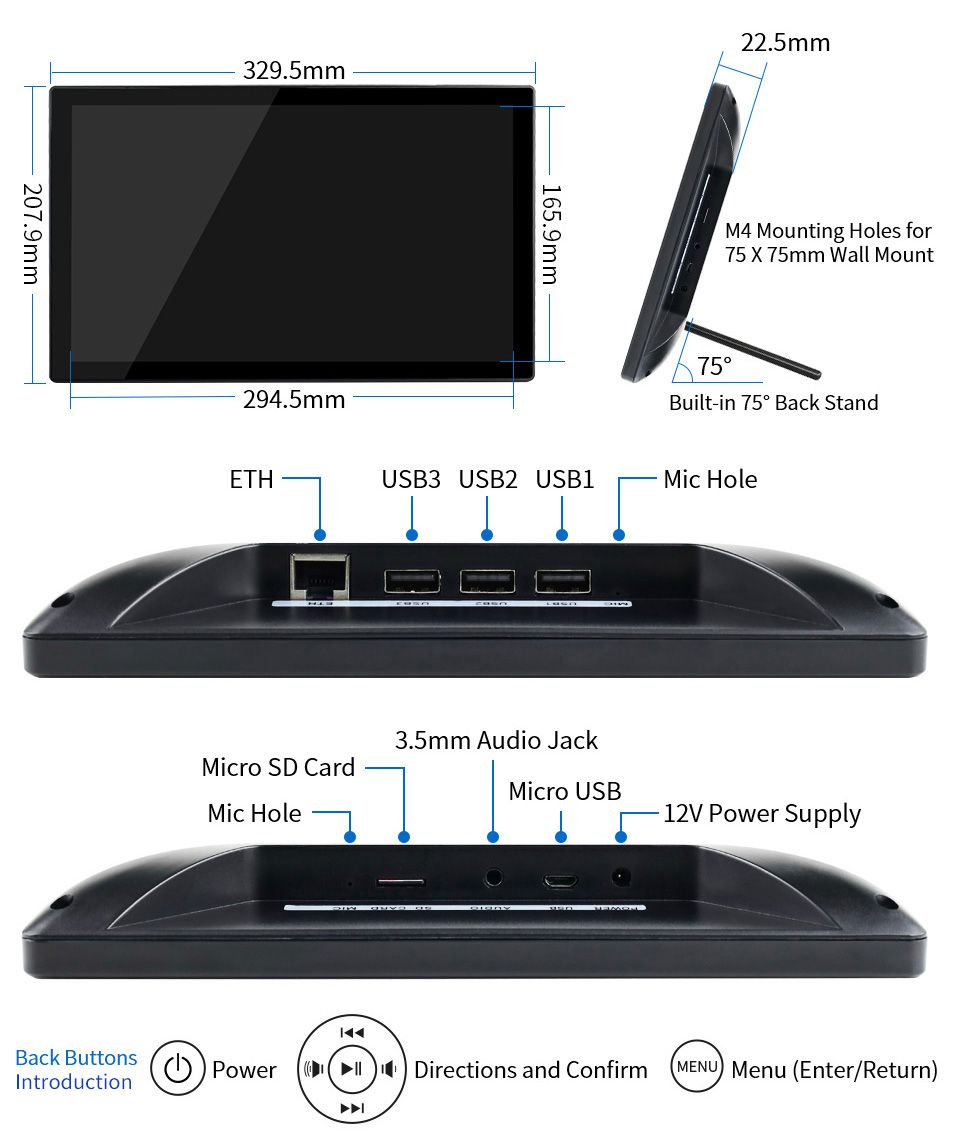
Mounting on the wall is only possible in landscape mode (with the holes in the back wall).
-
Getting rid of the (power) cable is difficult when it is hung. In landscape mode you can look at the connections from the sides.
-
As far as I know (see below what Waveshare wrote) the backlight cannot be controlled via software. So if the brigthness level is okay during the day, it is too light in the evening.
-
The bezel around the display is in my opinion quite wide.
-
On Amazon I saw a review that the housing quality is not that good and looks like a toy, not sure if this is really an issue.
Still hope to read some comments or user experiences here.
Waveshare support answered my email, they replied that the brightness could be controlled via software but it will be complicated. They didn’t tell me how to do that. I have notified Waveshare of this post and asked to provide more information through this forum.
-
-
Looks like an HA build…
-
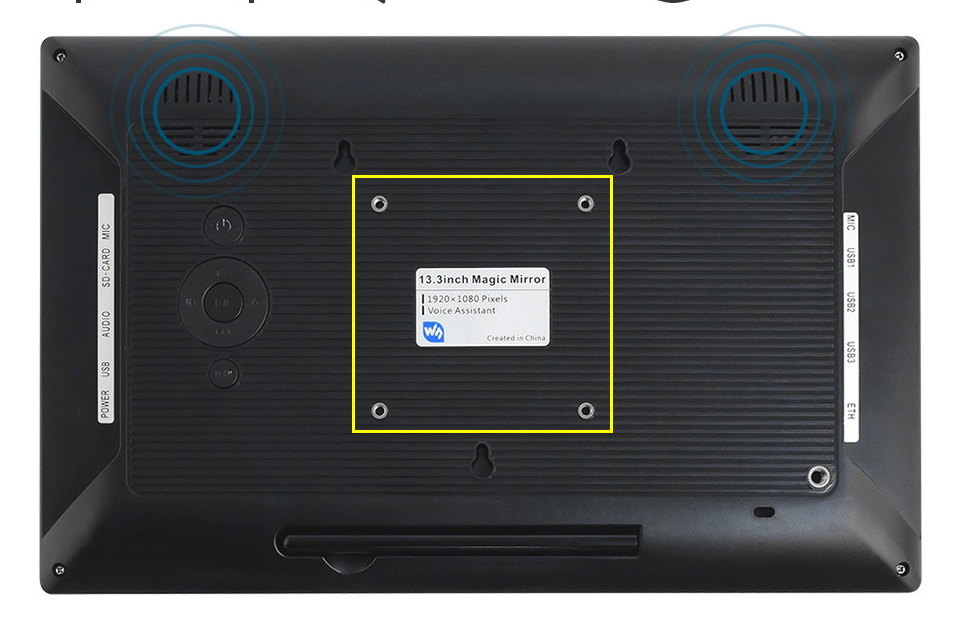
- The rear shell of 13.3inch Magic Mirror has square M3 fixing holes, allowing you to fix it in both landscape and portrait mode.
- You can consider using the built-in battery to solve this problem. If conditions permit, we will release models with batteries in the future;
- At present, the backlight brightness can only be adjusted through the OSD menu. At present, the CM4 core board has been released. We are working on the CM4 version of Magic Mirror. We will consider adding software to modify the backlight brightness function;
- The black frame depends on factors such as the LCD AA area, touchpad and rear case model, and will be adjusted appropriately in conjunction with customer feedback;
5.13.3inch Magic Mirror is built-in Raspberry Pi 3A+, raspberry Pi is not a toy, for more information, please check RPI official website: https://www.raspberrypi.org/
Maybe they are referring to the slower running speed, which depends on the pi version (currently 3A+). You can expect the CM4 version of Magic Mirror.
- The rear shell of 13.3inch Magic Mirror has square M3 fixing holes, allowing you to fix it in both landscape and portrait mode.
-
@Laohu
Thanks for your kind explanation! Any idea when the new (CM4 update) version will be available? -
Definitely looks like it is running HA in the video.
-
Yes, that’s what I wrote above: “from an HA user”. But the user experience will therefore not differ on my 5 points.
-
I ordered the display and my first experience is that it looks neat (not a toy) but points 1-4 above remain a concern. An additional problem is that once hung up, the buttons for the on-screen display are no longer accessible.
The RPi desktop (OS with recommended software) is unusable slow, no idea what the reason is. However, working via SSH is good and fast.
The installation instructions for MM on the Waveshare WiKi did not work for me. I used their monitor settings and the sound card driver and installed MM further as described in the online MagicMirror² Documentation. Thereafter MM works as expected.
The monitor was delivered without a manual and something did not work properly with the onscreen display. I asked a question about this via the support address on the Waveshare site but never got an answer. After an email to sales it turned out that the address was no longer correct and I had to email support02@waveshare.com. I did but I’m still waiting for an answer … That seems to take way too long and until then I can’t do anything with the monitor :-(
-
Is it an actual 2 way mirror finish or just a touchscreen monitor?
-
Maybe I don’t understand you well, but it’s a one-way mirror over a touchscreen. I believe this monitor is also sold without the mirror. There is some space between the mirror and the display. I have not yet used the touch function because I will not be able to continue until I have an answer from Waveshare support.
-
Just got one of these today, kinda happy with it, especially as a bit of a beginner system!
FYI - if you want to programmatically change the brightness (as I’m seeing in older posts):
CAUTION - This worked for me, but involves enabling scary flags and setting potentially unsafe values to the monitor. Exercise caution.
Edit
vi /boot/config.txt
Add:dtparam=i2c2_iknowwhatimdoingReboot
Then
sudo apt-get install ddcutilRun
sudo ddcutil detect
You should see an output like:pi@raspberrypi:~ $ sudo ddcutil detect Display 1 I2C bus: /dev/i2c-2 EDID synopsis: Mfg id: RTK Model: RTK FHD Serial number: [redacted] Manufacture year: 2011 EDID version: 1.3 VCP version: 2.2If you do, you can then run:
sudo ddcutil getvcp 10to get the brightness
and
sudo ddcutil setvcp 10 [1-100]to set the brightness, where 1-100 is the desired value of the brightness -
Thanks for this example! I got the Waveshare Magic Mirror a few days ago and was looking for a solution to dim the backlight.
I’m using
xscreensaverto blank the screen after 2 minutes and used theddcutilcommand to dim the backlight.Here is the script I’m using:
#!/bin/sh
process() {
        while read line; do
                case "$line" in
                        UNBLANK*)
                                sudo ddcutil setvcp 10  100
                        ;;
                        BLANK*)
                                sudo ddcutil setvcp 10  1
                        ;;
                esac
        done
}

xscreensaver-command -watch | process
I use
xscreensaver-command -watchto get the state changes, see https://www.jwz.org/xscreensaver/man3.html


Hello! It looks like you're interested in this conversation, but you don't have an account yet.
Getting fed up of having to scroll through the same posts each visit? When you register for an account, you'll always come back to exactly where you were before, and choose to be notified of new replies (either via email, or push notification). You'll also be able to save bookmarks and upvote posts to show your appreciation to other community members.
With your input, this post could be even better 💗
Register Login