MMM-CalendarExt3Timeline
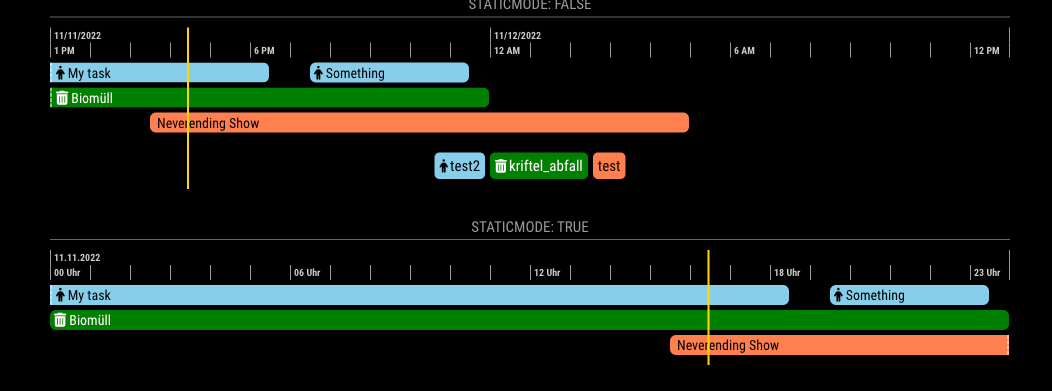
The successor of CalendarExtTimeline, the Magicmirror module. A sibling module of MMM-CalendarExt3. This module would show the timeline of events.
The successor of CalendarExtTimeline, the Magicmirror module. A sibling module of MMM-CalendarExt3. This module would show the timeline of events.
@rsiggins
In my test, the module itself returns the right time of the target place converted to my local timezone. Anyway, there may be some special reason for your case.
Of course, the developer should look inside to know what really happened. But as a emergency cure, you can use some monkey-patching before real fixation from the developer.
{
	module: "MMM-ModuleMonkeyPatch",
	config: {
		patches: [
			{
				module: "MMM-OpenmapWeather",
				method: "processWeather",
				patch: function (original, args) {
					const [ data ] = args
					const yourDesiredOffset = 5 * 60 * 60 // 5 hours
					data.sys.sunrise = new Date((data.sys.sunrise + yourDesiredOffset) * 1000).valueOf()
					data.sys.sunset = new Date((data.sys.sunset + yourDesiredOffset) * 1000).valueOf()
					original(data)
				}
			},
		]
	}
}
start: function () {
  // init your module.
  // Not recommended doing your real job here. Because this method is evaluated only one time on startup before all the stuff be prepared (e.g, DOM creating)
  this.timer = null
},

notificationReceived: function (notification, payload, sender) {
  if (notification === 'DOM_OBJECTS_CREATED') {
    // This might be the best position where your real job starts.
    this.myJob()
  }
},

myJob: function () {
  clearTimeout(this.timer)
  let rand = Math.floor( ... ) // random number to pick
  let hour = (new Date()).getHours() // select hour to pick the folder
  // ...  Your logic for picking image by hour and rand

  this.timer = setTimeout(() => {
    // ... Your logic for displaying image picked.

    this.myJob() // recursive execution per updateInterval.
    // It would be a better habbit to use setTimeout instead of setInterval
  }, this.config.updateInterval)
},
@mumblebaj
Thanks for your hard work on my behalf.
BTW, if you are not maintaining MMM-News any more, can you return the ownership to me again? I want to archive it in my control back.
@JeffreyDaro
To save the daily quota,
updateInterval as some minutes, not seconds. It will help your quota consumption.start: function () {
this.timer = null
this.targetURL = null
this.setImageURL()
},
getDom: function () {
console.log(">", this.targetURL)
var dom = document.createElement('div')
dom.style.backgroundImage = `url(${this.targetURL})`
dom.style.height = '100vh' // I recommend to control this through CSS, but in this example, I just hardcode it.
dom.style.width = '100vw'
dom.style.backgroundSize = 'cover'
return dom
},
notificationReceived: function (notification, payload, sender) {
if (notification === 'DOM_OBJECTS_CREATED') {
this.job()
}
},
job: function () {
clearTimeout(this.timer)
this.updateDom()
this.setImageURL()
this.timer = setTimeout(() => {
this.job()
}, this.config.updateInterval)
},
setImageURL: function () {
// do your logic for picking image. Here I pick the random unsplash image instead for example.
let rand = Math.floor(Math.random() * 100000)
this.targetURL = `https://source.unsplash.com/random?seed=${rand}`
}
@bicolorbore586
Sorry, It can’t be done at this moment. In some day, I have a plan to update. I’ll consider your needs at that time.
@fozi
Once I was the original creator of this module (and many others)
For some personal reasons, I couldn’t maintain my modules anymore at that time by myself. But I didn’t want to break the maintenance of the modules for the community. So I transferred all the ownership to any volunteer who wants to take over. I believed that they could keep the module’s maintenance and develop more than me.
After one and a half years passed, I return to this scene now.
What I see is, …
Some modules are being maintained still well, some are abandoned, some are, …
Well, I will not claim my ownership back, those modules are not mine anymore from my discard. And I believe everyone has his own good mind. So I don’t care.
However, a little sorry to you for this situation though.
@bicolorbore586
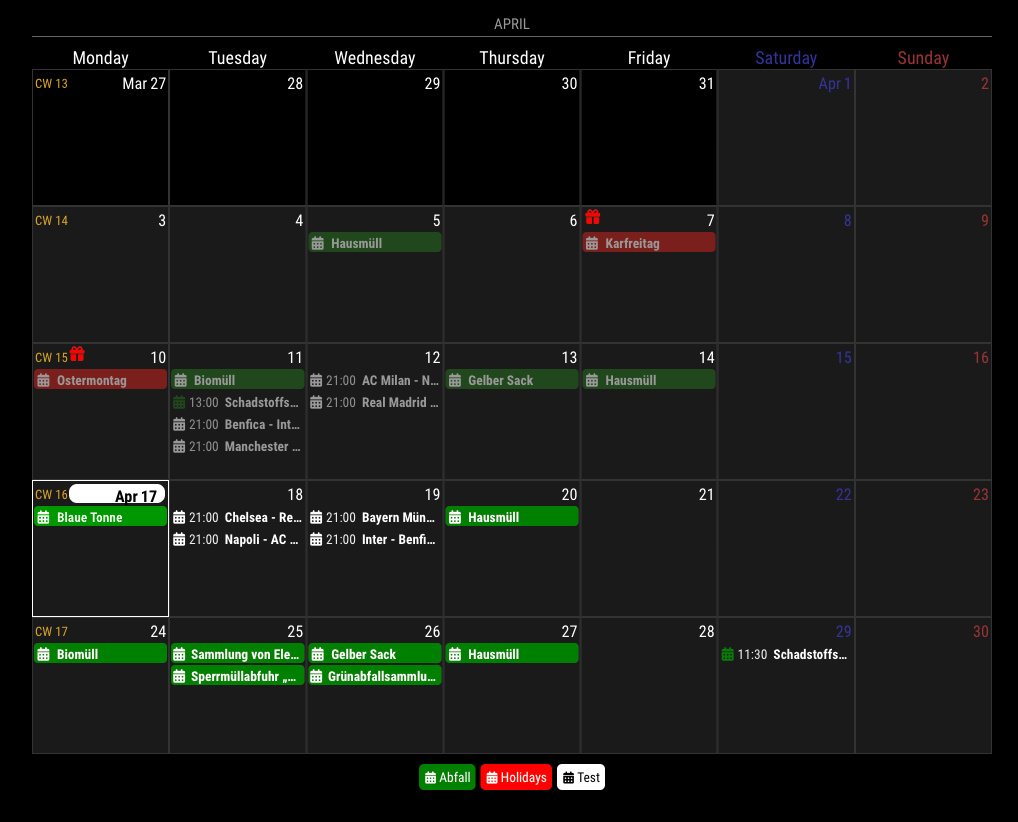
Since 1.3.0, with manipulateDateCell callback function in configuration, you can handle date cell itself. So you can achieve what you want.
Here is a simple example; (more tweek might be needed to match with your wants wholely)
manipulateDateCell: (cell, events) => {
	if (Array.isArray(events) && events.some(e => e.calendarName === 'Holidays')) {
		let dateIcon = document.createElement('span')
		dateIcon.classList.add('fa', 'fa-fas', 'fa-fw', 'fa-gift')
		dateIcon.style.color = 'red'
		dateIcon.style.fontSize = '0.9em'
		let header = cell.querySelector('.cellHeader')
		let celldate = header.querySelector('.cellDate')
		header.insertBefore(dateIcon, celldate)
	}
}
Anyway, it could be possible.
@rxldavid
You need ‘request’ module. It was deprecated from MM, but your quote of the day module is depending on it.
npm install request
@btastic You are right. Cheer up for your work!
I wish a new module which can be more flexible and modular with modern techniques, and especially, not dedicated to RPI(recently I never work with it), but I have not enough time and interest to do so…
@Kelemvor
1.
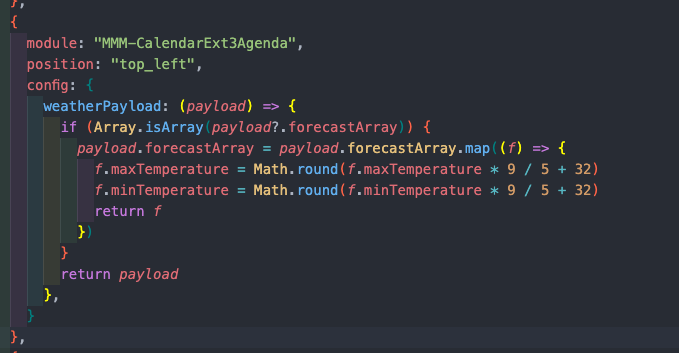
That’s an issue with the Weather module. Sometimes, the weather module sends incorrect units in the broadcasting notification, which is different from the settings used for screen display. I don’t know why it happens, but you may need to ask the MM developers. Anyway, that example you read is created for such cases in my favour. The responsibility for this issue does not lie with this module.
.CX3A .event .description,
.CX3A .event .location {
  display: none;
}
Put into your Custom.css, .
Why is it not served as a config value? Sorry, it’s my design.
Presentation and logic should be separated. Maybe showDescription would be useful, but how about these? showEventTime, showDayWeatherIcon, showDayWeatherTempMax, showDayWeatherTempMin, … Maybe those also are useful. But I cannot prepare all the configurable values for all the things. This module still has too many options.
But just for the presentation, only CSS overriding could solve many things without much code and for various cases.
3 . The default calendar modules spit out events when each calendar is fetched. The problem is, there is no way to know all the calendars are fetched. So, if your calendars are too many and big, some calendars may need time to finish fetching; that calendar will not be rendered at the first cycle of this module’s refreshing. From next cycle(I hope), it will be shown. So, wait to be refreshed. (default refreshInterval is 30 minutes)
Alternatively, you can use waitFetch to delay the rendering of the first cycle. By providing a sufficient value, you can ensure that the parsing of calendars is completed within that time. Since the duration of parsing for each calendar is unknown, it may require a considerable amount of time. Perhaps around 30 seconds should be sufficient, although it depends on the specific calendars being parsed.
Default waitFetch is set as 5000 ms,
@bicolorbore586
What is that ‘blank’? I cannot guess what it is pointing. Could you show me a bigger picture? and to reproduce your case, send or show me the config and css with real ical urls. (eouia0819@gmail.com)
@Kelemvor
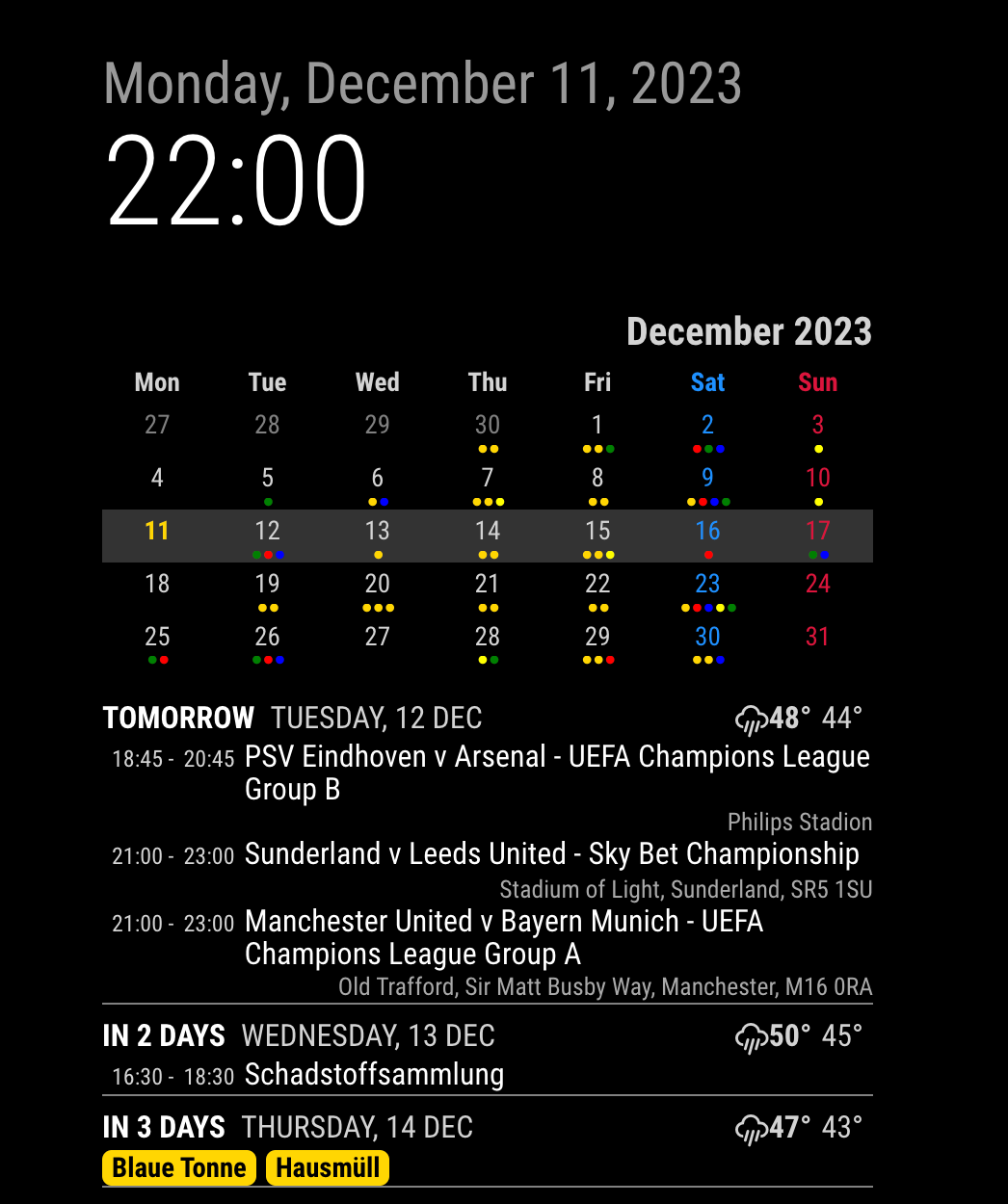
Sorry, that is a known bug which will be fixed on next update. (I think it could be in 24H)
https://github.com/MMRIZE/MMM-CalendarExt3Agenda/issues/38
Just wait a day. (It could be fixed by CSS tweak, but you need to restore it again after update…)
The center position is the weirdest thing of MM. The width of center is decided by this code;
.region.top.center,
.region.bottom.center {
  left: 50%;
  transform: translateX(-50%);
}
This code looks so intuitive, but not so really. It is calculated and applied after rendering, so that makes some issues;
Anyway, this code would be a help for what you want;
.region.left {
  width: 50%;
  background-color: rgba(255,0,0, 0.2); /* to check how it shows visibly; remove this line later. */
}

.region.right {
  width: 50%;
  background-color: rgba(0,255,0, 0.2); /* to check how it shows visibly; remove this line later. */
}

.region.center {
  display:none;
}
By the way, current structure of MM’s positioning becomes a bit old and stubborn legacy.(almost 7 or 8 years old) Maybe we need to progress with more modern techs.
@UncleRoger said in [MMM-MailMessage] Send messages to your MagicMirror via e-mail:
I did the card thing per the template
It doesn’t work for some time.
@sdetweil
I was happy to use a new feature toSorted but ppl may have trouble with compatibility issue. I’ll provide fallback codes in the next update.