Also, how do you rotate the screen??
M
Offline
A New Chapter for MagicMirror: The Community Takes the Lead
Read the statement by Michael Teeuw here.
Read the statement by Michael Teeuw here.
Posts
-
RE: Magic Mirror on the Raspberry Pi 1, agonizingly difficult
-
RE: Magic Mirror on the Raspberry Pi 1, agonizingly difficult
Now the software is working I have a few more questions:
(Btw I’m running MM in serveronly mode in Chromium.)- How do I make MM auto run when the Pi turns on, disable screensaver and make it fullscreen?
- Should I be concerned that the RPi gets quite hot in operation, especially as it will be in a frame and in constant operation.
- Is it advisable to turn the raspberry pi off (and turn off the magic mirror) by switching it off at the mains, and if not how would I turn it off and on?
-
RE: Magic Mirror on the Raspberry Pi 1, agonizingly difficult
Good news!
The config file is (mostly) working (it needed a reboot) and I’ll configure it until I’m satisfied at which point I need to figure out how to keep it fullscreen, disable screen timeout and do the autostart and all that…
In the meantime, thanks to everyone for their help :-D -
RE: Magic Mirror on the Raspberry Pi 1, agonizingly difficult
@cowboysdude Thanks.
This is the situation:
The default config file is working (I have it backed up) though when I run it in server only the clock and weather work fine, but all the other modules say “Loading…”.
I did try to customise it, but got the “No config file”, so either I have syntax errors or the sources aren’t right…
Talking of, does anyone know of a list of compatible news feeds and the like?
Thanks again -
RE: Magic Mirror on the Raspberry Pi 1, agonizingly difficult
It worked!!
Thank you to everyone :-D
Now all that’s left is screensaver, autostart and all that…
Thanks again! -
RE: Magic Mirror on the Raspberry Pi 1, agonizingly difficult
Alright, it says Magic Mirror installation was successful, but I’m not sure what to do next…
-
RE: Magic Mirror on the Raspberry Pi 1, agonizingly difficult
I’ve got a progress bar that’s progressing slowly, hopefully it will work, though it ma take a while.
Updates to follow… -
RE: Magic Mirror on the Raspberry Pi 1, agonizingly difficult
@Sean I’ve tried following the instructions on that page but it hasn’t worked.
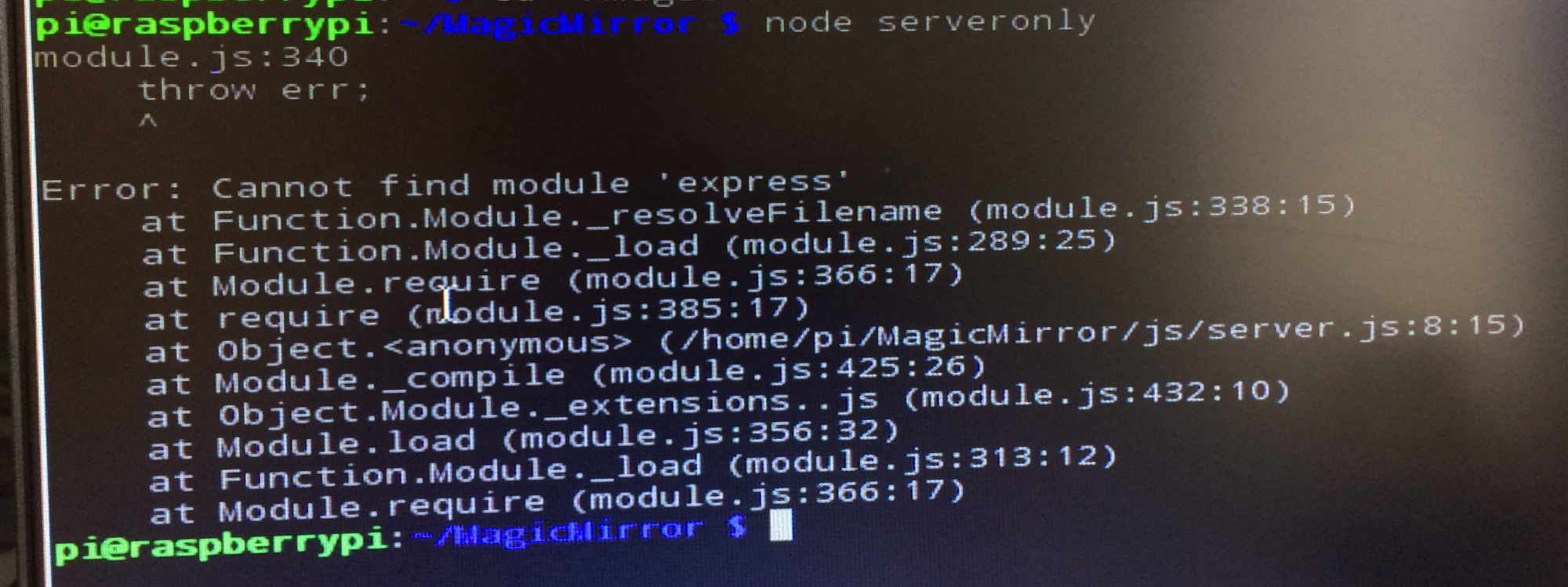
How do I install express.js? -
RE: Magic Mirror on the Raspberry Pi 1, agonizingly difficult
It says that the site can’t be reached and that localhost refused to connect
-
RE: Magic Mirror on the Raspberry Pi 1, agonizingly difficult
Thanks for the quick reply.
I’ve tried to run node serveronly in the terminal, but as far as I understand, I haven’t been able to get it to work.
Howeve, when I go to http://localhost in Chromium (where I assume the MM would be when it works) it do get a message mentioning ngix and saying the debian web server is up and running, though the serveronly mode doesn’t seem to be working. -
Magic Mirror on the Raspberry Pi 1, agonizingly difficult
First if all, I’m new to linux and the pi, so please forgive my ignorance.
Anyway, I’ve been trying to get the magic mirror to work on my old Pi 1 for some time now, but can’t for the life of me figure out how to do it.
I’ve followed all the instructions that I’ve come across, but still can’t figure it out.
I understand the Pi 1 is not supported so needs to be run in serveronly mode which I cannot get to work.
I’ve installed node.js and npm (I think) but can’t get it to work. (To say I have no idea what I’m doing is an understatement.)
(I did try to comment out the bit of the installer that checks the RPi version and the installer did run [after executing bash raspberry.sh] but said it was unable to install dependencies.)Specs:
Raspberry Pi 1
node.js - version 5.1.0
npm - version 3.3.12
docker - version 1.3.3Any help would be greatly appreciated.
P.S. Sorry for the long post and thank you in advance
(By the way, I have looked at the other posts regarding the Pi1 but none of the information there helped, I really am clueless)