MagicMirror Forum
    • Recent
    • Tags
    • Unsolved
    • Solved
    • MagicMirror² Repository
    • Documentation
    • 3rd-Party-Modules
    • Donate
    • Discord
    • Register
    • Login
    1. Home
    2. MMrustykayn66
    3. Posts
    A New Chapter for MagicMirror: The Community Takes the Lead
    Read the statement by Michael Teeuw here.
    M
    Offline
    • Profile
    • Following 0
    • Followers 0
    • Topics 2
    • Posts 11
    • Groups 0

    Posts

    Recent Best Controversial
    • RE: Calendar doubling events- Calendar & Calendar EXT3

      @sdetweil
      -the test event isn’t supposed to be on Sunday at all. Its only supposed to occur on Saturday. It shows up on Saturday for the first occurrence then the next Sunday and every Sunday after that.

      -Should I turn of broadcast past events? I have events set to 12 to push the calendar module out a little bit so everything is more visually balanced. If its not the right side column is a bit crunched and doesn’t line up properly with the left column where I have EXT3

      • My Broadcasting only has 579 events. SO a much ‘smaller’ calendar.

      • I assume visual event time-frame refers to the data that would only show for the weeks displayed. Nothing displays in the Calendar at all for any of the days, Personal or Holiday Calendar.

      posted in Troubleshooting
      M
      MMrustykayn66
    • RE: MMM-CalendarExt3 - How do I get more weeks in mode: "weeks"

      @sdetweil Yep 🤣. Could have sworn I tried that but I must have been to tired to notice it worked. 🤦‍♂️

      posted in Troubleshooting
      M
      MMrustykayn66
    • MMM-CalendarExt3 - How do I get more weeks in mode: "weeks"

      I would like mode:“week” to always show 6 weeks. When I switch from Month to week it only shows the remaining weeks for the month.
      showing past weeks seems like a waste of space and loosing my ability to ‘look forward’ as I near the end of the month really reduces the usefulness of the mirror.
      I know there are solutions like carousel or having two instances side to but I would prefer keeping it as simple as possible for now.

      any help much appreciated

      posted in Troubleshooting
      M
      MMrustykayn66
    • RE: Calendar doubling events- Calendar & Calendar EXT3

      @sdetweil

      Sorry for the late reply.

      — I am only using two calendars currently. Googles Holiday calendar and one personal Calendar.

      — I reverted to the most current update before adding events VIA the web interface. After that I re-installed G Calendar for IOS and added a reoccurring event. I didn’t realise before that it is not doubling events. Its actually displaying the correct event , the same event on the next day and then on that day for all reoccurring events. IE I set up a reoccurring event for Sat at 9. It shows that event, one on Sunday at 9 and then one for every Sunday at 9 moving forward. Magic Mirror is the only place this happens.

      — I git pulled the release you are working on. Its giving me the same error it was before. Calendar module shows events correctly but nothing ever loads on EXT3. PM me your email address and I will send over the ICS. EXT3 is up to date.

      {
      			module: "calendar",
      			position: "top_right",
      			config: {
      				maximumEntries: 12,
      				//wrapEvents: true,
      				broadcastPastEvents: true, // <= IMPORTANT to see past events
      				calendars: [
      					{
      			fetchInterval: 50000,
      			url: "https://calendar.google.com/calendar/ical/teaxxxxxxx",
                              name: "Shandra", // <= RECOMMENDED to assign name
                              color: "blue" // <= RECOMMENDED to assign color		
      					},
      					{
      					url: "https://calendar.google.com/calendar/ical/en.usa%23holiday%40group.v.calendar.google.com/public/basic.ics",
                              name: "us_holiday", // <= RECOMMENDED to assign name
                              color: "red" // <= RECOMMENDED to assign color
      					},
      				]
      			}
      		},
      		{
                  module: "MMM-CalendarExt3",
                  position: "top_left",
                  title: "",
                  config: {
      		    refreshInterval: 60000,
                          mode: "month",
                          instanceId: "basicCalendar",
                          locale: 'en-US',
                          maxEventLines: 6,
                          firstDayOfWeek: 0,
                          calendarSet: ['us_holiday', 'abfall', 'mytest', 'Shandra'],
              }
      
      posted in Troubleshooting
      M
      MMrustykayn66
    • RE: Calendar doubling events- Calendar & Calendar EXT3

      @sdetweil

      Re-entering the data via Google Calendars web interface seems to have fixed the problem. I deleted all entries that were added via Google calendar on IOS and re entered them. It seems to only affect events that are reoccurring.

      Hopefully this provides insight to someone who knows why.

      Thank you for all your help. Much appreciated

      posted in Troubleshooting
      M
      MMrustykayn66
    • RE: Calendar doubling events- Calendar & Calendar EXT3

      @sdetweil when I had nothing showing up on EXT3 I upped the refresh rate to every minute to see if that was the problem. Nothing ever loaded.

      posted in Troubleshooting
      M
      MMrustykayn66
    • RE: Calendar doubling events- Calendar & Calendar EXT3

      @sdetweil Curiouser and Curiouser.

      -I might try a fresh install this evening to see if that fixes the problem.

      -Im inputting information to Google calendar via an iPhone. Probably not the problem but I will log into Calendar via my computer to see if that makes a difference. Probably not, but might be worth a try.

      Only ideas I’ve had so far

      Thanks for the Help , fingers crossed I can get this sorted soon as the significant other is less than impressed with her new calendar 🤣🤦‍♂️

      posted in Troubleshooting
      M
      MMrustykayn66
    • RE: Calendar doubling events- Calendar & Calendar EXT3

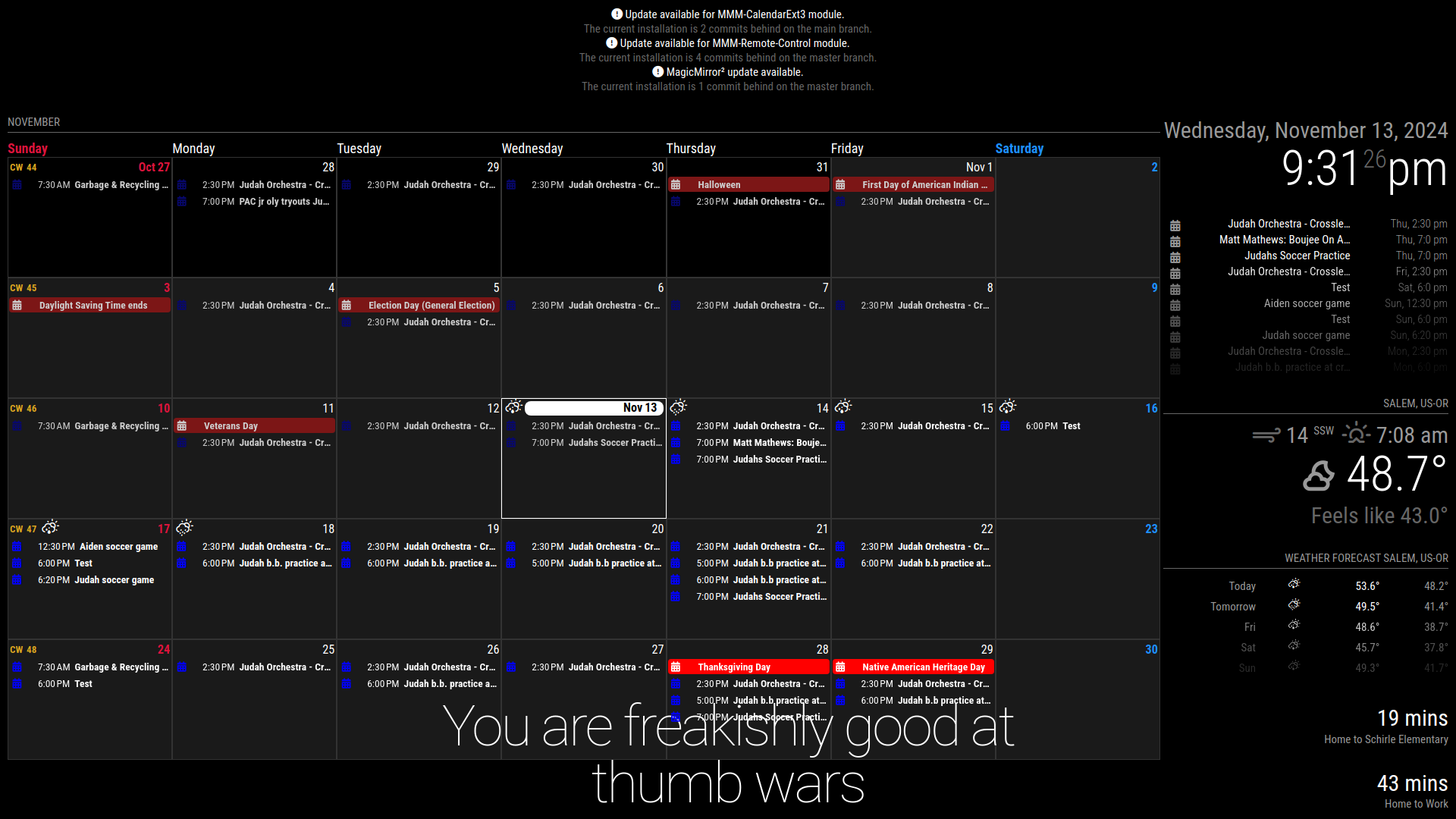
      @sdetweil I tried reverting to the version I backed-up before I updated and it exhibits the same doubled entry error. Its version v2.28.0 20241113_21h31m26s_grim.png

      posted in Troubleshooting
      M
      MMrustykayn66
    • RE: Calendar doubling events- Calendar & Calendar EXT3

      @sdetweil kinda figured something like that was the problem :)

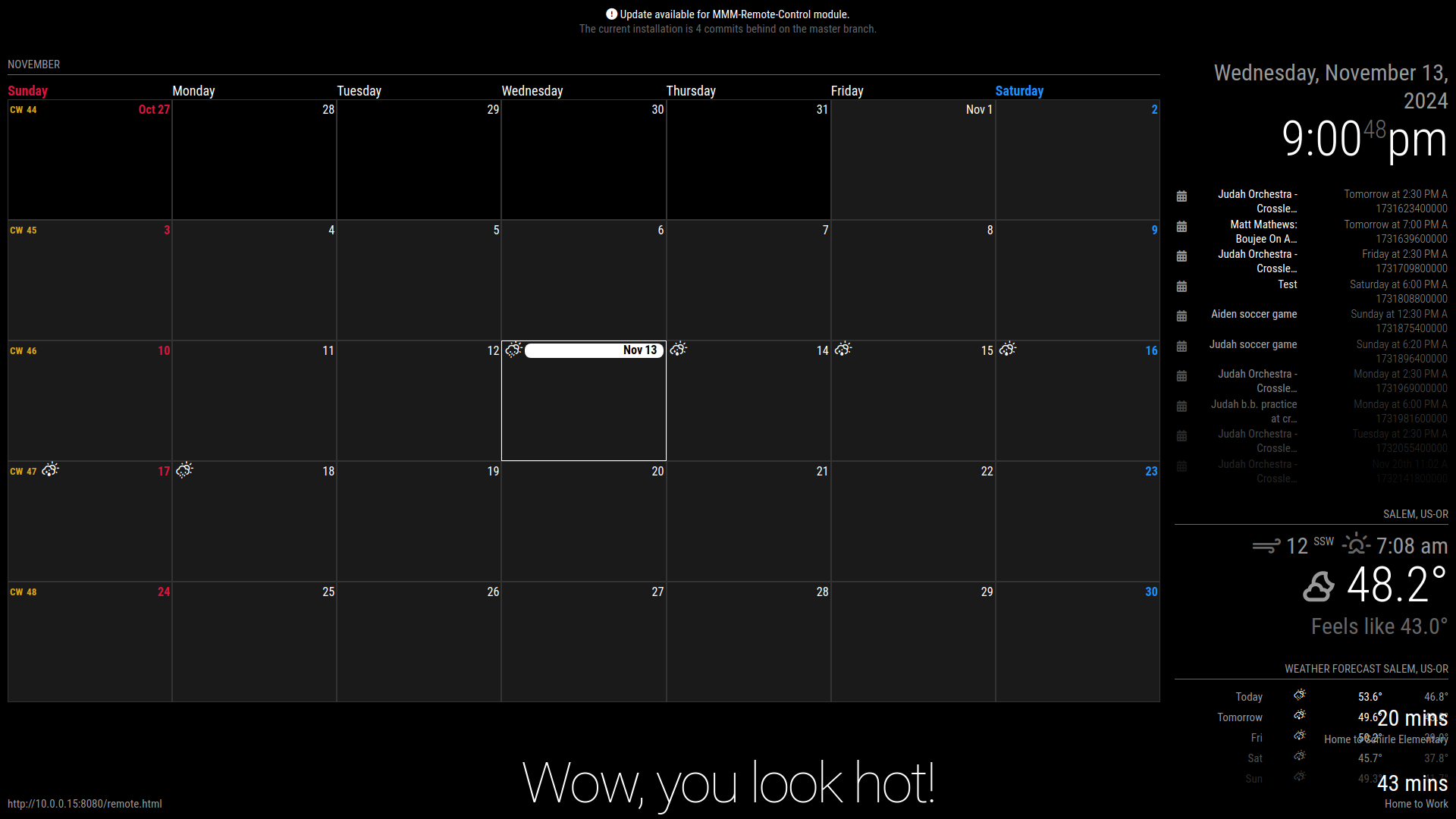
      The double event issue has gone away but it broke other things.

      Calendar EXT3 is no longer displaying any information ( I increased the refresh rate to make sure it wasn’t a pull issue)
      Calendar is no longer showing the double entries but the is a number code bellow the date that is pushing the entire module beyond my layout. 20241113_21h00m48s_grim.png

      posted in Troubleshooting
      M
      MMrustykayn66
    • RE: Calendar doubling events- Calendar & Calendar EXT3

      @sdetweil I tried pasting into terminal and I got the error

      fatal: not a git repository (or any of the parent directories): .git

      was I supposed to be in the calendar folder when I executed that command

      posted in Troubleshooting
      M
      MMrustykayn66
    • Calendar doubling events- Calendar & Calendar EXT3

      I just finished up my first Magic Mirror build. I updated Magic Mirror today as well as other modules it told me where out of date. After updating I started adding re-occurring tasks to my Google Calendar. I realised that these tasks are doubling. They display on the day the are supposed to occur as well as the day after. This does not occur for re-occurring tasks I added before updating.
      Its a pretty Vanilla install I am using the Calendar EXT3 module for my Calendar. I’m not really code literate, just good at following directions

      My Config File

      						// - another specific IPv4/6 to listen on a specific interface
      							// - "0.0.0.0", "::" to listen on any interface
      							// Default, when address config is left out or empty, is "localhost"
      	port: 8080,
      	basePath: "/",	// The URL path where MagicMirror² is hosted. If you are using a Reverse proxy
      									// you must set the sub path here. basePath must end with a /
      	//ipWhitelist: ["127.0.0.1", "::ffff:127.0.0.1", "::1"],	// Set [] to allow all IP addresses
      	ipWhitelist: [],
      									// or add a specific IPv4 of 192.168.1.5 :
      									// ["127.0.0.1", "::ffff:127.0.0.1", "::1", "::ffff:192.168.1.5"],
      									// or IPv4 range of 192.168.3.0 --> 192.168.3.15 use CIDR format :
      									// ["127.0.0.1", "::ffff:127.0.0.1", "::1", "::ffff:192.168.3.0/28"],
      
      	useHttps: false,			// Support HTTPS or not, default "false" will use HTTP
      	httpsPrivateKey: "",	// HTTPS private key path, only require when useHttps is true
      	httpsCertificate: "",	// HTTPS Certificate path, only require when useHttps is true
      
      	language: "en",
      	locale: "en-US",
      	logLevel: ["INFO", "LOG", "WARN", "ERROR"], // Add "DEBUG" for even more logging
      	timeFormat: 12,
      	units: "imperial",
      
      	modules: [
      		{
      			module: "alert",
      		},
      	
      		{
      			module: "updatenotification",
      			position: "top_bar"
      		},
      		{
      			module: "clock",
      			position: "top_right"
      		},
      		{
      			module: "calendar",
      			position: "top_right",
      			config: {
      				//wrapEvents: true,
      				broadcastPastEvents: true, // <= IMPORTANT to see past events
      				calendars: [
      					{
      			fetchInterval: 300000,
      			url: "https://calendar.google.com/calendar/***/basic.ics",
                              name: "Shandra", // <= RECOMMENDED to assign name
                              color: "blue" // <= RECOMMENDED to assign color		
      					},
      					{
      					url: "https://calendar.google.com/calendar/ical/en.usa%23holiday%40group.v.calendar.google.com/public/basic.ics",
                              name: "us_holiday", // <= RECOMMENDED to assign name
                              color: "red" // <= RECOMMENDED to assign color
      					},
      				]
      			}
      		},
      		{
                  module: "MMM-CalendarExt3",
                  position: "top_left",
                  title: "",
                  config: {
                          mode: "month",
                          instanceId: "basicCalendar",
                          locale: 'en-US',
                          maxEventLines: 6,
                          firstDayOfWeek: 0,
                          calendarSet: ['us_holiday', 'abfall', 'mytest', 'Shandra'],
              }
      	}, 
      		{
      			module: "compliments",
      			position: "bottom_center"
      		},
      		{
      			module: "weather",
      			position: "top_right",
      			config: {
      				weatherProvider: "openmeteo",
      				type: "current",
      				lat: 44.9429,
      				lon: -123.0351
      			}
      		},
      		{
      			module: "weather",
      			position: "top_right",
      			header: "Weather Forecast",
      			config: {
      				weatherProvider: "openmeteo",
      				type: "forecast",
      				lat: 44.9429,
      				lon: -123.0351
      			}
      		},
      		{
      	module: "MMM-Traffic",
      	position: "bottom_right",
      	config: {
      		accessToken: "pk.eyJ1IjoibW1ydXN0eWtheW42NiIsImEiOiJjbTE0MjFweGYxa3BwMmxvcnJqb2kzZTQ5In0.1_",
      		originCoords: "-",
      		destinationCoords: "-",
      		showSymbol: false,
      		firstLine: "{duration} mins",
      		secondLine: "Home to Schirle Elementary"
      	}
          },
          		{
      	module: "MMM-Traffic",
      	position: "bottom_right",
      	config: {
      		accessToken: "pk.eyJ1IjoibW1ydXN0eWtheW42NiIsImEiOiJjbTE0MjFweGYxa3BwMmxvcnJqb2kzZTQ5In0.1_HtZ4tllgp8MkK41SkAAQ",
      		originCoords: "-",
      		destinationCoords: " -


      ",
      		showSymbol: false,
      		firstLine: "{duration} mins",
      		secondLine: "Home to Work"
      	}
          },
          {
          module: 'MMM-Remote-Control',
          // uncomment the following line to show the URL of the remote control on the mirror
          position: 'bottom_left',
          // you can hide this module afterwards from the remote control itself
          config: {
              customCommand: {},  // Optional, See "Using Custom Commands" below
              showModuleApiMenu: true, // Optional, Enable the Module Controls menu
              secureEndpoints: true, // Optional, See API/README.md
              // uncomment any of the lines below if you're gonna use it
              // customMenu: "custom_menu.json", // Optional, See "Custom Menu Items" below
              // apiKey: "", // Optional, See API/README.md for details
              // classes: {} // Optional, See "Custom Classes" below
          }
      },
      		/*
      	    {
      			module: "newsfeed",
      			position: "bottom_center",
      			config: {
      				feeds: [
      					{
      						title: "New York Times",
      						url: "https://rss.nytimes.com/services/xml/rss/nyt/HomePage.xml"
      					}
      				],
      				showSourceTitle: true,
      				showPublishDate: true,
      				broadcastNewsFeeds: true,
      				broadcastNewsUpdates: true
      			}
      		},*/
      	]
      };
      
      /*************** DO NOT EDIT THE LINE BELOW ***************/
      if (typeof module !== "undefined") { module.exports = config; }
      
      posted in Troubleshooting
      M
      MMrustykayn66
    • 1 / 1