MagicMirror Forum
    • Recent
    • Tags
    • Unsolved
    • Solved
    • MagicMirror² Repository
    • Documentation
    • 3rd-Party-Modules
    • Donate
    • Discord
    • Register
    • Login
    1. Home
    2. Mykle1
    3. Posts
    A New Chapter for MagicMirror: The Community Takes the Lead
    Read the statement by Michael Teeuw here.
    Mykle1M Offline
    • Profile
    • Following 5
    • Followers 73
    • Topics 101
    • Posts 4,397
    • Groups 2

    Posts

    Recent Best Controversial
    • RE: need help with config file

      @csdesign3
      I was just like you a few weeks ago. I didn’t know a thing about this, or coding. A complete noob, as they say. My suggestion, because it helped me, is, don’t do your editing in the terminal. Do it in the graphical user interface (GUI). Navigate your desktop as you would on a PC with Windows or a Mac’s Finder.

      Click on File Manager (the folder at the top left of your desktop, usually)
      Double click the MagicMirror folder
      Double click the config folder
      Right click the config.js.sample file - select Copy
      Right click again somewhere else in that same window - select Paste
      Rename the file to config.js and click the Rename button
      The new config.js file that you just pasted is now your working config file for MagicMirror
      Double click it and it should open in a text editor.

      This is one of the places where you will customize your MM. It’s actually good enough to run your MM, although it will only show some of the modules but you’ll be encouraged by the fact that it is at least working. Every module folder has a ReadMe file that instructs you on what to add to your config.js file to get that module up and running.

      I think that’s good for now. If you want to run MM right now to see how your new config.js is working you will have to go back to the terminal. Do this:

      Open a new terminal
      type cd MagicMirror
      then type npm start

      Sit back and watch the magic happen. When you calm down after a minute or two of watching your MM actually working and you want to quit MM, press the Option key on your keyboard. Select QUIT from File menu that appears, top left of your screen

      posted in Troubleshooting
      Mykle1M
      Mykle1
    • RE: How to go back to previous version of a module?

      @strawberry-3.141

      I should download from the version page I want? If I do a git clone https://github.com/ianperrin/MMM-NetworkScanner.git won’t that give me the newest version?

      posted in Troubleshooting
      Mykle1M
      Mykle1
    • RE: How to go back to previous version of a module?

      @strawberry-3.141 said in How to go back to previous version of a module?:

      https://github.com/ianperrin/MMM-NetworkScanner/commits/master

      Thank you! :thumbsup_tone1:

      posted in Troubleshooting
      Mykle1M
      Mykle1
    • How to go back to previous version of a module?

      The newest version of MMM-NetworkScanner is not working for me the way the previous version was. I just don’t know how to go about finding previous versions. I went the module clone page on github but I don’t see previous versions.

      Please advise, and thank you ahead of time

      posted in Troubleshooting
      Mykle1M
      Mykle1
    • RE: [MMM-NetworkScanner] disable logging

      I spent a good amount of time with this, yesterday and today.

      module: 'MMM-NetworkScanner',
              		position: 'top_left', 
              		config: {
      			debug: false,
                  		devices: [
                          	{ macAddress: "bc:9f:ef:bb:1c:de", name: "Dove", icon: "medkit"},
                          	{ macAddress: "e0:b5:2d:d3:e6:26", name: "BottlePop", icon: "globe"},
                          	{ macAddress: "0c:d7:46:1e:a0:3f", name: "Donna", icon: "venus"},
      			{ macAddress: "64:9a:be:e3:83:6b", name: "Nikki", icon: "coffee"},
      			{ macAddress: "90:b6:86:d2:16:99", name: "Jason", icon: "fire-extinguisher"},
      			{ macAddress: "84:d6:d0:f9:8b:f6", name: "MJD", icon: "child"}
                      		],
                  		showUnknown: false,
                  		showOffline: true,
      			showLastSeen: false,
                  		keepAlive: 180,
                  		updateInterval: 10,
                  		residents: ["BottlePop"],
      

      Here are my cells phones using macAddress because ipAddress no longer works for me. With residents: set as above, BottlePop appears online always, even when the phone is powered off for 20 minutes. If I set residents as such, [“BottlePop”, “Dove”, “Donna”], then BottlePop blinks on and off about every 10 seconds. If I have residents set to [], then each device goes online briefly and then offline until the device is used again

      posted in Troubleshooting
      Mykle1M
      Mykle1
    • RE: [MMM-NetworkScanner] disable logging

      @binderth said in [MMM-NetworkScanner] disable logging:

      MMM-NetworkScanner received CONFIG

      This started happening yesterday to me, too. Now only macAddress works. ipAddress no longer works. And it used to work perfectly. I started a new topic. Forgive me for that. I was in a panic. Still am.

      MMM-NetworkScanner received CONFIG

      posted in Troubleshooting
      Mykle1M
      Mykle1
    • RE: Throwing down the gauntlet

      @cyberphox said in Throwing down the gauntlet:

      Almost accomplished this look today. Got some duplicate weather showing up I’m sure I can fix. The main problem I’m having is: No Realistic icons for weather at all.

      Are you using WunderGround weather? If so, make sure you have coloricon: true, in your config. Like this.

      module: 'MMM-WunderGround', // Just for current weather
          			position: 'top_center',
          			config: {
              		apikey: 'YOUR API KEY', // private; don't share!
              		pws: 'pws:KNYNEWYO103', // Richmondtown Weather Station - Very Cool
      			currentweather: 1,
              		coloricon: true,
      			animationSpeed: 5000,
          			roundTmpDecs: 0,
          			UseCardinals: 1,
      			windunits: "mph", // bft or mph
      
      posted in Troubleshooting
      Mykle1M
      Mykle1
    • RE: MMM-NetWorkScanner

      After a 3rd deletion and re-installation of the module and dependencies with no success, I tried using only macAddress instead of ipAddress in the device list of the config for the module. At least now the module reports the device as online but still won’t recognize any device by ipAddress. Also, the keepAlive: 300, is not working like it used to. The device (iPhone) is not recognized until I do something with it. As soon as my activity with the iPhone is done I get about 10-15 seconds before the module reports the device is offline, so keepAlive is not happening.

      I have all static IP addresses on my devices. The module used to work beautifully with static IP addresses. Not so now.

              		module: 'MMM-NetworkScanner',
              		position: 'top_left', 
              		config: {
                  		devices: [
                          	{ macAddress: "bc:9f:ef:bb:1c:de", name: "Dove", icon: "medkit"},
                          	{ macAddress: "e0:b5:2d:d3:e6:26", name: "BottlePop", icon: "globe"},
                          	{ macAddress: "0c:d7:46:1e:a0:3f", name: "Donna", icon: "venus"},
      			{ macAddress: "64:9a:be:e3:83:6b", name: "Nikki", icon: "coffee"},
      			{ macAddress: "90:b6:86:d2:16:99", name: "Jason", icon: "fire-extinguisher"},
      			{ macAddress: "84:d6:d0:f9:8b:f6", name: "MJD", icon: "child"},
                      		],
                  		showUnknown: false,
                  		showOffline: true,
      			showLastSeen: false,
                  		keepAlive: 300,
                  		updateInterval: 10,
                  		residents: [],
      		}        
       		},
      

      Anyone want to chime in here?

      posted in Troubleshooting
      Mykle1M
      Mykle1
    • RE: Unable to import 3rd modules party in config.js

      @giulianomondin said in Unable to import 3rd modules party in config.js:

      I would like to understand how to insert these strings in config.js

      If you paste a copy of your config here someone will help you.

      In the meantime, here is what some entries look like. You can scroll through the code. It’s easier if you add them one at a time. Don’t forget to make a backup of your config once you get it working. This way if something happens you can go back to a previous working config

      var config = {
      	port: 8080,
      	ipWhitelist: ["::fff:0.0.0.0/1", "::fff:128.0.0.0/2", "::fff:192.0.0.0/3", 
      			"::fff:224.0.0.0/4", "127.0.0.1", "::ffff:127.0.0.1", "::1"], 
      
      	language: 'en',
      	timeFormat: 12,
      	units: 'imperial',
      
      	modules: [
      		{
      			module: 'helloworld',
      			position: 'top_bar',	// This can be any of the regions.
      			classes: 'small bright',
      			config: {
      			text: 'Bottle Pop welcomes you to his very own Magic Mirror! You could have one if you were brilliant and talented and cool like him!'
      		}
      		},
      		{
          			module: 'MMM-Remote-Control',
          			position: 'lower_third'
      		},
      		{
      			module: 'compliments',
      			position: 'lower_third'
      		},
      		{
      			module: 'planetrise',
      			position: 'lower_third',	// This can be any of the regions.
      			// header: 'Join pop in looking at the heavens through his telescope',
              		config: {  
                  		latitude: 20.574776,  // Place the latitude and longitude of your mirror
                  		longitude: -20.112443,  // Place the latitude and longitude of your mirror
                  		bodies: {'Sun': '☉',
                          	'Moon': '☽',
                          	'Mercury': '☿',
                          	'Venus': '♀',
                          	'Mars': '♂',
                          	'Jupiter': '♃',
                          	'Saturn': '♄',
                  	}
              	}
      		},
      		{
      			module: 'alert',
      			config: {
      			timer: 3500,
      			effect: 'jelly', // Possible values: scale slide genie jelly flip exploader bouncyflip
      			alert_effect: 'flip', // Same as above
      			position: 'middle_center',
      		}
      		},
      		{
      			module: 'MMM-SimpleLogo',
      			position: 'bottom_left',	// This can be any of the regions.
      			fileUrl: "modules/MMM-SimpleLogo/public/yes.jpg",
      			config: {
      			width: "260px",
      			}
      		},
      		{
      			module: 'MMM-SimpleLogo',
      			position: 'bottom_right',	// This can be any of the regions.
      			config: {
      			width: "260px",
      			fileUrl: "modules/MMM-SimpleLogo/public/starship.jpg",
      			}
      		},
      		{
      			module: 'MMM-Globe',
      			position: 'bottom_center',
      			config: {
      			style: 'natColor', // natColor, geoColor, airMass, fullBand, europeDiscNat, europeDiscSnow, centralAmericaDiscNat
      			imageSize: 175,
      			updateInterval: 10*60*1000
      		}
      		},
      		{
      			module: 'clock',
      			position: 'top_center'
      		},
      
      posted in Troubleshooting
      Mykle1M
      Mykle1
    • RE: Go East, young icon!

      @slametps said in Go East, young icon!:

      the space on the left of the icon. How to remove it?

      Strawberry helped me with this. I’m not trying to answer for him, but while you’re waiting, this is what he did for me.

      Add this to your custon.css file.

      .MMM-NetworkScanner .fa-ul {
        margin-left: 0px; 
      }
      

      /* This aligned NetworkScanner to the left margin. Thanks to Strawberry-3.141 */

      posted in Troubleshooting
      Mykle1M
      Mykle1
    • RE: Correct way of deleting a module and its dependencies?

      @broberg said in Correct way of deleting a module and its dependencies?:

      No, the dependencies are installed in the specific folder you run the install in (if you look in your MMM-NetworkScanner folder you should have a folder that’s called “node_modules” that’s where the dependencies are)

      Ok, great. I was afraid that maybe I did something wrong by doing it that way.

      Thanks for the info! :thumbsup_tone1:

      posted in Troubleshooting
      Mykle1M
      Mykle1
    • Correct way of deleting a module and its dependencies?

      Is there a correct way of doing this. I’m having trouble with MMM-NetworkScanner. That’s in another topic if anyone cares to help.

      So, I simply dragged the MMM-NetworkScanner module folder out of the MagicMirror/modules folder and trashed it. I cloned it again into the MagicMirror/modules folder and installed the dependencies (again) as directed.

      Was that wrong?

      Please advise

      posted in Troubleshooting
      Mykle1M
      Mykle1
    • RE: The oldest to make a Magic Mirror?

      @TonyOtokia said in The oldest to make a Magic Mirror?:

      I am not sure I want to be the oldest, I am 62

      I’m not the oldest . . . but I look the best. :wink:

      posted in General Discussion
      Mykle1M
      Mykle1
    • RE: MMM-NetWorkScanner

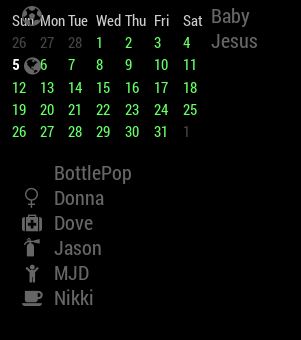
      Removed the custom.css entry for NetWorkScanner to see if that helped anything. This keeps going from bad to worse. Not only are the two modules overlapping, but it appears that part of NetWorkScanner has been diced up, and only part of it is overlapping the calendar_monthly, and the other part is below calendar_monthly.

      0_1488733552502_yikesCapture.JPG

      posted in Troubleshooting
      Mykle1M
      Mykle1
    • RE: MMM-NetWorkScanner

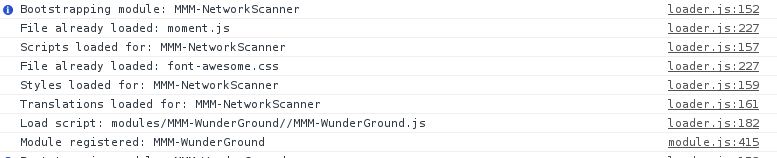
      Console report after launching MM

      0_1488732835109_consoleCapture.JPG !

      and

      0_1488732942301_consoleCapture2.JPG

      posted in Troubleshooting
      Mykle1M
      Mykle1
    • RE: MMM-NetWorkScanner

      I even used several config backups (I save them as I change them for just this type of thing) but they don’t change anything, so I’m sure it is not the config at this point.

      posted in Troubleshooting
      Mykle1M
      Mykle1
    • RE: Go East, young icon!

      @slametps said in Go East, young icon!:

      How to make icon on the left, but without margin?

      The icon is on the left by default

      posted in Troubleshooting
      Mykle1M
      Mykle1
    • RE: MMM-NetWorkScanner

      @FlatPepsi said in MMM-NetWorkScanner:

      You sure you need that last comma on the residents line?

      That config entry has been working since I installed NetworkScanner some weeks ago but I tried that anyway, with negative results. The module loads, as stated above, but all devices appear offline. I looked in dev tools, and where it used to show NetworkScanner activity, it no longer does. However, it does show the module as loading

      0_1488730162067_devCapture.JPG

      Is there a proper way of deleting a module and its dependencies. I simply dragged the NetworkScanner folder to the trash, then reinstalled it from github, and the dependencies, but it still is not reporting those devices as online.

      posted in Troubleshooting
      Mykle1M
      Mykle1
    • MMM-NetWorkScanner

      For some reason, this stopped working for me. I went as far as deleting the module and reinstalling the module and dependencies. The devices that I have entered in the config all show as offline.

      {
              		module: 'MMM-NetworkScanner',
              		position: 'top_left',
              		config: {
      			devices: [
                          		{ ipAddress: "192.168.1.8", name: "BottlePop", icon: "globe"},
      				{ ipAddress: "192.168.1.17", name: "Baby Jesus", icon: "futbol-o"},
      				{ ipAddress: "192.168.1.2", name: "Dove", icon: "medkit"},
      				{ ipAddress: "192.168.1.11", name: "Donna", icon: "venus"},
                          		{ ipAddress: "192.168.1.10", name: "Nikki", icon: "coffee"},
                          		{ ipAddress: "192.168.1.7", name: "Jason", icon: "fire-extinguisher"},
                      		],
                  			showUnknown: false,              // shows devices found on the network even if not specified in the 'devices' option 
              			showOffline: true,              // shows devices specified in the 'devices' option even when offline
              			showLastSeen: false,            // shows when the device was last seen e.g. "Device Name - last seen 5 minutes ago"
              			keepAlive: 300,                 // how long (in seconds) a device should be considered 'alive' since it was last found on the network
              			updateInterval: 10,             // how often (in seconds) the module should scan the network
      				residents: [],
              		}        
          		},
      
      posted in Troubleshooting
      Mykle1M
      Mykle1
    • RE: 1 old noob + 1 rPi = I can't believe I did it! (revisited)

      @Mykle1

      Holy Moly!

      posted in Show your Mirror
      Mykle1M
      Mykle1
    • 1 / 1