@mz-ber Oh I guess I understand. If the function is not getting the right details than -> e if everything is okay than -> sdo
 M
Offline
M
Offline
A New Chapter for MagicMirror: The Community Takes the Lead
Read the statement by Michael Teeuw here.
Read the statement by Michael Teeuw here.
Posts
-
RE: Volvo on Call
-
RE: Volvo on Call
@sdetweil Thank you Sam! Can you please tell me what the letters in the bracket mean?
(e, sdo, sde) -
RE: Volvo on Call
@jerryp Hi Jerry - thank you for checking! I still stuck and I dont know where I’m doing something wrong. I dont want to give up because I know it is still working for you.
The weird thing is that the API works perfect. I can pull all informations from my car via
voc dashborad.
Only the module is telling me: No vehicle found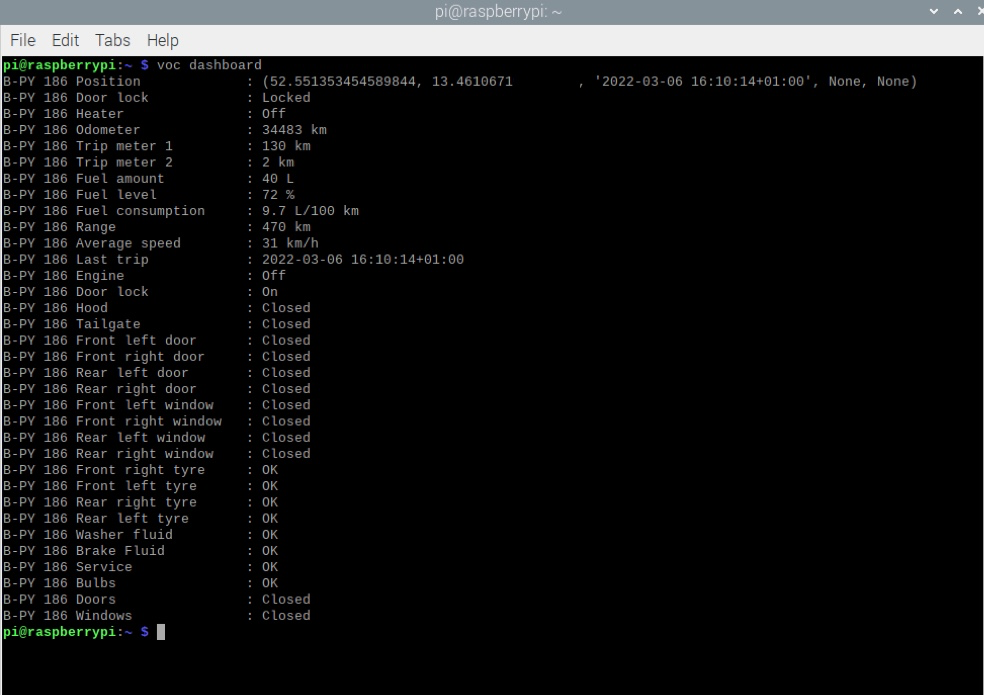
That is my current config:
{
	  module: "MMM-VolvoOnCall",
	  disabled: false,
	  debug: true,
	  position: "top_left",
	  config: {
		scanInterval: 1000 * 60 * 30,
		units: "metric",
		timestampFormat: "MMM D. HH:mm:ss",
		durationFormat: "HH:mm",
		display: {
					info: true,
					position: true,
					status: true,
					notice: true,
					trip: true,
					}
				}
			},
It is setup correctly I guess.
I’m wondering where in this node_helper.js is the
vocpulled from? I’m not good in JavaScript :-(const exec = require('child_process').exec const spawn = require('child_process').spawn const moment = require("moment") var NodeHelper = require("node_helper") module.exports = NodeHelper.create({ start: function() { this.config = null this.carInfo = [] }, socketNotificationReceived: function(noti, payload) { if (noti == "SCAN") { this.scan() this.trip() } if (noti == "INIT") { this.config = payload this.list() } }, list: function() { exec("voc list", (e, sdo, sde)=>{ if (e) { console.log("[VOC] ERROR(>list):", e.toString()) } else { this.listResult(sdo) } }) }, listResult: function(output) { var re = /^([^ ]+)\s\(([^\)]+)\)\s([^ ]+)$/gm var matches = null var result = [] while (matches = re.exec(output)) { this.carInfo.push({ id: matches[1], type: matches[2], vin: matches[3] }) } if (this.carInfo.length > 0) { this.sendSocketNotification("INITIALIZED", this.carInfo) } else { console.log("[VOC] ERROR: No vehicle found. Check your account. Module stopped.") } }, scan: function() { exec("voc dashboard", (e, sdo, sde)=> { if (e) { console.log("[VOC] ERROR:", e.toString()) } else { this.scanResult(sdo) //this.sendSocketNotification("RESULT", sdo) } }) }, scanResult: function(output) { var carIndex = this.carInfo.map((value, index, array)=>{ return value.id }) var result = [] var re = /^([^\s]+)\s([\w\s]+)\:\s(.+)$/gm var matches = null while (matches = re.exec(output)) { var idx = carIndex.indexOf(matches[1]) var key = matches[2].trim() var value = this.reformValue(key, matches[3].trim()) if (typeof result[idx] == 'undefined') { result[idx] = [] } result[idx].push({ id: matches[1], key: key, value: value }) } if (Object.keys(result).length == 0) { console.log("[VOC] ERROR: No information could be retrieved.") console.log(output) } else { this.sendSocketNotification("SCAN_RESULT", result) } }, reformValue: function(key, value) { if (key == "Position") { var re = /([0-9\.\-]+)\,\s([0-9\.\-]+),\s\'([^\']+)\'/ var matches = re.exec(value) if (matches) { return { lat: matches[1], long: matches[2], time: moment(matches[3]).format("X") } } else { return null } } if (key == "Fuel level") { return value.replace(/\s/, "") } if (key == "Fuel amount" || key == "Range" || key == "Odometer" || key == "Average speed") { return value.replace(/[^0-9\.]+/g, '') } if (key == "Fuel consumption") { var re = /^([0-9\.]+)/g var matches = re.exec(value) if (matches) { return matches[1] } } return value }, trip: function() { for(var i = 0; i < this.carInfo.length; i++) { try { carId = this.carInfo[i].id var sdo = "" var result = spawn('voc', [ '-i', carId, '--json', 'trips' ]) result.stdout.on('data', (data)=>{ sdo += data }) result.on('close', (killcode)=>{ this.tripResult(carId, JSON.parse(sdo)) }) } catch (e) { console.log("[VOC] ERROR:", e.toString()) } } }, tripResult: function(carId, obj) { if (Array.isArray(obj) && obj.length > 0) { var trip = obj[0] var detail = trip.tripDetails[0] var ret = { title: trip.name, category: trip.category, note: trip.userNotes, fuelConsumption : detail.fuelConsumption, electricalConsumption : detail.electricalConsumption, electricalRegeneration: detail.electricalRegeneration, distance: detail.distance, startTime: moment(detail.startTime).format("X"), startPosition: detail.startPosition, endTime: moment(detail.endTime).format("X"), endPosition: detail.endPosition, } this.sendSocketNotification("TRIP_RESULT", {id:carId, data:ret}) } else { return } } }) -
RE: Volvo on Call
@jerryp Would you do me a favor and test it without the key or a wrong key? Just wondering if that is the issue
-
RE: Volvo on Call
@jerryp is it working for you without the map function? I’m actually not interested in it.
-
RE: Volvo on Call
Hey @jerryp - I’m getting the output as soon as I write
voc list. So that seems to work.
My config:
{ module: "MMM-VolvoOnCall", position: "top_right", config: { scanInterval: 1000 * 60 * 30, units: "metric", timestampFormat: "MMM D. HH:mm:ss", durationFormat: "HH:mm", } },@JerryP Can you please share your config? I’m not sure what I’m doing wrong.
-
RE: Volvo on Call
I was able to fix the problem with the authorization issue (just reseted my password). So I’m able to pull the information with the python script from https://github.com/molobrakos/volvooncall.
Now I’m getting the following error as soon as I start the Mirror:
[28.02.2022 22:03.38.534] [LOG] [VOC] ERROR: No vehicle found. Check your account. Module stopped.Which is weird because I can pull the data from my car by just typing
voc listorvoc dashboardAny advice would be really appreciated.
-
Volvo on Call
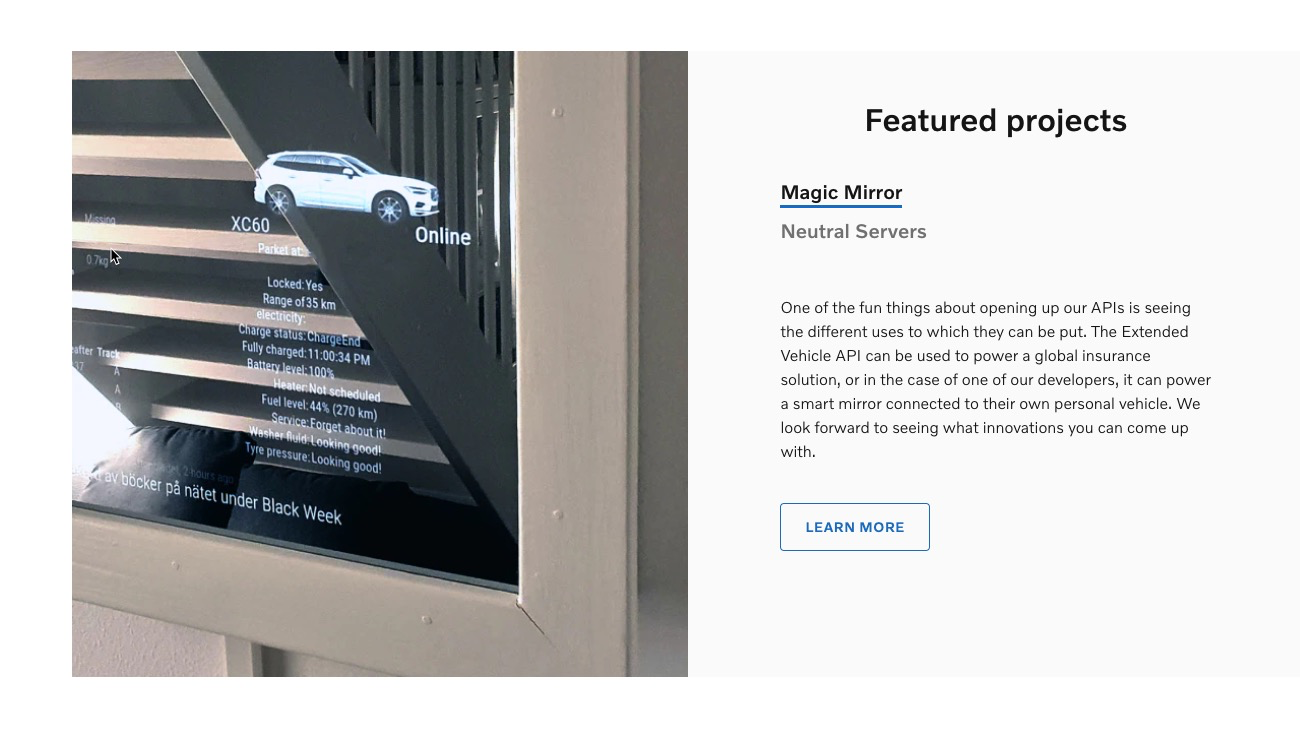
Hello there - I’m discovering the Volvo on Call API and I noticed that Volvo added a screenshot from a MagicMirror on their website. Does anyone knows to whom that belongs?
I tried to install the https://github.com/eouia/MMM-VolvoOnCall but I’m stuck. I’m getting an 401 Error with the message I’m unauthorised. :-/
https://developer.volvocars.com/volvo-api/
-
RE: Sequel of MMM-PublicTransportBerlin only displays "Loading..."
Hi @kai - I have the same issue and I noticed there is a problem with the BVG API service.
@KristjanESPERANTO just added a pull request. I guess, as soon as you do a
git pullin the folder MMM-PublicTransportBerlin it should work. -
RE: Magic(Dashboard)Mirror
@vince Thank you! MMM-DarkSkyForecast isnt available anymore because Apple bought Dark Sky and decided to stop allowing free access to their weather API. @j-e-f-f create a new version with MMM-OpenWeatherForecast. Have a look at his post here: https://forum.magicmirror.builders/topic/9181/mmm-darkskyforecast-yet-another-weather-module
-
RE: Magic(Dashboard)Mirror
@sil3ntstorm Hey, ich nutze noch MMM-MyCalendar. Damit es aber richtig läuft, musste ich noch
npm install requestundnpm install valid-urlausführen. In den letzten Updates vom MagicMirror wurden diese entfernt. -
RE: PIR Sensor: false positive detections
@thgmirror Yep, that is what I’ll do next. Already ordered a starter kit with resistors, inductors and capacitors.
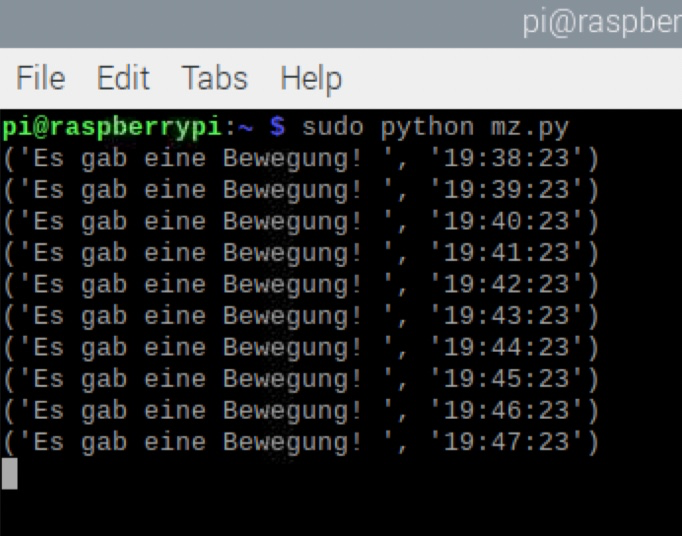
I also noticed, even if I added the ferrite beat, that the sensor recevied every minute excact on the second a signal
-
RE: PIR Sensor: false positive detections
Hi @zoltan - I was reviewing your tutorial. Really good documented. I have a question about the wiring drawing you shared. I’m new to it and dont understand everything. But I’m a fast learner :-)
In your drawing you added a couple of symbols. I guess these are resistors and filters, right?
Numbers 1, 2 and 3 look similar, only with a diffrent capacity. Is that a Capacitor?
What are 4 and 5? Is that a conductor? What capacity is here needed?
And number 6, not sure. Is that a RND or a resistor?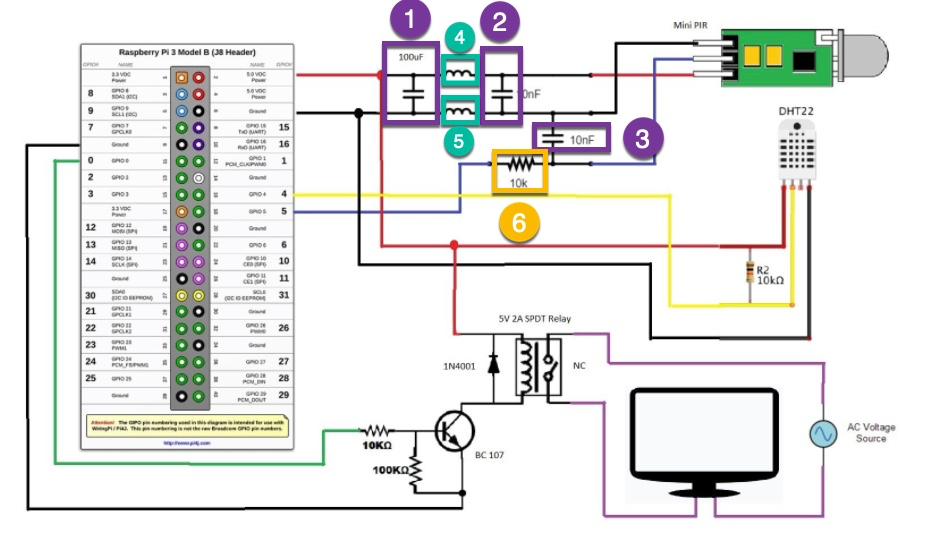
-
RE: PIR Sensor: false positive detections
@fozi Yes! I followed your instructions in detail - that was very helpful. And yes, I noticed how sensitive it is. In your tutorial you removed the the tiny SMD resistor soldered and replaced that. What if I just remove it and not replace it. Is the range than completely gone and doesent work anymore?
-
RE: PIR Sensor: false positive detections
Hey folks - thanks for your answers. I decided to goahed with a RCWL-0516. But have the same issues. I’m testing the sensitivity with a python script. I also covered it in alu foil - no change. Now I ordered a ferrite beat and will add to the cables (around all of the them or only GND, 5v or Output?)
I’m also thinking about adding a low pass filter, but I have no experience with that. Where do I have to add that? GND & Output?
-
RE: Magic(Dashboard)Mirror
Hi @bjoern - schau mal in diesem Post: https://forum.magicmirror.builders/topic/11177/display-colored-emoji?_=1637417880966
Hier gab es mehrere Methoden. Ich hatte meine auch gepostet.
-
PIR Sensor: false positive detections
Hey folks - Ive added a new gadget to my MagicMirror: HC-SR501 PIR sensor. I was able to set it properly up with MMM-NewPIR. But I noticed that I have a lot of false positive detections (every 4-5 min.). Even if my sensitivity is as low as possible.
Do you have any recommendations to reduce the false positive rate?
-
RE: MMM-NewsAPI
@mumblebaj I guess I found the problem. The new option
sortBywas causing the issue. In the everything config example issortbywith a small b and not with a capital BsortBy.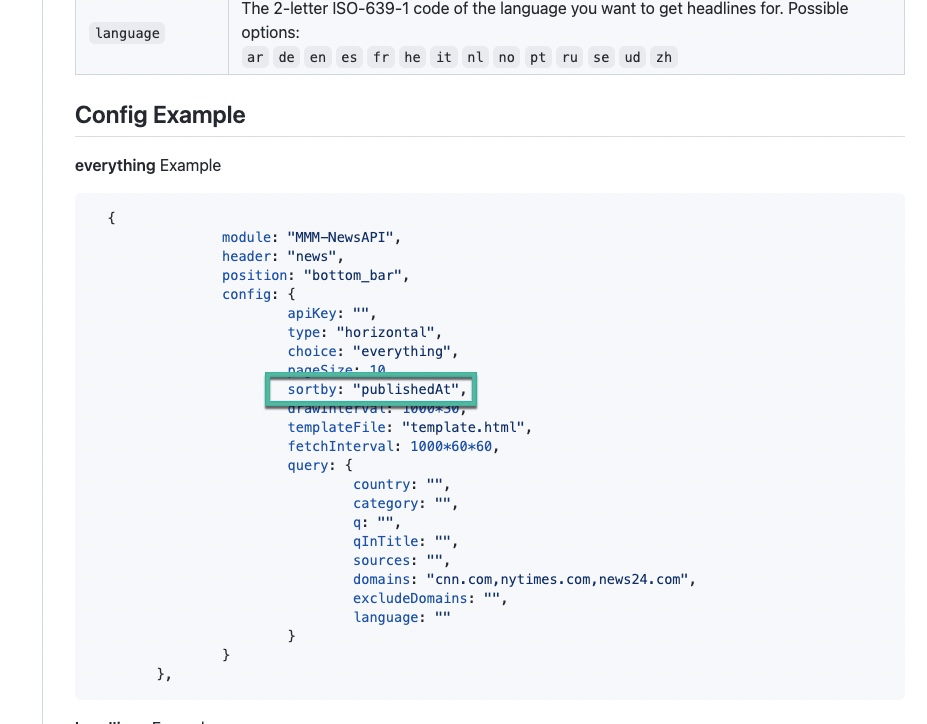
-
RE: MMM-NewsAPI
@mumblebaj I guess I need your help again because the module isnt showing any news anymore. The console is showing me following error:
[15.11.2021 18:23.33.169] [LOG]   Refreshed access token because it has expired. Expired at: 18:23:32 now is: 18:23:33
[15.11.2021 18:23.33.191] [LOG]   response received:  {"status":"error","code":"parametersMissing","message":"Required parameters are missing. Please set any of the following parameters and try again: sources, q, language, country, category."}
[15.11.2021 18:23.33.192] [LOG]   sending articles:  []
[15.11.2021 18:23.33.483] [LOG]   Refreshed access token because it has expired. Expired at: 19:23:33 now is: 18:23:33
For testing prupose I used also your default config setting:
{
                module: "MMM-NewsAPI",
                header: "news",
                position: "bottom_bar",
                config: {
                        apiKey: "XXXXXXXXX",
                        type: "horizontal",
                        choice: "everything",
                        pageSize: 10,
                        sortby: "publishedAt",
                        drawInterval: 1000*30,
                        templateFile: "template.html",
                        fetchInterval: 1000*60*60,
                        query: {
                                country: "",
                                category: "",
                                q: "",
                                qInTitle: "",
                                sources: "",
                                domains: "cnn.com,nytimes.com,news24.com",
                                excludeDomains: "",
                                language: ""
                        }
                }
        },
I also created another API Key but same error.
And yes, I tested multiple parameter settings. Always the same.