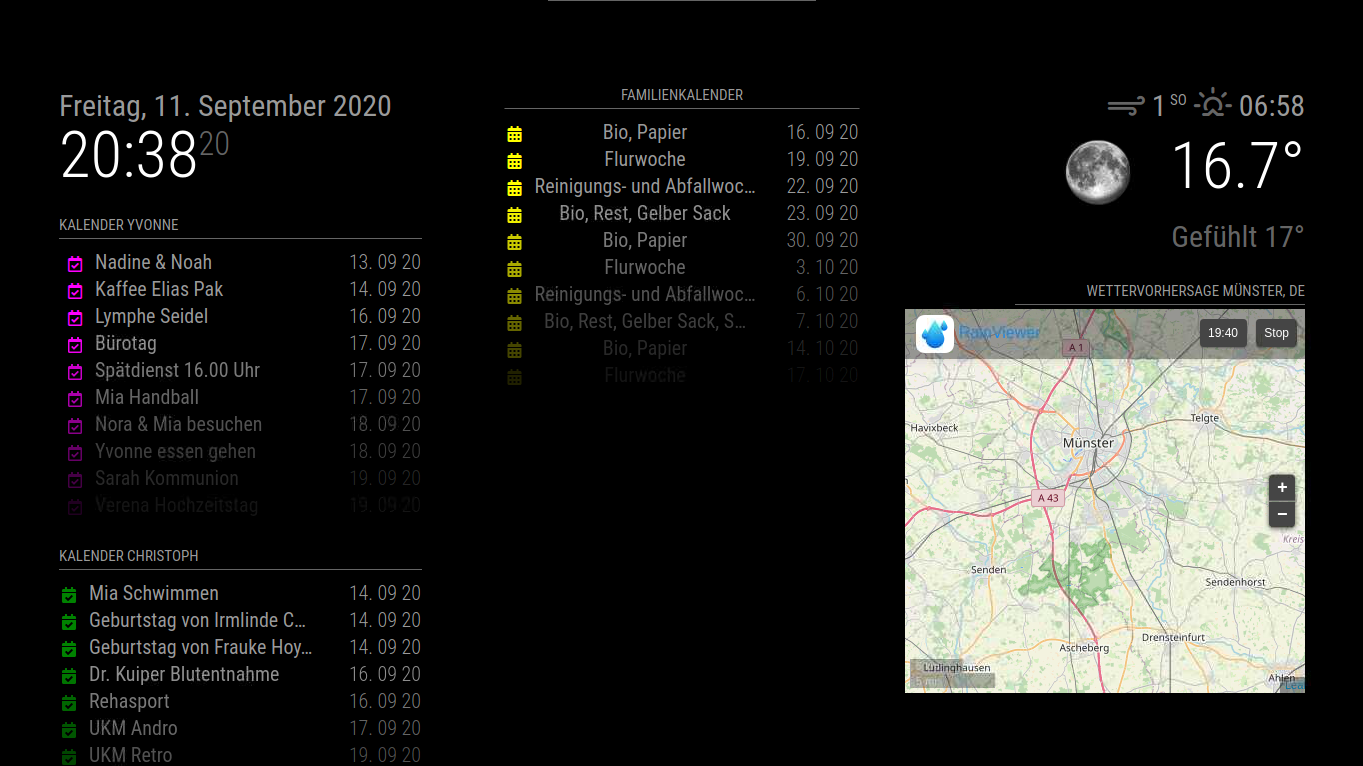
Danke für die schnelle Antwort.
Wie mache ich eigentlich ein Update.
Oder reicht es wenn ich den Magic Mirror Ordner auf dem Raspberry sichere.
Danke.
R
Offline
A New Chapter for MagicMirror: The Community Takes the Lead
Read the statement by Michael Teeuw here.
Read the statement by Michael Teeuw here.
Posts
-
RE: Update MM von 2.12 nach 2.16
-
Update MM von 2.12 nach 2.16
Hallo Gemeinde
Ich möchte meinen MM von 2.12 nach 2.16 updaten.
Wie mach ich das nochmal?
Muss ich was beachten?
Danke -
Add digital clock in MMM-MyWordClock
I saw in a forum post that a digital clock was shown in the MMM-MyWordClock module (see photo) how and where can I add this clock to the module

-
RE: MMM-MyWordClock how to change fonts and color
I have another question.
In a forum tweet I saw that there is still a digital clock above the word clock.
Where can you set this. And is the Word clock not working correctly?
I had in the display that it was 5 after 12 but in reality it was 8 after 12 -
MMM-MyWordClock how to change fonts and color
I installed the MMM-MyWordClock module.
Now I would like to know where and how I can change the fonts and font color. I would like to have the font in capital letters and the displayed time in white.
Can someone help me there.
Thank you in advance -
RE: MMM-Pages and Alexa
I also use the MMM remote control module.
The Pages tab is empty on the smartphone or in the browser -
RE: MMM-Pages and Alexa
Unfortunately, I’m not the kind of programmer that debugging is concerned
But switching radar is possible in the Alexa app and by voice -
RE: MMM-Pages and Alexa
OK
is the code correct in terms of reasoning
Because I cannot switch pages in the Alexa app -
RE: Deutsche Anleitung MagicMirror auf RaspberryPi 3
Sorry I Think i Create a Post in German too
OK -
RE: Deutsche Anleitung MagicMirror auf RaspberryPi 3
Hallo Gemeinde
Ich habe das Modul MMM-Pages installiert (nur das Modul noch zusätzlich das MMM-Page-Indicator Modul)
Meine 2 Seiten wechseln auch.{ module: 'MMM-pages', config: { animationTime: 0, rotationTime: 10000, rotationDelay: 0, pages: 2, modules: [[ "calendar", "weatherforecast"], [ "MMM-RAIN-RADAR" ]], fixed: ["clock", "MMM-OpenmapWeather", "MMM-page-indicator"], } },Nun möchte ich zusätzlich mit Alexa die Seiten nach bedarf umschalten.
Hier meine Config{ module: 'MMM-AlexaControl', position: 'bottom_left', config:{ image: false, pm2ProcessName: "mm", refresh: true, restart: true, reboot: false, monitorToggle: true, vcgencmd: 'vcgencmd', deviceName: "Spiegel", startPort: 12000, notifications: [ { name: 'Radar', port: 11101, OnOff: true, notification: [["SHOW_RADAR", null],["HIDE_RADAR", null]] }, { name: 'Seite eins', port: 11102, OnOff: true, notification: ["PAGE_CHANGED", 0] }, { name: 'Seite zwei', port: 11103, OnOff: true, notification: ["PAGE_CHANGED", 1] } ] } },Alexa findet auch Geräte aber ich kann Sie nicht einschalten
Leider finde ich meinen Gedankenfehler nicht -
MMM-Pages and Alexa
I have a problem with MMM-Pages (only have MMM-Pages installed) and Alexa
I’ve already managed to change the 2 sides see code:{ module: 'MMM-pages', config: { animationTime: 0, rotationTime: 10000, rotationDelay: 0, pages: 2, modules: [[ "calendar", "weatherforecast"], [ "MMM-RAIN-RADAR" ]], fixed: ["clock", "MMM-OpenmapWeather", "MMM-page-indicator"], } },Now I would like to switch the pages on or switch over with Alexa see code:
{ module: 'MMM-AlexaControl', position: 'bottom_left', config:{ image: false, pm2ProcessName: "mm", refresh: true, restart: true, reboot: false, monitorToggle: true, vcgencmd: 'vcgencmd', deviceName: "Spiegel", startPort: 12000, notifications: [ { name: 'Radar', port: 11101, OnOff: true, notification: [["SHOW_RADAR", null],["HIDE_RADAR", null]] }, { name: 'Seite eins', port: 11102, OnOff: true, notification: ["PAGE_CHANGED", 0] }, { name: 'Seite zwei', port: 11103, OnOff: true, notification: ["PAGE_CHANGED", 1] } ] } },Unfortunately that doesn’t work.
Now the question where is my mistake
P.S. Alexa finds my devices -
RE: Deutsche Anleitung MagicMirror auf RaspberryPi 3
Ich hab das mal versucht aber es verschiebt mir alle Kalender
Ich habe alles zurückgestelt und die Verschiebung der region wieder vorgenommen so wie ich es brauche
Ich hatte mir zwar schon sowas gedacht aber ich habs trotzdem mal versucht
Danke aber trotzdem für den Tipp -
RE: Deutsche Anleitung MagicMirror auf RaspberryPi 3
Hat jemand Erfahrung mit dem Modul MMM-Pages
-
RE: Deutsche Anleitung MagicMirror auf RaspberryPi 3
Das mit der Ausrichtung des mittleren Kalenders habe ich hinbekommen indem ich in die custom.js folgendes eingetragen habe.
.region.top.center { background : black; margin-left: 10px; margin-top: 130px; } -
RE: Do not display modules when booting MagicMirror
I got that with the alignment of the middle calendar.
I entered the parameters for the calendar module in custom.js..region.top.center { background : black; margin-left: 10px; margin-top: 130px; }So I can solve part of the problem myself.
-
Do not display modules when booting MagicMirror
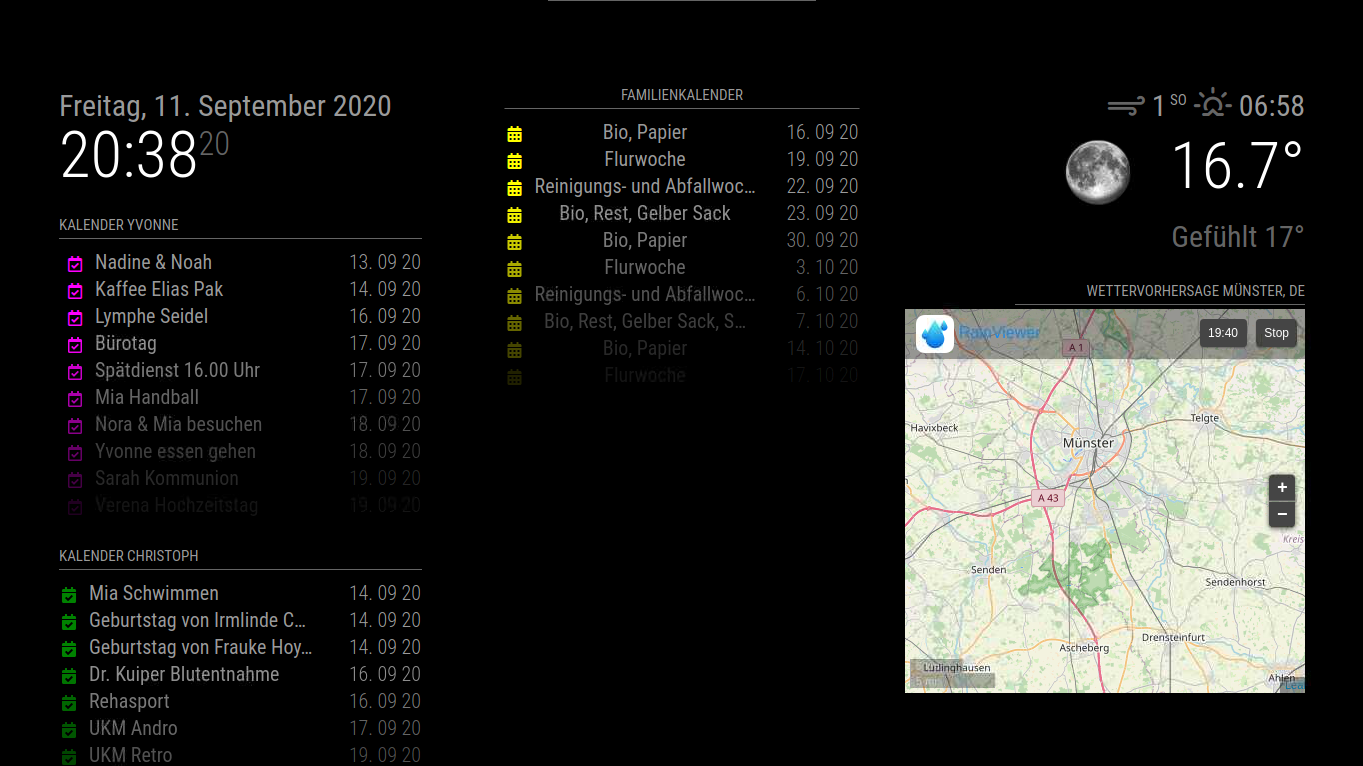
I have another question
When booting the Magic Mirror, all my modules come as they should.
I can switch the rain radar off and on with Alexa and the remote function.
Now I would like that the rain radar is not displayed when booting and the rain radar is only displayed on request with Alexa or Remote.
How can you implement that.
And can you adjust the middle calendar to the same height as the first left calendar?
Thanks in advance.
-
RE: Deutsche Anleitung MagicMirror auf RaspberryPi 3
Habe noch einmal eine Frage
Beim booten des Magic Mirror kommen alle meine Module so wie es sei soll.
Ich kann mit Alexa und der Remote Funktion den Regenradar aus und einschalten.
Nun möchte ich gerne das beim Boozten der Regenradar erst mal nicht angezeigt wird und erst auf anforderung mit Alexa oder Remote der Regenradar eingeblendet wird.
Wie kann mann das umsetzen.
Und kann mann den mittleren Kalender auf die gleiche höhe angleichen wie der erste linke Kalender?
Danke schon mal