Thanks! The text area is reproduced as it is delivered by WeatherUnderground… so barring any heuristics on the actual content it’s beyond our control…
R
Offline
A New Chapter for MagicMirror: The Community Takes the Lead
Read the statement by Michael Teeuw here.
Read the statement by Michael Teeuw here.
Posts
-
RE: Weatherunderground - currently - hourly - daily - configurable
-
RE: PIR sensor behind glass?
@yo-less It think all mirrors suffer from this… You need enough brightness to show things in the day… Which will be overkill at night…
-
RE: PIR sensor behind glass?
@yo-less Thanks!
The mirror is from a dutch webshop… At night, when there’s no other illumination you do see the backlight of the screen shining through… In the daytime it looks like the picture.
I’ve been pondering altering the backlight/brightness of the screen according to ambiant lightlevels… unfortunately this is only controllable by navigating the screens menu as opposed to discrete buttons…Oh, and yes… there is: https://github.com/RedNax67/DailyXKCD
It’s forked from the original author… Ive added the random comic on non comic days…
-
RE: PIR sensor behind glass?
@Cato No problem… anyone care to donate to the WWF Panda?
There’s a PIR sensor on the bottom of the mirror, out of eyesight. It detects … well… hot legs :D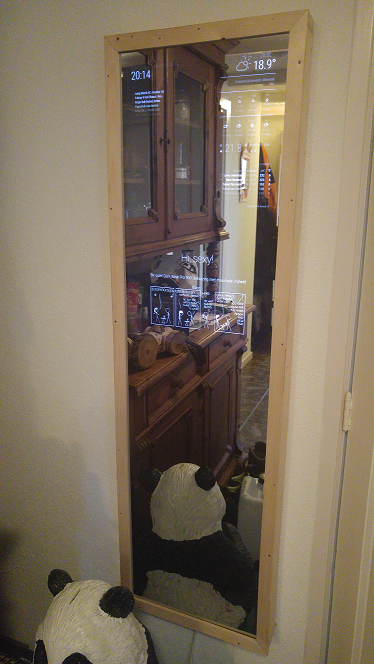
-
RE: PIR sensor behind glass?
Pir isn’t really an option behind glass. There’s a cam based solution which works through the mirror.
That said, my mirror is full sized and the pir peeks out the bottom… You’d never know it’s there unless you know where tot look…
-
RE: Weatherunderground - currently - hourly - daily - configurable
@yo-less Thanks, i’ve added your suggestion :D
-
RE: Weatherunderground - currently - hourly - daily - configurable
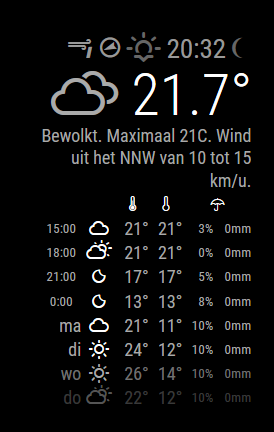
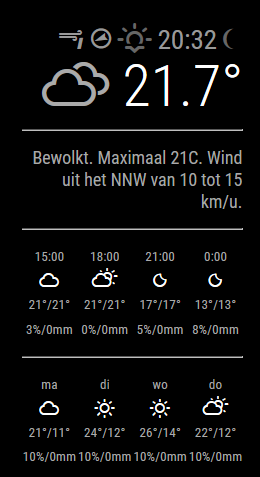
New version now shows the current moon phase and there’s a new layout option :)
in config set layout:“vertical” for the traditional layout:
or layout: “horizontal” for:
-
RE: Weatherunderground - currently - hourly - daily - configurable
Hi,
You went over the 10 calls per minute, probably while setting up/testing? The default settings won’t go over that when left alone. When you debug/play with :D your mirror through a browser on your pc and hit f5 a lot, you’ll go over it quickly. I’ve personally never had it happen.
-
RE: Weatherunderground - currently - hourly - daily - configurable
@fireshipmate Hi!
The roundValue isn’t used (it’s a leftover bit from earlier versions). The temperature is displayed as it’s delivered in the weather underground payload. You could however modify the code and apply the rounding function to the temp:this.temperature = this.roundValue(this.temperature);To get cardials “N,NO…”. you could use data.current_observation.wind_dir friom the wu payload which should have them in your defined language. You could assign:
windDirectionIcon.innerHTML = this.windDirectionTxt;You’ll have to take out the arrow, as it will otherwise rotate your winddirectiontxt to the winddirection :D
Or you could just do a git pull and have a look at the readme ;)
-
RE: Adjust brightness of the screen in the night
@Keromida The raspbian os is a linux derivative and includes cron which is used to schedule things.
You can tell it to do things through your crontab.When you log on to your pi issue the crontab -e command. The first time it will ask you which editor to use… chose the default if you’re not sure.
You’ll be greeted by something like this:
#
# To define the time you can provide concrete values for
# minute (m), hour (h), day of month (dom), month (mon),
# and day of week (dow) or use '*' in these fields (for 'any').#
# Notice that tasks will be started based on the cron's system
# daemon's notion of time and timezones.
#
# Output of the crontab jobs (including errors) is sent through
# email to the user the crontab file belongs to (unless redirected).
#
# For example, you can run a backup of all your user accounts
# at 5 a.m every week with:
# 0 5 * * 1 tar -zcf /var/backups/home.tgz /home/
#
# For more information see the manual pages of crontab(5) and cron(8)
#
# m h  dom mon dow   command
00 23 * * * /usr/bin/tvservice -o
00 06 * * * /usr/bin/tvservice -p
You’ll have to add the two lines at the bottom which, in this example, will turn the mirror off at 2300 (11pm) and on again at 0600.
Save the file, and when asked yes you’re sure, and exit the editor… all done!
-
RE: Adjust brightness of the screen in the night
@Keromida You can easily use cron and tvservice to turn on/off at specific times…
tvservice -o turns off the display.
tvservice -p turns it back on.Just use cron (crontab -e) to schedule them…
-
RE: currentweather - temperature (minimum and maximum)
@Keromida Do you mean the forecast?
http://api.openweathermap.org/data/2.5/forecast?q='Dusseldorf,DE'&lang=DE&units=metric&APPID=<APPID>You can also have a look here: http://openweathermap.org/api
-
RE: currentweather - temperature (minimum and maximum)
@Keromida The request url is assembled here:
var url = this.config.apiBase + this.config.apiVersion + "/" + this.config.weatherEndpoint + '/' + this.getParams();The deafults are:
		apiVersion: "2.5",
		apiBase: "http://api.openweathermap.org/data/",
		weatherEndpoint: "weather"
Which makes:
http://api.openweathermap.org/data/2.5/weather/Then getParams() adds id or q depending on your config, units, lang and APPID ultimately making (example):
http://api.openweathermap.org/data/2.5/weather/?q='Dusseldorf,DE'&lang=DE&units=metric&APPID=<YOUR APPID>They returned JSON will oook like this:
{"coord":{"lon":6.78,"lat":51.22},"weather":[{"id":803,"main":"Clouds","description":"überwiegend bewölkt","icon":"04d"}],"base":"stations","main":{"temp":12.27,"pressure":1011,"humidity":63,"temp_min":10.56,"temp_max":14.44},"wind":{"speed":2.12,"deg":94.501},"clouds":{"all":76},"dt":1471496164,"sys":{"type":3,"id":192509,"message":0.0438,"country":"DE","sunrise":1471494283,"sunset":1471546042},"id":2934246,"name":"Dusseldorf","cod":200} -
RE: Weatherunderground - currently - hourly - daily - configurable
@yo-less Did you also pull the MM 2.0.4 main framework? That’s where the icons went… Then again, when you did heavy modding… ;) Care to share screenshots of your version?
-
RE: Weatherunderground - currently - hourly - daily - configurable
@yo-less Do they? They’re taken straight from http://weathericons.io/ which isn’t under my control. What’s missing?
-
RE: Weatherunderground - currently - hourly - daily - configurable
Actually the weatherfont update in 2.0.4 is actually my doing… Should nstill work as expected when you’ve pulled the latest Wunderground module… You could also switch to the one in the development branch which takes advantage of having the weathericons now being part of the main framework.
-
RE: Weatherunderground - currently - hourly - daily - configurable
Hi,
Thanks for debugging :D Added (a version) of this in the develop branch!
-
RE: What Monitor did you use?
@neuzehie They, unfortunately, go by a lot of names: Confrontatiespiegel, observatieglas/spiegel, halfdoorlatende spiegel…
-
RE: Expired session in Chrome (PC) and Brave (Android)
Hi,
Had the exact same thing. You’ll have to delete the associated cookies from your browser.
-
RE: Weatherunderground - currently - hourly - daily - configurable
Hi!
The alerts array is always there, even when there’s zero items in it. The behaviour you’re seeing is only possible if/when the api errors out and doesn’t send a meaningful payload. Could build a check for that…
Could it be BATTLE3 goes offline at times? When using the earlier mentiond config setting, it works just fine here… (there was a flod warning if i remember correctly)…