it’s strange,
sometimes I reboot my Raspberry the device card changes for my microphone plugged in USB, sometimes it is in device: "plughw: 1", sometimes in device: "plughw: 2", so I have to change it in my config.js
A New Chapter for MagicMirror: The Community Takes the Lead
Read the statement by Michael Teeuw here.
Read the statement by Michael Teeuw here.
R
Offline
Posts
-
RE: [Electron] display, MM faded away
-
RE: [Electron] display, MM faded away
@sdetweil thanks a lot for the pm2 logs command i found the error and fixed it. It works very well.
-
[Electron] display, MM faded away
Hello,
I finally succeeded tonight in installing MMM-GoogleAssistant bugsounet then my Raspi started to slow down until it blocked, so I rebooted and since then I had to reinstall MMM-DHT-Sensor but above all my MM does not start anymore, appears instead: [Electron] see attached photo, I always have the same screen whether it is with thepm2 restart mmcommand or by closing the [Electron] window which opens automatically or by doing several reboots, there is always this [Electron] window.
I do not want to start all over again … Would there be a diagnostic to launch and publish here to find out where the problem comes from and solve it by a command or reinstall a part that would have scratched?
Thank you for your help.
-
RE: impossible to get MMM-TomTomTraffic
it’s crazy, after several reboot it works …
-
RE: MMM-DHT22 : Temperature and Humidity : Undefined
I remove MMM-DHT Sensor, MMM-DHT22 and MMM-dht22, I did not removel node-dht-sensor because I don’t know how to remove, I reinstall MMM-DHT Sensor, I left in GPIO 2 (3) not to change the config.js and the MMM-DHT-Sensor.js, it does not work either, after several relaunch of MM, it worked one time but after a relaunch again it does not work anymore. .
It’s crazy, I ordered a new DHT22 because it may be defective … -
RE: MMM-DHT22 : Temperature and Humidity : Undefined
I do this in first and i retry now but it’s always display “loading sensor data”, then i modify
sensorPin: 20,in the MMM-DHT-Sensor.js because it stayedcode_sensorPin: 20,but the problem stay here…
I even connected DHT22 directly to my raspi (GND in pin 6 and VCC in pin 4)
it’s annoying because it sounds simple …my DHT22 would it be broken, how to know it …
-
RE: MMM-DHT22 : Temperature and Humidity : Undefined
My MMM-DHT-Sensor.js :
Module.register("MMM-DHT-Sensor", {

	defaults: {
		updateInterval: 60 * 60 * 1000, // Every hour.
		initialLoadDelay: 0, // No delay/
		animationSpeed: 1000, // One second.
		units: config.units, // Celsius
		relativeScale: 30,
		debug: false,
		sensorPin: 2,
		sensorType: 22
My config.js :
{ module: "MMM-DHT-Sensor", position: "top_right", header: "Upstairs", config: { sensorPin: 2, sensorType: 22, updateInterval: 60 * 60 * 1000, initialLoadDelay: 0, animationSpeed: 1000, units: "metric", relativeScale: 35, debug: false } }, -
RE: MMM-DHT22 : Temperature and Humidity : Undefined
thank you for the info, it worked with MMM-DHT-Sensor by plugging it into the GPIO 2 as a prerequisite then rebooting it does not work anymore it displays all the time “loading sensor data”
-
MMM-GoogleAssistant, stuck at "node auth_and_test.js"
Hello,
I am blocked at node auth_and_test.js, indeed when I type this command here is what is displayed :
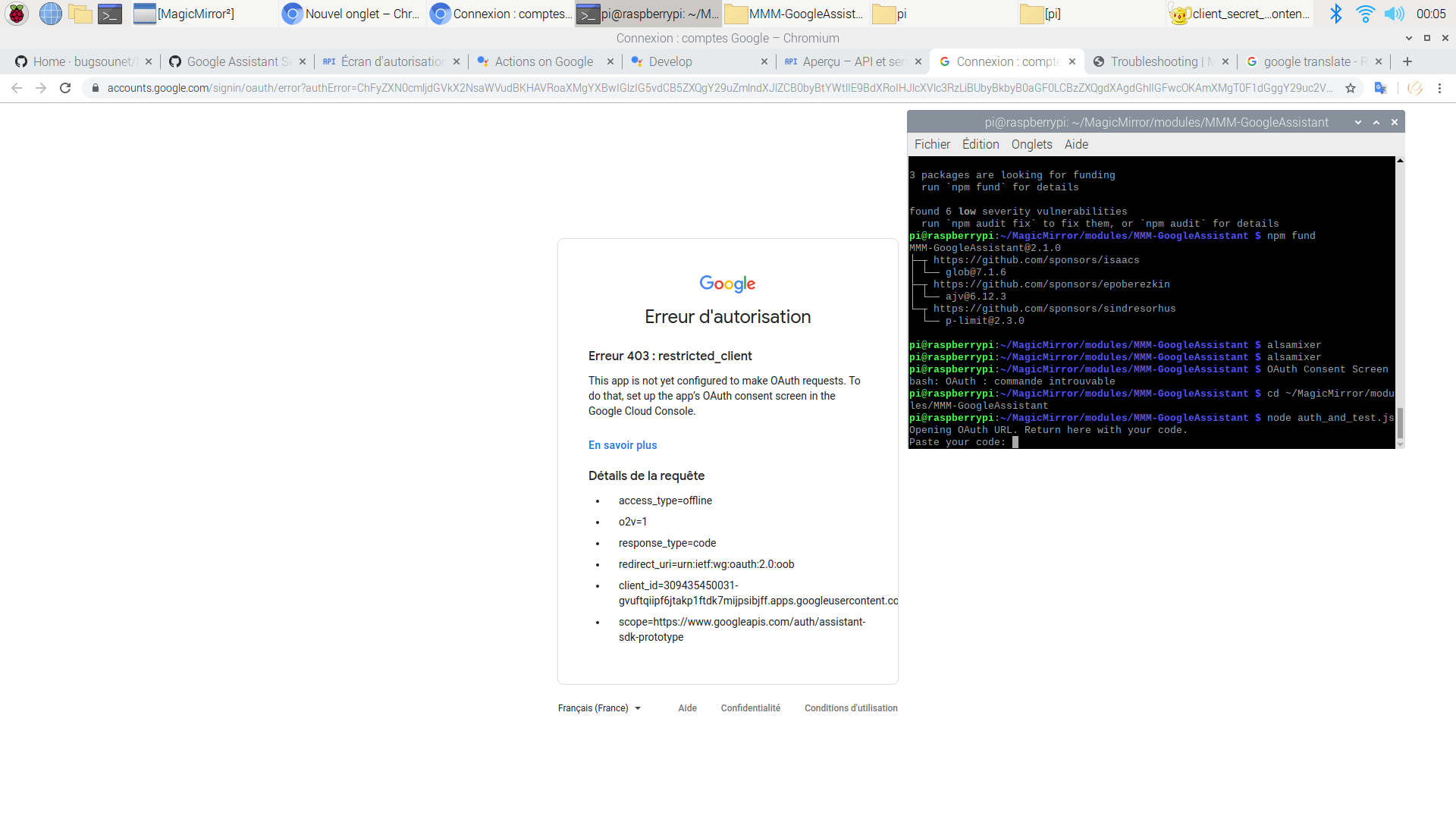
So I can’t Copy the code and paste in my console’s requestwhere do I make a mistake?
Thank you for your help. -
MMM-DHT22 : Temperature and Humidity : Undefined
Hello,
I just installed the MMM-DHT22 module
here is my installation with a RasberryPi and DTH 22 (not 11) :
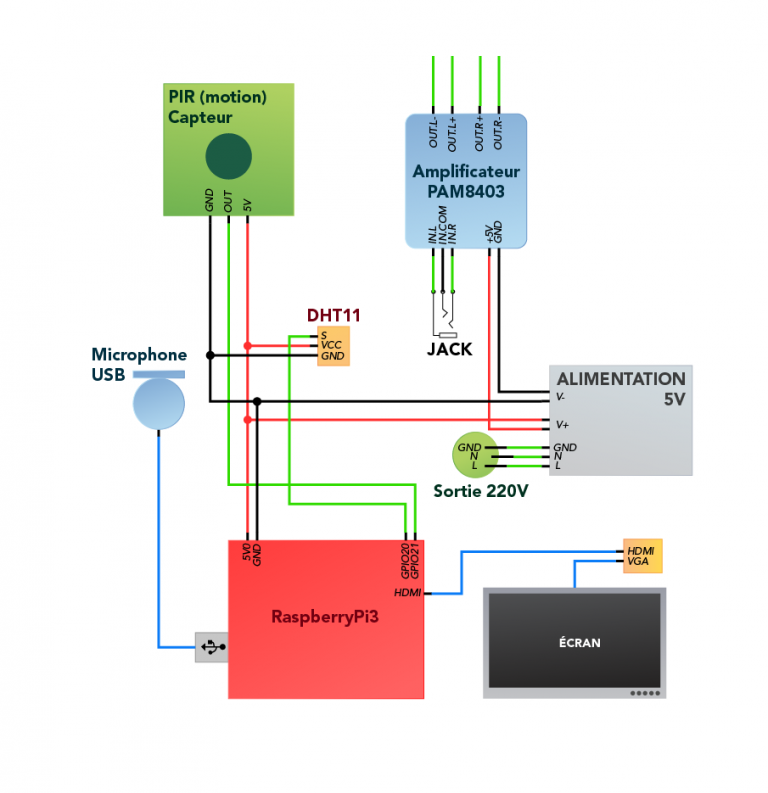
I modified in my config.js and in MMM-DTH22.js:
sensorPIN: 20,,
but the temperature is displayed in Undefined and I have nothing in humidity. I tried withsensorPIN: 38,while leaving my DTH22 connected to GPIO 20 but that does not change anything.
Thank you for your help. -
RE: MMM-GoogleAssistant problem with .asoundrc
I tried to edit my 1st post but I can’t: “You are only allowed to edit posts for 3600 second (s) after posting”.
in the case I published which is:
**** Liste des Périphériques Matériels CAPTURE ****
carte 1: USB [WordForum USB], périphérique 0: USB Audio [USB Audio]
  Sous-périphériques: 1/1
  Sous-périphérique #0: subdevice #0
pi@raspberrypi:~ $ aplay -l
**** Liste des Périphériques Matériels PLAYBACK ****
carte 0: b1 [bcm2835 HDMI 1], périphérique 0: bcm2835 HDMI 1 [bcm2835 HDMI 1]
  Sous-périphériques: 4/4
  Sous-périphérique #0: subdevice #0
  Sous-périphérique #1: subdevice #1
  Sous-périphérique #2: subdevice #2
  Sous-périphérique #3: subdevice #3
carte 2: Headphones [bcm2835 Headphones], périphérique 0: bcm2835 Headphones [bcm2835 Headphones]
  Sous-périphériques: 4/4
  Sous-périphérique #0: subdevice #0
  Sous-périphérique #1: subdevice #1
  Sous-périphérique #2: subdevice #2
  Sous-périphérique #3: subdevice #3
pi@raspberrypi:~ $
my mic in on card 1, device 0 because " Liste des Périphériques Matériels CAPTURE", and my 3.5 jack headphone is on card 2, device 0 because " Liste des Périphériques Matériels PLAYBACK" , and in card 0, device 0 it’s HDMI.
is it correct ?
-
RE: MMM-GoogleAssistant problem with .asoundrc
Great, thank you !
So can you confirm me the card and device for my mic and headphones ? -
RE: MMM-GoogleAssistant problem with .asoundrc
@Bugsounet TOUTES MES PLATES EXCUSES !!! J’avais donc mal compris, vraiment désolé…
I continue in English because it is required here (and that you will understand that I all pages and tutorials read with google translate …):
But then why in the page of your MMM-GoogleAssistant there is only the link git@github.com: bugsounet / MMM-GoogleAssistant.git and not all the description to install MMM-GoogleAssistant ?