MagicMirror Forum
    • Recent
    • Tags
    • Unsolved
    • Solved
    • MagicMirror² Repository
    • Documentation
    • 3rd-Party-Modules
    • Donate
    • Discord
    • Register
    • Login
    1. Home
    2. sdetweil
    3. Best
    A New Chapter for MagicMirror: The Community Takes the Lead
    Read the statement by Michael Teeuw here.
    S Offline
    • Profile
    • Following 0
    • Followers 110
    • Topics 92
    • Posts 21,389
    • Groups 1

    Posts

    Recent Best Controversial
    • testing new fixes, or solving current problems with next release code

      fixes are published in the next release via the develop branch

      to get there

      if you did manual install

      cd ~/MagicMirror
      git checkout develop
      git pull
      npm install
      

      restart MagicMirror as normal

      if you used my install script

      cd ~/MagicMirror
      git fetch origin develop:develop
      git checkout develop
      npm install
      

      if u are already ON the develop branch, and want to update to the latest,

      git pull
      npm install
      

      restart MagicMirror as normal

      posted in Troubleshooting
      S
      sdetweil
    • Upcoming Release April 1, 2026 , breaking changes, some operational changes

      Breaking changes in upcoming April release,
      We’ve structurally reorganized the system to strictly separate user data from repository data.

      The modules folder now contains only user data in the form of third-party modules. The standard modules included with MagicMirror² have been moved to a separate directory, defaultmodules.,

      The css folder now contains only data belonging to the MagicMirror repository.

      The previously located custom.css file has been moved to the config folder. This happens automatically the first time you start the new version of MagicMirror². The installer and upgrade scripts will do this too

      The way config.js is loaded has changed. This should not affect standard users. However, it may have side effects for third-party modules. The client (browser) no longer loads config.js directly from the file system but via the web server (/config).,

      Support for config.js.template files has been removed. we will not generate the final config.js like we do today.

      Instead, config.js now supports curly braced bash variables. and the .env file remains the same

      Users who previously used a template must copy its contents into config.js once
      If MagicMirror² is running as an Electron application:

      We’ve changed the default window manager in the startup script from X11 to Wayland. Most Raspberry Pi OS users are likely now using trixie or bookworm, which already ship with Wayland as the default. Running node --run start is now equivalent to node --run start:wayland. Users still using X11 must now switch to node --run start:x11.

      The kioskmode, which has been marked as deprecated for 10 years, has been removed. If the kiosksmode parameter is set in config.js, it can be removed; it is now ineffective. You may need to adjust electronOptions parameters if you used kiosksmode before.

      If you think any modules you’ve developed may be impacted, you can use the develop branch to test . see this topic about how to get the develop branch if you need to do that
      https://forum.magicmirror.builders/post/86422

      also if you test as a user and find any issues

      please use this topic for any issues you find…

      Also,

      there are substantial changes to the Calendar module to finally cleanup all the date, timezone, and Daylight savings problems. this removes the use of the moment js library

      a complete rewrite of the weather module, to move data acquisition into the node_helper and share that data between module instances (current/forecast for example) … this will help reduce the number of api calls the module makes when there are multiple instances.

      posted in Upcoming Features
      S
      sdetweil
    • new compositor on wayland

      starting w oct 27, 2024 ( dated Oct 22) a new compositor (called labwc) was released in an updated bookworm release

      i know my install script is impacted

      see
      https://www.raspberrypi.com/news/a-new-release-of-raspberry-pi-os/

      @bugsounet i know this will impact your stuff too

      posted in Troubleshooting
      S
      sdetweil
    • RE: Magic(Dashboard)Mirror

      @davidt89 said in Magic(Dashboard)Mirror:

      But, how do you get MMM-MyCalendar to work?

      this module is missing a package.json file to record the use of the valid-url library, which was removed in MM 2.16

      SO, you can add it back

      cd ~/MagicMirror
      npm install valid-url

      posted in Show your Mirror
      S
      sdetweil
    • updated installer script available for testing

      I have updated the installer script…

      correct node/npm version checks failing
      check and install npm < — this is the big one
      fix pm2 setup for current userid
      (on my system it isn’t pi)

      curl -sL https://raw.githubusercontent.com/sdetweil/MagicMirror_scripts/master/raspberry.sh | bash

      let me know

      edited: Jan 4, 2020 move distro from dropbox to github

      posted in Troubleshooting
      S
      sdetweil
    • RE: [MMM-Remote-Control] Cannot GET /api

      @AxLed said in [MMM-Remote-Control] Cannot GET /api:

      api/module/alert/showalert?message=Hello&timer=2000

      it looks like the api was changed, but not documented…

      looking thru node_helper.js you can see all the commands

      ip:port/remote?action=xxxxx&parms=???&parms2=???

      the code lists these actions

                  if (query.action === "SHUTDOWN") {
                  if (query.action === "REBOOT") {
                  if (query.action === "RESTART" || query.action === "STOP") {
                  if (query.action === "USER_PRESENCE") {
                  if (["MONITORON", "MONITOROFF", "MONITORTOGGLE", "MONITORSTATUS"].indexOf(query.action) !== -1) {
                      this.monitorControl(query.action, opts, res);
                  if (query.action === "HIDE" || query.action === "SHOW" || query.action === "TOGGLE") {
                      self.sendSocketNotification(query.action, query);
                  if (query.action === "BRIGHTNESS") {
                      self.sendSocketNotification(query.action, query.value);
                  if (query.action === "SAVE") {
                  if (query.action === "MODULE_DATA") {
                  if (query.action === "INSTALL") {
                  if (query.action === "REFRESH") {
                      self.sendSocketNotification(query.action);
                  if (query.action === "HIDE_ALERT") {
                      self.sendSocketNotification(query.action);
                  if (query.action === "SHOW_ALERT") {
                      self.sendSocketNotification(query.action, {
                  if (query.action === "UPDATE") {
                  if (query.action === 'NOTIFICATION') {
                          this.sendSocketNotification(query.action, { 'notification': query.notification, 'payload': payload });
                  if (["MINIMIZE", "TOGGLEFULLSCREEN", "DEVTOOLS"].indexOf(query.action) !== -1) {
                          switch (query.action) {
                  if (query.action === "DELAYED") {
      

      to send an alert thru the api

      http://mirror_ip:mirror_port/remote?action=SHOW_ALERT&message=foo&title=help&timer=10&type=alert
      

      the remote.html does NOT use the api, but uses the socketNotifications pipe under the covers.
      which is why it works, but the older /api/modulename… approach doesn’t

      posted in Troubleshooting
      S
      sdetweil
    • RE: MMM-Calendar not showing calendar

      @castletonroad I’m not sure this will help, but the local mirror web server is not on port 80, but typically on 8080 (port setting in config.js)

      so, your url should be

      url: "http://127.0.0.1:8080/modules/calendars/basic.ics"
      

      and the mirror web server base directory is the modules folder… so your file would need to be located in that directory tree somewhere

      I downloaded my calendar, and it works fine locally

                url: "http://localhost:8086/modules/cals/basic.ics"
      

      my mirror is running on port 8086.

      posted in Troubleshooting
      S
      sdetweil
    • RE: Worked for 5 minutes...

      @bhepler we should start a new script for upgrades

      installers/upgrade

      #!/bin/bash
      # change to MagicMirror folder
      cd ~/MagicMirror
      
      # get the latest upgrade
      if git pull; then
        # update any dependencies for base
        if npm install;
          # process updates for modules after base chnaged
          cd modules
          # get the list of modules with  package.json files
          find  -maxdepth 2 -name 'package.json'  | while IFS= read -r FILE; do
            echo "processing for module " $(dirname $FILE)
            # change to that directory
            cd  $(dirname $FILE)
              # process its dependencies
              npm install
            # return to modules folder
            cd - >/dev/null
          done
          return to Magic Mirror folder
          cd - >/dev/null
        fi
      else
        echo git pull failed
        # return to original folder
        cd - >/dev/null
      fi
      
      posted in Troubleshooting
      S
      sdetweil
    • RE: module for mm background

      @costascontis I use MMM-ImagePhotos, or MMM-ImageSlideshow (search on google for their github location)

      both load images from the local MM disk as background.
      I’m sure there are others too…

      posted in Requests
      S
      sdetweil
    • RE: has anyone used any of the charting tools, like chartjs?

      here are some pics of the two charts

      two charts upper right

      two

      two charts closer view
      two closer

      one chart
      one chart

      posted in General Discussion
      S
      sdetweil
    • RE: MMM-WeatherOrNot

      @Mykle1 does the module rebuild the display or does it locate the dom elements and update those?
      document.getElementbyId() … if so, you probably have duplicate IDs w 2 versions running

      in my modules I use the module identifier as part of the item id to avoid this

      this.identifer in the modulename.js

      posted in System
      S
      sdetweil
    • RE: MacMirror

      @trividar mmm-voice/hello Lucy use pocketsphinx for voice reco. It is supported on osx and Ubuntu.

      And those modules support ‘go to sleep’. Which can launch a command to turn off hdmi, or whatever.

      My MMM-SleepWake does motion detection via camera and can do the wakeup when they do sleep

      posted in Show your Mirror
      S
      sdetweil
    • RE: MMM-SleepWake not working

      @dazza120 no. Motion is not related to MM. It can do all sorts of things. Record video, take snapshots, and a lot more. Supports just about every camera.

      And has exits which can be used to inform others of motion, video files, …

      So, follow it’s install instructions. Then edit /etc/motion/motion.conf, and update the lines I documented in the readme. This will call the script I provided to inform my module of motion(start and end)

      U also customize the motion app on sensitivity, delay, etc etc. All things I have seen people ask about.

      posted in Troubleshooting
      S
      sdetweil
    • RE: Need help from a developer, little code, but need solution

      @thestigh we exchanged info on this, and have solved the problem…

      posted in Requests
      S
      sdetweil
    • RE: I'm trying this one : MMM-CalendarWeek

      @frode or, you weren’t in the mm/modules folder when u did the git clone… so the MMM-CalendarWeek folder is in the wrong place…

      posted in General Discussion
      S
      sdetweil
    • RE: More of a Smart Display than a Magic Mirror..

      @Camthalion cool… I will add this

      do NOT change our files… every config change can be done thus config.js and custom.css

      all your changes to main.css can be done in custom.css

      css is a stack , searched from the top down

      custom.css on top
      module provided  css 
      main.css
      

      first found wins.

      so you could put all you main.css changes in custom.css

      and some you could change other variables (border size etc) as we have added those things in the last couple releases… (so you don’t have to make such drastic changes)

      but very cool

      thanks for the repo

      posted in Show your Mirror
      S
      sdetweil
    • RE: Error on Updating to v2.6.0

      Erase both lock files, and go again

      posted in Troubleshooting
      S
      sdetweil
    • RE: Hide modules when display goes off through PIR (power saving)

      @ejay-ibm yes, a well written module will suspend operations while hidden or suspended.

      posted in Requests
      S
      sdetweil
    • Connecting Apple retina displays to SBC (Raspberry pi)

      nice article for connecting Apple retina displays to SBC like Raspberry pi

      https://blog.hackster.io/connect-apples-retina-displays-to-a-single-board-computer-using-an-edp-adapter-25e0881f961

      posted in General Discussion
      S
      sdetweil
    • RE: Mirror for a Charity Auction

      @Tippon yes, you register a URL that targets the machine thru the tunnel
      and then u can target specific systems and ports

      one of those is the guacamole app, in a container

      then guacamole will let you create sub apps and different access points to the systems

      so my ha.xxx.yyy talks directly to home assistant
      but my rm.xxx.yyy talks to guacamole, which has ‘apps’ defined
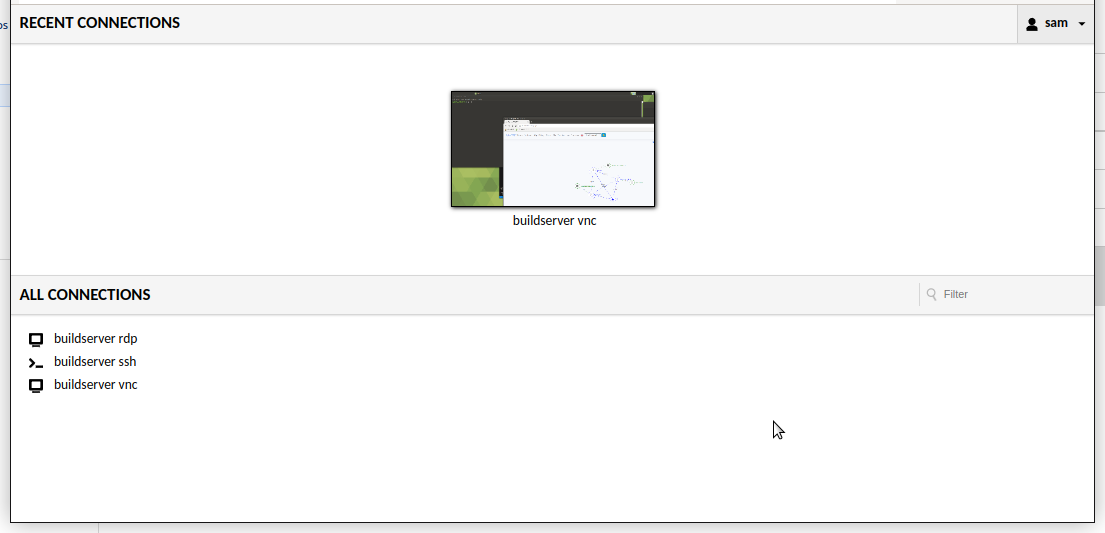
      Screenshot at 2024-01-17 17-51-49.png

      after I logon to guac, I get a list of my ‘apps’… these present in a web page on the system I am on , so ssh in a web page… now… some things, don’t work the same, nano doesn’t display. but vnc works…

      posted in Show your Mirror
      S
      sdetweil
    • 1 / 1