@emos Hmm… I wounder if it is because you use an http link? Can you try to change it to an rtsp link?
 S
Offline
S
Offline
A New Chapter for MagicMirror: The Community Takes the Lead
Read the statement by Michael Teeuw here.
Read the statement by Michael Teeuw here.
Posts
-
RE: MMM-MotionEye - surveillance video stream on your mirror!
-
RE: MMM-MotionEye - surveillance video stream on your mirror!
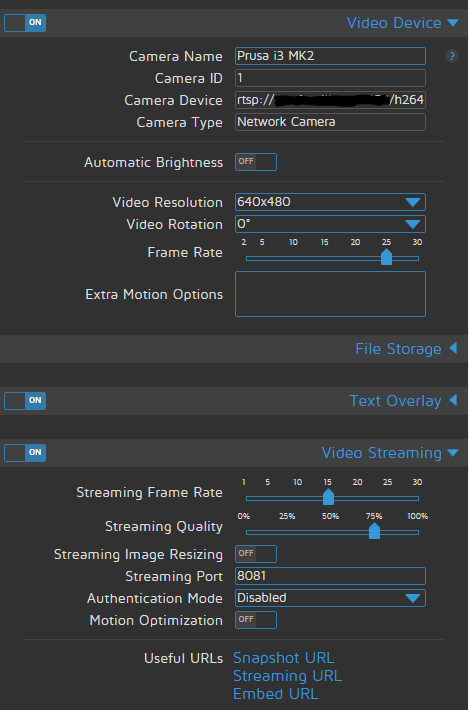
@emos Here is one of mine:
-
RE: MMM-MotionEye - surveillance video stream on your mirror!
@emos you need to add it in to MotionEyeOS. So it knows about it. I have 3 cameras in the same way. You can add any “network-camera”.
rtsp://yourcam:port/whatever-format in the “add” dialog in MotionEyeOS. :) -
RE: MMM-MotionEye - surveillance video stream on your mirror!
Hi @emos I’m also using different cameras from the same MotionEye install.
I have my cameras set on different ports like this.
http://MotionEyeOS:8081
http://MotionEyeOS:8082
http://MotionEyeOS:8083
I think that the default way…
Then you have the motiontrigger url like this in MotionEyeOS/Camera (for example):
http://MagicMirror:8080/motioneye/1
http://MagicMirror:8080/motioneye/2
http://MagicMirror:8080/motioneye/3That’s it. :)
-
RE: Withings
Hi @aluini, is your module still working correctly? I’m only getting the weight. :)
I have an Body Cardio Scale, do I have to define this somewhere?Thanks!
-
RE: My First Magic Mirror
Looks great! Good reflection and see-through.
If you want to share… :)
What modules are you using and what customisation have you done?
I can see the colours on the calendar appointments, how did you manage that? -
MMM-Modulebar - A module that adds touch buttons for showing/hiding other modules.
Description:
This Module adds a touch menu to hide / show other the defined (in the config.js) modules.
Screenshots:
Module with symbols only in row mode:

Module with symbols only in column mode:

Module with symbols and text in column mode:

Module with symbols and text in row mode:

This is my own mirrors view (Bottom Bar) using some addition in the custom.css see below.

Download:
[card:Snille/MMM-Modulebar]
Custom-CSS
Here is my CSS settings for the module that I have added to my custom.css to give it the extra special look. :)
/* MMM-Modulebar ------------------------------------*/
.modulebar-button {
  margin: 1px;
  padding: 1px 1px;
  border: 2px solid #fff;
  background-color: #fff;
  color: #000;
  border-radius: 0px;
  border-radius: 50%;
  width: 60px;
  height: 60px;
}
.modulebar-picture {
  margin: 0px 0px;
  border-radius: 50%;
}
.modulebar-menu {
  align-items: flex-start;
}
/*****************************************************/
Version 0.2
- Had to change the button array format a bit. Make sure to update your config to the new “standard”.
The reason for the change where to be able control each module separately even if it is the same module multiple times. :)
Version 0.1
- Initial release.
- Had to change the button array format a bit. Make sure to update your config to the new “standard”.
-
RE: When weather updates module unhides...
This is solved. It was actually the Profile-Switcher that created the problem. :)
-
RE: How do you develop locally and push to the Pi?
I’m using Expandrive for lot’s of different connections to all kinds of systems. It support connecting a drive (in Windows) using SSH for example. So you can have full access to your RPi directly in windows. Very handy. However it’s not completely free ($50) for a single licence.
http://www.expandrive.com/Then you don’t have to mess around with CIFS or Samba… ;)
-
RE: 1 old noob + 1 rPi = I can't believe I did it! (revisited)
Great work! Looking good! I bet your kid will be impressed! I know I would if my father took on a project like yours! :)
-
RE: How to make updateDom actually refresh <img src...>?
Oh, sorry, I completely forgot about this topic. Good that you solved it. :)
-
RE: MMM-Wunderground Add wind forecast
Looks great, I’m switching to this module now.
Good work! -
Build on Benja...
Hi all,
I’m currently working on a Digital Photo Frame. When looking for a good place to start I found this: https://benja.io
It’s basically ARCH with only Electron running.
Not only that, it’s fully Hardware accelerated! :)I thought, maybe the MagicMirror² can use this as a base instead of a Raspbian Jessie (Lite) installation as it is today. Maybe you guys already knew about this. But in case you didn’t I just wanted to let you know. :)
I’m also building a MM of course. :)
Best regards Erik
-
RE: [MMM-PlexNowPlaying] - Display current song played by PlexMediaServer
Hi @youse, Thank you! Adding your module now. :)
-
RE: How to make updateDom actually refresh <img src...>?
Hi @matthewj
You can use javascript to make the image URL unique all the time thought adding a “number” (in this case just a simple timecode). :)OBS: I had to add spaces after the " < " before the end " > ".
Just remove them when you use it. :)Otherwise it would not show.
< img id="graph" alt="" src="https://plot.ly/~myPlotlyAccount/myGraph.png" />

< script language="javascript" type="text/javascript" >
  var d = new Date();
  document.getElementById("graph").src = "https://plot.ly/~myPlotlyAccount/myGraph.png=" + d.getTime();
< /script >
Good luck. :)
-
RE: MMM-MotionEye - surveillance video stream on your mirror!
@Cato Great! Thanks for fixing my mistakes. :)
-
Splitting zone...
Hi all, I’m trying to save space on my mirror to be.
I’m thinking if it would be possible to make a module where you can “split” a zone. Or rather arrange other modules in another way in a zone. As it is now you can basically only decide what module is on top and the order the modules are added under each other in config. I would like to be able to put modules beside each other as well. Here is an example:
This is my current left top corner:
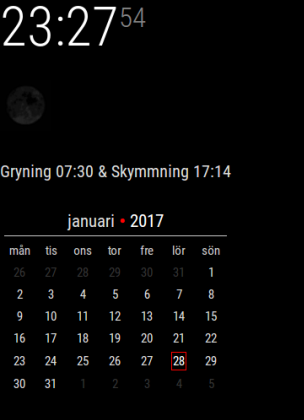
This is how I would like it to be:
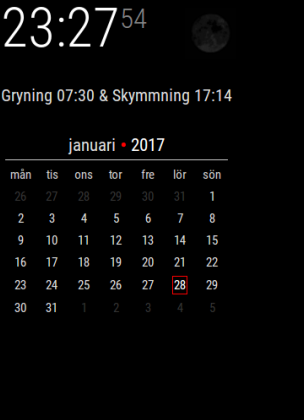
So, I want to move the “moon” to beside the clock, but still be in the top_left.
Is this possible?Thank you all for this great project! :)
-
RE: MMM-MotionEye - surveillance video stream on your mirror!
Fixed. Just sent you a PR. :)
Check it, I’m fairly new to Node.js so it may not be the best solution. :) -
RE: MMM-MotionEye - surveillance video stream on your mirror!
Hi again, It would be cool to be able to hide the camera manually… For example visit another link… Say http://MagicMirror:8080/motioneye/1/hide
Right? :)