I am extremely interested in this as well. In fact, I just posted about this very thing elsewhere in this forum. Question- OpenFrame and Canviz (openframe is on github, canviz software you can download for free) do what I want. Is there a way to incorporate them into the same pi, or somehow use them as modules on the mm? I want to run the mm with all the info for certain parts of the day and then use it the rest of the day as a digital art display for my artist daughter’s artwork.
S
Offline
A New Chapter for MagicMirror: The Community Takes the Lead
Read the statement by Michael Teeuw here.
Read the statement by Michael Teeuw here.
Posts
-
RE: digital photo frame
-
Anyone try dual loading mm and openframe?
Here’s a crazy question… I am building another MM for my daughter, who is an artist. I came across openframe the other day and decided to build her a beautiful system to display her artwork on (like a digital art frame). I was wondering though, if anyone had any experience with dual loading them? I am thinking I can have MM run from her normal wakeup time till after she goes to school and then run it as a frame with openframe for the rest of the day. Any suggestions if I try this? Other options - Could load her artwork UNDER mm - as a background, but that won’t look as elegant… Or best yet- it would be great if it would act as a photo frame UNTIL she steps in front of it, and then it could load her mm stuff. HMM… ideas, ideas…
-
RE: London Bus status
I re-ran the npm install just in case I hadn’t done it before, and then pulled your update. Now the headers are back! Thanks!
-
RE: London Bus status
HI there! One of the newest updates took off the heading for my multiple instances. It only puts a header on the first one. I tried adding a header in the config.js file but it ignors it. Help please?
-
RE: London Bus status
It works! Thank you SO VERY much! I really appreciate it! Thank you!
-
RE: MMM-Nest
I know this is a dumb question but is the Pin you get when you run the getToken script the same as the token that you put into the config file? If not where do I get a token from? I seem to only have a pin, a product id and a product secret…
When I added in the Pin to the token field and run mm… I get a Loading… where the module should be…
-
RE: London Bus status
Hm. I tried that. I copied the module and contents to modulename2, changed the .js to 2.js - edited the 2.js to (module.register) to modulename2 .
Then I changed my config file - copied the first module to another instance and changed its name to modulename2. (then i changed the atcocode for a new bus stop). --It’s stuck on loading bus info…
-
RE: London Bus status
@nmootton Hi there! Thank you for being so responsive! I had another question. I actually want to load 3 of these. I tried loading the module three separate times, but it just loads 3 of the initial entry, even though the atcocodes are different for each one. Any suggestions?
-
RE: London Bus status
Thank you both! I have gotten it up and running! Looks GREAT!
-
RE: London Bus status
That certainly helped! The code loads now and now it’s stuck on Loading bus info… time to recheck my api codes?
-
RE: London Bus status
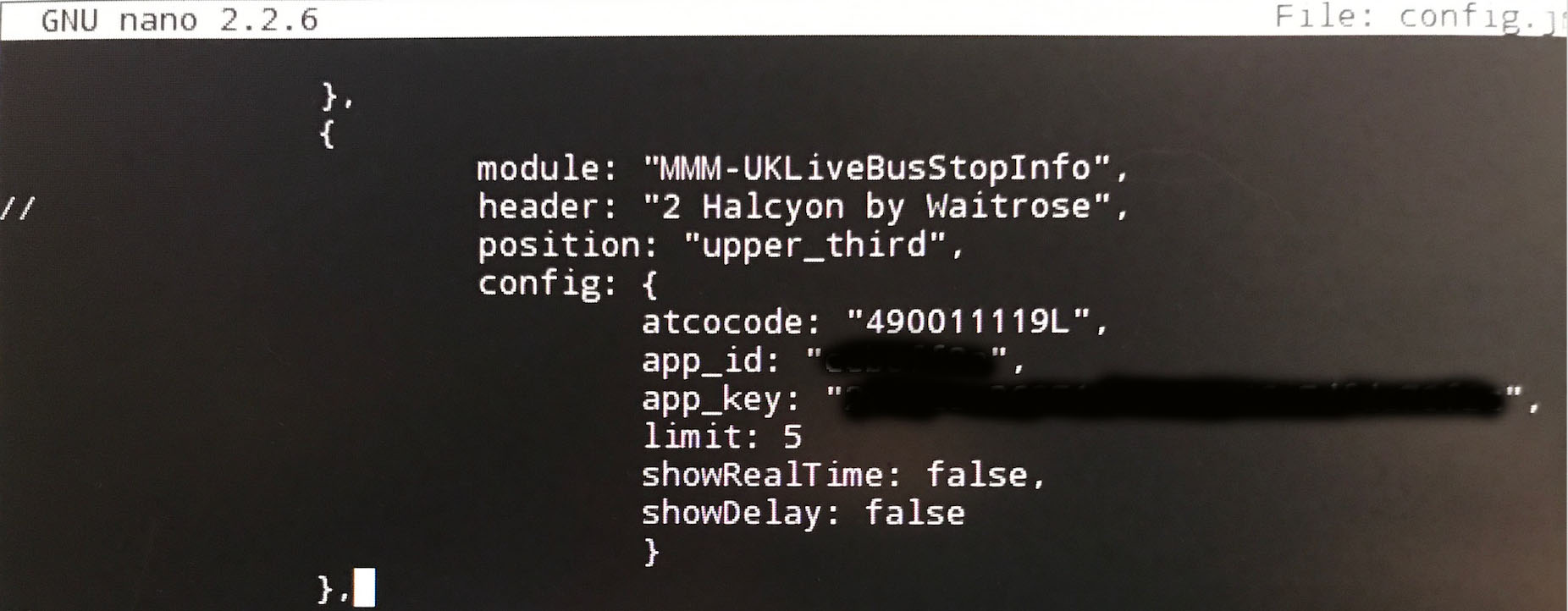
HI there! Thanks so much for tackling this. I seem to be a mess and can’t get it to load. There must be some mistake in my config file as I get the error upon loading. I have checked off all the boxes in the troubleshooting - as in I have an app_id, app_key and I know the atcocode - I have verified all against the live api docs and it runs without error. I will try to load my config entry and see if you guys can help me spot what I entered wrong. Thanks in advance!!
-
RE: How hot does your mirror run?
I built the same, and the thing is HOT! I have to install some ventillation and maybe a fan… The monitor itself under the 2 way glass is almost burning to the touch!
-
RE: Any options for old iphone
I don’t know if you solved this yet, but there is an app for that… it’s called Morning. Panic used to have an amazing app called Status Board but they have discontinued it :( . But if you’re looking for a basic one, use Morning.
-
Canviz frame tutorial
Does anyone know the company Canviz ? They do a fairly similar thing to the magic mirror, (although the content that they display is different) - mostly pictures, animation, and things. However, they just decided to share their frame building tutorial for free! Also - if you are struggling with building a frame (and you have a 21.5" monitor your are using for your MM) you can simply purchase a ready made one of their frame! Looks to be MM compatible!
For those of you who don’t know, the Canviz is a monitor inside a frame run by a raspberry pi… :) sound familiar?
*am am not affiliated with canviz at all - just excited to have a proper frame tutorial! *
-
RE: Help with font size please.
:) I changed the main.css file. I can tell you what I did to make the font way bigger…
I changed font size (currently says 2em)
and line-height (currently 1.5em)and then under the .xsmall .small, etc I upped each value by 5
If you want to go smaller - then try making each of those values smaller…
-
RE: Help with font size please.
Ah! Ok - sorry for a whole thread… I fixed my own problem by modifying the main.css file instead. :)
-
RE: Help with font size please.
I have tried adding a custom font size into the magicmirror custom.css - nothing changed.
I then went into each css file for each module that I wanted to be larger and if it had a font status, i changed it to be 100% (just to see if it worked) and nothing… and -yes, i rebooted the MM after each change. nothing… :( (also - I am running these on 21" monitors) -
RE: Wifi Connectivity / Access Settings
Did you get this fixed? With the MM running in kiosk mode, you can just and it will load the menu for you to get to the terminal screen. You can work from there or type in (pm2 stop mm) and it will stop the MM. I had a major issue with mine where when I followed the instructions for installation, my wifi wouldn’t work. I had to skip a step (the network config for wireless power) and the wifi comes up just fine.
-
Help with font size please.
Hi there! I am building a triple monitor/pi MM system that will go on my living room wall as a family command center. I have it almost entirely up and running (just building the frame now) but when I put it up on the wall, the font is small and this causes us not to be able to read it. Is there a way to set a universally larger font (perhaps in the config.js file) so that everything is larger and we can see it from the middle of the room?