Thanks for this module cowboysdude.
I’ve been using it for some time. Now I updated it, since then it shows only “undefined”.
What’s wrong?
S
Offline
A New Chapter for MagicMirror: The Community Takes the Lead
Read the statement by Michael Teeuw here.
Read the statement by Michael Teeuw here.
Posts
-
RE: MMM-DailyQuote
-
RE: MMM-Soccer - Standings, Schedules and Top Scorers
@strawberry-3-141
I suspected that. Really a pity. That was different in the past.Nevertheless, thank you.
-
RE: MMM-Soccer - Standings, Schedules and Top Scorers
I cant get it to work again, not even with the new version.
Where is the mistake?module: "MMM-soccer", disabled: false, position: "bottom_left", header: "", config: { colored: true, show: 'GERMANY', logos: false, focus_on: { "GERMANY": "Erzgebirge Aue" }, max_teams: 5, leagues: { "GERMANY": "BL2", } } -
RE: So ... to update MagicMirror I would ... ??
@E3V3A
I thought I tried both. But it doesn’t matter now, I’ve redone everything. It’s back on now. Thanks for your help. -
RE: So ... to update MagicMirror I would ... ??
Hello,
I can’t get it to work anymore. :-(
have meanwhile updated the Raspi including firmware. MagicMirror directory renamed and reinstalled.
After booting only a black screen.Does that mean anything to anyone?
pi@ftpi:~/MagicMirror $ npm start > magicmirror@2.3.1 start /home/pi/MagicMirror > sh run-start.sh npm ERR! Linux 4.14.32-v7+ npm ERR! argv "/usr/bin/node" "/usr/bin/npm" "start" npm ERR! node v6.14.1 npm ERR! npm v3.10.10 npm ERR! code ELIFECYCLE npm ERR! magicmirror@2.3.1 start: `sh run-start.sh` npm ERR! Exit status 1 npm ERR! npm ERR! Failed at the magicmirror@2.3.1 start script 'sh run-start.sh'. npm ERR! Make sure you have the latest version of node.js and npm installed. npm ERR! If you do, this is most likely a problem with the magicmirror package, npm ERR! not with npm itself. npm ERR! Tell the author that this fails on your system: npm ERR! sh run-start.sh npm ERR! You can get information on how to open an issue for this project with: npm ERR! npm bugs magicmirror npm ERR! Or if that isn't available, you can get their info via: npm ERR! npm owner ls magicmirror npm ERR! There is likely additional logging output above. npm ERR! Please include the following file with any support request: npm ERR! /home/pi/MagicMirror/npm-debug.log pi@ftpi:~/MagicMirror $ -
RE: So ... to update MagicMirror I would ... ??
@Richard238 said in So ... to update MagicMirror I would ... ??:
Installed MM2.3.1, still got black screen
Installed earlier version electron, still got black screen.Shutdown and restarted.
Now nothing on :8080 either :(
Same with me. I was not at home over Easter, had switched off the raspberry 3 days. Launched yesterday and just a black screen. :(
After that I read this with the new update and executed it, unfortunately without any changes. The downgrade of electron described above also brought no change. Still a black screen and no display via ip:8080. -
RE: Synology PhotoStation Share as perfect picture source but how?
@MrBorg said in Synology PhotoStation Share as perfect picture source but how?:
I have figured out how to make this slideshow show in an iFrame
module on my screenHello, MrBorg,
can you describe in more detail how you did it?
I would also like to see the photos of Synology DiskStation on MM. Ideally from folders or private photo station albums including subfolders.
I would appreciate a hint.Greeting Dirk
-
RE: reduce bottom margin
margin-bottom: 0pxhad no effect.
But I had an error under Body, there was a comment with special characters, so the height parameter didn’t work. After deleting the comment it now works as desired.
Thanks again for your help @doubleT. -
RE: reduce bottom margin
Hello doubleT,
thanks for your answer. You recognized the source correctly, of course.;)
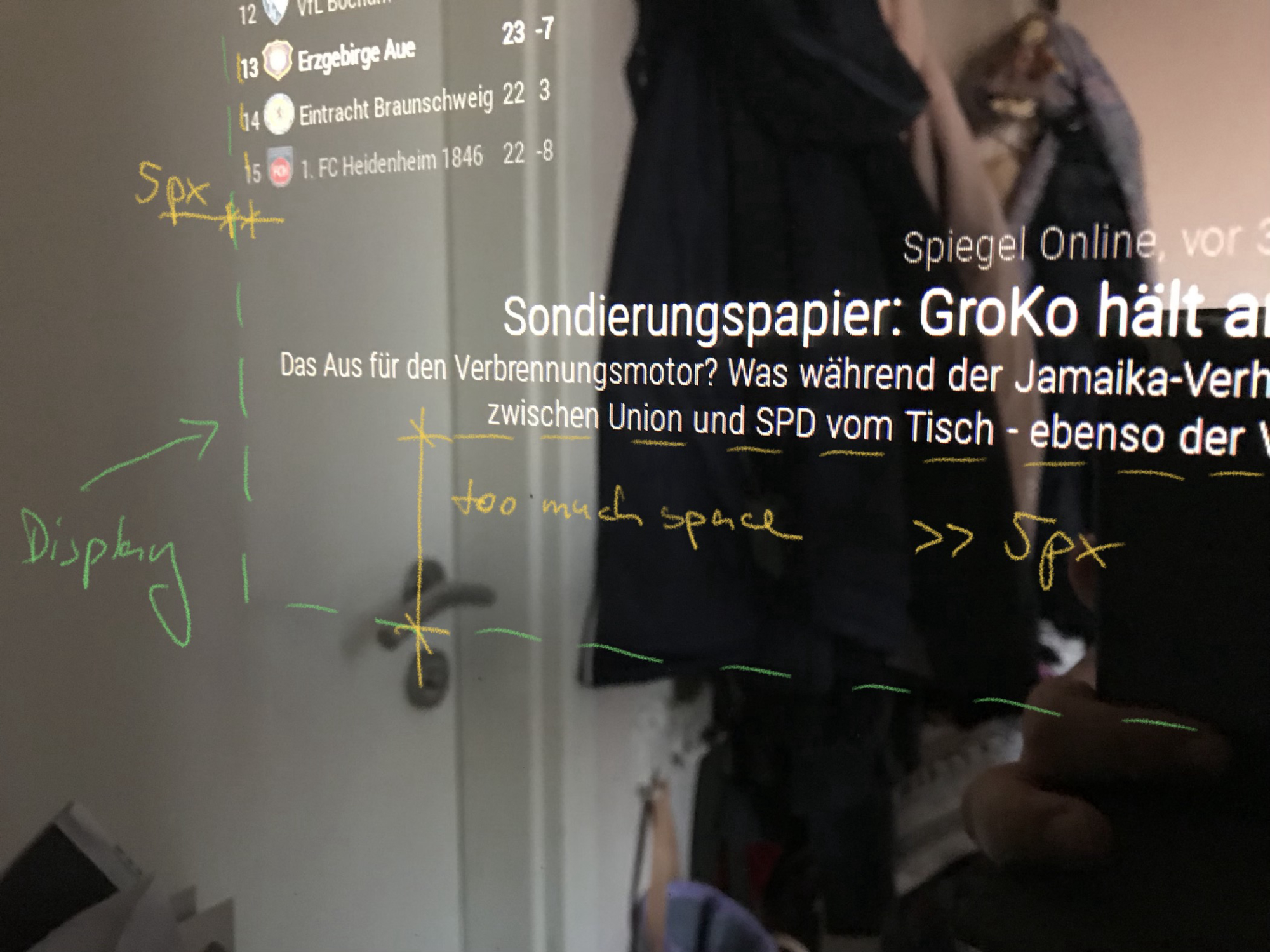
I understood that so far and also wanted the modules (e. g. MMM-Soccer) stop bouncing over the newsmodul. But then I noticed that the lower distance between the news module and the display edge is too big. The distance is at the top, left and right correctly only bottom space is wasted. The „height“ parameter doesn’t seem to work.
By the way, my display is smaller than the mirror.Maybe a picture will make it clearer…
-
reduce bottom margin
hello,
maybe someone can help me.I have already successfully reduced the margins of my MM. But somehow it doesn’t work on the lower side, there is some space left.
I would like to get the news module directly to the bottom of the display.my custom.css:
body {
  margin: 5px;
  height: calc(100% - 10px);
  width: calc(100% - 10px);
  cursor: help;
}

.region.bottom.bar .container .module.newsfeed {
  height: 100px; 		///* height of the module with maximum lines possible */
}
thanks
-
Pictures on MM
Hello,
I am looking for a module that displays photos on my MM. I have a Synology- Nas and would like to display random pictures from a folder including subfolders.
Does anyone have an idea which module would be best suited for this?Thanks Dirk
-
RE: Default Calendar adjustment
Hello barnosch,
it is the default calendar module from MagicMirror.Dirk
-
Default Calendar adjustment
Hello,
first of all thanks to all who are involved here, I am impressed. With the help of the forum I have build a MM and installed the software as noob. But I can read English better than write, so I apologize that I use the help of google to post here. ;)A question about the default calendar module. How can I display a relative date without the word “um” (in english “at”)? Someone has an idea?
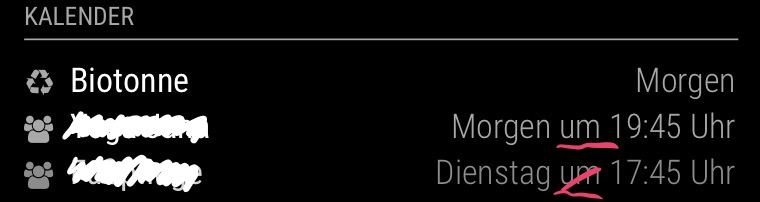
Dirk
-
RE: Two way mirror order for Europe - Orders closed!
Hallo @Goldjunge_Chriz , kann ich kurzfristig noch auf den Zug aufspringen? Würde mich freuen.
Hi, if it is not too late, I also would like to place an order.
0,8 x 0,6 m, polished edges, pickup, Fürth.Gruß Dirk