MagicMirror Forum
    • Recent
    • Tags
    • Unsolved
    • Solved
    • MagicMirror² Repository
    • Documentation
    • 3rd-Party-Modules
    • Donate
    • Discord
    • Register
    • Login
    1. Home
    2. Tribun
    3. Posts
    A New Chapter for MagicMirror: The Community Takes the Lead
    Read the statement by Michael Teeuw here.
    T
    Offline
    • Profile
    • Following 0
    • Followers 0
    • Topics 4
    • Posts 23
    • Groups 0

    Posts

    Recent Best Controversial
    • MMM-MktIndex is not working

      The module no longer works for me. Now only the display without numbers or values ​​is shown. Reinstalling the module didn’t help.

      I found the following lines in the logs:
      MagicMirror-error.log

      MKTINDEX] API Error:  Invalid response body while trying to fetch https://consent.yahoo.com/v2/collectConsent?sessionId=3_cc-session_107e0739-baad-498b-8fa5-54ff56f16484: Premature close (/home/pi/MagicMirror/modules/MMM-MktIndex/node_helper.js:59 )
      

      MagicMirror-out.log

      2024-04-07T18:42:17 <log> fetch https://consent.yahoo.com/v2/collectConsent?sessionId=3_cc-session_107e0739-baad-498b-8fa5-54ff56f16484 (/home/pi/MagicMirror/modules/MMM-MktIndex/node_modules/yahoo-finance2/dist/cjs/src/lib/options.js:19 Object.debug)
      [07.04.2024 18:43.09.937] [LOG]   2024-04-07T18:43:09 <log>  payload: undefined (/home/pi/MagicMirror/modules/MMM-Logging/node_helper.js:34 Class.socketNotificationReceived)
      [07.04.2024 18:43.09.955] [LOG]   2024-04-07T18:43:09 <log>  payload: undefined (/home/pi/MagicMirror/modules/MMM-Logging/node_helper.js:34 Class.socketNotificationReceived)
      [07.04.2024 18:44.19.963] [LOG]   2024-04-07T18:44:19 <log>  payload: undefined (/home/pi/MagicMirror/modules/MMM-Logging/node_helper.js:34 Class.socketNotificationReceived)
      [07.04.2024 18:44.19.988] [LOG]   2024-04-07T18:44:19 <log>  payload: undefined (/home/pi/MagicMirror/modules/MMM-Logging/node_helper.js:34 Class.socketNotificationReceived)
      [07.04.2024 18:45.29.960] [LOG]   2024-04-07T18:45:29 <log>  payload: undefined (/home/pi/MagicMirror/modules/MMM-Logging/node_helper.js:34 Class.socketNotificationReceived)
      [07.04.2024 18:45.29.990] [LOG]   2024-04-07T18:45:29 <log>  payload: undefined (/home/pi/MagicMirror/modules/MMM-Logging/node_helper.js:34 Class.socketNotificationReceived)
      [07.04.2024 18:46.39.968] [LOG]   2024-04-07T18:46:39 <log>  payload: undefined (/home/pi/MagicMirror/modules/MMM-Logging/node_helper.js:34 Class.socketNotificationReceived)
      [07.04.2024 18:46.39.987] [LOG]   2024-04-07T18:46:39 <log>  payload: undefined (/home/pi/MagicMirror/modules/MMM-Logging/node_helper.js:34 Class.socketNotificationReceived)
      

      Can someone help me with troubleshooting?
      posted in Troubleshooting
      T
      Tribun
    • RE: MMM-Netatmo updated

      @Laz
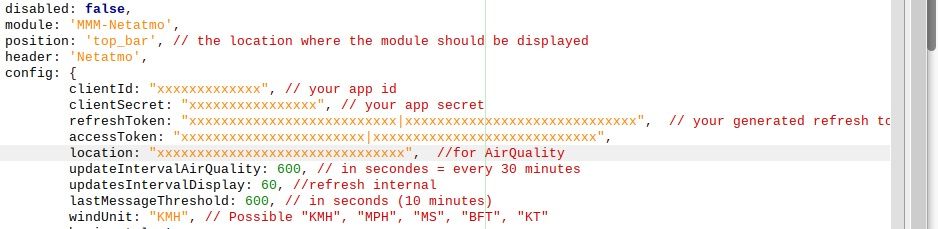
      At choose scopes: select “read station” and press generate token, you will get the “refreshToken:” and
      “accessToken:”

      Enter all newly created values ​​in config.js after that it should work again.

      Netatmo.jpg

      posted in Utilities
      T
      Tribun
    • RE: MMM-Netatmo updated

      @Laz Sorry, I got the module wrong, I used RaymondMolenaar’s module. There it was enough to recreate the module data on the Netatmo developer homepage and to exchange the data in config.js. A few months ago I recreated the access data because the module was no longer working properly, something was probably wrong with the API at the time Netatmo changed.
      I have the new data "clientId: "
      "clientSecret: "
      “refreshToken:”
      “accessToken:”
      inserted into the config and the module works again.

      posted in Utilities
      T
      Tribun
    • RE: MMM-Netatmo updated

      @kasperinline Have you tried to create new credentials via the Netatmo web portal?
      https://dev.netatmo.com/ I am using a fork of this module and have clientId,
      clientSecret, accessToken, new
      created. With this, the query of the Netatmo data works again.

      posted in Utilities
      T
      Tribun
    • RE: Size ratio is not correct

      Hello, you should adjust your screen resolution. Try 1280 x 1024 or higher.
      You can change the setting with “sudo raspi-config” under Display options.

      posted in Troubleshooting
      T
      Tribun
    • RE: Contribute to a module. Volunteers wanted! Easy!

      n2718, Eisenstadt (Burgenland), Austria , CET - Central European Time

      posted in Troubleshooting
      T
      Tribun
    • RE: Netatmo - no connection

      @PetterT
      If you only have a spinning circle in the middle, something is wrong with your login details. It may be that one of the values ​​is incorrect: clientId, clientSecret or refreshToken. No error is displayed in the logs if the login did not work. I changed the registration data and was able to reproduce your mistake. If the data is correct, the module works fine for me.

      posted in Troubleshooting
      T
      Tribun
    • RE: Sync private iCloud calendar with MagicMirror

      @jlnxaer
      (/home/pi/.vdirsyncer/status) is a hidden folder in /home/pi

      you can also find the pm2 log in /home/pi/.pm2/logs this is also hidden.

      posted in Tutorials
      T
      Tribun
    • RE: Sync private iCloud calendar with MagicMirror

      @jlnxaer what does the pm2 log show? Are error messages displayed at the log?

      I also had this phenomenon recently, as the calendar did not syncronize automatically. I had an error message in the log. I no longer know the exact wording of the report.
      For me it helped to delete and recreate the files under /home/pi/.vdirsyncer/status and the created * .ics files. after creating the data again with “vdirsyncer sync”, everything now runs automatically as described in the instructions.

      posted in Tutorials
      T
      Tribun
    • RE: MMM-iCloud-Client

      @wuermchen what does the pm2 log show? Are error messages displayed at the log?
      I did not get this module to work when the 2factor authentication is activated.

      mfg

      posted in Utilities
      T
      Tribun
    • RE: [MMM-MieleAtHome] - Show the status of your Miele@Home Devices

      @ViDiBi Hallo Victor, thanks for the link. Unfortunately, I am not familiar with programming on this page. Where should I log in or register?

      I can also no longer enter any data for the Api registration on the Miele home page. (https://www.miele.com/f/com/en/register_api.aspx)

      mfg

      posted in Utilities
      T
      Tribun
    • RE: MM freeze over night

      @MajorC pm2 Logs can be found @

      /home/pi/.pm2/logs
      

      npm Logs @

      /home/pi/.npm/_logs
      

      different system logs @

      /var/log
      

      you can install the following module for better logging:

      https://github.com/shbatm/MMM-Logging
      
      posted in Troubleshooting
      T
      Tribun
    • RE: [MMM-MieleAtHome] - Show the status of your Miele@Home Devices

      Hi folks, I installed the module according to the instructions, when I restart the MM² I only see “Charging devices”. In the log I find the following error message:

      [2020-10-31 11:34:19.387] [ERROR]  MagicMirror will not quit, but it might be a good idea to check why this happened. Maybe no internet connection?
      [2020-10-31 11:34:19.391] [ERROR]  If you think this really is an issue, please open an issue on GitHub: https://github.com/MichMich/MagicMirror/issues
      [2020-10-31 11:34:21.485] [ERROR]  2020-10-31T11:34:21 <warn> 401 Login Error ! (/home/pi/MagicMirror/modules/MMM-MieleAtHome/utilities/mieleathome.js:308 Request._callback)
      [2020-10-31 11:34:21.489] [ERROR]  2020-10-31T11:34:21 <warn> undefined (/home/pi/MagicMirror/modules/MMM-MieleAtHome/utilities/mieleathome.js:309 Request._callback)
      

      I can log into my Miele account using the mobile app. Username and password are the same as with the Miele app? I have already created several client_ID and a client_Secret. However, I always get the same error message.

      posted in Utilities
      T
      Tribun
    • RE: All Souls Day is displayed 1 day late.

      @sdetweil Thanks for the fix, now it is displayed correctly.

      posted in Troubleshooting
      T
      Tribun
    • All Souls Day is displayed 1 day late.

      Hi folks, when I enter the holidays from Apple in the calendar module, All Souls Day is displayed 1 day too late. All Saints ‘Day is displayed in 6 days, All Souls’ Day in 8 days.
      The day is displayed correctly on the Ipad and the Iphone.
      I’m using the developer branch.

      DTSTART;VALUE=DATE:20201102
      CLASS:PUBLIC
      SUMMARY;LANGUAGE=de-AT:Allerseelen
      TRANSP:TRANSPARENT
      CATEGORIES:Feiertag
      X-APPLE-UNIVERSAL-ID:4b6d2f05-680e-7b5e-043f-8cbd2ad082c0
      END:VEVENT
      BEGIN:VEVENT
      DTSTAMP:20171204T190108Z
      
      https://p39-calendars.icloud.com/holidays/at_de.ics
      

      IMG_0087.png

      posted in Troubleshooting
      T
      Tribun
    • RE: Magicmirror in QNAP Containerstation installation

      Hello sdetweil, for you as experts it shouldn’t be a problem to start the Docker, as a beginner I can only do a limited amount with the instructions. When I start the Docker via the Shell I get the following error message: container-station/docker: Error response from daemon: driver failed programming external connectivity on endpoint magic_mirror (6372ebe4277aea6a53fc9129dcfe8c145b3010217241886e1ec5eb7ef103b8b1): listen tcp 0.0.0.0:80: bind: address already in use.

      When I call the Docker via the container station, the MagicMirror server is started, but I cannot connect to the web browser.
      “ERR_CONNECTION_REFUSED”

      I will read about Container Station, Docker in the next few days, maybe I’ll still get it to work.

      posted in Troubleshooting
      T
      Tribun
    • Magicmirror in QNAP Containerstation installation

      Hello, I wanted to ask if anyone has experience with the Magicmirror2 as Dockerimage in the QNAP container station. I have a Qnap 1079Pro with the container station in operation. Pihole is currently running smoothly in the container station. Now I wanted to install the Magicmirror as Docker in order to have a test environment so as not to shoot my Rapberry mirror through games and updates.

      Does anyone know how to install the image and what settings have to be made?

      I was able to download the image to the container station, what do I have to do when I create the container?
      How do I adjust the paths for the config, modules and css?

      posted in Troubleshooting
      T
      Tribun
    • RE: Cronjob doesn't work with my MM

      Hello MisterT
      I’m not an expert, I’m more of a beginner, but I tried to use a cronjob to stop and start the mirror on my mirror.

      10 23 * * * pm2 stop mm> / dev / null 2> & 1
      15 23 * * * pm2 start mm> / dev / null 2> & 1
      it worked for me.
      I use the MagicMirror² v2.11.0 and NAME = “Raspbian GNU / Linux”
      VERSION_ID = “10”
      VERSION = “10 (buster)”
      VERSION_CODENAME = buster.
      With older versions of the software I always had problems starting MagicMirror because of access violations with pm2 after a reboot.
      Maybe this will help you solve your problem.

      posted in Troubleshooting
      T
      Tribun
    • RE: MMM-Netatmo updated

      @Miller thanks for your help and the great design. ;)

      posted in Utilities
      T
      Tribun
    • RE: MMM-Netatmo updated

      Hi Miller,
      First of all, I want to tell you that you have built a great module. It looks awesome.
      However, I have a problem with the display of the air quality.
      What do I have to enter if I want to take this place?
      e.g .:
      https://aqicn.org/city/austria/laschoberstrasse--ostlich-kreisverkehr-ruster-strasse/

      I only see “wait”.

      posted in Utilities
      T
      Tribun
    • 1 / 1
