@jdahli1 I tried deleting my uber api key and generating a brand new key and it didn’t help. I reinstalled my magicmirror from scratch and it didn’t help. The API must have changed.
 T
Offline
T
Offline
A New Chapter for MagicMirror: The Community Takes the Lead
Read the statement by Michael Teeuw here.
Read the statement by Michael Teeuw here.
Posts
-
RE: MMM-uber and MMM-lyft
-
RE: MMM-FAA-Delay
I did notice it was broken for the last couple days but didn’t check these forums until now. Thanks for the update! I’ll be updating today.
-
RE: MMM-uber and MMM-lyft
My MMM-uber has been fine for weeks, but just says “uberX in undefined min” for the last couple of days. Anybody else have this issue?
-
RE: MMM-AfterShip
Great, clean, and simple module. It seems pretty reliable as I’ve had issues with other Aftership modules sometimes not displaying any data.
Configuration options would be helpful:
-Show/hide certain columns, as this is a pretty wide module
-Control number of days that delivered parcels display
-Control the DATE/MONTH format
-Control the module width
-Control the refresh period for new packages/updatesI’ve edited these items in MMM-AfterShip.js, but an easy option in the config would be nice.
-
RE: MMM-ImagesPhotos - Show images from a directory
@ninjabreadman exiftran worked wonderfully! I used the “automatic” option and it fixed them all! Thanks!
-
RE: MMM-ImagesPhotos - Show images from a directory
I realize this might not be the fault of the module, but many of my images display with the orientation incorrect on this module. I open them on my Mac, and the orientation is correct. I open them in the built-in image viewer on the raspberry pi, and the orientation is correct.
I’ve tried using exiftool to remove the orientation settings entirely with no success. I also tried using exiftool to change the orientation with no success.
My magic mirror is in portrait mode, so I wonder if that matters, but the built-in viewer has no problems.
-
Can somebody make MMM-MyWink compatible with Wink Hub 2?
This module is currently only compatible with Wink Hub. I would like it be updated to work with Wink Hub 2. I don’t understand their API enough to get it working. This would be very much appreciated!
-
RE: MMM-FAA-Delay
This module is great, but how do I get rid of the weather? I already have a weather module, so this wastes valuable space. Thanks.
EDIT: I answered my own questions. I just commented out this line in MMM-FAA-Delay.js:
//wrapper.appendChild(weatherRow); -
RE: MMM-MyWastePickup (Toronto waste collection schedule)
@waynerigley The way the module is written, it wants to tell you the day that garbage is picked up. For me, I put the trash out the same morning as it’s picked up a couple hours later. So in my situation, it makes sense. For you, indeed setting all dates back one day would work. However, you might also want to clarify the header of the module for others reading it. For example, the default is:
header: 'Waste & Recycling',If you set all dates back, you may want to change it to:
header: 'When to put out Waste & Recycling', -
RE: MMM-MyWastePickup (Toronto waste collection schedule)
@waynerigley Great! As tiny as this module is, it’s one of the things I appreciate most about the magic mirror. There’s no API to depend on… just a plain old text file that I update once a year.
-
RE: MMM-MyWastePickup (Toronto waste collection schedule)
@waynerigley Remove the double quotes from your entire file. For example, it should look like this:
Calendar,WeekStarting,GreenBin,Garbage,Recycling,YardWaste,ChristmasTreeNot this:
"Calendar,WeekStarting,GreenBin,Garbage,Recycling,YardWaste,ChristmasTree"Also, remove them from the beginning and end of all following lines.
-
RE: MMM-MyWastePickup (Toronto waste collection schedule)
In putty, once you ssh into your raspberry pi, do:
cd /home/pi/MagicMirror/modules/MMM-MyWastePickupThen:
sudo nano schedule_custom.csvYou’re now viewing the contents of schedule_custom.csv. I don’t remember if it included a sample or not, but just edit/type/paste your data here. When done, press Control X to exit. It will ask to save, and say “Y” for yes. The contents of the file should look like my post above from 2 months ago.
-
RE: MMM-MyWastePickup (Toronto waste collection schedule)
@waynerigley The screenshot of your google drive isn’t helpful, because the final result likely has leading/trailing blank spaces, or some other issue that prevents it from parsing correctly. Edit schedule_custom.csv directly at the command line on your raspberry pi.
-
RE: MMM-Parcel
I installed the update and used the new module code. It worked, although the “hideDelivered” doesn’t seem to be working. I have it set for “3” and as of April 5, I still have a March 28 delivery showing as delivered.
hideDelivered: 3, // Hide delivered parcels after 15 days. -
RE: MMM-Parcel
Great! But… I seem to have messed up the update, perhaps because I tried to update from the /config folder:
pi@magicmirror:~/MagicMirror/config $ git pull https://github.com/martinkooij/MMM-Parcel.git
warning: no common commits
remote: Counting objects: 241, done.
remote: Compressing objects: 100% (23/23), done.
remote: Total 241 (delta 11), reused 14 (delta 4), pack-reused 214
Receiving objects: 100% (241/241), 682.03 KiB | 0 bytes/s, done.
Resolving deltas: 100% (119/119), done.
From https://github.com/martinkooij/MMM-Parcel
 * branch            HEAD       -> FETCH_HEAD
fatal: refusing to merge unrelated histories
pi@magicmirror:~/MagicMirror/modules/MMM-Parcel $ git pull Updating a4093aa..31ec835 Fast-forward MMM-Parcel.js | 160 +++++++++++++++++++++++++++++++++++++++++++++++++++++++++++++++++++++++++++++++++++++++++++++------------------------------------------------- README.md | 135 ++++++++++++++++++++++++++++++++++++++++++++++++++++++++++++++++++++++++++++------------------------------------------- node_helper.js | 10 +++++---- package.json | 2 +- 4 files changed, 199 insertions(+), 108 deletions(-)It’s stuck at “Loading Parcel module…” How do I remove MMM-Parcel so that I can put it back correctly?
-
RE: default newsfeed and prohibitedWords
Thank you! My news feed is now Chump free!
-
default newsfeed and prohibitedWords
I’m truly sick of seeing “Trump” appear in my news headlines, unless it’s to notify me that he’s being impeached. It makes me not want to look at my magic mirror.
I’m not sure how to add prohibitedWords to my config to make him disappear. Any suggestions? Here’s what I have now. It works, but anywhere I try to put prohibitedWords: ‘trump’ , it breaks the module or magic mirror won’t load.
{ module: "newsfeed", position: "bottom_bar", // This can be any of the regions. Best results in center regions. config: { // The config property is optional. // If no config is set, an example calendar is shown. // See 'Configuration options' for more information. feeds: [ { title: "New York Times", url: "http://www.nytimes.com/services/xml/rss/nyt/HomePage.xml", }, { title: "The Verge", url: "https://www.theverge.com/rss/index.xml", }, ], } }, -
RE: MMM-MyWastePickup (Toronto waste collection schedule)
Ohh right, number of weeks. I was thinking it was number of events. Makes sense!
-
RE: MMM-MyWastePickup (Toronto waste collection schedule)
Wow, that was fast! Thanks!
I believe I have it setup right, but it looks like it’s giving me +1 than what I’m asking for, perhaps because it’s not including tomorrow?:
Setting ‘2’ gives me 3 total:

Setting ‘3’ gives me 4 total:

-
RE: MMM-MyWastePickup (Toronto waste collection schedule)
Yesterday, my pickup schedule looked like this:

Today, it looks like this:
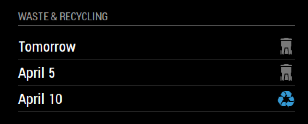
Is there a way to have it always display the next 3 events? My waste pickup is weekly, but recycling is every 2 weeks and I’d like to always see when the next recycling pickup is.
Thanks for another great module!