Read the statement by Michael Teeuw here.
-
@nigel-daniels Sorry for the long delay, but thanks!
-
This module is great, but how do I get rid of the weather? I already have a weather module, so this wastes valuable space. Thanks.
EDIT: I answered my own questions. I just commented out this line in MMM-FAA-Delay.js:
//wrapper.appendChild(weatherRow); -
@twosquirrels Glad you sorted it out. I figured the weather is useful if you are monitoring airports some distance away but if you live close to the one you track then I can see it’s redundant information.
-
The FAA have update their API and as a result broke this module. There is an updated version now in the git repository. This update has two features:
- It handles the new API correctly.
- It now has a flag to block the display of the airport weather.
On your magic mirror go into the MMM-FAA-Delay directory in the modules and run the following commands:
git pull
npm install
This should update the MMM-FAA-Delay code then update it’s dependancies.
-
@twosquirrels you may be seeing that the MMM-FAA-Delay module is broken, the FAA changed their code and did not let anyone know or put a proxy/web forward in place :( I have updated the code and added a flag
displayWeatherto the config so that when you update you don’t have to go in and hack the new code again. -
@fwood04 hi, you may be seeing errors for this module, the FAA changed stuff and broke the module, I’ve just fixed it so you should be good to update.
-
I did notice it was broken for the last couple days but didn’t check these forums until now. Thanks for the update! I’ll be updating today.
-
It was driving me nuts, but the config is showWeather, not displayWeather :smiling_face_with_open_mouth_closed_eyes:
-
@twosquirrels I’m so sorry. Fortunately I got it right in the git-hub docs!!
-
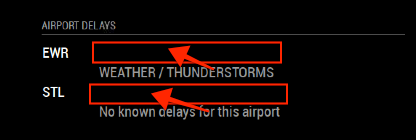
I have weather disabled with showWeather turned off, but I still have this wasted line after each airport. airport.css didn’t seem to have any option to control this. Is there any way?
-
@twosquirrels sorry for the delay in getting to this, I just got back from some travels. It looks like the FAA have made more changes than I realized. Next to the airports code (in the red boxes) should be a short status indicator, e.g. ‘Ok’, ‘Delays’, ‘Closed’, etc. Then in the line below (which is showing) should be a brief line of detail to give a bit more detail on the status, especially if there is a delay.
-
@twosquirrels ok I have made the changes, so try an update. The blanks should now display the headline status. Sadly the FAA’s documentation is somewhat opaque and does not seem to totally match what I actually get from the API so there may be one or two cases where the word ‘undefined’ crops up rather than a time for an actual delay. If you see that just drop me a line and let me know what the status and text was and I’ll try and figure out what’s going on.
-
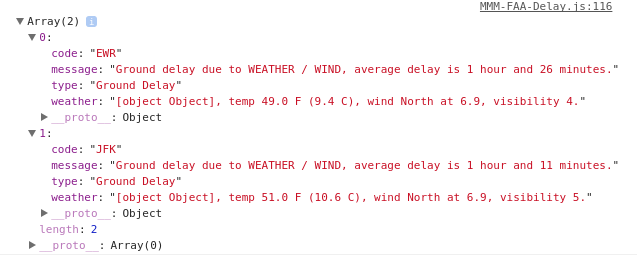
@nigel-daniels Nice work on the initial module and then reworking to keep up with the FAA API changes. I’m seeing “[object Object]” on my mirror at the beginning of the second line for each airport (the weather line, where I would guess it should be showing general conditions, e.g fair, raining, etc right before the temperature.
Are you seeing the same results? Another API change?
-
The data as it comes from the API:
Temporarily, you can use
showWeather: false,in your config until the author responds. However, this will remove all the weather data from the display.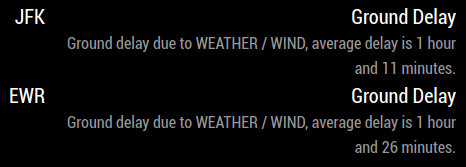


Hello! It looks like you're interested in this conversation, but you don't have an account yet.
Getting fed up of having to scroll through the same posts each visit? When you register for an account, you'll always come back to exactly where you were before, and choose to be notified of new replies (either via email, or push notification). You'll also be able to save bookmarks and upvote posts to show your appreciation to other community members.
With your input, this post could be even better 💗
Register Login