
MagicMirror Forum
    • Recent
    • Tags
    • Unsolved
    • Solved
    • MagicMirror² Repository
    • Documentation
    • 3rd-Party-Modules
    • Donate
    • Discord
    • Register
    • Login
    1. Home
    2. UncleRoger
    3. Posts
    A New Chapter for MagicMirror: The Community Takes the Lead
    Read the statement by Michael Teeuw here.
    Offline
    • Profile
    • Following 0
    • Followers 0
    • Topics 16
    • Posts 106
    • Groups 0

    Posts

    Recent Best Controversial
    • MMM-CalendarExt3 Formatting questions follow-up

      Re: MMM-CalendarExt3 Formatting questions

      I added this code:

      .CX3 .event .headline.useSymbol .symbol {
        display: none;
      }
      

      (from the above discussion) to custom.css in ~/MagicMirror/css and it had no effect – I still see the colored dot. I’m hoping to remove it and just apply the color to the text instead since I have limited horizontal width and don’t want to waste it on a dot. Is there something I’m missing?

      And, as a follow-up, I think I saw something about coloring the text so I will do more research there but it would be nifty to have an option of something like “textColor: true” which would apply the color to the text. Not sure if I’m making sense though.

      Lastly, I’m trying to figure out how to get the time to be just “08:30” (for 8:30 am) or “22:15” (for 10:15pm) and am not having much luck.
      posted in Troubleshooting
      UncleRogerU
      UncleRoger
    • RE: What is the minimum required and recommended Raspberry Pi to use?

      I picked up a Pi Zero 2 for $15 intending to use it for playing around with different modules and working on my mirror. At some point, in my Copious Spare Time™, I’ll replace the Pi 4B I’m using now with it so as to free up the 4 for something else (that I also don’t have time for 8^).

      It’s an affordable option if you want something to play around with.

      posted in Hardware
      UncleRogerU
      UncleRoger
    • RE: MMM-CalendarExt3Agenda

      @sdetweil @MMRIZE
      You guys are amazing! Thank you!

      Scenes2 looks really interesting but I think it’s probably overkill for what I’m trying to do (MagicMirror swapping with Mr. Rogers’ Picture Picture). I could see that there are a lot of possibilities with it. I might play around with it for a future build.

      The reason I have two calendar modules is that one is displayed for the dinner menu and one is there just to define the calendars for MMM-MonthlyCalendar. I’m planning on playing with CalendarExt3 to see if I like it better than MonthlyCalendar but the latter was quick and easy to get going.

      Anyway, thanks again!

      posted in Utilities
      UncleRogerU
      UncleRoger
    • RE: can i build software before hardware and how do i go about that ?

      @mezcalbomb
      Not necessarily… you can use the one RPi remotely. Before I got the second RPi, I was doing testing and setup on the main one downstairs. It worked fine. I have a browser tab open pointing to it so I can see what’s going on.

      You didn’t specify what hardware you wanted to wait on – I assumed you meant you wanted to get the MM set up before you physically built the frame and such for it. If you have an old monitor, you can plug your RPi into it or you should be able to run it without a monitor and just see the MM in the browser on your main computer.

      I managed to scrounge up a second RPi which means I can break stuff on it while the first one is still (relatively) functional downstairs, even though I haven’t gotten around to building a frame or mounting it on the wall. But you could still set things up with just one RPi as long as you’re not trying to put it into production before you finalize everything. (Or if you back up your settings frequently. Get Sam’s backup scripts.)

      posted in General Discussion
      UncleRogerU
      UncleRoger
    • RE: MMM-CalendarExt3Agenda

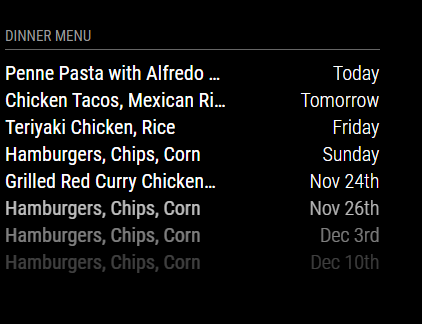
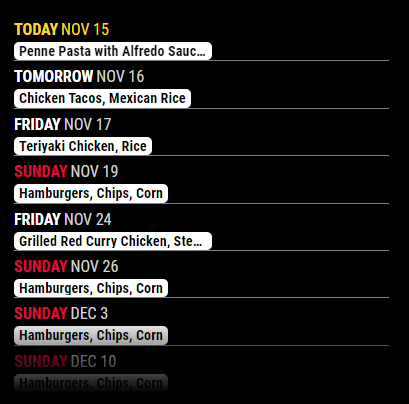
      I apologize for what I’m sure is a bonehead question… I had a stock calendar module to show events from one calendar (and a second, hidden instance of calendar) but when I tried to implement pages (MMM-Pages), it was loading the hidden calendar along with the non-hidden one.

      So I thought I’d try CalExt3Ag to replace the visible calendar. The problem is, I want it to look like the stock calendar:

      35737256-280b-45fe-a124-d924f3ebae43-image.png

      but the best I could get is this:

      f6ef7364-2363-4972-812d-f4bc711947cb-image.png

      Is it possible to get a much simplified listing (one line per event, relative dates) of events using CalExt3Ag?

      posted in Utilities
      UncleRogerU
      UncleRoger
    • RE: Modifying the Config File

      And now, having actually looked at the file in question, I see it includes latitude and longitude for each entry. Very cool.

      posted in Troubleshooting
      UncleRogerU
      UncleRoger
    • RE: Modifying the Config File

      @jimb I will always defer to @sdetweil 's greater knowledge and intelligence but another option is (I hope, anyway, since it’s what I’m using) to use the latitude and longitude of your location. I have the weather module set up to show my wife’s school using the coordinates. (We are known for our microclimates here – her school 2 miles away may have completely different weather from what we have at home.)

      To get the coordinates, I went to maps.google.com, clicked on a location, then copied the resulting URL. It should look like this:

      https://www.google.com/maps/@37.7761918,-122.4222641,16.25z?entry=ttu
      

      The first number after the @ sign is the latitude; the second is the longitude. So you could put in your config file:

      lat: 37.7761918,
      lon: -122.4222641,
      

      and it will show the weather for your location (or the San Francisco War Memorial Opera House in that example). This might be handy if you’re not near a city listed in the file.

      posted in Troubleshooting
      UncleRogerU
      UncleRoger
    • RE: can i build software before hardware and how do i go about that ?

      @mezcalbomb If you have a Raspberry Pi, I highly recommend @sdetweil 's installation script. You can set up the pi, install everything and use PuTTY and your browser of choice to do all your testing from your main desktop. Then, when you’ve got it all the way you like it, set up your monitor and frame and all and it will run locally.

      I have an RPi downstairs in the hall attached to an old monitor that will (eventually) get put in a frame and mounted in the kitchen. It’s running the MM as I have it set up thus far.

      Meanwhile, in my office upstairs, I have another RPi that I am using to test modules – I use PuTTY to run MM and view the console log, WinSCP to transfer files and the same editor I use for work to edit files. Then I just have a browser tab pointed at the RPi’s IP address. (Actually, I have two such tabs, one for the dev machine and one for the one downstairs.)

      posted in General Discussion
      UncleRogerU
      UncleRoger
    • RE: MMM-BackgroundSlideshow does not respond to notifications

      So the fix appears to be* to add the following line of code to the MMM-BackgroundSlideshow.js file at line ~175:

          //Quick and dirty fix to redirect the notification
          this.socketNotificationReceived(notification,payload);
      

      Seems to be working now.

      * https://github.com/darickc/MMM-BackgroundSlideshow/pull/135/commits/48ae1cb12408a119ec9dd07927ce953f9eaa2bf0#diff-58dd4b5e083de0ddd663e45190feabf1cabee2f0e3f6ca048c0f64a731888ff8R175-R176

      (Just adding this in case someone comes here to search for an answer first before going to Github.)

      posted in Troubleshooting
      UncleRogerU
      UncleRoger
    • RE: MMM-BackgroundSlideshow does not respond to notifications

      Never mind… it appears to be a bug in the module as discussed here: https://github.com/darickc/MMM-BackgroundSlideshow/issues/127

      posted in Troubleshooting
      UncleRogerU
      UncleRoger
    • 1
    • 2
    • 5
    • 6
    • 7
    • 8
    • 9
    • 10
    • 11
    • 7 / 11