MagicMirror Forum
    • Recent
    • Tags
    • Unsolved
    • Solved
    • MagicMirror² Repository
    • Documentation
    • 3rd-Party-Modules
    • Donate
    • Discord
    • Register
    • Login
    1. Home
    2. vandy2424
    3. Posts
    A New Chapter for MagicMirror: The Community Takes the Lead
    Read the statement by Michael Teeuw here.
    V
    Offline
    • Profile
    • Following 0
    • Followers 0
    • Topics 1
    • Posts 21
    • Groups 0

    Posts

    Recent Best Controversial
    • RE: node_helper.js is not working?

      @sdetweil Wow! Can’t believe it all came down to one line of code (as it always seems to do).

      I went ahead and tested adding those other modules and they work! Everything seems to be working great now. I really appreciate all the help and the patience to get through this. Grateful they’re people like you in the community to help! :)

      posted in Troubleshooting
      V
      vandy2424
    • RE: node_helper.js is not working?

      @sdetweil Wow so I’m a bit confused on this but its working. So I ran those commands and just started by running the default config.js from config.js.sample that had been copied over and all the modules worked (including calendar which includes a node_helper.js module).

      Whats interesting is when I tried copying the contents of my old config.js over to the new config.js, I actually got the same backend log as before:

      [10.02.2024 07:51.49.862] [LOG]   Starting MagicMirror: v2.26.0
      [10.02.2024 07:51.49.873] [LOG]   Loading config ...
      [10.02.2024 07:51.49.879] [DEBUG] config template file not exists, no envsubst
      [10.02.2024 07:51.49.887] [LOG]   Loading module helpers ...
      [10.02.2024 07:51.49.944] [LOG]   Initializing new module helper ...
      [10.02.2024 07:51.49.947] [LOG]   Module helper loaded: updatenotification
      [10.02.2024 07:51.49.949] [LOG]   No helper found for module: helloworld.
      [10.02.2024 07:51.49.950] [LOG]   All module helpers loaded.
      [10.02.2024 07:51.49.969] [LOG]   Starting server on port 8080 ...
      [10.02.2024 07:51.50.435] [LOG]   Server started ...
      [10.02.2024 07:51.50.438] [LOG]   Connecting socket for: updatenotification
      [10.02.2024 07:51.50.440] [LOG]   Starting module helper: updatenotification
      [10.02.2024 07:51.50.441] [LOG]   Sockets connected & modules started ...
      [10.02.2024 07:51.50.471] [LOG]   Launching application.
      

      Where as, when only manually editing the config contents copied over from the config.js.sample file, and only enabling the same modules as were being used in my old config (just disabled others), now the output looks like this (which I assume is what were looking for):

      
      [10.02.2024 08:02.54.899] [LOG]   Starting MagicMirror: v2.26.0
      [10.02.2024 08:02.54.909] [LOG]   Loading config ...
      [10.02.2024 08:02.54.915] [DEBUG] config template file not exists, no envsubst
      [10.02.2024 08:02.54.923] [LOG]   Loading module helpers ...
      [10.02.2024 08:02.54.925] [LOG]   No helper found for module: clock.
      [10.02.2024 08:02.55.227] [LOG]   Initializing new module helper ...
      [10.02.2024 08:02.55.228] [LOG]   Module helper loaded: calendar
      [10.02.2024 08:02.55.230] [LOG]   No helper found for module: weather.
      [10.02.2024 08:02.55.444] [LOG]   Initializing new module helper ...
      [10.02.2024 08:02.55.446] [LOG]   Module helper loaded: newsfeed
      [10.02.2024 08:02.55.447] [LOG]   All module helpers loaded.
      [10.02.2024 08:02.55.463] [LOG]   Starting server on port 8080 ...
      [10.02.2024 08:02.55.967] [LOG]   Server started ...
      [10.02.2024 08:02.55.970] [LOG]   Connecting socket for: calendar
      [10.02.2024 08:02.55.971] [LOG]   Starting node helper for: calendar
      [10.02.2024 08:02.55.973] [LOG]   Connecting socket for: newsfeed
      [10.02.2024 08:02.55.975] [LOG]   Starting node helper for: newsfeed
      [10.02.2024 08:02.55.977] [LOG]   Sockets connected & modules started ...
      [10.02.2024 08:02.56.003] [LOG]   Launching application.
      [10.02.2024 08:03.02.349] [LOG]   Create new calendarfetcher for url: https://ics.calendarlabs.com/76/mm3137/US_Holidays.ics - Interval: 604800000
      [10.02.2024 08:03.02.626] [LOG]   Create new newsfetcher for url: https://rss.nytimes.com/services/xml/rss/nyt/HomePage.xml - Interval: 300000
      [10.02.2024 08:03.03.472] [INFO]  Calendar-Fetcher: Broadcasting 11 events from https://ics.calendarlabs.com/76/mm3137/US_Holidays.ics.
      [10.02.2024 08:03.05.342] [INFO]  Newsfeed-Fetcher: Broadcasting 24 items.
      

      Granted, there is some other lines that came from the sample js that are included that weren’t in my config, but im still confused on the magic that happened here. Maybe I had a really weird formatting error causing something in the code to be out of scope? Id be curious if you had an idea of why this is the case. It was almost like that old config.js may have been corrupted in some way. Either way, this is a huge step in the right direction (in theory its working).

      Im going to try and add back non-default modules 1 by 1 to this new config and update in this post here soon.

      posted in Troubleshooting
      V
      vandy2424
    • RE: node_helper.js is not working?

      @sdetweil Interesting. So it would seem my issue isn’t based with permissions of the config file but something else causing the config file to not be read/synced properly? It is strange that mine is “failing” normally, even though my permissions are correct.

      I tried sudo chmod 644 config.js and nothing changed.

      I wonder if its worth reinstalling MM at this point? Not sure what your take would be on that.

      posted in Troubleshooting
      V
      vandy2424
    • RE: node_helper.js is not working?

      @sdetweil Yeah sure, the output actually looks the same even though I ran those commands:

      jackson@raspberrypi:~/Documents/MagicMirror/config $ ls -laF
      total 20
      drwxr-xr-x  2 jackson jackson 4096 Feb  9 19:19 ./
      drwxr-xr-x 18 jackson jackson 4096 Feb  2 10:27 ../
      -rwxrwxrwx  1 jackson jackson 1998 Feb  9 19:19 config.js*
      -rw-r--r--  1 jackson jackson 3534 Feb  2 10:27 config.js.sample
      -rw-r--r--  1 jackson jackson 1024 Feb  2 12:12 .config.js.swp
      

      And wow, its incredible you were able to find that. Thanks so much for the continuous help. Hopefully we are close!

      posted in Troubleshooting
      V
      vandy2424
    • RE: node_helper.js is not working?

      @sdetweil The calendar module still says loading… Everything else is the same as it was. Both logs show exactly the same as well.

      posted in Troubleshooting
      V
      vandy2424
    • RE: node_helper.js is not working?

      @sdetweil Okay I ran both of those commands.

      posted in Troubleshooting
      V
      vandy2424
    • RE: node_helper.js is not working?

      @sdetweil Apologies.

      jackson@raspberrypi:~/Documents/MagicMirror/config $ ls -laF
      total 20
      drwxr-xr-x  2 jackson jackson 4096 Feb  9 19:19 ./
      drwxr-xr-x 18 jackson jackson 4096 Feb  2 10:27 ../
      -rwxrwxrwx  1 root    root    1998 Feb  9 19:19 config.js*
      -rw-r--r--  1 jackson jackson 3534 Feb  2 10:27 config.js.sample
      -rw-r--r--  1 jackson jackson 1024 Feb  2 12:12 .config.js.swp
      
      posted in Troubleshooting
      V
      vandy2424
    • RE: node_helper.js is not working?

      @sdetweil Yes, here is the output:

      jackson@raspberrypi:~/Documents/MagicMirror/config $ ls -LaF
      ./  ../  config.js*  config.js.sample  .config.js.swp
      
      posted in Troubleshooting
      V
      vandy2424
    • RE: node_helper.js is not working?

      @MMRIZE
      Yeah I’m not currently port forwarding at all right now and would have no reason to for 8080 anyways. But I really appreciate all your help! I can tell you that when I did a clean install of the Raspberry Pi OS, I have only installed MM and its dependencies.

      All my libraries should be up to date. Maybe there is some strange clash going on with my library versions? Maybe I try to go to versions that you guys use (if they’re even different than mine)? Just some thoughts.

      I’m glad that we are all at least on the same page of the strangeness going on here. Hopefully a lightbulb will pop up at some point and we can resolve the issue. Thanks again! :)

      posted in Troubleshooting
      V
      vandy2424
    • RE: node_helper.js is not working?

      @MMRIZE
      I tried both localhost and the IP of my PI (LAN) and neither resolved the issue. Also, whether it matters or not, changing these also did not remove the WebSocket warning shown in the dev console.

      posted in Troubleshooting
      V
      vandy2424
    • RE: node_helper.js is not working?

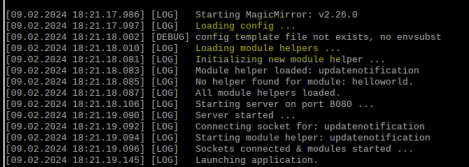
      @sdetweil This is true, but in the backend log, none of my modules say they were loaded, and never have. Just mentions loading config and loading module helpers.
      1359b8fd-32d2-4fbd-98e8-89ff78df43ca-image.png

      The clock & weather still work without showing they were loaded on the backend. (maybe this doesn’t matter since they don’t use a node_helper.js class).

      posted in Troubleshooting
      V
      vandy2424
    • RE: node_helper.js is not working?

      @sdetweil Hopefully this is what you were looking for here:

      jackson@raspberrypi:~ $ ps -ef | grep -i magic
      jackson   1781   806  0 08:21 ?        00:05:02 geany /home/jackson/Documents/MagicMirror/modules/MMM-Cocktails/node_helper.js
      jackson   6037  1698  0 18:17 pts/0    00:00:00 grep --color=auto -i magic
      
      posted in Troubleshooting
      V
      vandy2424
    • RE: node_helper.js is not working?

      @sdetweil it returned the same location:

      jackson@raspberrypi:~ $ find . -type f -name config.js
      ./Documents/MagicMirror/config/config.js
      
      posted in Troubleshooting
      V
      vandy2424
    • RE: node_helper.js is not working?

      @sdetweil I did this and exported a file out. I then went ahead and ran the MagicMirror for 2 minutes.

      Here is the output (same as before):

      [09.02.2024 17:44.28.817] [LOG]   Starting MagicMirror: v2.26.0
      [09.02.2024 17:44.28.835] [LOG]   Loading config ...
      [09.02.2024 17:44.28.841] [DEBUG] config template file not exists, no envsubst
      [09.02.2024 17:44.28.848] [LOG]   Loading module helpers ...
      [09.02.2024 17:44.28.905] [LOG]   Initializing new module helper ...
      [09.02.2024 17:44.28.907] [LOG]   Module helper loaded: updatenotification
      [09.02.2024 17:44.28.909] [LOG]   No helper found for module: helloworld.
      [09.02.2024 17:44.28.910] [LOG]   All module helpers loaded.
      [09.02.2024 17:44.28.928] [LOG]   Starting server on port 8080 ... 
      [09.02.2024 17:44.29.399] [LOG]   Server started ...
      [09.02.2024 17:44.29.402] [LOG]   Connecting socket for: updatenotification
      [09.02.2024 17:44.29.404] [LOG]   Starting module helper: updatenotification
      [09.02.2024 17:44.29.405] [LOG]   Sockets connected & modules started ...
      [09.02.2024 17:44.29.429] [LOG]   Launching application.
      Warning: vkCreateInstance: Found no drivers!
      Warning: vkCreateInstance failed with VK_ERROR_INCOMPATIBLE_DRIVER
          at CheckVkSuccessImpl (../../third_party/dawn/src/dawn/native/vulkan/VulkanError.cpp:88)
          at CreateVkInstance (../../third_party/dawn/src/dawn/native/vulkan/BackendVk.cpp:458)
          at Initialize (../../third_party/dawn/src/dawn/native/vulkan/BackendVk.cpp:344)
          at Create (../../third_party/dawn/src/dawn/native/vulkan/BackendVk.cpp:266)
          at operator() (../../third_party/dawn/src/dawn/native/vulkan/BackendVk.cpp:521)
      
      [09.02.2024 17:46.45.217] [LOG]   Shutting down server...
      [09.02.2024 17:46.45.219] [LOG]   Stopping module helper: updatenotification
      [09.02.2024 17:46.45.221] [LOG]   Node_helpers stopped ...
      
      posted in Troubleshooting
      V
      vandy2424
    • RE: node_helper.js is not working?

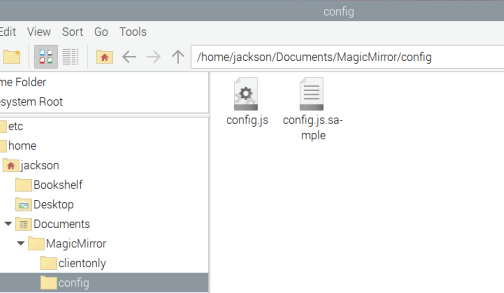
      @sdetweil yes here are the contents of the config folder:
      8b42c6b3-7b67-44b9-a377-e73b8ec503bd-image.png

      posted in Troubleshooting
      V
      vandy2424
    • RE: node_helper.js is not working?

      @MMRIZE Hey MMRize,

      Yeah I went ahead and setup the calendar module. The first thing I tried was running this module with the default config:

          module: "calendar",
          position: "top_left", // This can be any of the regions. Best results in left or right regions.
          config: {
            // The config property is optional.
            // If no config is set, an example calendar is shown.
            // See 'Configuration options' for more information.
          },
        },
      

      This returned loading… on the magic mirror. (I assumed based on the documentation it would at least show an example calendar).
      fd558aa7-bad8-4a27-a1e1-9a3d9ffa8353-image.png
      I then tried to add a very basic calendar in the config.js just to see if the result would change:

      module: "calendar",
            position: "top_left", // This can be any of the regions. Best results in left or right regions.
            config: {
              // The config property is optional.
              // If no config is set, an example calendar is shown.
              // See 'Configuration options' for more information.
              calendars: [
      					{
      						symbol: "calendar-check",
      						url: "https://www.calendarlabs.com/ical-calendar/ics/39/Canada_Holidays.ics"									
                },
              ],
            },
      

      And i still got the same result (Loading…).

      posted in Troubleshooting
      V
      vandy2424
    • RE: node_helper.js is not working?

      @sdetweil Hi Sam,

      I am unsure how else I am supposed to respond other than to say, this is the exact config that produced those backend/front end logs. If this is unusual, maybe something is broken here? I am not sure what “working” logs are supposed to look like, since it sounds like mine may be broken.

      To show proof, here are screenshots as I am unsure how else to provide feedback here.
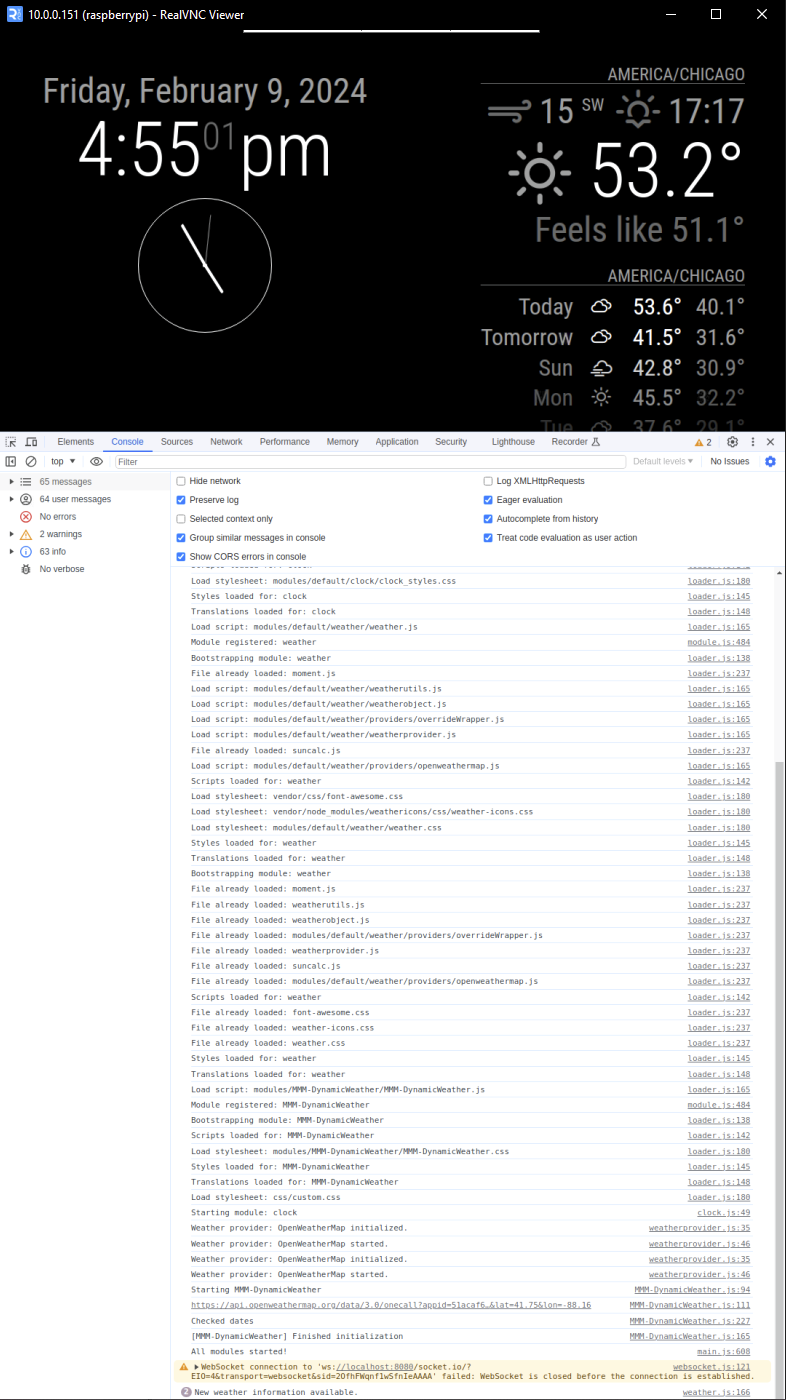
      (I pulled up the dev window as far as I could while still exposing working default modules). This output is the same as listed above:
      3ab5f282-9cb2-43b4-93bf-c62face3feb1-image.png

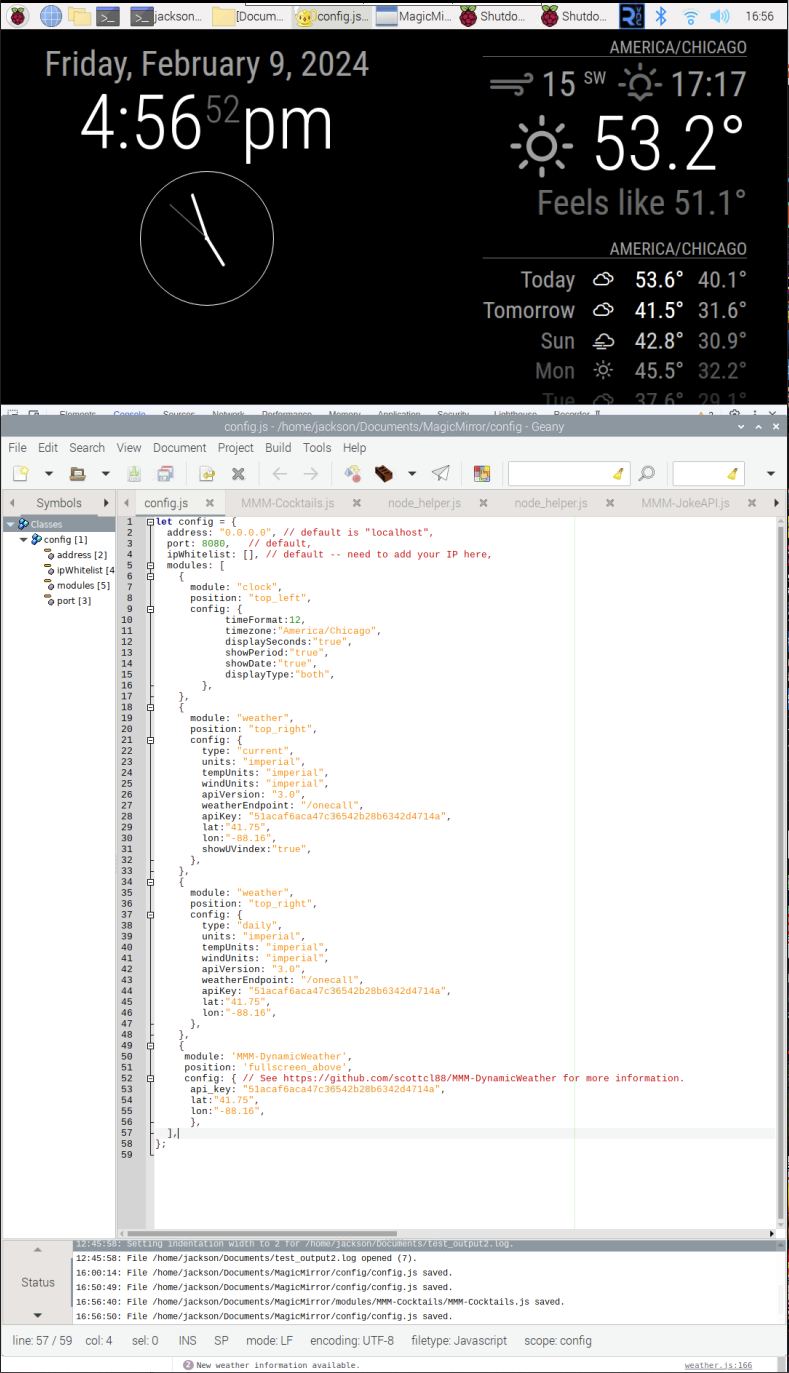
      I also did a CTRL-ALT-DELETE to allow me to access my text editor and pull up the MagicMirror/config.js file live while the magic mirror is still running. This is the exact config I posted previously:
      8f9bd632-1dc5-4147-ac28-ee83c8c5e6ee-image.png

      The front & backend logs remain completely the same as posted earlier. Hopefully I am not completely misunderstanding you here. Thanks for the help!

      posted in Troubleshooting
      V
      vandy2424
    • RE: node_helper.js is not working?

      @sdetweil Hi Sam, I am not sure what you mean by showing the logs from the backend and front end. I thought that is what I just showed you. (Terminal & dev console). You can see in the dev console, it loading clock, weather and MMM-DynamicWeather modules.

      Please let me know what I am not understanding here and I will get you those logs. Thanks!

      Here is the config.js file:

      let config = {
        address: "0.0.0.0",	// default is "localhost",
        port: 8080,		// default,
        ipWhitelist: [], // default -- need to add your IP here,
        modules: [
          {
            module: "clock",
            position: "top_left",
            config: {
                  timeFormat:12,
                  timezone:"America/Chicago",
                  displaySeconds:"true",
                  showPeriod:"true",
                  showDate:"true",
                  displayType:"both",
              },
          },
          {
            module: "weather",
            position: "top_right",
            config: {
              type: "current",
              units: "imperial",
              tempUnits: "imperial",
              windUnits: "imperial",
              apiVersion: "3.0",
              weatherEndpoint: "/onecall",
              apiKey: "KEY",
              lat:"50.75",
              lon:"-88.16",
              showUVindex:"true",
            },
          },
          {
            module: "weather",
            position: "top_right",
            config: {
              type: "daily",
              units: "imperial",
              tempUnits: "imperial",
              windUnits: "imperial",
              apiVersion: "3.0",
              weatherEndpoint: "/onecall",
              apiKey: "KEY",
              lat:"50.75",
              lon:"-88.16",
            },
          },
          {
           module: 'MMM-DynamicWeather',
           position: 'fullscreen_above',
           config: { // See https://github.com/scottcl88/MMM-DynamicWeather for more information.
            api_key: "KEY",
            lat:"50",
            lon:"-88.16",
            },
          },
        ],
      };


      Again this is just with the DynamicWeather module. I can add others but this simplifies.
      posted in Troubleshooting
      V
      vandy2424
    • RE: node_helper.js is not working?

      @MMRIZE Hello. To simplify this output, I am just enabling the default clock and weather module and MMM-DynamicWeather for these outputs. First is the dev console output. There is a Electron Security Warning but I think thats just a security notice. At the bottom, there is also another warning regarding the WebSocket.

      Dev-Console:

      main.js:589 Initializing MagicMirror².
      translator.js:122 Loading core translation file: translations/en.json
      VM4 sandbox_bundle:2 Electron Security Warning (Insecure Content-Security-Policy) This renderer process has either no Content Security
        Policy set or a policy with "unsafe-eval" enabled. This exposes users of
        this app to unnecessary security risks.
      
      For more information and help, consult
      https://electronjs.org/docs/tutorial/security.
      This warning will not show up
      once the app is packaged.
      warnAboutInsecureCSP @ VM4 sandbox_bundle:2
      translator.js:138 Loading core translation fallback file: translations/en.json
      loader.js:165 Load script: modules/default/clock/clock.js
      module.js:484 Module registered: clock
      loader.js:138 Bootstrapping module: clock
      loader.js:165 Load script: vendor/node_modules/moment/min/moment-with-locales.js
      loader.js:165 Load script: vendor/node_modules/moment-timezone/builds/moment-timezone-with-data.js
      loader.js:165 Load script: vendor/node_modules/suncalc/suncalc.js
      loader.js:142 Scripts loaded for: clock
      loader.js:180 Load stylesheet: modules/default/clock/clock_styles.css
      loader.js:145 Styles loaded for: clock
      loader.js:148 Translations loaded for: clock
      loader.js:165 Load script: modules/default/weather/weather.js
      module.js:484 Module registered: weather
      loader.js:138 Bootstrapping module: weather
      loader.js:237 File already loaded: moment.js
      loader.js:165 Load script: modules/default/weather/weatherutils.js
      loader.js:165 Load script: modules/default/weather/weatherobject.js
      loader.js:165 Load script: modules/default/weather/providers/overrideWrapper.js
      loader.js:165 Load script: modules/default/weather/weatherprovider.js
      loader.js:237 File already loaded: suncalc.js
      loader.js:165 Load script: modules/default/weather/providers/openweathermap.js
      loader.js:142 Scripts loaded for: weather
      loader.js:180 Load stylesheet: vendor/css/font-awesome.css
      loader.js:180 Load stylesheet: vendor/node_modules/weathericons/css/weather-icons.css
      loader.js:180 Load stylesheet: modules/default/weather/weather.css
      loader.js:145 Styles loaded for: weather
      loader.js:148 Translations loaded for: weather
      loader.js:138 Bootstrapping module: weather
      loader.js:237 File already loaded: moment.js
      loader.js:237 File already loaded: weatherutils.js
      loader.js:237 File already loaded: weatherobject.js
      loader.js:237 File already loaded: modules/default/weather/providers/overrideWrapper.js
      loader.js:237 File already loaded: weatherprovider.js
      loader.js:237 File already loaded: suncalc.js
      loader.js:237 File already loaded: modules/default/weather/providers/openweathermap.js
      loader.js:142 Scripts loaded for: weather
      loader.js:237 File already loaded: font-awesome.css
      loader.js:237 File already loaded: weather-icons.css
      loader.js:237 File already loaded: weather.css
      loader.js:145 Styles loaded for: weather
      loader.js:148 Translations loaded for: weather
      loader.js:165 Load script: modules/MMM-DynamicWeather/MMM-DynamicWeather.js
      module.js:484 Module registered: MMM-DynamicWeather
      loader.js:138 Bootstrapping module: MMM-DynamicWeather
      loader.js:142 Scripts loaded for: MMM-DynamicWeather
      loader.js:180 Load stylesheet: modules/MMM-DynamicWeather/MMM-DynamicWeather.css
      loader.js:145 Styles loaded for: MMM-DynamicWeather
      loader.js:148 Translations loaded for: MMM-DynamicWeather
      loader.js:180 Load stylesheet: css/custom.css
      clock.js:49 Starting module: clock
      weatherprovider.js:35 Weather provider: OpenWeatherMap initialized.
      weatherprovider.js:46 Weather provider: OpenWeatherMap started.
      weatherprovider.js:35 Weather provider: OpenWeatherMap initialized.
      weatherprovider.js:46 Weather provider: OpenWeatherMap started.
      MMM-DynamicWeather.js:94 Starting MMM-DynamicWeather
      MMM-DynamicWeather.js:111 https://api.openweathermap.org/data/3.0/onecall?appid=51acaf6aca47c36542b28b6342d4714a&lat=41.75&lon=-88.16
      MMM-DynamicWeather.js:227 Checked dates
      MMM-DynamicWeather.js:165 [MMM-DynamicWeather] Finished initialization
      main.js:608 All modules started!
      websocket.js:121 WebSocket connection to 'ws://localhost:8080/socket.io/?EIO=4&transport=websocket&sid=-Su8ujYWaq21RNXeAAAA' failed: WebSocket is closed before the connection is established.
      doClose @ websocket.js:121
      weather.js:166 New weather information available.
      weather.js:166 New weather information available.
      clock.js:67 [Violation] 'setTimeout' handler took 147ms
      

      For the terminal, everything is good besides a warning regarding vkCreateInstance drivers. I didn’t think to mention these warnings as my default modules are still working perfectly fine and the ones with node_helper.js that aren’t working, are still displaying their DIV on the MagicMirror (“…loading”).

      Terminal:

      
      [09.02.2024 12:30.48.203] [LOG]   Starting MagicMirror: v2.26.0
      [09.02.2024 12:30.48.214] [LOG]   Loading config ...
      [09.02.2024 12:30.48.220] [DEBUG] config template file not exists, no envsubst
      [09.02.2024 12:30.48.227] [LOG]   Loading module helpers ...
      [09.02.2024 12:30.48.283] [LOG]   Initializing new module helper ...
      [09.02.2024 12:30.48.285] [LOG]   Module helper loaded: updatenotification
      [09.02.2024 12:30.48.287] [LOG]   No helper found for module: helloworld.
      [09.02.2024 12:30.48.289] [LOG]   All module helpers loaded.
      [09.02.2024 12:30.48.307] [LOG]   Starting server on port 8080 ...
      [09.02.2024 12:30.48.778] [LOG]   Server started ...
      [09.02.2024 12:30.48.781] [LOG]   Connecting socket for: updatenotification
      [09.02.2024 12:30.48.783] [LOG]   Starting module helper: updatenotification
      [09.02.2024 12:30.48.784] [LOG]   Sockets connected & modules started ...
      [09.02.2024 12:30.48.808] [LOG]   Launching application.
      Warning: vkCreateInstance: Found no drivers!
      Warning: vkCreateInstance failed with VK_ERROR_INCOMPATIBLE_DRIVER
          at CheckVkSuccessImpl (../../third_party/dawn/src/dawn/native/vulkan/VulkanError.cpp:88)
          at CreateVkInstance (../../third_party/dawn/src/dawn/native/vulkan/BackendVk.cpp:458)
          at Initialize (../../third_party/dawn/src/dawn/native/vulkan/BackendVk.cpp:344)
          at Create (../../third_party/dawn/src/dawn/native/vulkan/BackendVk.cpp:266)
          at operator() (../../third_party/dawn/src/dawn/native/vulkan/BackendVk.cpp:521)
      

      Again my knowledge of js and web applications is very limited so these warnings may have something to do with this node_helper issue that I’m unaware of. Please let me know if there is any other information that is useful.

      Thanks!

      posted in Troubleshooting
      V
      vandy2424
    • RE: node_helper.js is not working?

      @sdetweil Hi Sam, thank you for the quick reply!

      MagicMirror version: v2.26.0
      NodeJs version: v20.11.0
      Electron version: 27.2.0

      If I do npm run server I do not get the messages.

      posted in Troubleshooting
      V
      vandy2424
    • 1
    • 2
    • 1 / 2