MagicMirror Forum
    • Recent
    • Tags
    • Unsolved
    • Solved
    • MagicMirror² Repository
    • Documentation
    • 3rd-Party-Modules
    • Donate
    • Discord
    • Register
    • Login
    1. Home
    2. wishmaster270
    3. Best
    A New Chapter for MagicMirror: The Community Takes the Lead
    Read the statement by Michael Teeuw here.
    Offline
    • Profile
    • Following 0
    • Followers 6
    • Topics 16
    • Posts 340
    • Groups 2

    Posts

    Recent Best Controversial
    • RE: which module to listen to the radio on my MM ?

      @rikko14 Hi,
      i wrote a module to play radio streams on the mirror. You can control it either via touch or notification. An autoplay feature is implemented as well. You do not need to display the module to get it active.

      MMM-MplayerRadio

      As there had been a lot of problems with mplayer the last weeks i strongly suggest to use vlc instead. The readme contains an example configuration on howto change to vlc.

      posted in Troubleshooting
      wishmaster270W
      wishmaster270
    • RE: Magic Mirror Module Development - Powershell embeded

      @nkc Hi,

      i think you can use my MMM-CommandToNotification module to call the script periodically and send it’s output as a notification.
      You then can use my MMM-ValuesByNotification module to display the value of the notification.

      posted in Development
      wishmaster270W
      wishmaster270
    • MMM-Temperature

      Description:

      This is a simple module which uses external scripts as data source to display the temperature and humidity of different sensors.
      As i use an HTU21 sensor a script to read the values is included already. There scripts to read data of DHT11, DHT22, BME280, DS18B20 included as of version 0.0.2.

      Download:

      MMM-Temperature
      [card:Tom-Hirschberger/MMM-Temperature]


      Version 0.0.10

      • added a wrapper script to call the Python scripts within a virtual environment
      • updated the instructions and default values to use the new wrapper script

      Version 0.0.9

      • added support for SHTC3 sensors

      Version 0.0.8

      • use spawnSync instead of execSync to call the scripts now. execSync caused “Error: write EFAULT” exceptions so this change was necessary

      Version 0.0.7

      • The values send via notification now can be parsed if they are in JSON version 5 format, too

      Version 0.0.6

      • the bme280 scripts now supports setting the I2C address via command line

      Version 0.0.5

      • additional values like wind speed, uv and rain can be displayed now
        
      • modified some of the examples to get a more reliable wifi connection on the esp32 boards and added a new example
        

      Version 0.0.4

      This new version 0.0.4 provides the following features:

      • the values of sensors no can be updated in a single notification which has an json structure as payload. if the keys “temperature_c”, “temperature_f” or “humidity” are present the values get updated. if either “temperature_c” or “temperature_f” is missing but the other one is present the missing value is calculated automatically.

      Version 0.0.3

      This new version 0.0.3 provides the following features:

      • it is now possible to specify a useValueCnt for each sensor. If the sensor provides data less periodically than the updateInterval (i.e. because the sensor sends the data via MQTT less frequently) the data can be used multiple intervals before it gets invalidated and “na” will be displayed.
      • added an example of howto provide data of an DHT11 (or DHT21, DHT22) sensor connected to an ESP8266 board which uses MQTT and deep sleep.
      • added an example of howto provide data of an DHT11 (or DHT21, DHT22) sensor connected to an ESP8266 board which uses plain tcp

      Version 0.0.2

      This new version provides the following improvements:

      • The values of sensors now can be updated via notification now.
      • It is possible to hide the temperature and humidity section for either all sensors or specific ones.
      • There are now scripts included to read values of DHT11, DHT22, BME280, HTU21 or DS18B20 connected to the Raspberry Pi.
      • There are different examples of howto read values of sensors connected to micro controllers via plain TCP or MQTT (with help of the MMM-MQTTbridge module).
      • As every wrapper now gets specific css classes assign you can customize the colors more easy

      Version 0.0.1

      The initial release provides the following features

      • read temperature of sensors by calling scripts with arguments
      • multiple sensors with different data scripts can be added
      • sensors can be displayed with or without name
      • an example script to read the data of an HTU21 sensor attached to the I2C bus of the raspberry is included and will be used as default data source
      • an example of how to connect an HTU21 sensor to an ESP32 micro controller with build-in wifi is included also

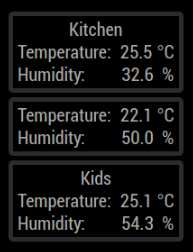
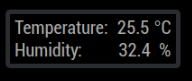
      Screenshots

      posted in Utilities
      wishmaster270W
      wishmaster270
    • RE: MMM-RadioDE will not play

      Hi,

      great if it works. You may want to add an “showStations: false,” to your config. The yellow radio symbol then will be displayed instead of showing the station logos. If you want the module to be invisible you can remove the position option. The module will be functional even if it is not displayed.

      posted in Troubleshooting
      wishmaster270W
      wishmaster270
    • RE: electron-rebuild problems with MagicMirror 2.22.0

      @KristjanESPERANTO
      The problem with installing it in the module directory is that we need to compile the library against the electron version installed in the MagicMirror project.
      If electron-rebuild is installed in the module directory it might fail to detect the right electron version (which was the cause of the rebuild problems in the past).
      So the right way is to install electron-rebuild in the same project as electron and call it from there.

      It might be worth to think about adding it as a dependency in the main project.

      posted in Troubleshooting
      wishmaster270W
      wishmaster270
    • RE: Online Radio

      @tanvir586 Hi,
      i developed MMM-MplayerRadio a couple of years ago. It still should be functional.

      posted in Entertainment
      wishmaster270W
      wishmaster270
    • [ MMM-LEDStripControl ] - Control a LED strip with optional Pong game support

      Description:

      This module controls a led strip (in my case a WS2801 strip with 160 leds or an WS2813 strip with 300 leds) with notifications that are converted to MQTT messages with help of the module MMM-MQTTbridge of sergge1 ([https://github.com/sergge1/MMM-MQTTbridge]). The led strip will be controlled with a Python based script that runs on a second Raspberry Pi which is connected to the network and registers to the MQTT topics. The different configuration options of the led strip are grouped into element groups. It is possible to hide unneeded groups. The current active element is marked with an red square. The active element can be changed either by touch or notification. Also the values can be changed by notification or touch. The touch icons provide two different steppings for up and down.

      The Python script supports the pong game. If the second button is pressed within a configured interval after the first one the pong mode starts. An running light will be initiated and the two players need to press their button in the moment the running light reaches their end of the strip. If the players hit the button to early or late the other player gets an hit. After an configurable amount of games the final result will be displayed and the strip changes back to normal mode. Each time the running light turns around it gets faster.
      This script is provided within the following repository: PythonLedControl. It currently supports all WS2801 and WS281X strips.

      Download:

      MMM-LEDStripControl
      [card:Tom-Hirschberger/MMM-LEDStripControl]


      Version 0.0.3

      • prefixed all CSS classes with the module name
      • fixed all issues reported by the new automatic module scanning script developed by @KristjanESPERAN

      Version 0.0.2

      • Multi-Instance-support
      • Fixed a issue which caused config values to be send in a wrong format
      • added examples of howto control led strips with ESP8266 or ESP32 micro controllers

      Version 0.0.1

      The initial release provides the following features

      • All elements are included to change the output state, color and pong game options of an led strip either with notifications or via touch elements
      • The to be displayed elements can be configured
      • The initial values, the steppings and the minimum values and maximum values can be configured
      • The module will react to configuration changes of the led strip
      • The layout is based on flexbox and can be changed easy in CSS

      Screenshots

      posted in Utilities
      wishmaster270W
      wishmaster270
    • RE: Motion Sensor/PIR

      Hi,

      i wrote an complete example recently and added it to my module:
      HC-SR501 PIR Example

      I translated it to german language as well: HC-SR501 PIR Beispiel

      posted in Troubleshooting
      wishmaster270W
      wishmaster270
    • RE: electron-rebuild problems with MagicMirror 2.22.0

      @KristjanESPERANTO

      I have a docker installation running for development here on my notebook.
      Everytime a module needs “npm install” I exec to the container and run the command in the container cause there will be called the correct npm and node version in the container and not the ones I currently use on my notebook.
      In this case the directory structure is the same as with a locally installed MagicMirror and the postinstall script will work as excepted.

      posted in Troubleshooting
      wishmaster270W
      wishmaster270
    • RE: Online Radio

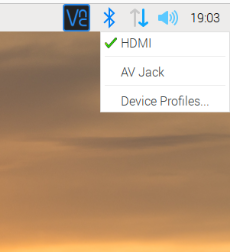
      @wishmaster270 If you do a right click on the speaker symbol you can decide where to output the sound:

      speaker.png

      posted in Entertainment
      wishmaster270W
      wishmaster270
    • RE: MMM-NINA

      @jalibu Hi, danke für das Update. Klappt bei mir super.
      Kleine Anmerkung: In der Readme ist ein Tippfehler: “downgradeLhpServerity” muss “downgradeLhpSeverity” sein.

      posted in Utilities
      wishmaster270W
      wishmaster270
    • RE: MagicMirror Version

      @kusselin
      Hi,

      you can jump to your MagicMirror directory and run:

      git log | head -n 10 | grep Release
      
      posted in Troubleshooting
      wishmaster270W
      wishmaster270
    • RE: PSA: DarkSky shuts down Jan 1st. expect broken weather

      @karsten13
      Hi,
      and done: Issue

      posted in Troubleshooting
      wishmaster270W
      wishmaster270
    • RE: Online Radio

      @tanvir586 Hi, just checked the website and found the “real” url of the radio.
      The url “http://95.154.250.9:9980” works fine with my vlc. As long as they do not change their ip it will be functional.

      If it stops working you can go to https://almubarakradio.com/ hit the “Tune in live” button and copy the url of the browser window.

      Edit:
      Found a better way. You can use the url “https://relay.emasjidlive.uk/almubarakradio” which is the url used by the player on page “https://emasjidlive.co.uk/listen/almubarakradio”

      posted in Entertainment
      wishmaster270W
      wishmaster270
    • RE: BME280 sensor with esp 8266

      Hi,

      i integrated some examples into my MMM-Temperature module (GitHub). There are serveral ones using an BME280 sensor connected to an ESP8266 or ESP32 sending the data either via plain TCP or MQTT.

      posted in Utilities
      wishmaster270W
      wishmaster270
    • RE: MMM-OpenWeatherForecast

      @sdetweil In default the module calls the Api every 10 minutes.

      posted in Troubleshooting
      wishmaster270W
      wishmaster270
    • RE: MMM-Fritz-Box-Callmonitor: Notification formatting

      @coernel
      @Jan-0

      Additional to the wrong rename the fritz_access.py had the mentioned wrong urllib2 imports. I fixed the python script and the import of the PythonShell module in node_helper.js.

      I created a pull request a few seconds ago.

      posted in Troubleshooting
      wishmaster270W
      wishmaster270
    • RE: Online Radio

      @tanvir586
      I release a new version of MMM-MplayerRadio (0.0.10) a few minutes ago which contains a new script called “streamlinkWrapper.bash” script. This script uses the streamlink tool to wrap the stream and restarts it if the connection gets lost.
      You will find a example configuration in the examples directory for streamlinkWrapper which contains the configuration needed for your case.

      Make sure to install streamlink:

      sudo apt -y update && sudo apt -y install streamlink
      
      posted in Entertainment
      wishmaster270W
      wishmaster270
    • RE: [MMM-ValuesByNotification] Display the payloads of notifications with titles and icons

      @Cr4z33
      Should be no problem:

      MMM-MQTTbridge/dict/mqttDictionary.js:

      var mqttHook = [
        {
          mqttTopic: "zigbee2mqtt/BTicino F20T60A",
          mqttPayload: [
            {
              payloadValue: "",
              mqttNotiCmd: ["POWERMETER"],
              mqttPayload: ""
            },
          ],
        },
      ];
      
      var mqttNotiCommands = [
        {
          commandId: "POWERMETER",
          notiID: "POWERMETER_VALUES",
        },
      ];
      
      module.exports = { mqttHook,  mqttNotiCommands};
      

      config.js:

      		{
      			module: "MMM-ValuesByNotification",
      			position: "top_left",
      			config: {
                                      updateInterval: 60,
                                      reuseCount: 5,
      				groups: [
      					{
      						items: [
      							{
      								notification: "POWERMETER_VALUES",
      								itemTitle: "Power",
      								values: [
      									{
      										valueUnit: "W",
      										jsonpath: "power",
      									},
      								]
      							},
      						]
      					},
      				]
      			},
      		},
      

      Will look like:
      power.png

      You may want to configure the updateInterval and/or reuseCount to your needs.

      posted in Utilities
      wishmaster270W
      wishmaster270
    • RE: Display different Roomtemperature on MagicMirror

      @Xilef
      Hi,
      thats great news.
      The screenshot shows that you setup the ESP32 and the sensor correctly.
      The main problem is that the ESP now displays a webpage.
      There are two possible ways now. Either you embed the webpage (as it is) into the mirror with a module like MMM-EmbedURL or to get the ESP to display the data machine readable.
      Maybe the sketch you flashed to the ESP already contains a way to read the data in a different format? Which one did you use?

      Edit: I think it is this one, am i right? Then there is no easy way.
      I think i can provide a sketch that is more “mirror friendly” but you will need to set a static IP for the ESP. Is this ok for you?

      You will need to change to your needs:

      • ##ADD_WIFI_SSID_HERE
      • ##ADD_WIFI_PASSWORD_HERE
      • IPAddress local_IP(192, 168, 0, 2);
      • IPAddress gateway(192, 168, 0, 1);
      • IPAddress subnet(255, 255, 255, 0);
      • IPAddress primaryDNS(192, 168, 0, 1);
      #include <WiFi.h>
      #include <Wire.h>
      #include <Adafruit_Sensor.h>
      #include <Adafruit_BME280.h>
      
      const char* ssid     = "##ADD_WIFI_SSID_HERE";
      const char* password = "##ADD_WIFI_PASSWORD_HERE";
      
      //ENTER STATIC IP OF THE ESP32 BOARD HERE
      IPAddress local_IP(192, 168, 0, 2);
      IPAddress gateway(192, 168, 0, 1);
      IPAddress subnet(255, 255, 255, 0);
      IPAddress primaryDNS(192, 168, 0, 1);
      IPAddress secondaryDNS(8, 8, 8, 8);
      
      Adafruit_BME280 bme;
      
      WiFiServer server(80);
      
      void setup()
      {
        Wire.begin();
        Serial.begin(115200);
      
        if (!WiFi.config(local_IP, gateway, subnet, primaryDNS, secondaryDNS)) {
          Serial.println("STA Failed to configure");
        }
      
        Serial.print("Connecting to ");
        Serial.println(ssid);
      
        WiFi.begin(ssid, password);
      
        while (WiFi.status() != WL_CONNECTED) {
          delay(500);
          Serial.print(".");
        }
      
        Serial.println("");
        Serial.println("WiFi connected!");
        Serial.print("IP address: ");
        Serial.println(WiFi.localIP());
        Serial.print("ESP Mac Address: ");
        Serial.println(WiFi.macAddress());
        Serial.print("Subnet Mask: ");
        Serial.println(WiFi.subnetMask());
        Serial.print("Gateway IP: ");
        Serial.println(WiFi.gatewayIP());
        Serial.print("DNS: ");
        Serial.println(WiFi.dnsIP());
      
        if (!bme.begin(0x76);) {
          Serial.println("Couldn't find sensor!");
          while (1);
        }
      
        server.begin();
      }
      
      void loop()
      {
        float temp = bme.readTemperature();
        float tempf = temp * 1.8 + 32;
        float rel_hum = bme.readHumidity();
      
        WiFiClient client = server.available();
        if (client) {
          Serial.println("New Client."); 
          client.println("{");
          client.print("  \"temperature_c\": ");
          client.print(temp);
          client.println(",");
          client.print("  \"temperature_f\": ");
          client.print(tempf);
          client.println(",");
          client.print("  \"humidity\": ");
          client.print(rel_hum);
          client.println(",");
          client.println("  \"error\": false");
          client.println("}");
          client.stop();
          Serial.println("Client disconnected.");
          Serial.println("");
        }
        delay(100);
      }
      

      You can use netcat to fetch the data:

      /bin/nc -w3 THE_IP_OF_THE_ESP 80
      

      And the result will be something like:

      {
         "humidity": 32.61236572265625,
         "temperature_c": 25.50150878906249, 
         "temperature_f": 77.9027158203125, 
         "error": false
      }
      

      This kind of JSON object then can be read by my MMM-Temperature module.

      posted in General Discussion
      wishmaster270W
      wishmaster270
    • 1
    • 2
    • 3
    • 4
    • 2 / 4