@harney Hi, I recently had the same problem and wrote a module to exactly do this job (MMM-TouchButton).
 W
Offline
W
Offline
A New Chapter for MagicMirror: The Community Takes the Lead
Read the statement by Michael Teeuw here.
Read the statement by Michael Teeuw here.
Posts
-
RE: Stop mm from a touch button
-
RE: MMM-Fritz-Box-Callmonitor: Notification formatting
@sdetweil
I should have checked that. Thank you for the link.
With the current develop branch the formatting works as expected, too.Edit: If the comment is removed of the translation files the translations work as well and the right title is displayed
-
RE: [MMM-ValuesByNotification] Display the payloads of notifications with titles and icons
@Cr4z33
Hi,
the short answer: Yes it can, maaayyyybee?
Does your powermeter send the data via MQTT already?
Do you have the MMM-MQTTbridge module configured to connect to your MQTT broker, subscribe for the topic(s) and send the data via notification?
How does the data look like? Is it plain text or is it a JSON object?
If it is JSON how is the data structured and which values do you want to display? -
RE: Display different Roomtemperature on MagicMirror
@sdetweil Hi Sam, i was to slow with editing my post. The Sketch i provided does exactly that.
-
RE: MMM-Fritz-Box-Callmonitor: Notification formatting
@coernel
Hi,
as i can see this fork https://github.com/drtorchwood/MMM-FRITZ-Box-Callmonitor-py3/tree/code_update_2023 contains all changes needed.
But you will need to either use the current development version of MagicMirror or wait for the next release which i think is planned for 2022-04-01 to get the alerts formatted correctly. -
RE: [MMM-ValuesByNotification] Display the payloads of notifications with titles and icons
@Cr4z33
No problem.
Simply add.vbn .groupWrapper { border-style: none; padding: 0px; }to your custom.css
Ps.: Try to never ever edit any files in the module directory (except mentioned in the documentation) as you will get problems with updates in the future otherwise!
-
RE: apt upgrade question
@ankonaskiff17 Hi,
it’s basically the same but not exactly…
apt full-upgradeupgrades all packages and removes old versions of the packagesapt dist-upgradeupgrades all packages and removes old versions but it tries to figure out which upgrade is more “worthful” if there are occur conflicts cause of the upgradesapt updateupdates the locally saved list of available packages by downloading the current package list of all configured repositoriesaptis the new replacement command ofapt-get
-
RE: MMM-PIR-Sensor-Lite modification
@Freddy_boy
Hi, my MMM-Screen-Powersave-Notification module can do this job. It has ahideInsteadShutoffoption.
You need my MMM-GPIO-Notifications in addition.
I wrote a Guide of how to configure the modules. -
RE: [MMM-ValuesByNotification] Display the payloads of notifications with titles and icons
@Cr4z33
If you still want to move the content to the left you can try something like the following in your custom.css:.vbn .groupWrapper { border-style: none; padding: 0px; margin-left: 20px; } .vbn .groupsWrapper, .vbn .groupWrapper, .vbn .itemsWrapper, .vbn .valueWrapper { justify-content: left; align-items: unset; } -
RE: MagicMirror Module for running a shell script
@Human99 Hi,
you can use my MMM-TouchButton module for this job.
-
RE: Display image based on state or time
@chimera Hi, you may be able to use my MMM-ValuesByNotification for this job.
It is a little hack but i tested it and it seems to work.The basic idea of the module is to display values send by notifications of other modules
BUT
the module has the ability to display a default value (naValue) if no value has been send by any other module. It has abilities to display icons instead the value and change the icons based on thresholds (conditions). In combination with the support to define functions to format the values before the check of the conditions it will be possible to get the current time:{ module: "MMM-ValuesByNotification", position: "top_left", header: "Energy", config: { updateInterval: 60, valuePositions: "i", valueNaPositions: "i", itemPositions: "e", groupPositions: "e", formatNaValue: true, transformerFunctions: { naToImgIdent: (value) => { let curHour = new Date().getHours(); if ((curHour >= 0) && (curHour <= 6)){ //From 0 to 6 o clock return "a" } else if ((curHour >= 7) && (curHour <= 12)) { //From 7 to 12 o clock return "b" } else if ((curHour >= 13) && (curHour <= 18)) { //From 13 to 18 o clock return "c" } else { //From 19 to 23 o clock return "d" } } }, groups: [ { items: [ { notification: "ICON_DUMMY_ABC", valueImgIcon: "modules/MMM-ValuesByNotification/icons/tom.jpg", values: [ { valueTransformers: ["naToImgIdent"], thresholds: [ { type: "eq", value: "a", valueImgIcon: "modules/MMM-ValuesByNotification/icons/tom.jpg", }, { type: "eq", value: "b", valueImgIcon: "modules/MMM-ValuesByNotification/icons/tom2.jpg", }, { type: "eq", value: "c", valueImgIcon: "modules/MMM-ValuesByNotification/icons/tom.jpg", }, { type: "eq", value: "d", valueImgIcon: "modules/MMM-ValuesByNotification/icons/tom2.jpg", }, ] }, ] }, ] }, ] }, },Edit:
I should have read your question in detail first :-)
If you can provide the state via MQTT already you can for sure use this module. You will need MMM-MQTTbridge to send the value as payload of a notification. Check for the notification in MMM-ValuesByNotification and display the icon you like. -
RE: Using MMM-Widget for images
@N6NG Hi,
I do not know the MMM-Widget module but you could use my MMM-EmbedURL for this job. Simply set the “embedElementType” to “img”.
The config will look something like:
{ module: "MMM-MMM-EmbedURL", position: "top_center", header: "Embed-URL", config: { updateInterval: 120, embedElementType: "img", embed: [ "https://www.hamqsl.com/solarmuf.php" ] }, }, -
RE: Request To Modify MMM-json
@sifuhall Hi,
I think it might be already possible with my MMM-ValuesByNotification module.
If you need a module to fetch the data you can use a curl command with my MMM-CommandToNotification.
If you can send the data via MQTT you can use MMM-MQTTbridge.
-
RE: MMM-Temperature uncaught exception...
i did some more investigation today and think i found a solution.
Although the exception looks different i think the problem is theexecSynccommand.
The only way i was able to fix it is to usespawnSync.But i can not say where or why the problem happens.
I tried different node versions (latest 16, 18, 20) and different electron versions (25.3.0, 25.3.2 and 25.4.0) withexecSync.I will release a new version of
MMM-Temperaturetoday which usesspawnSyncinstead ofexecSync. -
RE: [MMM-Screen-Powersave-Notification] A module which (de)activates the screen based on delay and notifications
I did a lot of work to the module the last days. Now modules can be hidden / shown instead of turning off/on the display. Also a countdown can be displayed and the delay can be set by active profile (MMM-ProfileSwitcher)
-
RE: MMM-DynamicWeather Failed getting api: 401
@JohnGalt
Hi,this module uses the old OpenWeater Map Api in version 2.5 to get the current weather.
This version of the Api stopped working recently.
The module needs to be migrated to the new version 3 Api.
As the data is returned in nearly the same format as before it might be enough to change the version in the hard coded Url of 2.5 to 3.You will also need to get a new Api key for the new version. You will need to provide credit card information but 1000 calls a day a free.
-
RE: Replacing Radar Sensing module (RCWL-0516) in place of PIR Sensor
@Rags Hi,
I use this type of sensor for motion detection. Currently not connect to the mirror directly but I used it for years as PIR replacement.
It should work out-of-the-box with any PIR module. -
[MMM-ValuesByNotification] Display the payloads of notifications with titles and icons
Description:
Need a MagicMirror² module which is able to display information which is send by a other module like MMM-MQTTbridge or MMM-CommandToNotification?
The information is provided as a simple message or as an JSON-Object?
You want to re-format the message before displaying it or want to select single values within the JSON-Object?
You need more than one instance and do want to style the instances different?
Do you want to style the elements or change displayed icons based on thresholds?
Do you want some elements to only be visible if a certain profile is active?Then this is the module you need!
BUT i think i created a monster. The configuration can be very tricky!
Screenshots:
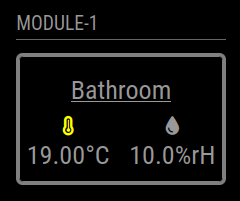
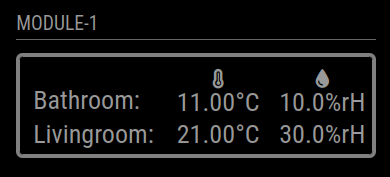
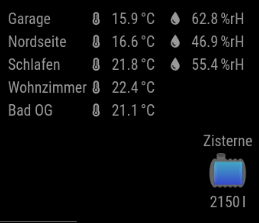
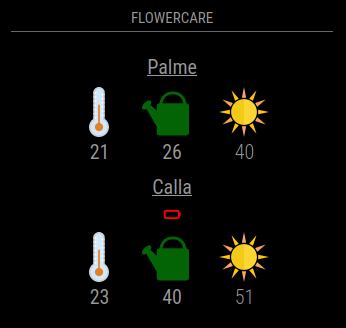
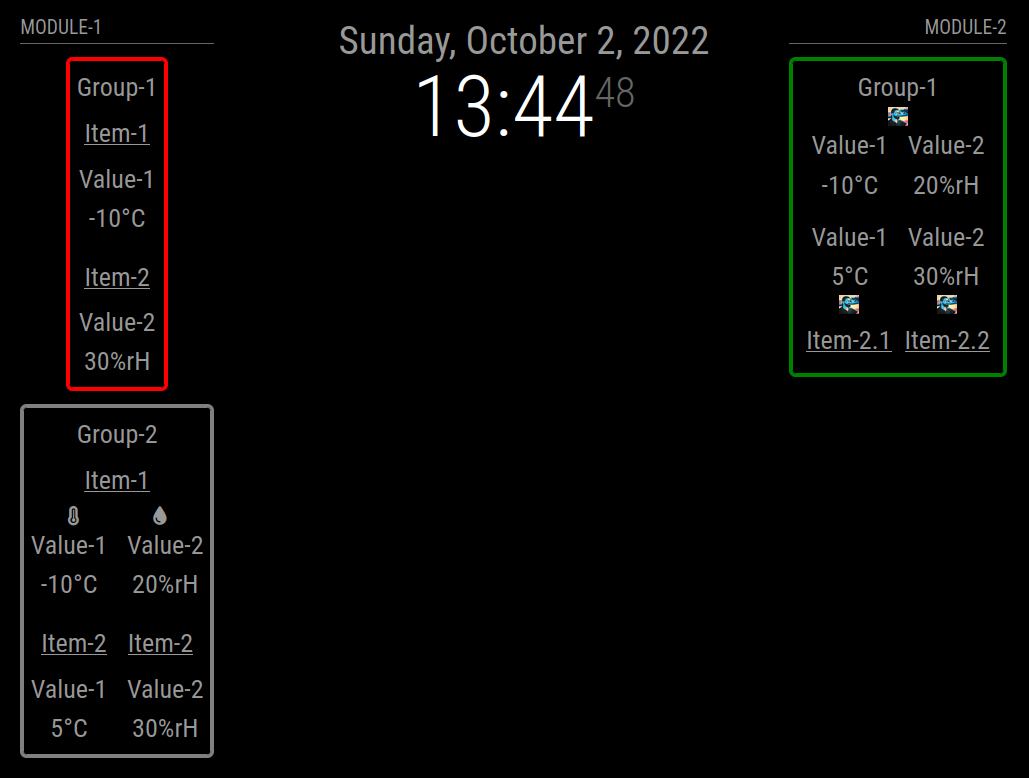
Download:
Download
[card:Tom-Hirschberger/MMM-ValuesByNotification]
Version 0.1.6
- bumped version of jsonpath-plus library to 10.3.0
Version 0.1.5
- bumped version of jsonpath-plus library to 10.1.0
Version 0.1.4
- it is possible to set the
reuseCounton group level now
Version 0.1.3
- added a postinstall script which creates a copy of the imported JSONPath library cause MagicMirror only imports files with ending
jsand notcjsto fix JSONPath
Version 0.1.2
- bumped jsonpath-plus library to version 10.0.1
- do not log every received notification anymore
- be more verbose if debug is enabled and the value format fails
Version 0.1.1
- Reverted the jsonpath-plus dependency upgrade (used version is 5.1.0 now) cause version 7.2.0 only worked with the newest MagicMirror version (2.24.0)
- fixed a bug which caused empty values to be converted to html and causing a exception in this process
- introduce a
debugconfig flag which causes some more information being printed to console if enabled
Version 0.1.0
- Each time a value is reused the values html elements get two classes added. The one configured with the new config option
reusedClass(default: “reused”) and the config option prefixed by a “-” and the count of reuses. - Updated the jsonpath-plus dependency to version 7.2.0. As this required a change to the import of the module this is a breaking change.
Version 0.0.10
- Introducing a feature to define own functions to transform the values (
valueTransformers). Added a example to values documentation - Changed the way titles, values and units are converted the html elements
- Added a new option called
unitSpaceto prefix the unit with a non-breakable space
Special thanks to @BKeyport for contribution
Version 0.0.9
- fixed a bug which caused selected JSON values with value
0being interpreted as not existing and replaced bynaValue
Version 0.0.8
- fixed a bug which caused values not being formatted if values before format are not of type String
- fixed a bug which caused newline replacement called even if no
valueFormatwas set
Version 0.0.7
- added new option
valueNaPositionswhich defines the positions of title, value, unit and icon of the value elements ifnaValueis used - added support to override
valuePositionsby threshold configurations (will overridevalueNaPositions, too!)
Version 0.0.6
- only the first element of a jsonpath result is used now
- if html is added as value which contains more than one html element they are wrapped in a
spannow
Version 0.0.5
- added support of Iconify icons
- all CSS definitions are now prefixed with the modules main class (MMM-ValuesByNotification)
Version 0.0.4
- fixed handling of new line characters in notifications; new lines will be replaced now before handling the values (default is a single space, see newlineReplacement option)
- fixed classes not bubbling up correctly
- added a flowercare example
Version 0.0.3
- if searching the value with “jsonpath” fails the “naValue” will be set now
- added a new option “formatNaValue” which controls if the naValue should be formatted as the regular are
Version 0.0.2
- Only classes which are added by thresholds are now set to higher (wrapper) elements if “letClassesBubbleUp” is set to “true”
Version 0.0.1
- Display values received as payload of notifications either as String or JSON Object
- Select single values with Jsonpath within the JSON objects
- Re-format the values with javascript functions (see valueFormat option)
- Group the values in items and groups and add titles and/or icons to the wrappers
- Re-order the elements in the wrappers based on position definition strings
- Filter elements based on the current active profile (MMM-ProfileSwitcher)
- Add classes or change icons based on thresholds reached by the values
-
RE: MMM-EmbedURL with MMM-Pages - Website reload....
@sdetweil
Hi Sam,you are right. But i do not want the content to be fixed as some users want the content to be recreated after the configured interval.
I just released a new version 0.0.8 of the module which introduces a
updateDomOnShowoption. If the option is set tofalsethe module uses the old html elements after a resume. Maybe this fixes the issue.