Hm, wunderground provides hurricane data. That should not be too complicated on first sight.
A New Chapter for MagicMirror: The Community Takes the Lead
Read the statement by Michael Teeuw here.
Read the statement by Michael Teeuw here.
Y
Offline
Posts
-
RE: Hurricane status?
-
RE: raspberry-pi alternatives
That kind of depends what you intend to do. Basically you can use every box (spare laptop, full workstation, small devices like raspberry, …) running Windows, Linux or MacOS.
However the raspberry is strong enough for most users, so I’m curious why you are asking for a stronger alternative.
Don’t be to anxious about Linux, once you setup your magicmirror you don’t have to twiddle around with Linux all day long. -
MMM-RNV
Description:
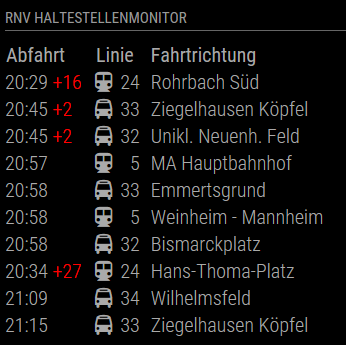
It monitors a given station in the RNV traffic network and shows the 10 upcoming departures with destination, type and delay. It also shows additional information if provided by the vendor.
Screenshots:
Download:
[card:yawnsde/MMM-RNV]
Version 1.0.0
- initial release
Version 1.1.0
- some more error handling
- added some tweaks in case the start time is after midnight, then the parsing failed
- added the alert ticker if some alert is present
- updated the readme
- removed odd default value for stationID from the module
-
RE: Modul Plug in RNV Abfrage
@Guschdl
Hi, glad you like it. Please let me know if anything should be changed.I updated the module.
- some more error handling
- added some tweaks in case the start time is after midnight, then the parsing failed
- added the alert ticker if some alert is present
- updated the readme
- removed odd default value for stationID from the module
Please run a “git pull” inside the MMM-RNV directory to receive the update. Please update your config file in case you left out the stationID.
Maybe @paviro or another moderator could mark this as resolved?
-
RE: Modul Plug in RNV Abfrage
@Guschdl
All right, I’m almost done. The module will need some tweaking and some cleanup, but you can use it. I will provide some installation and configuration instructions this evening (my wife is working long this evening :D ). Feel free to provide feedback and improvements.[card:yawnsde/MMM-RNV]
-
RE: Where to get (cheap) acrylic mirror from in Germany
@Steff
No need to apologize, this is just a fun thing, we all have our real live and more important stuff to do.
Did they ship the mirror or did you have to pick it up your self? -
RE: MMM-Temperature/Humidity Module (DHT11, DHT22 and AM2302 sensors.)
Right. I have the 4 pin version and this requires a resistor
-
RE: MMM-Temperature/Humidity Module (DHT11, DHT22 and AM2302 sensors.)
@psk
That depends on the sensor you buy. If you use a sensor with 4 pins you need the resistor. If you use the sensor with 3 pins mounted to a circuit board you don’t need the resistor. -
RE: Modul Plug in RNV Abfrage
Ok, understood. I don’t know if I find the time tomorrow. Maybe I have to wait until Wednesday to continue with the module. I keep you posted
-
RE: Error found: Error: Module version mismatch. Expected 50, got 46.
please run
npm list, which electron version are you running?If it is 1.4 then please run
npm rebuild --runtime=electron --target=1.4.0 --disturl=https://atom.io/download/atom-shell --build-from-source -
RE: Error found: Error: Module version mismatch. Expected 50, got 46.
Open a terminal, change into the MMM-Button folder and run this:
npm rebuild --runtime=electron --target=1.3.4 --disturl=https://atom.io/download/atom-shell --abi=50 -
RE: Modul Plug in RNV Abfrage
The vendor provided an api-key really fast and sending queries to their server is somehow simple. To go on I need a more detailed description of what you want to see on your mirror.
-
RE: Refresh Hello World module
Hi,
simplest way is to create a new module. So you don’t run into update problems in the future if someone changes the original hello world module.
Copy the whole helloworld folder from modules/default/ to modules/ and rename it to something different, lets say “mmm-iframe”.
- Rename the folder itself to
mmm-iframe - Rename the
helloworld.jsfile tommm-iframe.js
Then overwrite the content of
mmm-iframe.jswith this:/* global Module */ /* Magic Mirror * Module: mmm-iframe * * By Michael Teeuw http://michaelteeuw.nl * MIT Licensed. */ Module.register("mmm-iframe",{ // Default module config. defaults: { text: "Hello World!", animationSpeed: 1000, }, start: function() { Log.info('Starting module: ' + this.name); var self = this; setInterval(function() { self.updateDom(); }, this.config.animationSpeed); }, // Override dom generator. getDom: function() { var wrapper = document.createElement("div"); wrapper.innerHTML = this.config.text; return wrapper; } });- Now update your config file and replace the helloworld entry to load the mmm-iframe module instead.
I did not test this, I don’t have a magicmirror available currently, but this should get you going.
- Rename the folder itself to
-
RE: Black screen for copy of hellowold module
So you created a copy of the helloworld module and moved it to modules/Titus?
Then you renamed helloworld.js to Titus.js?
Did you modify Titus.js and changed this line
javascript Module.register("helloworld",{
to
javascript Module.register("Titus",{
to tell MagicMirror there is a new module called Titus? -
RE: Medos Bathroom Mirror
Good job. Very detailed description and the end result is very nice!
-
RE: MMM-Tube-Status (London Underground)
@djbenny07
enter the MMM-Tube-Status folder and rungit pull, that should pull all changes from github
If you run the clone command again it will tell you the target directory already exists -
RE: Trouble changing to 12 hour time and to Fahrenheit.
Looks fine to me except for the last line. The ’ ’ around undefined are not the right ones. But that could be a copy and paste problem. I don’t have a computer with MagicMirror currently, so I can’t test your config file right now.