cd ~/MagicMirror/modules/MMM-GoogleAssistant
git pull
Y
Offline
A New Chapter for MagicMirror: The Community Takes the Lead
Read the statement by Michael Teeuw here.
Read the statement by Michael Teeuw here.
Posts
-
RE: MMM-GoogleAssistant keeps saying "Update Available"
-
RE: Help for my fisrt MagicMirror
@greda
Complete Setup Tutorial: https://forum.magicmirror.builders/topic/236/complete-setup-tutorial
Comprehensive Tutorial how to modify the configuration file: https://forum.magicmirror.builders/topic/4528/how-to-create-a-working-config-for-absolute-beginners
Comprehensive Tutorial how to add more modules for additional features: https://forum.magicmirror.builders/topic/4231/how-to-add-modules-for-absolute-beginners -
RE: Selling Magic Mirrors!
henry: Stop posting your advertisement all over the forum, please stick with your one post.
-
RE: WE WANT YOU! [New Moderators]
I’d like to apply too.
I am active almost every day and try to help people where ever I can. I don’t know the entire magic mirror framework and all of it’s specifications by heart, but I know where to look.
I am a software engineer and IT analyst, giving support to others is my daily business. Feedback from my real life users was always great. -
RE: Jokes from Icanhazdadjoke
here you are: https://forum.magicmirror.builders/topic/5670/mmm-icanhazdadjoke-fetch-a-random-joke
Let me know if you need anything adjusted. :)
-
RE: not realy Fullscreen
Open the configuration file (in bash type
sudo nano /boot/config.txt) and look fordisable_overscan
This is either commented with a # or set to 0
It should bedisable-overscan=1
Be sure to look through the whole file, sometimes this setting appears more than once.Reboot your pi and you should be good
-
MMM-WorldTides - show high and low water for your region
Description:
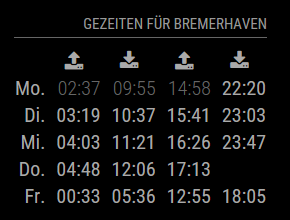
Since I was born in the north of Germany (Bremerhaven) and enjoy mudflat tours I wanted to generate a module showing high and low water. I tested it with some locations in Germany. This module derives predictions from worldtides.info for a given tide station
Screenshots:
Download:
[card:yawnsde/MMM-WorldTides]
Version 1.0.0
- initial release
-
RE: 1 old noob + 1 rPi = I can't believe I did it! (revisited)
@johnnyboy
The pictures are there, the forum is just not showing them currently.
I fixed the image links in the opening post manually -
RE: Modul Plug in RNV Abfrage
@Guschdl
All right, I’m almost done. The module will need some tweaking and some cleanup, but you can use it. I will provide some installation and configuration instructions this evening (my wife is working long this evening :D ). Feel free to provide feedback and improvements.[card:yawnsde/MMM-RNV]
-
RE: Building mirror without programing
@amanzimdwini
If you download and unzip modules, you don’t have a folder called.git, and without this folder you cannot rungit pullto update the specific module, when the developer releases a new version.
Everything else of course works fine. -
RE: Compliments text cycler without the randomizer
I just put this together, based on the original compliments module. I am not sure if this should be added to the default module by PullRequest, which is why I created a standalone repository first.
[card:yawnsde/MMM-Compliments]
-
RE: How do I edit config, I see every new module starts whit going to config.js
You missed one ] which I added on 4th line from bottom
var config = { port: 8080, ipWhitelist: ["127.0.0.1", "::ffff:127.0.0.1", "::1"], language: 'en', timeFormat: 24, units: 'metric', modules: [ { module: 'alert', }, { module: "updatenotification", position: "top_bar" }, { module: 'clock', position: 'top_left' }, { module: 'calendar', header: 'US Holidays', position: 'top_left', config: { calendars: [ { symbol: 'calendar-check-o ', url: 'webcal://www.calendarlabs.com/templates/ical/US-Holidays.ics' } ] } }, { module: 'compliments', position: 'lower_third' }, { module: 'currentweather', position: 'top_right', config: { location: 'New York', locationID: '', //ID from http://www.openweathermap.org appid: 'YOUR_OPENWEATHER_API_KEY' } }, { module: 'newsfeed', position: 'bottom_bar', config: { feeds: [ { title: "New York Times", url: "http://www.nytimes.com/services/xml/rss/nyt/HomePage.xml" } ], showSourceTitle: true, showPublishDate: true } }, ] }; /*************** DO NOT EDIT THE LINE BELOW ***************/ if (typeof module !== 'undefined') {module.exports = config;} -
RE: This Day in History ticker?
@cowboysdude said in This Day in History ticker?:
I wouldn’t have a problem with that if it’s a config option. :)
That’s exactly what I submitted: https://github.com/cowboysdude/MMM-History/pulls
-
RE: I am stuck need help
var config = {
	address: "localhost", // Address to listen on, can be:
	                      // - "localhost", "127.0.0.1", "::1"
	                      // - another specific IPv4/6
	                      // - "", "0.0.0.0", "::"
	                      //
	port: 8080,
	ipWhitelist: ["127.0.0.1", "::ffff:127.0.0.1", "::1"],

        language: "en",
	timeFormat: 24,
	units: "imperial",

	modules: [
		  {
			module: "alert",
		  },
		  {
			module: "updatenotification",
			position: "top_bar",
		  },
		  {
			module: "clock",
			position: "top_left",
		  },
		  {
		 	module: "calendar",
			header: "Calendar",
			position: "top_left",
			config: {
				calendars: [
					{
						symbol: "calendar-check",
						url: "webcal://www.calendarlabs.com/templates/ical/US-Holidays.ics"

				         },
                                         {

						symbol: "calendar-plus-o ",
						url: "https://calendar.google.com/XXXXXXXXX/basic.ics"
					},
					{
						symbol: "calendar-plus-o ",
						url: "https://calendar.google.com/XXXXXXX/basic.ics"
				}
				]
      }

		  },
		  {
			module: "helloworld",
		        position: "top_bar",
		        config: {

			         text: "Welcome to the Carls Residence"
			        }
		  },
		  {

                         module: "MMM-DarkSkyForecast",
                         header: "Weather",
                         position: "top_right",
                         classes: "default everyone",
                         disabled: false,
                         config: {
                                  apikey: "Xxxxxxxxxxdda4d069a",
                                  latitude: "39.548935",
                                  longitude: "-89.294533",
                                  iconset: "4c",
                                  concise: false,
                                  forecastLayout: "table"
                                 }

		  },
		  {
			 module: "MMM-MyScoreboard",
                         position: "bottom_left",
                         classes: "default everyone",
                         header: "My Scoreboard",
                         config: {
                                  showLeagueSeparators: true,
                                  colored: true,
                                  viewStyle: "mediumLogos",
                                     sports: [
                                              {
                                               league: "NHL",
                                               groups: ["Western"]
                                              },
                                              {
                                               league: "NFL",
                                               groups: ["NFC North"]
                                              },
                                              {
                                               league: "MLB",
                                               groups: ["NL Central"]
                                             },
                                             {
                                              league: "NCAAM",
                                              groups: ["Big Ten"]
                                             },
                                             {
                                              league: "NCAAF",
                                              groups: ["Big Ten"]
                                             }
                                       ]
                                  }
		  },
		  {


		       module: 'MMM-iFrame-Ping',
		       position: 'bottom_left',
		       config: {
			        // See 'Configuration options' for more information.
			        url: "https://radar.weather.gov/radar.php?rid=ILX&product=NCR&overlay=11101111&loop=yes",
			        autoRefresh: true,
			        updateInterval: 10,
			        displayLastUpdate: true,
			        width: "100%",
			        height: "400px",
			       scrolling: "no"
			}
	           },
                   {


                	module: "newsfeed",
			position: "bottom_bar",
			config: {
				 feeds: [
					{
						title: "Fox News",
						url: "http://feeds.foxnews.com/foxnews/latest"
					}
				 ],
				  showSourceTitle: true,
				  showPublishDate: true
			        }
		 },
	   ]

};


if (typeof module !== "undefined") {module.exports = config;}
You missed some
,, some]and some}
Oh, and you should never post your apikeys or links to personal calendars. I truncated both for you -
RE: [Remote-Control] Shutdown, Configure and Update your MagicMirror
@MagicMirrorPi
Are you talking about MMM-Remote-Control?
It is called remote because you use it to remote manage the mirror. So you can use it on your laptop, smartphone, tablet, … without having to attach mouse/keyboard to the mirror itself -
MMM-RNV
Description:
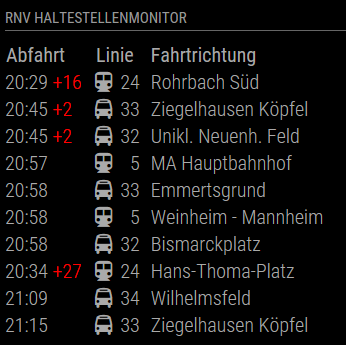
It monitors a given station in the RNV traffic network and shows the 10 upcoming departures with destination, type and delay. It also shows additional information if provided by the vendor.
Screenshots:
Download:
[card:yawnsde/MMM-RNV]
Version 1.0.0
- initial release
Version 1.1.0
- some more error handling
- added some tweaks in case the start time is after midnight, then the parsing failed
- added the alert ticker if some alert is present
- updated the readme
- removed odd default value for stationID from the module
-
RE: MMM-NOAA - Another Weather Module
de.json{ "GATHERING_WEATHER_STUFF": "Empfange Wetterdaten...", "CURRENTLY": "Aktuell", "CURRENT_TEMP": "Temperatur", "UV_INDEX": "UV Index", "WIND": "Wind", "FROM": "Von", "BAROMETER": "Barometer", "FORECAST": "Prognose", "MONDAY": "Montag", "TUESDAY": "Dienstag", "WEDNESDAY": "Mittwoch", "THURSDAY": "Donnerstag", "FRIDAY": "Freitag", "SATURDAY": "Samstag", "SUNDAY": "Sonntag", "OVERCAST": "Bedeckt", "CLOUDY": "Bewölkt", "RAIN": "Regen", "CLEAR": "Heiter", "PARTLY_CLOUDY": "Leicht bewölkt", "HIGH": "Maximum", "LOW": "Minimum", "HUMIDITY": "Luftfeuchtigkeit", "SAFE": "Sicher", "MODERATE": "Moderat", "SNOW_SHOWERS": "Schneeregen", "VERY_HIGH": "Sehr hoch", "EXTREME": "Extrem", "SUNSET": "Sonnenuntergang", "SUNRISE": "Sonnenaufgang" } -
RE: MMM-NOAA - Another Weather Module
I did not like the old look, but the new one is very nice. Well done!
-
RE: Family Info Board
You have two possibilities with the calendar module.
Option 1:
This shows one block and mixes both calendars, sorted by date
modules: [
	{
		module: 'calendar',
		header: 'both calendars'
		position: 'top_left',
		config: {
			calendars: [
				{
				url: 'http://www.whatever.....xx.ics',
				symbol: 'calendar',
				},
				{
				url: 'http://www.justanother....zz.ics',
				symbol: 'calendar',
				}
			],
		}
	}
]
Option 2:
This show calendar1 sorted by date and then shows calendar2 sorted by date, but in a seperate block with a seperate header
modules: [
	{
		module: 'calendar',
		header: 'calendar1'
		position: 'top_left',
		config: {
			calendars: [
				{
				url: 'http://www.whatever.....xx.ics',
				symbol: 'calendar',
				}
			],
		}
	},
	{
		module: 'calendar',
		header: 'calendar2'
		position: 'top_left',
		config: {
			calendars: [
				{
				url: 'http://www.justanother....zz.ics',
				symbol: 'calendar',
				}
			],
		}
	}
]