MagicMirror Forum
    • Recent
    • Tags
    • Unsolved
    • Solved
    • MagicMirror² Repository
    • Documentation
    • 3rd-Party-Modules
    • Donate
    • Discord
    • Register
    • Login
    A New Chapter for MagicMirror: The Community Takes the Lead
    Read the statement by Michael Teeuw here.

    JSON request module

    Scheduled Pinned Locked Moved Solved Requests
    41 Posts 3 Posters 16.0k Views 4 Watching
    Loading More Posts
    • Oldest to Newest
    • Newest to Oldest
    • Most Votes
    Reply
    • Reply as topic
    Log in to reply
    This topic has been deleted. Only users with topic management privileges can see it.
    • E Offline
      ELMAGO @wishmaster270
      last edited by

      @wishmaster270

      Thank you for your reply.
      So I installed the two modules and configured my config as follows:

      //TEMPERATURE MAISON
      
      {
         module: "MMM-CommandToNotification",
         disabled: false,
         config: {
          updateInterval: 10,
          commands: [
           {
            script: "http://192.168.100.244:3000/TEMPSALLE",
            args: "-10 10",
            timeout: 5,
            notifications: [
             "TEMPSALLE",
             ],
           },
           ]
         },
        },
      
      
      // AFFICHAGE
      
      {
         module: "MMM-ValuesByNotification",
         position: "top_right",
         header: "Module-1",
         config: {
          groups: [
           {
            items: [
             {
              notification: "TEMPSALLE",
              itemTitle: "Item-1",
              values: [
               {
                valueTitle: "Value-1",
      		valueUnit: "°C",
      		jsonpath: "data",
               },
              ]
             },
            ]
           },
          ]
         },
        },


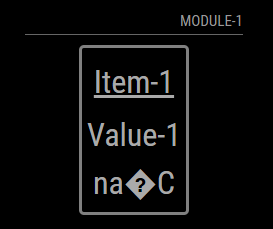
      and i get :

      663f9695-cd87-4675-9191-428defbea809-image.png

      Can you help me ?

      wishmaster270W 1 Reply Last reply Reply Quote 0
      • wishmaster270W Offline
        wishmaster270 Module Developer @ELMAGO
        last edited by wishmaster270

        @ELMAGO You can NOT enter the url directly into the Command module. You need to call a valid Shell Command.
        In your case I will suggest curl.

        The full command will be:

        curl -vs  http://192.168.100.244:3000/TEMPSALLE2
        

        So the command configuration should be something like:

        {
           module: "MMM-CommandToNotification",
           disabled: false,
           config: {
            updateInterval: 10,
            commands: [
             {
              script: "/usr/bin/curl",
              args: "-vs  http://192.168.100.244:3000/TEMPSALLE2",
              timeout: 5,
              notifications: [
               "TEMPSALLE",
               ],
             },
             ]
           },
          },
        

        As a result the output of the curl command will be send as notification ā€œTEMPSALEā€.

        You can test the curl command in a terminal.

        E 1 Reply Last reply Reply Quote 0
        • E Offline
          ELMAGO @wishmaster270
          last edited by

          @wishmaster270 said in JSON request module:
          Good evening

          (I am in France)

          Thanks for your answer but I still have the same result.

          //TEMPERATURE MAISON
          
          {
             module: "MMM-CommandToNotification",
             disabled: false,
             config: {
              updateInterval: 10,
              commands: [
               {
                script: "/usr/bin/curl",
                args: "-vs  http://192.168.100.244:3000/TEMPSALLE",
                timeout: 5,
                notifications: [
                 "TEMPSALLE",
                 ],
               },
               ]
             },
            },
          
          
          // AFFICHAGE
          
          {
             module: "MMM-ValuesByNotification",
             position: "top_right",
             header: "TEMPERATURE MAISON",
             config: {
              groups: [
               {
                items: [
                 {
                  notification: "TEMPSALLE",
                  itemTitle: "TEMPSALLE",
                  values: [
                   {
                    valueTitle: "TEMPSALLE",
          		valueUnit: "C",
          		jsonpath: "data",
                   },
                  ]
                 },
                ]
               },
              ]
             },
            },


          I have to miss something but I don’t see what

          wishmaster270W 1 Reply Last reply Reply Quote 0
          • wishmaster270W Offline
            wishmaster270 Module Developer @ELMAGO
            last edited by

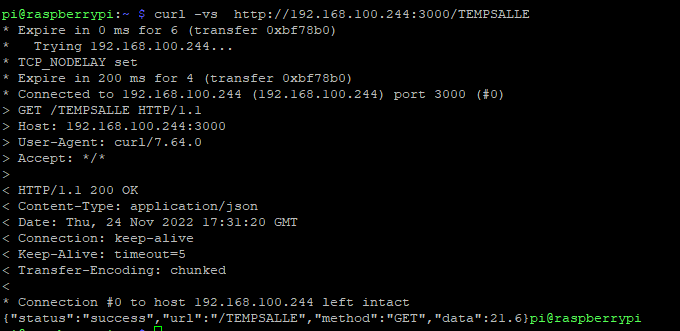
            @ELMAGO Hi, no problem let’s dive deeper. Can you please run the curl command manually on the console and paste the result here, please.

            E 1 Reply Last reply Reply Quote 0
            • E Offline
              ELMAGO @wishmaster270
              last edited by

              @wishmaster270

              There she is
              7b0d670b-43f1-410d-a6ba-5ce99a1012ed-image.png

              wishmaster270W 1 Reply Last reply Reply Quote 0
              • wishmaster270W Offline
                wishmaster270 Module Developer @ELMAGO
                last edited by

                @ELMAGO
                Sorry, my fault.
                Can you please remove the v option of the curl command. It needs to be curl -s ....

                E 1 Reply Last reply Reply Quote 0
                • E Offline
                  ELMAGO @wishmaster270
                  last edited by

                  @wishmaster270

                  It’s same

                  //TEMPERATURE MAISON
                  
                  {
                     module: "MMM-CommandToNotification",
                     disabled: false,
                     config: {
                      updateInterval: 10,
                      commands: [
                       {
                        script: "/usr/bin/curl",
                        args: "-s  http://192.168.100.244:3000/TEMPSALLE",
                        timeout: 5,
                        notifications: [
                         "TEMPSALLE",
                         ],
                       },
                       ]
                     },
                    },
                  
                  
                  // AFFICHAGE
                  
                  {
                     module: "MMM-ValuesByNotification",
                     position: "top_right",
                     header: "TEMPERATURE MAISON",
                     config: {
                      groups: [
                       {
                        items: [
                         {
                          notification: "TEMPSALLE",
                          itemTitle: "TEMPSALLE",
                          values: [
                           {
                            valueTitle: "TEMPSALLE",
                  		valueUnit: "C",
                  		jsonpath: "data",
                           },
                          ]
                         },
                        ]
                       },
                      ]
                     },
                    },
                  
                  
                  wishmaster270W 1 Reply Last reply Reply Quote 0
                  • wishmaster270W Offline
                    wishmaster270 Module Developer @ELMAGO
                    last edited by wishmaster270

                    @ELMAGO
                    Sorry, took me a moment to set up a test environment…
                    I think if your webserver is not very very fast you need to increase the timeout value in the command module.
                    The timeout is in milliseconds and you configured 5. I guess it should be 5000.
                    This config works fine in my development environment.

                                     {
                    			module: "MMM-CommandToNotification",
                    			disabled: false,
                    			config: {
                    			 updateInterval: 60,
                    			 commands: [
                    			  {
                    			   script: "/usr/bin/curl",
                    			   args: "-s http://192.168.100.244:3000/TEMPSALLE",
                    			   timeout: 5000,
                    			   notifications: [
                    				"TEMPSALLE",
                    				],
                    			  },
                    			  ]
                    			},
                    		},
                    		 
                    		{
                    			module: "MMM-ValuesByNotification",
                    			position: "top_right",
                    			header: "TEMPERATURE MAISON",
                    			config: {
                    			 groups: [
                    			  {
                    			   items: [
                    				{
                    				 notification: "TEMPSALLE",
                    				 itemTitle: "TEMPSALLE",
                    				 values: [
                    				  {
                    				   valueTitle: "TEMPSALLE",
                    				 valueUnit: "C",
                    				 jsonpath: "data",
                    				  },
                    				 ]
                    				},
                    			   ]
                    			  },
                    			 ]
                    			},
                    		},
                    

                    Edit: I increased the updateInterval to 60

                    E 1 Reply Last reply Reply Quote 0
                    • E Offline
                      ELMAGO @wishmaster270
                      last edited by

                      @wishmaster270
                      You are phenomenal…but I still have three problems:
                      1 - When I look for several values, it only shows me the first one.
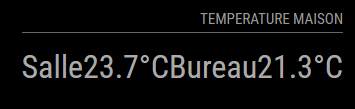
                      2- The Celsius symbol does not seem to be accepted
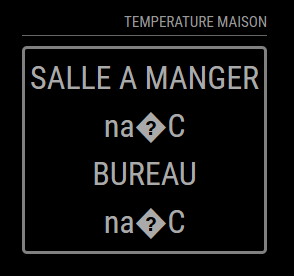
                      76b9ae31-734f-49b5-a4be-5cbf0490a0be-image.png

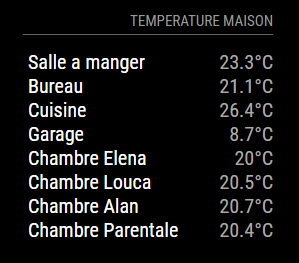
                      3- 3- If I may abuse…is it possible to do the same formatting as this one. CSS and me…

                      7e8bc18c-c15d-46ab-a37d-4f7782032f2f-image.png

                      Here is my code :

                      //TEMPERATURE MAISON
                      
                      {
                         module: "MMM-CommandToNotification",
                         disabled: false,
                         config: {
                          updateInterval: 60,
                          commands: [
                           {
                            script: "/usr/bin/curl",
                            args: "-s  http://192.168.100.244:3000/TEMPSALLE",
                            timeout: 5000,
                            notifications: [
                             "TEMPSALLE",
                             ],
                      	
                           },
                           ]
                         },
                        },
                      
                      {
                         module: "MMM-CommandToNotification",
                         disabled: false,
                         config: {
                          updateInterval: 60,
                          commands: [
                           {
                            script: "/usr/bin/curl",
                            args: "-s  http://192.168.100.244:3000/TEMPBUREAU",
                            timeout: 5000,
                            notifications: [
                             "TEMPBUREAU",
                             ],
                      	
                           },
                           ]
                         },
                        },
                      
                      
                      // AFFICHAGE
                      
                      {
                         module: "MMM-ValuesByNotification",
                         position: "top_right",
                         header: "TEMPERATURE MAISON",
                         config: {
                          groups: [
                           {
                            items: [
                             {
                              notification: "TEMPSALLE",
                              values: [
                               {
                                valueTitle: "SALLE A MANGER",
                      		valueUnit: "°C",
                      		jsonpath: "data",
                               },
                              ]
                             },
                      	          {
                              notification: "TEMPBUREAU",
                              values: [
                               {
                                valueTitle: "BUREAU",
                      		valueUnit: "°C",
                      		jsonpath: "data",
                               },
                              ]
                             },
                            ]
                           },
                          ]
                         },
                        },


                      Once again thank you for everything.

                      wishmaster270W 1 Reply Last reply Reply Quote 0
                      • wishmaster270W Offline
                        wishmaster270 Module Developer @ELMAGO
                        last edited by

                        @ELMAGO Step by Step closer to the goalšŸ˜‰
                        1: You can/need to use one instance of the command module to fetch the data of the to urls.
                        2: I use the Celsius sign in my setup without any problems but it may depend of the encoding of your operating system and Browser. You can try to use the html encoding ° instead.

                        //TEMPERATURE MAISON
                        
                        {
                           module: "MMM-CommandToNotification",
                           disabled: false,
                           config: {
                            updateInterval: 60,
                            commands: [
                             {
                              script: "/usr/bin/curl",
                              args: "-s  http://192.168.100.244:3000/TEMPSALLE",
                              timeout: 5000,
                              notifications: [
                               "TEMPSALLE",
                               ],
                             },
                        
                             {
                                   script: "/usr/bin/curl",
                                   args: "-s  http://192.168.100.244:3000/TEMPBUREAU",
                                   timeout: 5000,
                                   notifications: [
                                    "TEMPBUREAU",
                                    ],
                                  },
                             ]
                           },
                          },
                        
                        // AFFICHAGE
                        
                        {
                           module: "MMM-ValuesByNotification",
                           position: "top_right",
                           header: "TEMPERATURE MAISON",
                           config: {
                            groups: [
                             {
                              items: [
                               {
                                notification: "TEMPSALLE",
                                values: [
                                 {
                                  valueTitle: "SALLE A MANGER",
                        		valueUnit: "°C",
                        		jsonpath: "data",
                                 },
                                ]
                               },
                        	          {
                                notification: "TEMPBUREAU",
                                values: [
                                 {
                                  valueTitle: "BUREAU",
                        		valueUnit: "°C",
                        		jsonpath: "data",
                                 },
                                ]
                               },
                              ]
                             },
                            ]
                           },
                          },
                        

                        3: I provided a lot examples with screenshots in the modules doc directory (screenshots). You will find the corresponding config and css of each screenshot in the configs. Maybe there is a styling included you like. If not feel free to ask again.

                        E 2 Replies Last reply Reply Quote 0
                        • E Offline
                          ELMAGO @wishmaster270
                          last edited by

                          This post is deleted!
                          1 Reply Last reply Reply Quote 0
                          • E Offline
                            ELMAGO @wishmaster270
                            last edited by

                            @wishmaster270 said in JSON request module:

                            valueTitle

                            I’m really sorry but I’m really bad at this.

                            I did this:
                            config:

                            //TEMPERATURE MAISON
                            
                            {
                               module: "MMM-CommandToNotification",
                               disabled: false,
                               config: {
                                updateInterval: 60,
                                commands: [
                                 {
                                  script: "/usr/bin/curl",
                                  args: "-s  http://192.168.100.244:3000/TEMPSALLE",
                                  timeout: 5000,
                                  notifications: [
                                   "TEMPSALLE",
                                   ],
                                 },
                            
                                 {
                                       script: "/usr/bin/curl",
                                       args: "-s  http://192.168.100.244:3000/TEMPBUREAU",
                                       timeout: 5000,
                                       notifications: [
                                        "TEMPBUREAU",
                                        ],
                                      },
                                 ]
                               },
                              },
                            
                            // AFFICHAGE
                            
                            {
                            		module: "MMM-ValuesByNotification",
                            		position: "top_left",
                            		header: "TEMPERATURE MAISON",
                            		config: {
                            			updateInterval: 10,
                            			reuseCount: 100,
                            			addClassesRecursive: true,
                            			groups: [
                            				{
                            					items: [
                            						{
                            							notification: "TEMPSALLE",
                            							itemTitle: "Salle: ",
                            							classes: "withIcons",
                            							values: [
                            								{
                            									valueIcon: "fa fa-thermometer-full",
                            									valueUnit: "°C",
                            									valueFormat: "Number(${value}).toFixed(2)",
                            									jsonpath: "data",
                            								},
                            {
                            									valueUnit: "%rH",
                            									valueFormat: "Number(${value}).toFixed(1)",
                            									jsonpath: "humidity",
                            								},
                            							]
                            						},
                            						{
                            							notification: "TEMPBUREAU",
                            							itemTitle: "Bureau ",
                            							values: [
                            								{
                            									valueUnit: "°CC",
                            									valueFormat: "Number(${value}).toFixed(2)",
                            									jsonpath: "data",
                            								},
                            {
                            									valueUnit: "%rH",
                            									valueFormat: "Number(${value}).toFixed(1)",
                            									jsonpath: "humidity",
                            								},
                            							]
                            						},
                            					]
                            				},
                            			]
                            		},
                            	},


                            And use css :

                            .MMM-ValuesByNotification .vbn .itemWrapper {
                              flex-direction: row;
                            }
                            
                            .MMM-ValuesByNotification .vbn .itemTitle {
                              min-width: 105px;
                              text-decoration: none;
                            }
                            
                            .MMM-ValuesByNotification .vbn .itemTitle.withIcons {
                              margin-top: 17px;
                            }
                            
                            .MMM-ValuesByNotification .vbn .itemWrapper.withIcons {
                              line-height: 22px;
                            }
                            
                            .MMM-ValuesByNotification .vbn .itemWrapper:not(.withIcons) {
                              line-height: 10px;
                            }
                            

                            and nothing is displayed

                            wishmaster270W 1 Reply Last reply Reply Quote 0
                            • wishmaster270W Offline
                              wishmaster270 Module Developer @ELMAGO
                              last edited by

                              @ELMAGO
                              Great to see the data beeing displayed. We get the styling, too.
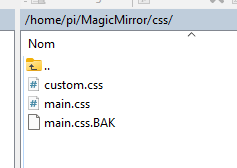
                              Please do not edit files in the module folder. You can modify/override all css in the custom.css file in the css directory of MagicMirror.
                              The examples only overrides the things needed.
                              Currently I only have my mobile and can not test any things. Maybe I can look at it tomorrow.

                              E 2 Replies Last reply Reply Quote 0
                              • E Offline
                                ELMAGO @wishmaster270
                                last edited by

                                @wishmaster270
                                The custom file?

                                there is no problem, you help me already it is a lot.

                                There is nothing urgent, I just have this display to do on a whole home automation installation.

                                I await your return and thank you again.

                                S 1 Reply Last reply Reply Quote 0
                                • S Offline
                                  sdetweil @ELMAGO
                                  last edited by sdetweil

                                  @ELMAGO the CSS design is a stack, top down

                                  css/custom.css
                                  module_provided_css (in the module folder)
                                  css/main.css (provided by MM).

                                  so a search for a css setting starts with custom.css and stops at the 1st occurrence.

                                  Sam

                                  How to add modules

                                  learning how to use browser developers window for css changes

                                  1 Reply Last reply Reply Quote 0
                                  • E Offline
                                    ELMAGO @wishmaster270
                                    last edited by

                                    @wishmaster270 @sdetweil

                                    I correct myself, it is displayed but thus, having created the custom.css file in css:
                                    c70503d5-7fdd-4bcf-aff4-0be3fdc8537d-image.png

                                    08393d06-6cfc-4d4b-a59a-d588f2c700cd-image.png

                                    Here is my config file:

                                    // AFFICHAGE
                                    
                                    {
                                    		module: "MMM-ValuesByNotification",
                                    		position: "top_right",
                                    		header: "TEMPERATURE MAISON",
                                    		config: {
                                    			updateInterval: 10,
                                    			reuseCount: 100,
                                    			addClassesRecursive: true,
                                    			groups: [
                                    				{
                                    					items: [
                                    						{
                                    							notification: "TEMPSALLE",
                                    							itemTitle: "Salle  ",
                                    							classes: "withIcons",
                                    							values: [
                                    								{
                                    									valueUnit: " °C",
                                    									valueFormat: "Number(${value}).toFixed(2)",
                                    									jsonpath: "data",
                                    								},
                                    							]
                                    						},
                                    						{
                                    							notification: "TEMPBUREAU",
                                    							itemTitle: "Bureau  ",
                                    							values: [
                                    								{
                                    									valueUnit: " °C",
                                    									valueFormat: "Number(${value}).toFixed(2)",
                                    									jsonpath: "data",
                                    								},
                                    							]
                                    						},
                                    					]
                                    				},
                                    			]
                                    		},
                                    	},

                                    
                                    
                                    wishmaster270W 1 Reply Last reply Reply Quote 0
                                    • wishmaster270W Offline
                                      wishmaster270 Module Developer @ELMAGO
                                      last edited by

                                      @ELMAGO
                                      Today, with my notebook ready things are getting easier.
                                      I styled the module like the example you provided…
                                      example.png

                                      Let’s look at the steps to do this now:

                                      First we tell the itemWrapper? to display the items in rows and not columns and set the line height to the regular value 1.0` to avoid a great space in between:

                                      .MMM-ValuesByNotification .vbn .itemWrapper {
                                        flex-direction: row;
                                        line-height: 1.0;
                                      }
                                      

                                      Next we tell the itemsWrapper to set a small space of 5px between the rows:

                                      .MMM-ValuesByNotification .vbn .itemsWrapper:first-child,
                                      .MMM-ValuesByNotification .vbn .itemsWrapper
                                      {
                                        gap: 5px;
                                      }
                                      

                                      We then remove some margins of the title if items, remove the underlining and set the min-with to 60px to get a straight lining of the values:

                                      .MMM-ValuesByNotification .vbn .itemTitle {
                                        margin-top: 0px;
                                        margin-bottom: 0px;
                                        min-width: 60px;
                                        text-decoration: unset;
                                        color: white;
                                      }
                                      

                                      If you do not like the gray border around the items you can remove it with:

                                      .MMM-ValuesByNotification .vbn .groupWrapper {
                                        border-style: none;
                                      }
                                      

                                      If you copy all these contents to the MagicMirror/css/custom.css file and restore the original valuesByNotification.css you should the style of above.

                                      E 1 Reply Last reply Reply Quote 0
                                      • E Offline
                                        ELMAGO @wishmaster270
                                        last edited by

                                        @wishmaster270
                                        good evening
                                        thank you for your return, for the config file I put back yours or mine is good? I would test this tomorrow morning, tonight it’s rugby.
                                        good evening and thank you again

                                        E 1 Reply Last reply Reply Quote 0
                                        • E Offline
                                          ELMAGO @ELMAGO
                                          last edited by

                                          @ELMAGO

                                          Good evening,

                                          I couldn’t wait…it’s almost great, I just have to find how to align the text on the left and the temperatures on the right.

                                          04655c32-b4d0-4180-a5f4-9724b5cc27f0-image.png

                                          Thank you very much for your help

                                          wishmaster270W 1 Reply Last reply Reply Quote 0
                                          • wishmaster270W Offline
                                            wishmaster270 Module Developer @ELMAGO
                                            last edited by

                                            @ELMAGO
                                            Do you mean something like this…
                                            example.png

                                            We first define a width for the most outer wrapper. I choose 200px but can adjust it to the value you want:

                                            .MMM-ValuesByNotification .vbn .groupsWrapper{
                                              width: 200px;
                                            }
                                            

                                            Then we configure the next two deeper wrappers to expand to the maximum width:

                                            .MMM-ValuesByNotification .vbn .groupWrapper,
                                            .MMM-ValuesByNotification .vbn .itemsWrapper {
                                              width: 100%;
                                            }
                                            

                                            And we tell the itemWrapper to expand to maximum width and justify its content by putting space around the items equally:

                                            .MMM-ValuesByNotification .vbn .itemWrapper {
                                              flex-direction: row;
                                              line-height: 1.0;
                                              width: 100%;
                                              justify-content: space-between;
                                            }
                                            

                                            The rest stays the same as before:

                                            .MMM-ValuesByNotification .vbn .itemTitle {
                                              margin-top: 0px;
                                              margin-bottom: 0px;
                                              min-width: 60px;
                                              text-decoration: unset;
                                              color: white;
                                            }
                                            
                                            .MMM-ValuesByNotification .vbn .groupWrapper {
                                              border-style: none;
                                            }
                                            
                                            E 2 Replies Last reply Reply Quote 0

                                            Hello! It looks like you're interested in this conversation, but you don't have an account yet.

                                            Getting fed up of having to scroll through the same posts each visit? When you register for an account, you'll always come back to exactly where you were before, and choose to be notified of new replies (either via email, or push notification). You'll also be able to save bookmarks and upvote posts to show your appreciation to other community members.

                                            With your input, this post could be even better šŸ’—

                                            Register Login
                                            • 1
                                            • 2
                                            • 3
                                            • 1 / 3
                                            • First post
                                              Last post
                                            Enjoying MagicMirror? Please consider a donation!
                                            MagicMirror created by Michael Teeuw.
                                            Forum managed by Sam, technical setup by Karsten.
                                            This forum is using NodeBB as its core | Contributors
                                            Contact | Privacy Policy