MagicMirror Forum
    • Recent
    • Tags
    • Unsolved
    • Solved
    • MagicMirror² Repository
    • Documentation
    • 3rd-Party-Modules
    • Donate
    • Discord
    • Register
    • Login
    A New Chapter for MagicMirror: The Community Takes the Lead
    Read the statement by Michael Teeuw here.

    Help with MMM-EmbedURL

    Scheduled Pinned Locked Moved Troubleshooting
    28 Posts 3 Posters 9.5k Views 3 Watching
    Loading More Posts
    • Oldest to Newest
    • Newest to Oldest
    • Most Votes
    Reply
    • Reply as topic
    Log in to reply
    This topic has been deleted. Only users with topic management privileges can see it.
    • T Offline
      TK421_VT
      last edited by

      I am new to MM and need help. I am trying to embed a WeatherUnderground url of my personal Weather station to my MM. I have loaded the module and added the basic code to my config file, but I get nothing. It sounds like it might be an issue with Embed sites that forbid embedding and Cookie banners, but I don’t understand how to remove it. I see the Chrome extension Requestly, but I don’t understand how or where to use it.

      Here is an example of a webpage that I want to use: https://www.wunderground.com/dashboard/pws/KVTCAMBR4?cm_ven=localwx_pwsdash

      Any help would be greatly appprecated.

      S wishmaster270W 2 Replies Last reply Reply Quote 1
      • S sdetweil moved this topic from Showcase on
      • S Offline
        sdetweil @TK421_VT
        last edited by sdetweil

        @TK421_VT said in Help with MMM-EmbedURL:

        https://www.wunderground.com/dashboard/pws/KVTCAMBR4?cm_ven=localwx_pwsdash

        I setup the module and see this error in the developers window
        ctrl-shift-i on keyboard, select the console tab

        Refused to display 'https://www.wunderground.com/' in a frame because it set 'X-Frame-Options' to 'sameorigin'.
        

        also see this in the console output from npm start

        [16.12.2022 07:04.53.720] [ERROR] (node:4015) electron: Failed to load URL: https://www.wunderground.com/dashboard/pws/KVTCAMBR4?cm_ven=localwx_pwsdash with error: ERR_BLOCKED_BY_RESPONSE
        

        I don’t know how to solve this

        Sam

        How to add modules

        learning how to use browser developers window for css changes

        1 Reply Last reply Reply Quote 0
        • wishmaster270W Offline
          wishmaster270 Module Developer @TK421_VT
          last edited by

          @TK421_VT Hi,

          i setup a quick dev environment and tried to add the URL. You are right the page forbids embedding.
          If a activate the Requestly extension in my Firefox and remove the response headers “X-Frame-Options”, “Content-Security-Policy”, “X-Content-Security-Policy” the site can be embedded. I am pretty sure if you follow the instructions in this tutorial you can embed the site into a MagicMirror instance that is running in server mode and is displayed within Firefox or Chrome.

          The question is if you are running MagicMirror in sever mode and display it in a local browser. If not you use the electron browser and you do not need any extensions but can use webview to embed the site.
          You will need to enable webview in the electronOptions as described in the Readme of the module and you need to set embedElementType: "webview" in the module configuration.

          S T 2 Replies Last reply Reply Quote 0
          • S Offline
            sdetweil @wishmaster270
            last edited by

            @wishmaster270 and I provide a script to launch chromium over server mode in my script repo.

            I set that up auto for pi0w.

            run-start.sh

            change the npm start to launch the run-start.sh

            Sam

            How to add modules

            learning how to use browser developers window for css changes

            T 1 Reply Last reply Reply Quote 0
            • T Offline
              TK421_VT @wishmaster270
              last edited by

              @wishmaster270 said in Help with MMM-EmbedURL:

              embedElementType: “webview”

              I am guessing I run Requestly on the PI itself on the default Browers? I don’t currently have Firefox or Chrome loaded on it (not that it is that hard to install).

              Honestly, I have no idea if I am running in Server Mode. I install the basic 64 bit PI OS. I am guessing that is not the Server Mode?

              I tried adding WebView to the Config file with no change:

              {
              module: “MMM-EmbedURL”,
              position: “top_right”,
              header: “Current Weather”,
              config: {
              updateInterval: 120,
              attributes: [
              “frameborder=0”,
              ],
              embedElementType: “webview”,
              embed: [
              “https://www.wunderground.com/dashboard/pws/KVTCAMBR4?cm_ven=localwx_pwsdash”
              ]
              },
              },

              Thoughts?

              1 Reply Last reply Reply Quote 1
              • T Offline
                TK421_VT @sdetweil
                last edited by

                @sdetweil

                I don’t have a start-up script running yet, I manually launch it with: npm run start as I am still configuring things.

                Is there something I am missing as to why I should?

                S 1 Reply Last reply Reply Quote 0
                • S Offline
                  sdetweil @TK421_VT
                  last edited by sdetweil

                  @TK421_VT note that u also have to allow WebView in the electronOptions config up by address/ipWhitelist

                  Sam

                  How to add modules

                  learning how to use browser developers window for css changes

                  1 Reply Last reply Reply Quote 0
                  • T Offline
                    TK421_VT
                    last edited by

                    I am not going to lie, I wish I understood what you just said.

                    S 1 Reply Last reply Reply Quote 0
                    • S Offline
                      sdetweil @TK421_VT
                      last edited by

                      @TK421_VT read his instructions. you have to enable electron webView before u can use it in a module

                      Sam

                      How to add modules

                      learning how to use browser developers window for css changes

                      T 1 Reply Last reply Reply Quote 0
                      • T Offline
                        TK421_VT @sdetweil
                        last edited by

                        @sdetweil Thank you for trying to help, but even after reading the readme there are terms or concepts I don’t follow.

                        This is at the beginning of the config file:

                        let config = {
                        electronOptions: {
                        webPreferences: {
                        webviewTag: true,
                        }
                        },
                        address: “localhost”, // Address to listen on, can be:

                        Then this in the module:

                        {
                        module: “MMM-EmbedURL”,
                        position: “top_right”,
                        header: “Current Weather”,
                        embedElementType: “webview”,
                        basicElementType: “div”,
                        config: {
                        updateInterval: 120,
                        attributes: [
                        “frameborder=0”,
                        ],
                        embed: [
                        “https://www.wunderground.com/dashboard/pws/KVTCAMBR4?cm_ven=localwx_pwsdash”
                        ]
                        },
                        },

                        this is what I see in the terminal log:

                        [16.12.2022 21:55.38.765] [ERROR] (node:57092) electron: Failed to load URL: https://www.wunderground.com/dashboard/pws/KVTCAMBR4?cm_ven=localwx_pwsdash with error: ERR_BLOCKED_BY_RESPONSE

                        wishmaster270W 1 Reply Last reply Reply Quote 0
                        • wishmaster270W Offline
                          wishmaster270 Module Developer @TK421_VT
                          last edited by wishmaster270

                          @TK421_VT Hi,

                          your config looks good.
                          There is one last thing we can try. Can you please use your IP address (the one of the Pi) instead of localhost at the address setting.

                          You can get your IP either by hovering over the network icon in the top right corner of the screen or by entering

                          ip a
                          

                          in the shell.

                          I had this changed for some other modules in my config cause of Cross-Origin problems and it is the only thing that is different in my setup.

                          T 1 Reply Last reply Reply Quote 0
                          • T Offline
                            TK421_VT @wishmaster270
                            last edited by

                            @wishmaster270 Thanks I will give that a try, I know the IP as I set it statically.

                            T 1 Reply Last reply Reply Quote 0
                            • T Offline
                              TK421_VT @TK421_VT
                              last edited by

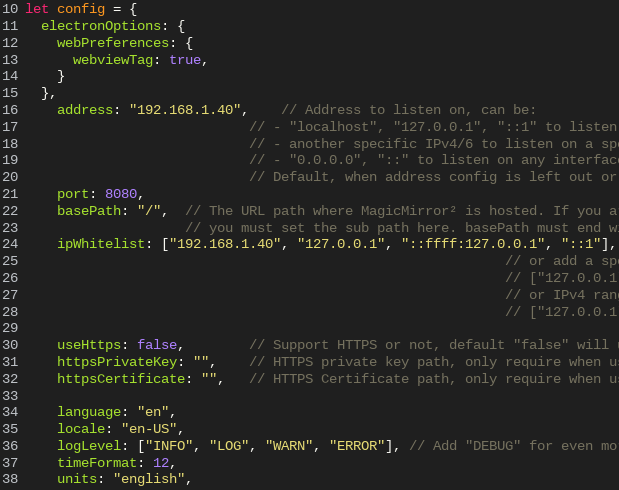
                              @TK421_VT Sorry for the delay, I have been busy with Holiday stuff. I added the IP address in the config file
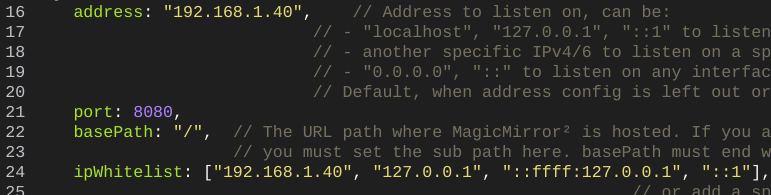
                              00ba9d0f-db1b-4624-ae57-5d273a951a84-image.png

                              it still doesn’t load anything in the top right region.
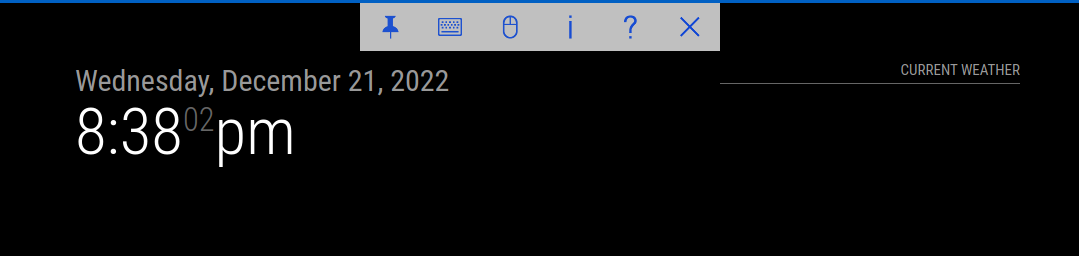
                              30d26cba-872d-4503-9a23-f56a98e2d9b2-image.png

                              This is what is in the module section in the config file
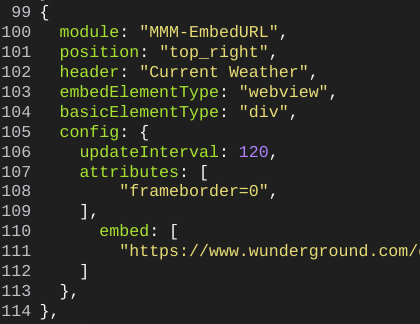
                              5e8b119a-35f1-4cc2-a9c8-3b7e144fe77b-image.png

                              Any other thoughts?

                              wishmaster270W 1 Reply Last reply Reply Quote 0
                              • wishmaster270W Offline
                                wishmaster270 Module Developer @TK421_VT
                                last edited by

                                @TK421_VT Hi,

                                that’s weird.
                                Do you still have Webview enabled in the config with:

                                electronOptions: {
                                  webPreferences: {
                                    webviewTag: true,
                                  }
                                },
                                
                                T 2 Replies Last reply Reply Quote 0
                                • T Offline
                                  TK421_VT @wishmaster270
                                  last edited by

                                  @wishmaster270 I will look, I ‘think’ so. but I am not sure.

                                  1 Reply Last reply Reply Quote 0
                                  • T Offline
                                    TK421_VT @wishmaster270
                                    last edited by

                                    @wishmaster270 4837fc51-8285-4256-8090-f0ecbb1bdd52-image.png

                                    wishmaster270W 1 Reply Last reply Reply Quote 0
                                    • wishmaster270W Offline
                                      wishmaster270 Module Developer @TK421_VT
                                      last edited by

                                      @TK421_VT Sorry for the late response. I will need to set up a identical environment to debug the problem. I will try to figure things out in the next days.

                                      wishmaster270W T 2 Replies Last reply Reply Quote 0
                                      • wishmaster270W Offline
                                        wishmaster270 Module Developer @wishmaster270
                                        last edited by

                                        @TK421_VT

                                        I setup a new environment today and tested your configuration. There are a few issues with it i did not see cause you did not use the code signs to paste your configuration in the forum.
                                        Please use the
                                        ```
                                        YOUR CONFIGURATION
                                        ```

                                        which results in

                                        YOUR CONFIGURATION
                                        

                                        next time.

                                        First thing is that you set the basicElementType and embedElementType in the wrong level. They need to be set as child object of config.

                                        The second problem is that you use a wrong time of double quotes. It looks like your editor uses a wired type of encoding.

                                        “
                                        

                                        is not the same as

                                        "
                                        

                                        With the following config everything works well:

                                        /* Magic Mirror Config Sample
                                         *
                                         * By Michael Teeuw https://michaelteeuw.nl
                                         * MIT Licensed.
                                         *
                                         * For more information on how you can configure this file
                                         * see https://docs.magicmirror.builders/getting-started/configuration.html#general
                                         * and https://docs.magicmirror.builders/modules/configuration.html
                                         */
                                        let config = {
                                        	electronOptions: {
                                        		webPreferences: {
                                        			webSecurity: false,
                                        			webviewTag: true,
                                        		},
                                        		fullscreen: true,
                                        		alwaysOnTop: false
                                        	},
                                        	// ignoreXOriginHeader: true,
                                        	// ignoreContentSecurityPolicy: true,
                                        	address: "192.168.1.1", // Address to listen on, can be:
                                        	// - "localhost", "127.0.0.1", "::1" to listen on loopback interface
                                        	// - another specific IPv4/6 to listen on a specific interface
                                        	// - "0.0.0.0", "::" to listen on any interface
                                        	// Default, when address config is left out or empty, is "localhost"
                                        	port: 8080,
                                        	basePath: "/", // The URL path where MagicMirror is hosted. If you are using a Reverse proxy
                                        	// you must set the sub path here. basePath must end with a /
                                        	ipWhitelist: ["127.0.0.1", "::ffff:127.0.0.1", "::1", "10.18.8.0/24"], // Set [] to allow all IP addresses
                                        	// or add a specific IPv4 of 192.168.1.5 :
                                        	// ["127.0.0.1", "::ffff:127.0.0.1", "::1", "::ffff:192.168.1.5"],
                                        	// or IPv4 range of 192.168.3.0 --> 192.168.3.15 use CIDR format :
                                        	// ["127.0.0.1", "::ffff:127.0.0.1", "::1", "::ffff:192.168.3.0/28"],
                                        
                                        	useHttps: false, // Support HTTPS or not, default "false" will use HTTP
                                        	httpsPrivateKey: "", // HTTPS private key path, only require when useHttps is true
                                        	httpsCertificate: "", // HTTPS Certificate path, only require when useHttps is true
                                        
                                        	language: "de",
                                        	locale: "de-DE",
                                        	logLevel: ["INFO", "LOG", "WARN", "ERROR"], // Add "DEBUG" for even more logging
                                        	timeFormat: 24,
                                        	units: "metric",
                                        	// serverOnly:  true/false/"local" ,
                                        	// local for armv6l processors, default
                                        	//   starts serveronly and then starts chrome browser
                                        	// false, default for all NON-armv6l devices
                                        	// true, force serveronly mode, because you want to.. no UI on this device
                                        
                                        	modules: [
                                        		{
                                        			module: "clock",
                                        			position: "top_center",
                                        		},
                                        		{
                                        			module: "MMM-EmbedURL",
                                        			position: "top_right",
                                        			header: "Current Weather",
                                        			config: {
                                        				embedElementType: "webview",
                                        				basicElementType: "div",
                                        				updateInterval: 120,
                                        				attributes: [
                                        					"frameborder=0",
                                        				],
                                        				embed: [
                                        					“https://www.wunderground.com/dashboard/pws/KVTCAMBR4?cm_ven=localwx_pwsdash”
                                        				]
                                        			},
                                        		},
                                        		{
                                        			module: "MMM-Touch",
                                        			position: "bottom_center",
                                        			config: {
                                        				debug: true,
                                        				useDisplay: false,
                                        				defaultMode: "default",
                                        				gestureCommands: {
                                        					default: {
                                        						TAP_1: (commander) => {
                                        							commander.sendNotification("USER_PRESENCE", true);
                                        						},
                                        						PRESS_1: (commander) => {
                                        							commander.sendNotification("SCREEN_TOGGLE", { forced: true });
                                        						},
                                        						SWIPE_UP_1: (commander) => {
                                        							commander.sendNotification("SCREEN_ON", { forced: true });
                                        						},
                                        						SWIPE_DOWN_1: (commander) => {
                                        							commander.sendNotification("SCREEN_OFF", { forced: true });
                                        						},
                                        						SWIPE_LEFT_1: (commander) => {
                                        							commander.sendNotification("PROFILE_INCREMENT_HORIZONTAL", null);
                                        						},
                                        						SWIPE_RIGHT_1: (commander) => {
                                        							commander.sendNotification("PROFILE_DECREMENT_HORIZONTAL", null);
                                        						}
                                        					}
                                        				}
                                        			}
                                        		},
                                        	]
                                        };
                                        
                                        /*************** DO NOT EDIT THE LINE BELOW ***************/
                                        if (typeof module !== "undefined") {
                                        	module.exports = config;
                                        }
                                        
                                        S T 2 Replies Last reply Reply Quote 0
                                        • S Offline
                                          sdetweil @wishmaster270
                                          last edited by sdetweil

                                          @wishmaster270 the bad " is because of the no code wrapper

                                          see this

                                          "something"
                                          

                                          vs this
                                          “something”

                                          copy/paste of the second will cause bad config message

                                          @TK421_VT to use the code wrapper

                                          paste your text in the message editor, select it all
                                          the hit the button above the edit that looks like </>

                                          note the code wrapper tag MUST start and end on a blank line…

                                          Sam

                                          How to add modules

                                          learning how to use browser developers window for css changes

                                          1 Reply Last reply Reply Quote 0
                                          • T Offline
                                            TK421_VT @wishmaster270
                                            last edited by

                                            @wishmaster270 Moving basicElementType & embedElementTpe into the correct location seemed to work.
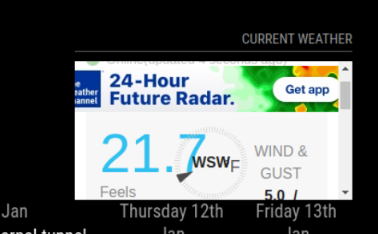
                                            dd86d950-3915-40c3-9b91-338c788cd75b-image.png

                                            Is there any way to make the window Wider or Longer? Or is it this size because of the region it is set in?

                                            T wishmaster270W 2 Replies Last reply Reply Quote 0

                                            Hello! It looks like you're interested in this conversation, but you don't have an account yet.

                                            Getting fed up of having to scroll through the same posts each visit? When you register for an account, you'll always come back to exactly where you were before, and choose to be notified of new replies (either via email, or push notification). You'll also be able to save bookmarks and upvote posts to show your appreciation to other community members.

                                            With your input, this post could be even better 💗

                                            Register Login

                                            • 1
                                            • 2
                                            • 1 / 2
                                            • First post
                                              Last post
                                            Enjoying MagicMirror? Please consider a donation!
                                            MagicMirror created by Michael Teeuw.
                                            Forum managed by Sam, technical setup by Karsten.
                                            This forum is using NodeBB as its core | Contributors
                                            Contact | Privacy Policy