MagicMirror Forum
    • Recent
    • Tags
    • Unsolved
    • Solved
    • MagicMirror² Repository
    • Documentation
    • 3rd-Party-Modules
    • Donate
    • Discord
    • Register
    • Login
    A New Chapter for MagicMirror: The Community Takes the Lead
    Read the statement by Michael Teeuw here.

    install upgrade scripts changed for version 2.25 and node 20

    Scheduled Pinned Locked Moved Unsolved Troubleshooting
    35 Posts 4 Posters 16.4k Views 4 Watching
    Loading More Posts
    • Oldest to Newest
    • Newest to Oldest
    • Most Votes
    Reply
    • Reply as topic
    Log in to reply
    This topic has been deleted. Only users with topic management privileges can see it.
    • S Offline
      sdetweil
      last edited by sdetweil

      given all the troubles with the node install process, I have rewritten that function to use the
      n
      command to do the upgrades for node and npm
      (n is a newer designed version of the nvm command (nvm= node version manager)

      | edit… all the changes have been merged back into master
      | too many using the master link as they didn’t look here…

      • upgrade
      bash -c  "$(curl -sL https://raw.githubusercontent.com/sdetweil/MagicMirror_scripts/master/upgrade-script.sh)" force
      
      • install
      bash -c  "$(curl -sL https://raw.githubusercontent.com/sdetweil/MagicMirror_scripts/master/raspberry.sh)" 
      

      everything else is the same … let me know

      so far all the places we’ve experienced troubles seem to be corrected now…
      just need some real test feedback…

      thanks for your time.

      Sam

      How to add modules

      learning how to use browser developers window for css changes

      mumblebajM 1 Reply Last reply Reply Quote 1
      • S sdetweil referenced this topic on
      • B Offline
        bdream
        last edited by

        as I face the same “node 20.8.0, but got 20.5.1” problematic, I tried to use upgrade script and get the error:

        Bildschirmfoto vom 2023-10-11 11-51-52.png

        –
        cheers, bdream

        S 1 Reply Last reply Reply Quote 0
        • S Offline
          sdetweil @bdream
          last edited by

          @bdream what system are you running on?
          show output of

          uname -a
          

          Sam

          How to add modules

          learning how to use browser developers window for css changes

          B 1 Reply Last reply Reply Quote 0
          • B Offline
            bdream @sdetweil
            last edited by

            @sdetweil said in install upgrade scripts changed for version 2.,25 and node 20:

            uname -a

            Linux MagicMirror 5.15.32-v7+ #1538 SMP Thu Mar 31 19:38:48 BST 2022 armv7l GNU/Linux
            

            –
            cheers, bdream

            S 1 Reply Last reply Reply Quote 0
            • S Offline
              sdetweil @bdream
              last edited by

              @bdream if u click the link while viewing here, you should see the source of the script

              this sounds like an Internet issue

              that error says it could not download the script

              Sam

              How to add modules

              learning how to use browser developers window for css changes

              B 1 Reply Last reply Reply Quote 0
              • B Offline
                bdream @sdetweil
                last edited by

                @sdetweil I wonder as I can ping from the Raspi and also get the usual update script working.

                Bildschirmfoto vom 2023-10-11 15-56-43.png

                From my PC I can also see both scripts in testit and in master

                –
                cheers, bdream

                S 1 Reply Last reply Reply Quote 0
                • S Offline
                  sdetweil @bdream
                  last edited by

                  @bdream interesting… never seen a problem like that before…

                  Sam

                  How to add modules

                  learning how to use browser developers window for css changes

                  B 1 Reply Last reply Reply Quote 0
                  • B Offline
                    bdream @sdetweil
                    last edited by

                    @sdetweil I wonder as both scrips are nearly same.
                    one is running other gives error in line 1 from script. I can’t see a difference :(

                    –
                    cheers, bdream

                    S 1 Reply Last reply Reply Quote 0
                    • mumblebajM Offline
                      mumblebaj Module Developer @sdetweil
                      last edited by

                      @sdetweil Great work Sam. Do we need to run the node script first?

                      bash -c “$(curl -sL https://raw.githubusercontent.com/sdetweil/MagicMirror_scripts/master/node20_install.sh)”

                      Or just the normal upgrade process with apply?

                      After fixing my dev machine I am about ready to give your script a go on my mirror but want to just double check if the node script is still required.

                      Check out my modules at: https://github.com/mumblebaj?tab=repositories
                      Check my blog-post: https://mumblebaj.xyz/
                      Check my MM Container: https://hub.docker.com/repository/docker/mumblebaj/magicmirror/general

                      1 Reply Last reply Reply Quote 0
                      • S Offline
                        sdetweil @bdream
                        last edited by

                        @bdream try this

                        curl -sL https://raw.githubusercontent.com/sdetweil/MagicMirror_scripts/testit/upgrade-script.sh
                        

                        Sam

                        How to add modules

                        learning how to use browser developers window for css changes

                        B mumblebajM 2 Replies Last reply Reply Quote 0
                        • B Offline
                          bdream @sdetweil
                          last edited by

                          @sdetweil I get the whole script shown on the screen

                          –
                          cheers, bdream

                          S 1 Reply Last reply Reply Quote 0
                          • S Offline
                            sdetweil @bdream
                            last edited by

                            @bdream as it should,

                            I see there was a problem with the " in the 1st post…

                            try again, copy/paste that line again

                            Sam

                            How to add modules

                            learning how to use browser developers window for css changes

                            1 Reply Last reply Reply Quote 0
                            • mumblebajM Offline
                              mumblebaj Module Developer @sdetweil
                              last edited by

                              @sdetweil Just to let you know this script worked fine on my Mirror first time. Did not need to run the Node one

                              Check out my modules at: https://github.com/mumblebaj?tab=repositories
                              Check my blog-post: https://mumblebaj.xyz/
                              Check my MM Container: https://hub.docker.com/repository/docker/mumblebaj/magicmirror/general

                              S 1 Reply Last reply Reply Quote 0
                              • S Offline
                                sdetweil @mumblebaj
                                last edited by

                                @mumblebaj said in install upgrade scripts changed for version 2.25 and node 20:

                                Did not need to run the Node one

                                correct… it is part of the install and upgrade scripts now

                                did u run the testit branch version?

                                Sam

                                How to add modules

                                learning how to use browser developers window for css changes

                                mumblebajM 1 Reply Last reply Reply Quote 0
                                • mumblebajM Offline
                                  mumblebaj Module Developer @sdetweil
                                  last edited by

                                  @sdetweil That is correct and worked first time. Checked the installers log and no errors or issues either. Strange thing though, it had no issue with MMM-NewsAPI either and that works fine.

                                  Check out my modules at: https://github.com/mumblebaj?tab=repositories
                                  Check my blog-post: https://mumblebaj.xyz/
                                  Check my MM Container: https://hub.docker.com/repository/docker/mumblebaj/magicmirror/general

                                  1 Reply Last reply Reply Quote 0
                                  • B Offline
                                    bdream
                                    last edited by

                                    @sdetweil yes, script is running now :beaming_face_with_smiling_eyes:

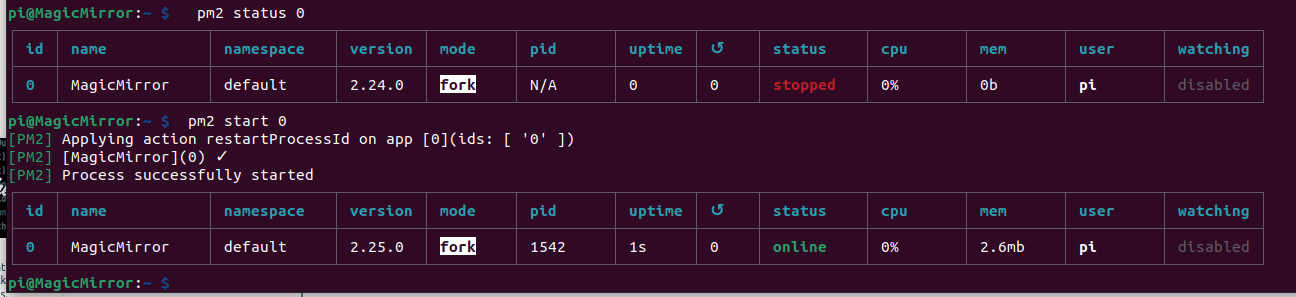
                                    MM is not starting automatic, also not after reboot.
                                    But this work fine

                                      pm2 start 0
                                    

                                    Bildschirmfoto vom 2023-10-11 18-36-13.png

                                    –
                                    cheers, bdream

                                    S 1 Reply Last reply Reply Quote 0
                                    • S Offline
                                      sdetweil @bdream
                                      last edited by

                                      @bdream ok

                                      probably missing library on some module

                                      do this

                                      pm2 stop all
                                      cd ~/MagicMirror
                                      npm start >/somefile.txt 2>&1
                                      

                                      wait 15 seconds
                                      in this same terminal window do
                                      ctrl-c

                                      then examine somefile.txt

                                      Sam

                                      How to add modules

                                      learning how to use browser developers window for css changes

                                      1 Reply Last reply Reply Quote 0
                                      • B Offline
                                        bdream
                                        last edited by

                                        @sdetweil do I have to use sudo?
                                        Bildschirmfoto vom 2023-10-11 19-03-03.png

                                        And what exactly you mean “then examine somefile.txt”?

                                        –
                                        cheers, bdream

                                        S 1 Reply Last reply Reply Quote 0
                                        • S Offline
                                          sdetweil @bdream
                                          last edited by

                                          @bdream edit sorry, typo

                                          2>./somefile.txt
                                          (notice the missing leading .)

                                          examine… edit, view, look inside

                                          Sam

                                          How to add modules

                                          learning how to use browser developers window for css changes

                                          J 1 Reply Last reply Reply Quote 0
                                          • J Offline
                                            Jonae @sdetweil
                                            last edited by

                                            @sdetweil

                                            this run this script:

                                            bash -c “$(curl -sL https://raw.githubusercontent.com/sdetweil/MagicMirror_scripts/testit/raspberry.sh)”

                                            get this error:
                                            system running in command line mode, configured for graphical desktop, please reboot

                                            after reboot, same error

                                            S 1 Reply Last reply Reply Quote 0

                                            Hello! It looks like you're interested in this conversation, but you don't have an account yet.

                                            Getting fed up of having to scroll through the same posts each visit? When you register for an account, you'll always come back to exactly where you were before, and choose to be notified of new replies (either via email, or push notification). You'll also be able to save bookmarks and upvote posts to show your appreciation to other community members.

                                            With your input, this post could be even better 💗

                                            Register Login

                                            • 1
                                            • 2
                                            • 1 / 2
                                            • First post
                                              Last post
                                            Enjoying MagicMirror? Please consider a donation!
                                            MagicMirror created by Michael Teeuw.
                                            Forum managed by Sam, technical setup by Karsten.
                                            This forum is using NodeBB as its core | Contributors
                                            Contact | Privacy Policy