MagicMirror Forum
    • Recent
    • Tags
    • Unsolved
    • Solved
    • MagicMirror² Repository
    • Documentation
    • 3rd-Party-Modules
    • Donate
    • Discord
    • Register
    • Login
    A New Chapter for MagicMirror: The Community Takes the Lead
    Read the statement by Michael Teeuw here.

    Internet-monitor module Not Starting Mirror

    Scheduled Pinned Locked Moved Solved Troubleshooting
    13 Posts 3 Posters 3.7k Views 3 Watching
    Loading More Posts
    • Oldest to Newest
    • Newest to Oldest
    • Most Votes
    Reply
    • Reply as topic
    Log in to reply
    This topic has been deleted. Only users with topic management privileges can see it.
    • S Do not disturb
      sdetweil @ebourne
      last edited by

      @ebourne thats not the startup messages

      do this is the module enabled in config.js

      pm2 stop all
      cd ~/MagicMirror
      npm start 
      

      that will display the errors

      pm2 start mm
      to restart thru pm2

      Sam

      How to add modules

      learning how to use browser developers window for css changes

      E 1 Reply Last reply Reply Quote 1
      • E Offline
        ebourne @sdetweil
        last edited by

        @sdetweil
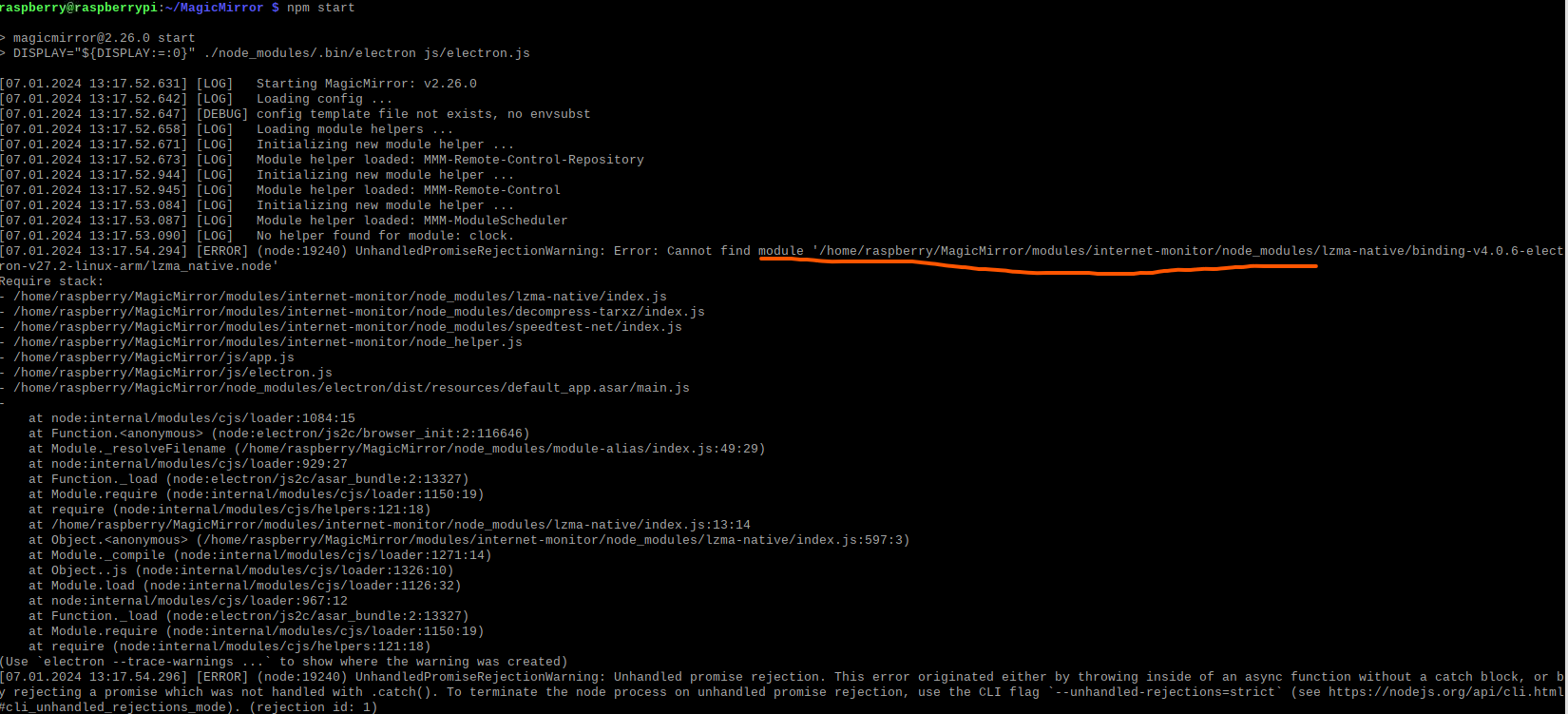
        oh i see. it seems it says it can’t find a folder, and that makes me confused since i did clone and npm installed in the internet-monitor folder. i thought that was all there was
        Screenshot 2024-01-07 130955.png

        S 1 Reply Last reply Reply Quote 0
        • S Do not disturb
          sdetweil @ebourne
          last edited by

          @ebourne which authors module are you using
          show

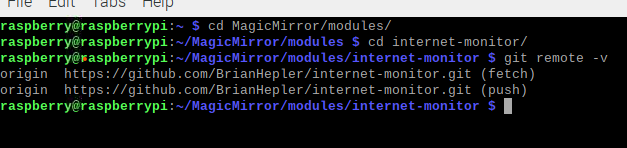
          git remote -v
          

          Sam

          How to add modules

          learning how to use browser developers window for css changes

          E KristjanESPERANTOK 2 Replies Last reply Reply Quote 1
          • E Offline
            ebourne @sdetweil
            last edited by

            @sdetweil brianhepler

            Screenshot 2024-01-07 135427.png

            1 Reply Last reply Reply Quote 0
            • KristjanESPERANTOK Offline
              KristjanESPERANTO Module Developer @sdetweil
              last edited by

              I also happened to be working on the problem just now. The speedtest-net package is apparently no longer compatible with the current node version. I created a PR to fix this: https://github.com/BrianHepler/internet-monitor/pull/2

              Let’s see when @bhepler merge it.

              S KristjanESPERANTOK 2 Replies Last reply Reply Quote 0
              • S Do not disturb
                sdetweil @KristjanESPERANTO
                last edited by sdetweil

                @KristjanESPERANTO not node version, electron version

                so, the steps to fix I think (tested, failed before, doesn’t fail now)

                #!/bin/bash
                cd ~/MagicMirror
                # this tool should be installed in MM
                if [ ! -e node_modules/.bin/electron-rebuild ]; then
                    npm install electron/rebuild 
                fi
                cd modules/internet-monitor
                ../../node_modules/.bin/electron-rebuild
                cd ~/MagicMirror
                

                this should be a postinstall step in the package.json

                this is the tested postinstall
                and works…

                and the fixed package.json

                {
                  "name": "internet-speed",
                  "version": "1.0.0",
                  "description": "Displays ping, download and upload speed on your smart mirror.",
                  "main": "index.js",
                  "scripts": {
                    "test": "echo \"Error: no test specified\" && exit 1",
                    "postinstall":"./postinstall"
                  },
                  "keywords": [
                    "internet",
                    "speed"
                  ],
                  "author": "Debayan Deb",
                  "license": "MIT",
                  "dependencies": {
                    "justgage": "^1.3.5",
                    "round-to": "^1.1.0",
                    "speedtest-net": "^2.2.0",
                    "raphael": "^2.2.8"
                  }
                }
                

                have to make postinstall executable

                chmod +x postinstall
                

                Sam

                How to add modules

                learning how to use browser developers window for css changes

                KristjanESPERANTOK 1 Reply Last reply Reply Quote 0
                • KristjanESPERANTOK Offline
                  KristjanESPERANTO Module Developer @sdetweil
                  last edited by

                  @sdetweil Interesting solution! I’m still not quite getting to grips with the rebuild of electron.

                  My approach in the PR is to use a version of speedtest-net that is compatible with the current version. That way, no rebuild is necessary.

                  S 1 Reply Last reply Reply Quote 0
                  • S Do not disturb
                    sdetweil @KristjanESPERANTO
                    last edited by sdetweil

                    @KristjanESPERANTO its not a rebuild of electron … its rebuilding binaries for the current electron version

                    Sam

                    How to add modules

                    learning how to use browser developers window for css changes

                    1 Reply Last reply Reply Quote 1
                    • KristjanESPERANTOK Offline
                      KristjanESPERANTO Module Developer @KristjanESPERANTO
                      last edited by

                      @KristjanESPERANTO said in Internet-monitor module Not Starting Mirror:

                      I also happened to be working on the problem just now. The speedtest-net package is apparently no longer compatible with the current node version. I created a PR to fix this: https://github.com/BrianHepler/internet-monitor/pull/2

                      Let’s see when @bhepler merge it.

                      @ebourne The maintainer of the module, @bhepler, accepted my Pull Request. Please update your module and check if it’s working 🙂

                      E 1 Reply Last reply Reply Quote 0
                      • E Offline
                        ebourne @KristjanESPERANTO
                        last edited by

                        @KristjanESPERANTO just wanna say thanks
                        it works

                        1 Reply Last reply Reply Quote 1

                        Hello! It looks like you're interested in this conversation, but you don't have an account yet.

                        Getting fed up of having to scroll through the same posts each visit? When you register for an account, you'll always come back to exactly where you were before, and choose to be notified of new replies (either via email, or push notification). You'll also be able to save bookmarks and upvote posts to show your appreciation to other community members.

                        With your input, this post could be even better 💗

                        Register Login

                        • 1 / 1
                        • First post
                          Last post
                        Enjoying MagicMirror? Please consider a donation!
                        MagicMirror created by Michael Teeuw.
                        Forum managed by Sam, technical setup by Karsten.
                        This forum is using NodeBB as its core | Contributors
                        Contact | Privacy Policy