Read the statement by Michael Teeuw here.
MMM-Pir or MMM-PIR-Sensor
-
Next Problems on my side…
First of all, the assignment I used:
PIR sensor that I have connected: HC-SR505
Pins : 2(5V) 9(Ground) 15(GPIO22)
Raspberry Pi 3bThe first thing I tried was https://github.com/MarcLandis/MMM-PIR-Sensor?tab=readme-ov-file on my MM.
Installation so far ok. But when I wanted to install wiring-pi I got stuck at the following step:

What exactly do I have to enter under ‘wiring-pi’? This is where I fail.
Then I thought I’d give it a try with
https://github.com/bugsounet/MMM-Pir .
The timer also counts down nicely and switches the monitor off after 2 minutes, but the PIR doesn’t react.{ module: 'MMM-Pir', position: 'top_left', config: { debug: false, delay: 2 * 60 * 1000, turnOffDisplay: true, mode: 1, ecoMode: true, displayCounter: true, displayBar: true, displayStyle: "Text", displayLastPresence: true, lastPresenceTimeFormat: "LL H:mm", mode6_gpio: 20, mode6_clearGpioValue: true, pir_gpio: 21, pir_reverseValue: false, xrandrForceRotation: "normal", wrandrForceRotation: "normal" } },I would have to
mode6_gpio: 20, and / or pir_gpio: 21, to 15? But the PIR doesn’t react there either.
I read somewhere that you have to “unlock” the pins first?
Can you tell me how I can use one of the two modules? -
@sdetweil thank you and i got it working!
-
@svenpisa 1st thing to do is use one of the python pir scripts to verify that the pir works, without MagicMirror involvement
Google search how to use the PIR
-
@sdetweil
HELP!!!
and how do I do that?
I just googled and came across the following page:
https://tutorials-raspberrypi.de/raspberry-pi-bewegungsmelder-sensor-pir/?utm_content=cmp-truedo I just need to create the file and refer to the correct pin?
Or what exactly do I need to install?
-
@svenpisa I would go here
-
@svenpisa said in MMM-Pir or MMM-PIR-Sensor:
But when I wanted to install wiring-pi I got stuck at the following step:
That is just a usage step. You can ignore that. If you ran the
npm install wiring-pithen you should be all set. -
Hi Sam, I have now taken the instructions from you
https://pimylifeup.com/raspberry-pi-motion-sensor/ and have gone through them step by step.I am using pin 15 (Gripo22)
I then edited the motion_sensor.py and entered pir_sensor = 15.
I simply ignored the piezo =7 entry as I only want to connect the PIR. So I really only entered pir_sensor = 15.I have now entered the following in Config.js
		{
			module: 'MMM-Pir',
			position: 'top_left',
			config: {
				debug: false,
				delay: 1 * 60 * 1000,
				turnOffDisplay: true,
				mode: 1,
				ecoMode: true,
				displayCounter: true,
				displayBar: true,
				displayStyle: "SemiCircle",
				displayLastPresence: true,
				lastPresenceTimeFormat: "LL H:mm",
				mode6_gpio: 22,
				mode6_clearGpioValue: true,
				pir_gpio: 22,
				pir_reverseValue: false,
				xrandrForceRotation: "normal",
				wrandrForceRotation: "normal"
			}
		},
But I don’t have the feeling that the PIR is really reacting to my movements. I can stand in front of it or tap it with my finger, but the screen doesn’t wake up.
But strangely enough, the screen does wake up from time to time, which I don’t think is due to the PIR.where is my mistake or am I using the following entry incorrectly? What is the purpose of the two entries?
				mode6_gpio: 22,
				mode6_clearGpioValue: true,
				pir_gpio: 22,
				pir_reverseValue: false,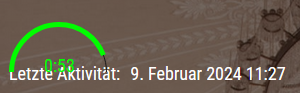
As you can see the countdown runs down and goes back to full time but I have no idea why. I don’t think it’s because of the PIR… I can fiddle with it as much as I like… The time doesn’t change
-
@svenpisa that is why I wanted you to run the python script outside of MagicMirror to confirm the PIR sensor is working correctly, detecting presence
if it doesn’t work without MagicMirror it won’t work WITH MagicMirror either.
-
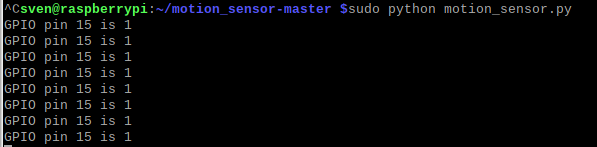
I don’t understand that. I have done it exactly according to the tutorial and via
sudo python motion_sensor.pyto test the Pir. I could not recognize a new line immediately after a movement, but a line is generated every 5 seconds.
Since the tutorial says that the sensor waits 5 seconds until it queries again, I would have thought that it would work since the 1 is specified.But now an entry is created directly every 5 seconds
I am open to all modules and settings to get the PIR up and running. If only I knew how to do it…
-
@svenpisa I don’t know exactly the problem…
the 5 second thing is in the code, not the PIR
it sounds like the pin number you are using is wrong, or the code is expecting no heat to be 0 and heat to be 1 ( pull up)
there are three different pin numbering orders and they are all different. sequential on the pi, and two others I can never remember.
until you get the python script showing motion/no motion, it cannot work under MagicMirror
-
Just for fun, I have now entered a different GPIO pin in sensor.py and started sudo python motion_sensor.py. Nothing happens here. So I have already selected the correct pin. But as you say, it’s probably the script.
How can I uninstall the motion sensor again? Simply delete the folder or is there a clean way?
I guess I’ll have to look for another solution, won’t I? -
@svenpisa yes, just delete the folder
-
-
I have the same problem. The Module is not working, I tried so many parameter changes. Besides that I tried to read the values of the PIR with a python script and is working. To power on/off the monitor via console is working too. I don’t know what to try else
-
@Andrei-Leahu can you show the info from npm start.
Right after
starting application -
@sdetweil Hello here is the Info Log: magicmirror@2.26.0 start
DISPLAY=“${DISPLAY:=:0}” ./node_modules/.bin/electron js/electron.js
[2024-10-06 14:00:06.410] [LOG] Starting MagicMirror: v2.26.0
[2024-10-06 14:00:06.456] [LOG] Loading config …
[2024-10-06 14:00:06.469] [LOG] config template file not exists, no envsubst
[2024-10-06 14:00:07.561] [INFO] Checking config file /home/xenon/MagicMirror/config/config.js …
[2024-10-06 14:00:07.688] [INFO] Your configuration file doesn’t contain syntax errors :)
[2024-10-06 14:00:07.689] [INFO] Checking modules structure configuration …
[2024-10-06 14:00:07.770] [INFO] Your modules structure configuration doesn’t contain errors :)
[2024-10-06 14:00:08.526] [LOG] Loading module helpers …
[2024-10-06 14:00:08.537] [LOG] No helper found for module: alert.
[2024-10-06 14:00:08.625] [LOG] Initializing new module helper …
[2024-10-06 14:00:08.626] [LOG] Module helper loaded: updatenotification
[2024-10-06 14:00:08.641] [LOG] No helper found for module: clock.
[2024-10-06 14:00:08.644] [LOG] No helper found for module: compliments.
[2024-10-06 14:00:08.646] [LOG] No helper found for module: weather.
[2024-10-06 14:00:08.726] [LOG] Initializing new module helper …
[2024-10-06 14:00:08.728] [LOG] Module helper loaded: MMM-GoogleKeep
[2024-10-06 14:00:08.732] [LOG] No helper found for module: MMM-CalendarExt3.
[2024-10-06 14:00:09.350] [LOG] Initializing new module helper …
[2024-10-06 14:00:09.351] [LOG] Module helper loaded: calendar
[2024-10-06 14:00:10.016] [LOG] Initializing new module helper …
[2024-10-06 14:00:10.017] [LOG] Module helper loaded: MMM-BackgroundSlideshow
[2024-10-06 14:00:10.053] [LOG] Initializing new module helper …
[2024-10-06 14:00:10.055] [LOG] Module helper loaded: MMM-Pir
[2024-10-06 14:00:10.058] [LOG] All module helpers loaded.
[2024-10-06 14:00:10.104] [LOG] Starting server on port 8080 …
[2024-10-06 14:00:10.979] [LOG] Server started …
[2024-10-06 14:00:10.981] [LOG] Connecting socket for: updatenotification
[2024-10-06 14:00:10.983] [LOG] Starting module helper: updatenotification
[2024-10-06 14:00:10.985] [LOG] Connecting socket for: MMM-GoogleKeep
[2024-10-06 14:00:10.987] [LOG] [MMM-GoogleKeep_helper]:: Starting node_helper for module [MMM-GoogleKeep]
[2024-10-06 14:00:10.988] [LOG] Connecting socket for: calendar
[2024-10-06 14:00:11.013] [LOG] Starting node helper for: calendar
[2024-10-06 14:00:11.019] [LOG] Connecting socket for: MMM-BackgroundSlideshow
[2024-10-06 14:00:11.027] [LOG] Connecting socket for: MMM-Pir
[2024-10-06 14:00:11.040] [LOG] Sockets connected & modules started …
[2024-10-06 14:00:11.581] [LOG] Launching application.
[2024-10-06 14:00:16.406] [INFO] System information:SYSTEM: manufacturer: Raspberry Pi Foundation; model: Raspberry Pi 4 Model B Rev 1.2; virtual: false
OS: platform: linux; distro: Raspbian GNU/Linux; release: 11; arch: arm; kernel: 6.1.21-v8+
VERSIONS: electron: 27.3.5; used node: 18.17.1; installed node: 20.8.0; npm: 10.9.0; pm2:
OTHER: timeZone: Europe/Berlin; ELECTRON_ENABLE_GPU: undefined
[2024-10-06 14:00:17.370] [LOG] Create new calendarfetcher for url: xxxx- Interval: 2000
[2024-10-06 14:00:17.661] [LOG] Create new calendarfetcher for url: xxxxxx - Interval: 2000
[2024-10-06 14:00:17.671] [LOG] [MMM-Pir] Version: 1.5.4 rev: 240824
[2024-10-06 14:00:17.680] [LOG] [MMM-Pir] [LIB] [PIR] Mode 0 Selected (onoff library)
[2024-10-06 14:00:17.768] [LOG] [MMM-Pir] [CALLBACK] Pir: PIR_STARTED
[2024-10-06 14:00:17.770] [LOG] [MMM-Pir] [LIB] [PIR] Started!
[2024-10-06 14:00:17.773] [LOG] [MMM-Pir] [LIB] [SCREEN] Mode 1: vcgencmd
[2024-10-06 14:00:17.775] [LOG] [MMM-Pir] [LIB] [SCREEN] Start.
[2024-10-06 14:00:17.777] [LOG] [MMM-Pir] [CALLBACK] Screen: SCREEN_PRESENCE true
[2024-10-06 14:00:17.806] [LOG] [MMM-Pir] [CALLBACK] Screen: SCREEN_SHOWING
[2024-10-06 14:00:17.808] [LOG] [MMM-Pir] Started!
[2024-10-06 14:00:17.812] [INFO] updatenotification: Updater Class Loaded!
[2024-10-06 14:00:17.813] [INFO] updatenotification: Checking PM2 using…
[2024-10-06 14:00:17.817] [INFO] Checking git for module: MMM-GoogleKeep
[2024-10-06 14:00:17.873] [INFO] BACKGROUNDSLIDESHOW: Reading directory “modules/MMM-BackgroundSlideshow/exampleImages/” for images.
[2024-10-06 14:00:17.877] [INFO] BACKGROUNDSLIDESHOW: 4 files found
[2024-10-06 14:00:17.881] [INFO] BACKGROUNDSLIDESHOW: reading path “modules/MMM-BackgroundSlideshow/exampleImages//1.png”
[2024-10-06 14:00:17.882] [LOG] resizeImages: false
[2024-10-06 14:00:17.935] [INFO] Checking git for module: MMM-CalendarExt3
[2024-10-06 14:00:17.958] [LOG] [MMM-Pir] [LIB] [SCREEN] Display: Force On Start
[2024-10-06 14:00:17.960] [LOG] [MMM-Pir] [LIB] [SCREEN] Display ON.
[2024-10-06 14:00:18.016] [INFO] Checking git for module: MMM-BackgroundSlideshow
[2024-10-06 14:00:18.103] [INFO] Checking git for module: MMM-Pir
[2024-10-06 14:00:18.312] [INFO] Checking git for module: MagicMirror
[2024-10-06 14:00:18.632] [LOG] Stream closed.
[2024-10-06 14:00:19.094] [INFO] Calendar-Fetcher: Broadcasting 0 events from xxxxx
[2024-10-06 14:00:19.260] [INFO] Calendar-Fetcher: Broadcasting 0 events from xxxxx
[2024-10-06 14:00:19.266] [LOG] [MMM-Pir] [CALLBACK] Screen: SCREEN_POWERSTATUS true
[2024-10-06 14:00:19.268] [LOG] [MMM-Pir] [LIB] [SCREEN] [POWER] Display from false —> true
[2024-10-06 14:00:19.273] [LOG] [MMM-Pir] [CALLBACK] Screen: SCREEN_OUTPUT { timer: ‘00:20’, bar: 0 }
[2024-10-06 14:00:20.280] [LOG] [MMM-Pir] [CALLBACK] Screen: SCREEN_OUTPUT { timer: ‘00:19’, bar: 1000 }
[2024-10-06 14:00:20.429] [LOG] {
note_text: {
header: ’
text: [
‘â Pampers’
]
}
}
[2024-10-06 14:00:20.599] [LOG] [MMM-GoogleKeep] finished running…
[2024-10-06 14:00:20.851] [INFO] updatenotification: You are not using pm2
[2024-10-06 14:00:21.382] [LOG] [MMM-Pir] [CALLBACK] Screen: SCREEN_OUTPUT { timer: ‘00:18’, bar: 2000 }
[2024-10-06 14:00:21.553] [INFO] xxxx
[2024-10-06 14:00:21.768] [INFO] Calendar-Fetcher: Broadcasting 0 events from xxx
[2024-10-06 14:00:22.405] [LOG] [MMM-Pir] [CALLBACK] Screen: SCREEN_OUTPUT { timer: ‘00:17’, bar: 3000 }
[2024-10-06 14:00:23.465] [LOG] [MMM-Pir] [CALLBACK] Screen: SCREEN_OUTPUT { timer: ‘00:16’, bar: 4000 }
[2024-10-06 14:00:23.820] [INFO] Calendar-Fetcher: Broadcasting 0 events from xxxx
[2024-10-06 14:00:24.475] [LOG] [MMM-Pir] [CALLBACK] Screen: SCREEN_OUTPUT { timer: ‘00:15’, bar: 5000 }
[2024-10-06 14:00:25.477] [LOG] [MMM-Pir] [CALLBACK] Screen: SCREEN_OUTPUT { timer: ‘00:14’, bar: 6000 } -
@Andrei-Leahu thanks. Bullseye, 64bit,
@bugsounet will have to look at this
-
@sdetweil I know but
MMM-Pirv2 is under-codingIn all case:
[MMM-Pir] [LIB] [PIR] Mode 0 Selected (onoff library): onoff library will be removed[MMM-Pir] [LIB] [SCREEN] Mode 1: vcgencmd: vcgencmd will be removed
-
@bugsounet I understand, so to make it work I should use now another mode right? Thank you
-
so I tried xset dpms force off and on and they are working so I will use mode: 2 for the screen. Now I have this behavior for pir_mode:1 : the counter is not counting down as if the sensor is always on maybe?
pir_mode:2 not working. Thank you -
Did anyone get MMM-PIR-Sensor work with bookworm?


Hello! It looks like you're interested in this conversation, but you don't have an account yet.
Getting fed up of having to scroll through the same posts each visit? When you register for an account, you'll always come back to exactly where you were before, and choose to be notified of new replies (either via email, or push notification). You'll also be able to save bookmarks and upvote posts to show your appreciation to other community members.
With your input, this post could be even better 💗
Register Login