MagicMirror Forum
    • Recent
    • Tags
    • Unsolved
    • Solved
    • MagicMirror² Repository
    • Documentation
    • 3rd-Party-Modules
    • Donate
    • Discord
    • Register
    • Login
    A New Chapter for MagicMirror: The Community Takes the Lead
    Read the statement by Michael Teeuw here.

    MMM-octoprint

    Scheduled Pinned Locked Moved Utilities
    17 Posts 6 Posters 6.0k Views 5 Watching
    Loading More Posts
    • Oldest to Newest
    • Newest to Oldest
    • Most Votes
    Reply
    • Reply as topic
    Log in to reply
    This topic has been deleted. Only users with topic management privileges can see it.
    • BKeyportB Offline
      BKeyport Module Developer @btastic
      last edited by

      @btastic Slick. I like it.

      The "E" in "Javascript" stands for "Easy"

      1 Reply Last reply Reply Quote 0
      • S Offline
        sdetweil @btastic
        last edited by sdetweil

        @btastic I did install the plugins

        and went into thumbnails and scanned the gcode files…

        Sam

        How to add modules

        learning how to use browser developers window for css changes

        1 Reply Last reply Reply Quote 0
        • J Offline
          jasondreher
          last edited by

          Great module, but mine keeps flipping between fine and unavailable. When it flips to unavailable I look at the ip address and all looks fine…

          any idea what the issue is?

          1 Reply Last reply Reply Quote 0
          • X Offline
            xIExodusIx
            last edited by

            Interessantes Modul,
            leider wird bei mir außer “Lade…” nichts weiter angezeigt, auch nach 24 Std. nicht.

            Hard- & Software Infos:
            Magic Mirror: 2.30 on Raspberry Pi4, 4GB
            OctoPrint: 1.10.3, Python: 3.11.2, OctoPi: 1.1.0 on Raspberry Pi4, 8GB

            KristjanESPERANTOK 1 Reply Last reply Reply Quote -1
            • KristjanESPERANTOK Offline
              KristjanESPERANTO Module Developer @xIExodusIx
              last edited by

              @xIExodusIx Try this: Remove this line const fetch = require("fetch"); from node_helper.js in the module directory. If it doesn’t work, show us the log output.

              S X 2 Replies Last reply Reply Quote 0
              • S Offline
                sdetweil @KristjanESPERANTO
                last edited by

                @KristjanESPERANTO or just comment out

                // const fetch = require(“fetch”);

                Sam

                How to add modules

                learning how to use browser developers window for css changes

                1 Reply Last reply Reply Quote 1
                • X Offline
                  xIExodusIx @KristjanESPERANTO
                  last edited by

                  @KristjanESPERANTO & @sdetweil
                  Danke für die Hilfe, es scheint zu funktionieren, jetzt wird nicht mehr nur “Lade…” angezeigt, sondern die angegebenen Druck-Infos. Ich muss das aber noch mit einem Druck-Auftrag testen.

                  Thanks for the help, it seems to work, now it’s not just showing “loading…” anymore, now it shows the specified print information. But I still have to test this with a print job.

                  Thank you :-)

                  S 1 Reply Last reply Reply Quote 1
                  • S Offline
                    sdetweil @xIExodusIx
                    last edited by

                    @xIExodusIx great!! thx for the feedback

                    Sam

                    How to add modules

                    learning how to use browser developers window for css changes

                    X 1 Reply Last reply Reply Quote 0
                    • X Offline
                      xIExodusIx @sdetweil
                      last edited by

                      @sdetweil & @KristjanESPERANTO
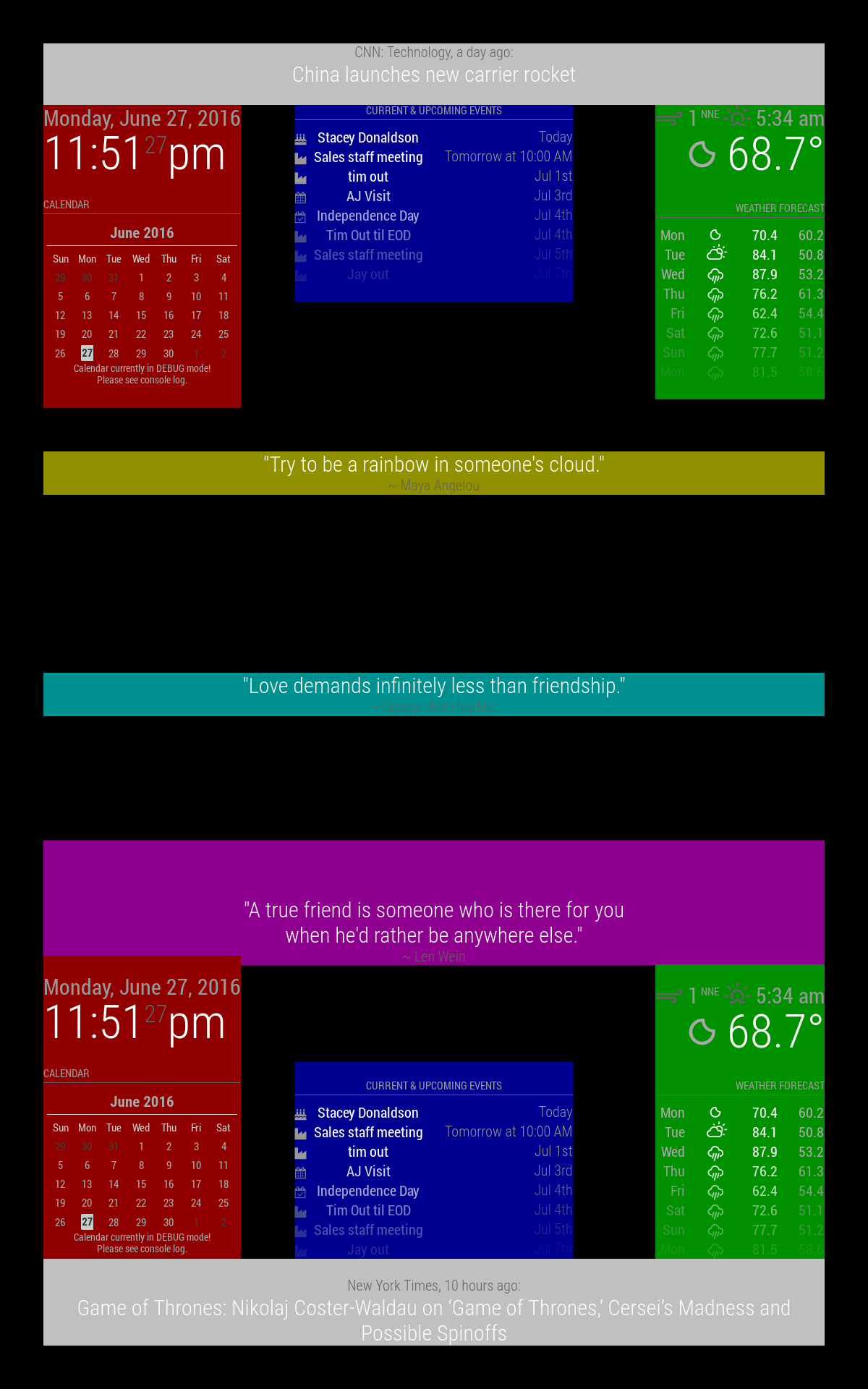
                      Yes, everything is working now, even the thumbnail and the layer progress are displayed. Only downside: It is displayed very, very small on the left edge of the screen. Not as I specified “middle_center”. I’m trying to figure out why.

                      But thanks for your great and fast Help :-)

                      S 1 Reply Last reply Reply Quote 0
                      • S Offline
                        sdetweil @xIExodusIx
                        last edited by sdetweil

                        @xIExodusIx

                        please don’t double post… all posts from users with reputation below 2 are reviewed (by me)… surprizingly I DO do other things than MM…!!

                        from the doc, middle_center is all the way across the screen (magenta here)

                        https://docs.magicmirror.builders/modules/configuration.html#position
                        regions.png

                        Sam

                        How to add modules

                        learning how to use browser developers window for css changes

                        1 Reply Last reply Reply Quote 0

                        Hello! It looks like you're interested in this conversation, but you don't have an account yet.

                        Getting fed up of having to scroll through the same posts each visit? When you register for an account, you'll always come back to exactly where you were before, and choose to be notified of new replies (either via email, or push notification). You'll also be able to save bookmarks and upvote posts to show your appreciation to other community members.

                        With your input, this post could be even better 💗

                        Register Login

                        • 1 / 1
                        • First post
                          Last post
                        Enjoying MagicMirror? Please consider a donation!
                        MagicMirror created by Michael Teeuw.
                        Forum managed by Sam, technical setup by Karsten.
                        This forum is using NodeBB as its core | Contributors
                        Contact | Privacy Policy
