Read the statement by Michael Teeuw here.
MMM-PublicTransportHafas - Error when loading - DeparturFetcher.mjs
-
@p1lspeda said in MMM-PublicTransportHafas - Error when loading - DeparturFetcher.mjs:
### VERSIONS: electron: 32.2.7; used node: 22.14.0; installed node: 22.14.0; npm: 10.9.2; pm2: 5.4.3You still need to upgrade MagicMirror. I recommend the official upgrade process.
-
I used the update script again and now MM is 2.31.0
MMM-PublicTransportHafas works again, that`s fine, but now MMM-SmartWebDisplay is gone…
Not fine… -
@Volkae any errors listed in MagicMirror startup?
-
@sdetweil
Sorry, I don`t know how to show the errors during startup :-( -
@Volkae where does npm start output
if using pm2 tge
pm2 logs --lines=xxx
xxx is the number of most recent lines
default 15probably 100 good start
note the output comes in 2 partserror and output
-
@sdetweil
Not using pm2
using cronjob to start MM -
@Volkae i forgot to mention that the full calendar url
is shown
i have deleted the other message -
@sdetweil
Upps,
thank you!!! -
@KristjanESPERANTO
I’ve upgraded to the latest MM Versionpi@magicmirror:~/MagicMirror $ grep version package.json "version": "2.31.0-develop",[2025-05-07 09:57:22.742] [INFO] System information: ### SYSTEM: manufacturer: ; model: ; virtual: false ### OS: platform: linux; distro: Debian GNU/Linux; release: 12; arch: arm64; kernel: 6.12.20+rpt-rpi-v8 ### VERSIONS: electron: 32.2.7; used node: 22.14.0; installed node: 22.14.0; npm: 10.9.2; pm2: 5.4.3 ### OTHER: timeZone: Europe/Berlin; ELECTRON_ENABLE_GPU: undefinedAnd I still get this error
[2025-05-07 09:57:19.297] [ERROR] Error when loading MMM-PublicTransportHafas: require() of ES Module /home/pi/MagicMirror/modules/MMM-PublicTransportHafas/core/DepartureFetcher.mjs not supported.
Instead change the require of /home/pi/MagicMirror/modules/MMM-PublicTransportHafas/core/DepartureFetcher.mjs to a dynamic import() which is available in all CommonJS modules.
My module version:
pi@magicmirror:~/MagicMirror/modules/MMM-PublicTransportHafas $ grep version package.json
  "version": "3.1.11",
pi@magicmirror:~/MagicMirror/modules/MMM-PublicTransportHafas $ git pull
Already up to date.
I do not know what else I can do or what I have missed
-
I just done a fresh install of the module and it works fine for me.
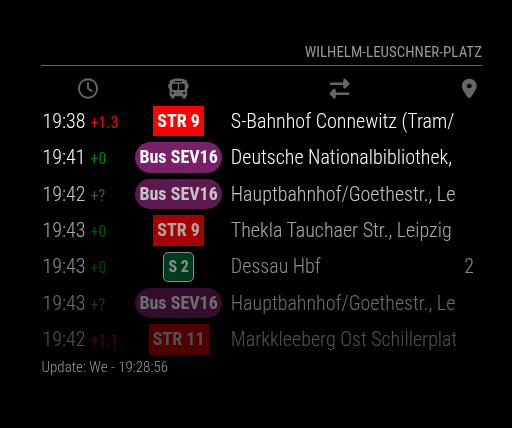
Just out of curiosity, did you do the following steps?
-
cd MMM-PublicTransportHafas -
npm ci --omit=dev
@KristjanESPERANTO ) saw the below in the log, I am assuming it is nothing to be concerned about?
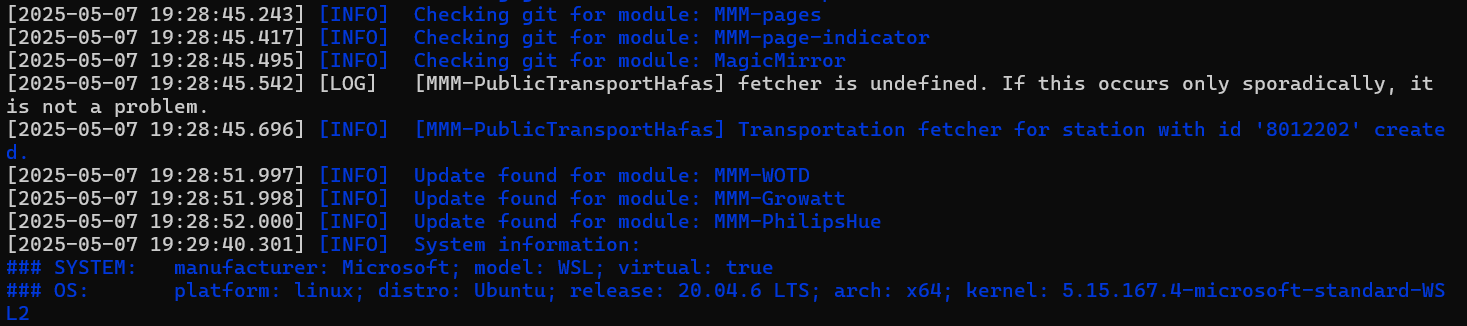
-
-
@p1lspeda said in MMM-PublicTransportHafas - Error when loading - DeparturFetcher.mjs:
I’ve upgraded to the latest MM Version
not really,
2.31.0-develop <> 2.31.0 -
@p1lspeda How did you perform the MagicMirror update? Please show us the output of
git branchwhen you are in the MagicMirror root directory. -
@KristjanESPERANTO looks like he was on the dev branch for a fix and didn’t use my script to update or follow the instructions I posted
https://forum.magicmirror.builders/topic/19561/version-2.31.0-april-1-2025-upgrade-reminder
-
@KristjanESPERANTO
Thanks for your patience,Edit: did a complete reinstall and now it works. I must have misconfigured something and could not remember what or how.
#############################
This is what I have done:- I switched to the master branch yesterday and ran @sdetweil 's update script no change
- I’ve done a fresh module install - no change
- I’ve ran @sdetweil 's upgrade script - no change
pi@magicmirror:~/MagicMirror $ git branch
  _fix_clipping
* master
pi@magicmirror:~/MagicMirror $ cd modules/MMM-PublicTransportHafas/
pi@magicmirror:~/MagicMirror/modules/MMM-PublicTransportHafas $ npm ci --omit=dev

> mmm-publictransporthafas@3.1.11 prepare
> [ -f node_modules/.bin/husky ] && husky || echo husky is not installed.

husky is not installed.

added 63 packages, and audited 64 packages in 20s

19 packages are looking for funding
  run `npm fund` for details

found 0 vulnerabilities
pi@magicmirror:~/MagicMirror/modules/MMM-PublicTransportHafas $
pi@magicmirror:~/MagicMirror $ grep version package.json
        "version": "2.31.0",
Here’s my config.js
                {
                        module: "MMM-PublicTransportHafas",
                        position: "top_right",
                        config: {
                                stationID: "000405041",                   // Replace with your stationID!
                                stationName: "Höfchen/Listmann",   // Replace with your station name!
                                direction: "",                    // Show only departures heading to this station. (A station ID.)
                                ignoredLines: [],                 // Which lines should be ignored? (comma-separated list of line names)
                                excludedTransportationTypes: [],  // Which transportation types should not be shown on the mirror? (comma-separated list of types) possible values: StN for >
                                timeToStation: 10,                // How long do you need to walk to the next Station?
                                showColoredLineSymbols: true,     // Want colored line symbols?
                                useColorForRealtimeInfo: true,    // Want colored real time information (timeToStation, early)?
                                showTableHeadersAsSymbols: true,  // Table Headers as symbols or text?
                                maxUnreachableDepartures: 0,      // How many unreachable departures should be shown?
                                maxReachableDepartures: 10,        // How many reachable departures should be shown?
                                customLineStyles: "",             // Prefix for the name of the custom css file. ex: Leipzig-lines.css (case sensitive)
                                showOnlyLineNumbers: false        // Display only the line number instead of the complete name, i. e. "11" instead of "STR 11"
                                 }
                },
The error still occurs.
At this point I’m completely clueless -
Hello together,
i tried your instruction and updated MM and node.
My node Version is 23.7.0
My MM Version is 2.31.0
git branch shows me master (highlighted)I also updated the module Version to: “3.1.11”
Still got the error message.
-
@Vulan12354 how did you upgrade MagicMirror?
-
@p1lspeda on my upgrade script, can you show me the ~/MagicMirror/installers/upgrade.log
or tell me the command you used
-
@sdetweil
I removed the entire MagicMirror directory before reinstalling MM.
I didn’t make a backup, so I cannot provide the log. Sorry.For updating I tried
bash -c "$(curl -sL https://raw.githubusercontent.com/sdetweil/MagicMirror_scripts/master/upgrade-script.sh)"and
bash -c "$(curl -sL https://raw.githubusercontent.com/sdetweil/MagicMirror_scripts/master/upgrade-script.sh)" applyand the fresh install was achieved by using
bash -c "$(curl -sL https://raw.githubusercontent.com/sdetweil/MagicMirror_scripts/master/raspberry.sh)" -
@p1lspeda great thanks…
only THIS one DOES the upgrade
bash -c "$(curl -sL https://raw.githubusercontent.com/sdetweil/MagicMirror_scripts/master/upgrade-script.sh)" applyBUT, if you did a git pull manually then the local code would be at the new/current version
and I would abort, as you are ALREADY at the current level…THEN you have to do
bash -c "$(curl -sL https://raw.githubusercontent.com/sdetweil/MagicMirror_scripts/master/upgrade-script.sh)" forcecause I won’t let you upgrade OVER the same release accidentally
~/MagicMirror/installers/upgrade.log is created and updated in all cases.
so we can tell what happenedif it didn’t seem to work, I want to know… and get the log,
even if you decide to abort and start overthese scripts are very conservative… I do NOT want to destroy your running MM system
-
@sdetweil
good to know for the future. Thanks.
I was unaware of the “force” parameter, that’s why I never tried it.



Hello! It looks like you're interested in this conversation, but you don't have an account yet.
Getting fed up of having to scroll through the same posts each visit? When you register for an account, you'll always come back to exactly where you were before, and choose to be notified of new replies (either via email, or push notification). You'll also be able to save bookmarks and upvote posts to show your appreciation to other community members.
With your input, this post could be even better 💗
Register Login