MagicMirror Forum
    • Recent
    • Tags
    • Unsolved
    • Solved
    • MagicMirror² Repository
    • Documentation
    • 3rd-Party-Modules
    • Donate
    • Discord
    • Register
    • Login
    A New Chapter for MagicMirror: The Community Takes the Lead
    Read the statement by Michael Teeuw here.

    MMM-MyTado

    Scheduled Pinned Locked Moved Utilities
    30 Posts 4 Posters 717 Views 4 Watching
    Loading More Posts
    • Oldest to Newest
    • Newest to Oldest
    • Most Votes
    Reply
    • Reply as topic
    Log in to reply
    This topic has been deleted. Only users with topic management privileges can see it.
    • htilburgsH Offline
      htilburgs @MyMirror
      last edited by htilburgs

      @MyMirror
      This is a font issue on the Raspberry Pi.
      Can you try sudo apt install fonts-symbola reboot your PI and look again?

      This issues with the alignement of the Home Name and the Status icons is fixed also. Just published an update.

      (still trying to learn JS, but not afraid to ask and AI is my best friend) ☺

      M 1 Reply Last reply Reply Quote 0
      • M Offline
        MyMirror @htilburgs
        last edited by MyMirror

        @htilburgs
        fonts-Symbola installed and rebootet:
        Fonts.png

        And some inspections:
        Insp1o.png
        Insp2o.png
        Insp3o.png Insp2o2.png

        Insp1.png Insp2.png

        J 1 Reply Last reply Reply Quote 0
        • J Offline
          JoeFranz @MyMirror
          last edited by

          @MyMirror
          I didn’t have any colors either.

          Then I installed the “Noto Color Emoji” font.

          After that, I added the following to custom.css:

          /* Do NOT use Symbola */
          .MMM-MyTado {

          font-family: “Noto Color Emoji”, sans-serif !important;

          }

          Now the colors are there :-)

          Bildschirmfoto 2026-03-02 um 11.38.24.png

          M 1 Reply Last reply Reply Quote 1
          • M Offline
            MyMirror @JoeFranz
            last edited by MyMirror

            @JoeFranz
            Yes !! - This “Noto Color Emoji” font works!
            Now i’ve colors and pictures.

            The steps:
            sudo apt update
            sudo apt install fonts-noto-color-emoji
            fc-cache -fv

            • change font in css
              and reboot your mirror

            Thanks for your help and one more time: Thanks for the module

            htilburgsH 1 Reply Last reply Reply Quote 0
            • htilburgsH Offline
              htilburgs @MyMirror
              last edited by

              @MyMirror
              Your welcome.
              Have much fun in using this module

              @joefranz
              Thanks for the help with the fonts.

              (still trying to learn JS, but not afraid to ask and AI is my best friend) ☺

              J 1 Reply Last reply Reply Quote 0
              • J Offline
                JoeFranz @htilburgs
                last edited by JoeFranz

                @htilburgs
                I’ve made the view a bit more compact. The word “Status” was stretching everything too much. Now I only see the status icon. Looks better, I think… :-)

                /* Nur die STATUS-Überschrift ausblenden */
                .MMM-MyTado th:last-child {
                display: none !important;
                }
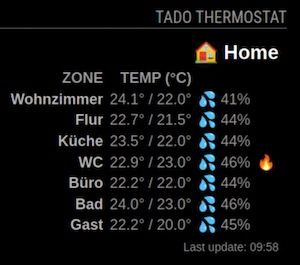
                Bildschirmfoto 2026-03-03 um 10.01.09.jpg

                htilburgsH 2 Replies Last reply Reply Quote 0
                • htilburgsH Offline
                  htilburgs @JoeFranz
                  last edited by

                  @JoeFranz
                  I will take a look at it when I’m at home. Currently at work.

                  (still trying to learn JS, but not afraid to ask and AI is my best friend) ☺

                  M 1 Reply Last reply Reply Quote 0
                  • M Offline
                    MyMirror @htilburgs
                    last edited by MyMirror

                    @htilburgs
                    @joefranz
                    That looks good.

                    I also saw this in the README (OpenWindow):
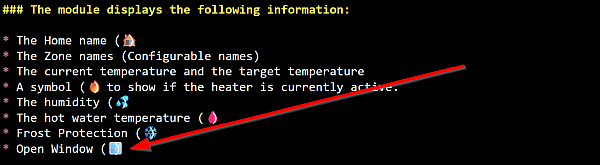
                    OpenWindow1.png

                    I often see this message in my app, but how can I activate it here too?

                    J 1 Reply Last reply Reply Quote 0
                    • J Offline
                      JoeFranz @MyMirror
                      last edited by

                      @MyMirror
                      Perhaps this is due to the time period of updating the data. Unfortunately, the values are only updated every 30 minutes. If the window is opened and closed again during this period, then of course it will not be displayed. Just a guess…😉

                      htilburgsH 1 Reply Last reply Reply Quote 0
                      • htilburgsH Offline
                        htilburgs @JoeFranz
                        last edited by htilburgs

                        @JoeFranz @mymirror
                        That is correct. Due to the limit of 100 polls a day (thanks to Tado), you will probably not see this often.

                        When you have the “contract” with Tado, you can put the polling lower (mine is at 300000 / 5 min, still trying how far I can go) and I have seen it once, when I let my door open for a few minutes).

                        (still trying to learn JS, but not afraid to ask and AI is my best friend) ☺

                        1 Reply Last reply Reply Quote 0
                        • htilburgsH Offline
                          htilburgs @JoeFranz
                          last edited by

                          @JoeFranz
                          I see what you did, but there are more ways to do this:

                          showColumnHeaders: false
                          

                          Then no headers are shown and you have a compact view

                          or you leave the statusColumnName: "" (empty) so no name is shown.
                          With the CSS change, it becomes definitive, and that is not what should happen.

                          (still trying to learn JS, but not afraid to ask and AI is my best friend) ☺

                          1 Reply Last reply Reply Quote 0
                          • htilburgsH Offline
                            htilburgs
                            last edited by

                            Just updated to v1.0.3 - Add debug option, to prevent to many loggings in the logfiles.

                            In config.js simple add debug: false, (or true for showing console log messages). Default it is false, because loggings were growing to fast.

                            Update:

                            cd ~/MagicMirror/modules/MMM-MyTado
                            git pull
                            npm install
                            

                            (still trying to learn JS, but not afraid to ask and AI is my best friend) ☺

                            M 1 Reply Last reply Reply Quote 0
                            • M Offline
                              MyMirror @htilburgs
                              last edited by

                              @htilburgs
                              Two more questions:
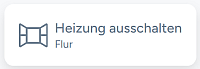
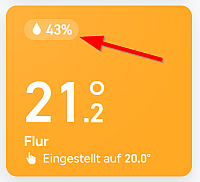
                              Is it possible to provide the humidity and the exact open window as well?
                              In the app both are visible:

                              Open window:
                              MMM-Tado_14.03.26_3a.png

                              Humidity:
                              MMM-Tado_14.03.26_4.png
                              BR

                              htilburgsH 1 Reply Last reply Reply Quote 0
                              • htilburgsH Offline
                                htilburgs @MyMirror
                                last edited by

                                @MyMirror
                                The humidity is already shown -> The humidity (💦)
                                The open window is already shown -> Open Window (🪟)
                                It will be shown in the status column when it appears in that zone.

                                (still trying to learn JS, but not afraid to ask and AI is my best friend) ☺

                                M 1 Reply Last reply Reply Quote 0
                                • M Offline
                                  MyMirror @htilburgs
                                  last edited by

                                  @htilburgs
                                  You’re completly right …

                                  1 Reply Last reply Reply Quote 0

                                  Hello! It looks like you're interested in this conversation, but you don't have an account yet.

                                  Getting fed up of having to scroll through the same posts each visit? When you register for an account, you'll always come back to exactly where you were before, and choose to be notified of new replies (either via email, or push notification). You'll also be able to save bookmarks and upvote posts to show your appreciation to other community members.

                                  With your input, this post could be even better 💗

                                  Register Login

                                  • 1
                                  • 2
                                  • 2 / 2
                                  • First post
                                    Last post
                                  Enjoying MagicMirror? Please consider a donation!
                                  MagicMirror created by Michael Teeuw.
                                  Forum managed by Sam, technical setup by Karsten.
                                  This forum is using NodeBB as its core | Contributors
                                  Contact | Privacy Policy