Read the statement by Michael Teeuw here.
layer definition: here MMM-Globe overlaps left panel
-
I tested my Magic Mirror today with a rotated display and found, that the picture of my globe in MMM-Globe overlaps the left panel side. That is also, if I move the MMM-Globe in the config.sys to the top. The right panel side is nicely in the background and above the globe.
Is there a way to show change the layer visibility?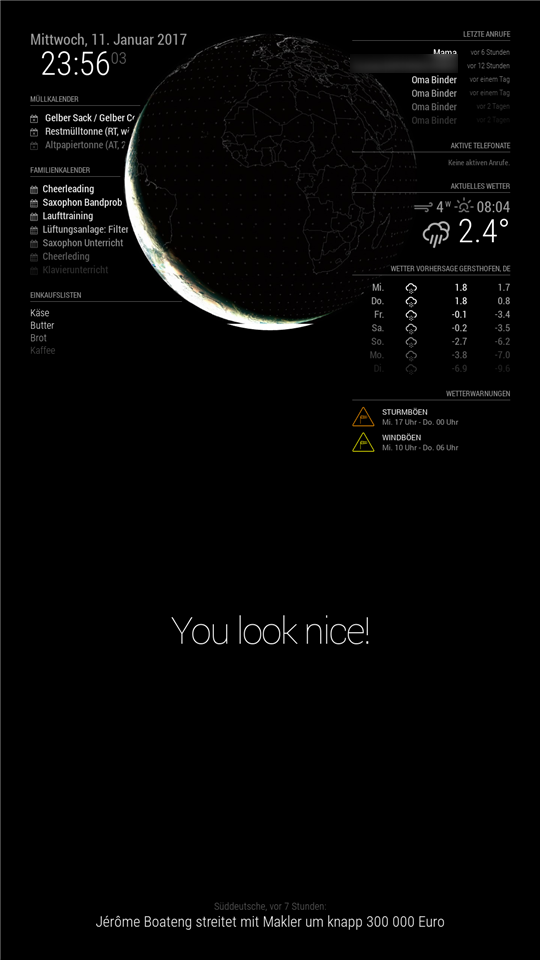
-
Yes, using z-index on the modules you can arrange the layers.
Like
.MMM-Globe {
z-index: 2;
}
Will put the globe module above everyother module, you can also apply this to regions.
-
thanks! Works like a charm now!
-
Hello,
I’m sorry, but where I have to change the Settings to arrange the layers? -
@Niggich
~/MagicMirror/css/custom.css -
I did, but it’s not working… :-(
-
@Niggich how does your custom.css look like
-
Like:
/***************************************************** * Magic Mirror * * Custom CSS * * * * By Michael Teeuw http://michaelteeuw.nl * * MIT Licensed. * * * * Add any custom CSS below. * * Changes to this files will be ignored by GIT. * *****************************************************/ body { } .compliments .xlarge { font-size: 40px; line-height: 40px; letter-spacing: 0px; font-weight: 400; } .calendar { width: 100%; font-size: 15px; } .MMM-FRITZ-Box-Callmonitor { width: 90% } .currentweather { width: 100% } .weatherforecast { width: 100% } .MMM-DWD-WarnWeather { width: 100% } .MMM-Globe { z-index: 2; } -
@Niggich when you set it to two it will be above all, you have to set a lower value than the other have like -1
-
no, it is not working… I try -1, also -20 and -50
-
not working for me too
-
can you test
.MMM-Globe {
z-index: 2;
position: relative;
}
if this is not working i will download the module and debug it myself
Please create a github issue if you need help, so I can keep track
-
@strawberry-3.141 thats my custom.css:
/*****************************************************
 * Magic Mirror                                      *
 * Custom CSS                                        *
 *                                                   *
 * By Michael Teeuw http://michaelteeuw.nl           *
 * MIT Licensed.                                     *
 *                                                   *
 * Add any custom CSS below.                         *
 * Changes to this files will be ignored by GIT. *
 *****************************************************/

body {
  margin: 20px;
  position: absolute;
  height: calc(100% - 40px);
  width: calc(100% - 40px);
  background: #000;
  color: #aaa;
  font-family: "Roboto Condensed", sans-serif;
  font-weight: 400;
  font-size: 2em;
  line-height: 1.5em;
  -webkit-font-smoothing: antialiased;
}

.brightb {
color: #55acee;
}
.currentweather .wi-sunrise {
color: #ffd700;
}
.currentweather .wi-sunset {
color: #ffa500;
}
.currentweather .wi-day-sunny {
color: #ffff00;
}
.currentweather .wi-night-showers {
color: #55acee;
}
.currentweather .wi-degrees {
color: #415;
}
.currentweather .wi-rain {
color: #55acee;
}
.currentweather .wi-showers {
color: #55acee;
}
.currentweather .wi-night-showers {
color: #55acee;
}
.currentweather .wi-night-alt-cloudy-windy {
color: #aaa;
}
.currentweather .wi-night-cloudy {
color: #aaa;
}
.currentweather .wi-cloudy {
color: #aaa;
}
.currentweather .wi-day-cloudy {
color: #aaa;
}
.currentweather .wi-cloudy {
color: #aaa;
}
.currentweather .wi-cloudy-windy {
color: #aaa;
}
.currentweather .wi-showers {
color: #55acee;
}
.currentweather .wi-thunderstorm {
color: #ff00ff;
}
.currentweather .wi-snow {
color: #fff;
}
.currentweather .wi-fog {
color: #999;
}
.currentweather .wi-night-clear {
color: #fff;
}
.currentweather .wi-night-rain {
color: #55acee;
}
.currentweather .wi-night-thunderstorm {
color: #ff00ff;
}
.currentweather .wi-night-snow {
color: #fff;
}

.weatherforecast .wi-sunrise {
color: #ffd700;
}
.weatherforecast .wi-sunset {
color: #ffa500;
}
.weatherforecast .wi-day-sunny {
color: #ffff00;
}
.weatherforecast .wi-night-showers {
color: #55acee;
}
.weatherforecast .wi-degrees {
color: #415;
}
.weatherforecast .wi-rain {
color: #55acee;
}
.weatherforecast .wi-showers {
color: #55acee;
}
.weatherforecast .wi-night-showers {
color: #55acee;
}
.weatherforecast .wi-night-alt-cloudy-windy {
color: #aaa;
}
.weatherforecast .wi-night-cloudy {
color: #aaa;
}
.weatherforecast .wi-cloudy {
color: #aaa;
}
.weatherforecast .wi-day-cloudy {
color: #aaa;
}
.weatherforecast .wi-cloudy {
color: #aaa;
}
.weatherforecast .wi-cloudy-windy {
color: #aaa;
}
.weatherforecast .wi-showers {
color: #55acee;
}
.weatherforecast .wi-thunderstorm {
color: #ff00ff;
}
.weatherforecast .wi-snow {
color: #fff;
}
.weatherforecast .wi-fog {
color: #999;
}
.weatherforecast .wi-night-clear {
color: #fff;
}
.weatherforecast .wi-night-rain {
color: #55acee;
}
.weatherforecast .wi-night-thunderstorm {
color: #ff00ff;
}
.currentweather .wi-night-snow {
color: #fff;
}

.region.fullscreen {
  position: absolute;
  top: -20px;
  left: -20px;
  right: -20px;
  bottom: -20px;
}
where should i put ?
 .MMM-Globe {
z-index: 2;
position: relative;
}
everywhere I tried it, it´s not working :see_no_evil:
-
nope… it’s not working for me…
-
for me the following is working
.region.top.center {
z-index: -2
position: absolute;
}
Please create a github issue if you need help, so I can keep track
-
@strawberry-3.141
yes!! Thats it! I just have to change the region to lower.third…Thanks a lot!
-
This post is deleted! -
@strawberry-3.141 @Niggich
Hi guys! I crashed my sd card and now this :
.region.top.center { z-index: -2 position: absolute; }
work anymore!?! If I c+p this in my custom.css the globe disappears!? -
@schlachtkreuzer6 Without this in your custom.css the Globe is working?
-
@Niggich yes





Hello! It looks like you're interested in this conversation, but you don't have an account yet.
Getting fed up of having to scroll through the same posts each visit? When you register for an account, you'll always come back to exactly where you were before, and choose to be notified of new replies (either via email, or push notification). You'll also be able to save bookmarks and upvote posts to show your appreciation to other community members.
With your input, this post could be even better 💗
Register Login