MagicMirror Forum
    • Recent
    • Tags
    • Unsolved
    • Solved
    • MagicMirror² Repository
    • Documentation
    • 3rd-Party-Modules
    • Donate
    • Discord
    • Register
    • Login
    A New Chapter for MagicMirror: The Community Takes the Lead
    Read the statement by Michael Teeuw here.

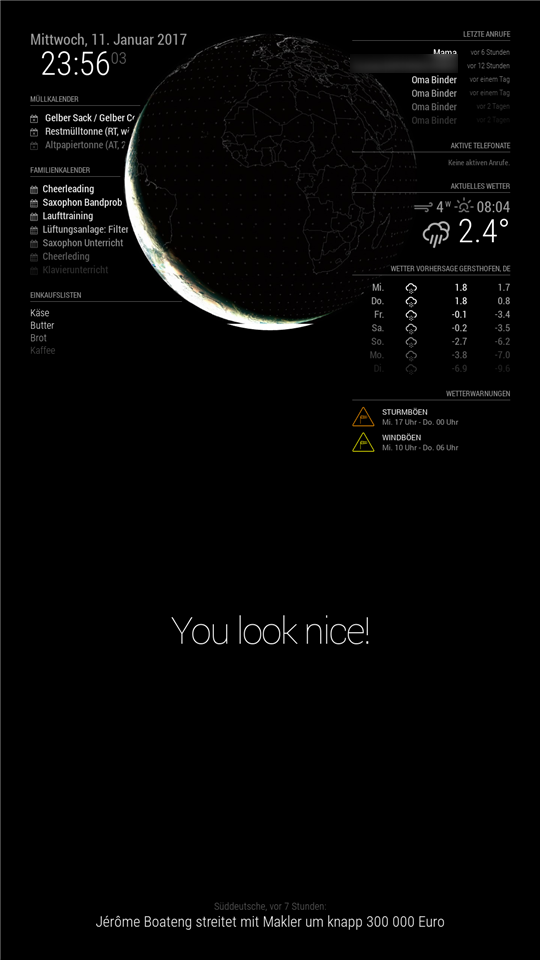
    layer definition: here MMM-Globe overlaps left panel

    Scheduled Pinned Locked Moved Solved Troubleshooting
    25 Posts 7 Posters 22.0k Views 7 Watching
    Loading More Posts
    • Oldest to Newest
    • Newest to Oldest
    • Most Votes
    Reply
    • Reply as topic
    Log in to reply
    This topic has been deleted. Only users with topic management privileges can see it.
    • strawberry 3.141S Offline
      strawberry 3.141 Project Sponsor Module Developer @Niggich
      last edited by

      @Niggich when you set it to two it will be above all, you have to set a lower value than the other have like -1

      Please create a github issue if you need help, so I can keep track

      1 Reply Last reply Reply Quote 1
      • N Offline
        Niggich
        last edited by

        no, it is not working… I try -1, also -20 and -50

        strawberry 3.141S 1 Reply Last reply Reply Quote 0
        • schlachtkreuzer6S Offline
          schlachtkreuzer6
          last edited by

          not working for me too

          1 Reply Last reply Reply Quote 0
          • strawberry 3.141S Offline
            strawberry 3.141 Project Sponsor Module Developer @Niggich
            last edited by

            @Niggich @schlachtkreuzer6

            can you test

            .MMM-Globe {
            z-index: 2;
            position: relative;
            }
            

            if this is not working i will download the module and debug it myself

            Please create a github issue if you need help, so I can keep track

            schlachtkreuzer6S N 2 Replies Last reply Reply Quote 0
            • schlachtkreuzer6S Offline
              schlachtkreuzer6 @strawberry 3.141
              last edited by

              @strawberry-3.141 thats my custom.css:

              /*****************************************************
               * Magic Mirror                                      *
               * Custom CSS                                        *
               *                                                   *
               * By Michael Teeuw http://michaelteeuw.nl           *
               * MIT Licensed.                                     *
               *                                                   *
               * Add any custom CSS below.                         *
               * Changes to this files will be ignored by GIT. *
               *****************************************************/
              
              body {
                margin: 20px;
                position: absolute;
                height: calc(100% - 40px);
                width: calc(100% - 40px);
                background: #000;
                color: #aaa;
                font-family: "Roboto Condensed", sans-serif;
                font-weight: 400;
                font-size: 2em;
                line-height: 1.5em;
                -webkit-font-smoothing: antialiased;
              }
              
              .brightb {
              color: #55acee;
              }
              .currentweather .wi-sunrise {
              color: #ffd700;
              }
              .currentweather .wi-sunset {
              color: #ffa500;
              }
              .currentweather .wi-day-sunny {
              color: #ffff00;
              }
              .currentweather .wi-night-showers {
              color: #55acee;
              }
              .currentweather .wi-degrees {
              color: #415;
              }
              .currentweather .wi-rain {
              color: #55acee;
              }
              .currentweather .wi-showers {
              color: #55acee;
              }
              .currentweather .wi-night-showers {
              color: #55acee;
              }
              .currentweather .wi-night-alt-cloudy-windy {
              color: #aaa;
              }
              .currentweather .wi-night-cloudy {
              color: #aaa;
              }
              .currentweather .wi-cloudy {
              color: #aaa;
              }
              .currentweather .wi-day-cloudy {
              color: #aaa;
              }
              .currentweather .wi-cloudy {
              color: #aaa;
              }
              .currentweather .wi-cloudy-windy {
              color: #aaa;
              }
              .currentweather .wi-showers {
              color: #55acee;
              }
              .currentweather .wi-thunderstorm {
              color: #ff00ff;
              }
              .currentweather .wi-snow {
              color: #fff;
              }
              .currentweather .wi-fog {
              color: #999;
              }
              .currentweather .wi-night-clear {
              color: #fff;
              }
              .currentweather .wi-night-rain {
              color: #55acee;
              }
              .currentweather .wi-night-thunderstorm {
              color: #ff00ff;
              }
              .currentweather .wi-night-snow {
              color: #fff;
              }
              
              .weatherforecast .wi-sunrise {
              color: #ffd700;
              }
              .weatherforecast .wi-sunset {
              color: #ffa500;
              }
              .weatherforecast .wi-day-sunny {
              color: #ffff00;
              }
              .weatherforecast .wi-night-showers {
              color: #55acee;
              }
              .weatherforecast .wi-degrees {
              color: #415;
              }
              .weatherforecast .wi-rain {
              color: #55acee;
              }
              .weatherforecast .wi-showers {
              color: #55acee;
              }
              .weatherforecast .wi-night-showers {
              color: #55acee;
              }
              .weatherforecast .wi-night-alt-cloudy-windy {
              color: #aaa;
              }
              .weatherforecast .wi-night-cloudy {
              color: #aaa;
              }
              .weatherforecast .wi-cloudy {
              color: #aaa;
              }
              .weatherforecast .wi-day-cloudy {
              color: #aaa;
              }
              .weatherforecast .wi-cloudy {
              color: #aaa;
              }
              .weatherforecast .wi-cloudy-windy {
              color: #aaa;
              }
              .weatherforecast .wi-showers {
              color: #55acee;
              }
              .weatherforecast .wi-thunderstorm {
              color: #ff00ff;
              }
              .weatherforecast .wi-snow {
              color: #fff;
              }
              .weatherforecast .wi-fog {
              color: #999;
              }
              .weatherforecast .wi-night-clear {
              color: #fff;
              }
              .weatherforecast .wi-night-rain {
              color: #55acee;
              }
              .weatherforecast .wi-night-thunderstorm {
              color: #ff00ff;
              }
              .currentweather .wi-night-snow {
              color: #fff;
              }
              
              .region.fullscreen {
                position: absolute;
                top: -20px;
                left: -20px;
                right: -20px;
                bottom: -20px;
              }
              

              where should i put ?

               .MMM-Globe {
              z-index: 2;
              position: relative;
              }
              

              everywhere I tried it, it´s not working :see_no_evil:

              1 Reply Last reply Reply Quote 0
              • N Offline
                Niggich @strawberry 3.141
                last edited by

                @strawberry-3.141

                nope… it’s not working for me…

                strawberry 3.141S 1 Reply Last reply Reply Quote 0
                • strawberry 3.141S Offline
                  strawberry 3.141 Project Sponsor Module Developer @Niggich
                  last edited by

                  @Niggich @schlachtkreuzer6

                  for me the following is working

                  .region.top.center {
                  z-index: -2
                  position: absolute;
                  }
                  

                  Please create a github issue if you need help, so I can keep track

                  N schlachtkreuzer6S 2 Replies Last reply Reply Quote 0
                  • N Offline
                    Niggich @strawberry 3.141
                    last edited by

                    @strawberry-3.141
                    yes!! Thats it! I just have to change the region to lower.third…

                    Thanks a lot!

                    1 Reply Last reply Reply Quote 0
                    • D Offline
                      Disturbx
                      last edited by

                      This post is deleted!
                      1 Reply Last reply Reply Quote 0
                      • schlachtkreuzer6S Offline
                        schlachtkreuzer6 @strawberry 3.141
                        last edited by

                        @strawberry-3.141 @Niggich
                        Hi guys! I crashed my sd card and now this :
                        .region.top.center { z-index: -2 position: absolute; }
                        work anymore!?! If I c+p this in my custom.css the globe disappears!?

                        N 1 Reply Last reply Reply Quote 0
                        • N Offline
                          Niggich @schlachtkreuzer6
                          last edited by

                          @schlachtkreuzer6 Without this in your custom.css the Globe is working?

                          schlachtkreuzer6S 1 Reply Last reply Reply Quote 0
                          • schlachtkreuzer6S Offline
                            schlachtkreuzer6 @Niggich
                            last edited by

                            @Niggich yes

                            N 1 Reply Last reply Reply Quote 0
                            • N Offline
                              Niggich @schlachtkreuzer6
                              last edited by

                              @schlachtkreuzer6 This is my Entry at the custom.css.

                              .region.lower.third {
                              	z-index: 0;
                              	position: absolute;
                              }
                              

                              Maybe you have to change the position in the custom.css like .region.top.center.

                              schlachtkreuzer6S 1 Reply Last reply Reply Quote 0
                              • schlachtkreuzer6S Offline
                                schlachtkreuzer6 @Niggich
                                last edited by

                                @Niggich nope does not work for me… strange! i changed the location of the globe (lower third), without any success.

                                N 1 Reply Last reply Reply Quote 0
                                • N Offline
                                  Niggich @schlachtkreuzer6
                                  last edited by

                                  @schlachtkreuzer6 hmm… try to re-install the modul!

                                  schlachtkreuzer6S 1 Reply Last reply Reply Quote 0
                                  • schlachtkreuzer6S Offline
                                    schlachtkreuzer6 @Niggich
                                    last edited by

                                    @Niggich nope :( does not work either

                                    1 Reply Last reply Reply Quote 0
                                    • D Offline
                                      DeeZett
                                      last edited by

                                      Hi everyone,
                                      if anyone has still trouble with it. I installed the MMM-Globe module and had the same issue. I declared all modules to foreground and just the globe one layer behind all. Keep an eye onto the z-index config. Worked fine for me.

                                      I use the globe module in config.js at the middle_center:

                                      module: 'MMM-Globe',
                                      position: 'middle_center',
                                      

                                      What I’ve declared in custom.css:

                                      .module {
                                      z-index: 1;
                                      width: 300px;
                                      transform: scale(1.3);
                                      padding-bottom: 15%;
                                      }
                                      
                                      .MMM-Globe {
                                      z-index: 0;
                                      width: 100%;
                                      height: 100%;
                                      position: absolute;
                                      margin: auto;
                                      padding-top: 120%;
                                      opacity: 0.7;
                                      }
                                      

                                      Greets,
                                      Dee.

                                      1 Reply Last reply Reply Quote 0

                                      Hello! It looks like you're interested in this conversation, but you don't have an account yet.

                                      Getting fed up of having to scroll through the same posts each visit? When you register for an account, you'll always come back to exactly where you were before, and choose to be notified of new replies (either via email, or push notification). You'll also be able to save bookmarks and upvote posts to show your appreciation to other community members.

                                      With your input, this post could be even better 💗

                                      Register Login

                                      • 1
                                      • 2
                                      • 1 / 2
                                      • First post
                                        Last post
                                      Enjoying MagicMirror? Please consider a donation!
                                      MagicMirror created by Michael Teeuw.
                                      Forum managed by Sam, technical setup by Karsten.
                                      This forum is using NodeBB as its core | Contributors
                                      Contact | Privacy Policy