MagicMirror Forum
    • Recent
    • Tags
    • Unsolved
    • Solved
    • MagicMirror² Repository
    • Documentation
    • 3rd-Party-Modules
    • Donate
    • Discord
    • Register
    • Login
    A New Chapter for MagicMirror: The Community Takes the Lead
    Read the statement by Michael Teeuw here.

    stumped newbe

    Scheduled Pinned Locked Moved Troubleshooting
    40 Posts 3 Posters 24.4k Views 3 Watching
    Loading More Posts
    • Oldest to Newest
    • Newest to Oldest
    • Most Votes
    Reply
    • Reply as topic
    Log in to reply
    This topic has been deleted. Only users with topic management privileges can see it.
    • T Offline
      trader dude @Mykle1
      last edited by

      @Mykle1 ok i posted some pic hope this helps

      Mykle1M 1 Reply Last reply Reply Quote 0
      • T Offline
        trader dude
        last edited by

        This post is deleted!
        1 Reply Last reply Reply Quote 0
        • Mykle1M Offline
          Mykle1 Project Sponsor Module Developer @trader dude
          last edited by Mykle1

          @trader-dude said in stumped newbe:

          ok i posted some pic hope this helps

          Here is my entry for weather. Please post yours here so I can see it

          {
          		module: "currentweather",
          		position: "top_right",	// This can be any of the regions.
          		config: {
          			location: "Amsterdam,Netherlands",
          			locationID: "", //Location ID from http://openweathermap.org/help/city_list.txt
          			appid: "abcde12345abcde12345abcde12345ab" //openweathermap.org API key.
          		}
          	},

          Create a working config
          How to add modules

          Mykle1M 1 Reply Last reply Reply Quote 0
          • Mykle1M Offline
            Mykle1 Project Sponsor Module Developer @Mykle1
            last edited by

            Just copy your config.js file and past it here, as I have done above

            Create a working config
            How to add modules

            1 Reply Last reply Reply Quote 0
            • T Offline
              trader dude
              last edited by

              https://goo.gl/photos/2GKDMrT24BDquX498

              Mykle1M T 2 Replies Last reply Reply Quote 0
              • Mykle1M Offline
                Mykle1 Project Sponsor Module Developer @trader dude
                last edited by

                @trader-dude It’s not very easy to see those pictures so it’s difficult for me to help you. Can you paste your config here instead of linking it to a picture?

                Create a working config
                How to add modules

                Mykle1M 1 Reply Last reply Reply Quote 0
                • Mykle1M Offline
                  Mykle1 Project Sponsor Module Developer @Mykle1
                  last edited by

                  @Mykle1 Just put XXXXXXXXXXXXXXXXX where your api key goes

                  Create a working config
                  How to add modules

                  1 Reply Last reply Reply Quote 0
                  • yawnsY Offline
                    yawns Moderator
                    last edited by

                    There is no error message, it just says there is no helper module. That’s fine, these modules don’t use a helper module.

                    There was another guy some days ago with the same trouble, but he switched to Wunderground so we were unable to troubleshoot

                    1 Reply Last reply Reply Quote 0
                    • T Offline
                      trader dude @trader dude
                      last edited by

                      @trader-dude does that help?give me a sec i will do that
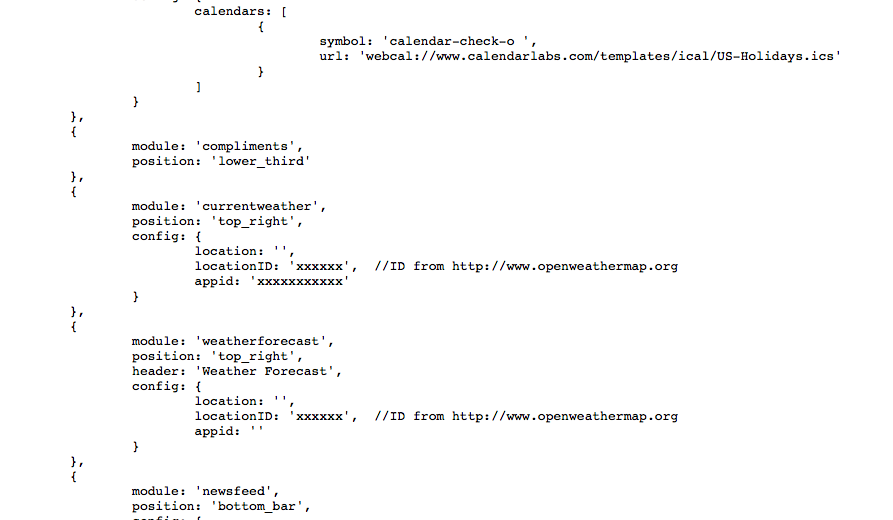
                      0_1490453065847_Screen Shot 2017-03-25 at 10.44.00 AM.png

                      Mykle1M 1 Reply Last reply Reply Quote 0
                      • Mykle1M Offline
                        Mykle1 Project Sponsor Module Developer @trader dude
                        last edited by

                        @trader-dude Lets start with locationID: That is usually a 6 digit number obtained from openweathermap.org. e.g 512856. Make sure that is correct. Next, the appid: is just a long sequence of numbers and letters obtained from openweathermap.org. e.g 12345gu3454uddu4u5uu64u3. Make sure you enter this exactly as provided. Do not enter the entire url, just the number itself. You need to do that in both the currentweather and weatherforecast.

                        Create a working config
                        How to add modules

                        T 1 Reply Last reply Reply Quote 0
                        • T Offline
                          trader dude @Mykle1
                          last edited by

                          @Mykle1 that i have can i post That?

                          Mykle1M T 2 Replies Last reply Reply Quote 0
                          • Mykle1M Offline
                            Mykle1 Project Sponsor Module Developer @trader dude
                            last edited by

                            @trader-dude said in stumped newbe:

                            that i have can i post That?

                            your appid? No, don’t post that. That is yours and it is private

                            Create a working config
                            How to add modules

                            1 Reply Last reply Reply Quote 0
                            • T Offline
                              trader dude @trader dude
                              last edited by

                              @trader-dude i had first installed the first version of magic mirror and used a different type of install i think it was called python it worked with my api code.

                              Mykle1M 1 Reply Last reply Reply Quote 0
                              • Mykle1M Offline
                                Mykle1 Project Sponsor Module Developer @trader dude
                                last edited by

                                @trader-dude Are you using MagicMirror version 2.1 now?

                                Create a working config
                                How to add modules

                                1 Reply Last reply Reply Quote 0
                                • T Offline
                                  trader dude
                                  last edited by

                                  there is some kind of warning that comes up when i install the magic mirror

                                  Mykle1M 1 Reply Last reply Reply Quote 0
                                  • T Offline
                                    trader dude
                                    last edited by

                                    yes I’m using 2.1

                                    1 Reply Last reply Reply Quote 0
                                    • Mykle1M Offline
                                      Mykle1 Project Sponsor Module Developer @trader dude
                                      last edited by

                                      @trader-dude There are some warnings that don’t affect the operation of the mirror. Errors are another story

                                      Create a working config
                                      How to add modules

                                      1 Reply Last reply Reply Quote 0
                                      • T Offline
                                        trader dude
                                        last edited by

                                        my location id has 7 digits I looked this up on open weather and i double checked the api and it is correct

                                        Mykle1M 1 Reply Last reply Reply Quote 0
                                        • Mykle1M Offline
                                          Mykle1 Project Sponsor Module Developer @trader dude
                                          last edited by

                                          @trader-dude

                                          Try putting in a location, just to see, but that should not matter. Also, the readme file example of the config entry shows double quotes " instead of single quote '. You might want to try replacing those.

                                          location: "Paris,France",
                                          locationID: "1234567",
                                          appid: "abcde12345abcde12345abcde12345ab"
                                          

                                          Create a working config
                                          How to add modules

                                          Mykle1M T 2 Replies Last reply Reply Quote 0
                                          • Mykle1M Offline
                                            Mykle1 Project Sponsor Module Developer @Mykle1
                                            last edited by

                                            From the readme Using the module Notice, all double quotes"

                                            module: "currentweather",
                                            position: "top_right",	// This can be any of the regions.
                                            		config: {
                                            			location: "Amsterdam,Netherlands",
                                            			locationID: "", 
                                            			appid: "abcde12345abcde12345abcde12345ab"

                                            Create a working config
                                            How to add modules

                                            1 Reply Last reply Reply Quote 0

                                            Hello! It looks like you're interested in this conversation, but you don't have an account yet.

                                            Getting fed up of having to scroll through the same posts each visit? When you register for an account, you'll always come back to exactly where you were before, and choose to be notified of new replies (either via email, or push notification). You'll also be able to save bookmarks and upvote posts to show your appreciation to other community members.

                                            With your input, this post could be even better 💗

                                            Register Login

                                            • 1
                                            • 2
                                            • 1 / 2
                                            • First post
                                              Last post
                                            Enjoying MagicMirror? Please consider a donation!
                                            MagicMirror created by Michael Teeuw.
                                            Forum managed by Sam, technical setup by Karsten.
                                            This forum is using NodeBB as its core | Contributors
                                            Contact | Privacy Policy