MagicMirror Forum
    • Recent
    • Tags
    • Unsolved
    • Solved
    • MagicMirror² Repository
    • Documentation
    • 3rd-Party-Modules
    • Donate
    • Discord
    • Register
    • Login
    A New Chapter for MagicMirror: The Community Takes the Lead
    Read the statement by Michael Teeuw here.

    Missing the weather after new installation

    Scheduled Pinned Locked Moved Troubleshooting
    8 Posts 5 Posters 4.7k Views 4 Watching
    Loading More Posts
    • Oldest to Newest
    • Newest to Oldest
    • Most Votes
    Reply
    • Reply as topic
    Log in to reply
    This topic has been deleted. Only users with topic management privileges can see it.
    • corsalessC Offline
      corsaless
      last edited by

      Hello out there!
      I have a question about the weather modul:
      I have setup following the manuals now two times the MM2 and always the weather on the right hand side is missing? I created an account @Openweathermap and looked up my city.
      Both entered in the config.js… but still no weather displayed?

      Thank you in advance for your support!

      0_1493216766152_upload-9b54a877-0495-4e31-ab6f-b8ef8d0c60fd

      Newbie… but the willingness to learn :-)

      1 Reply Last reply Reply Quote 0
      • corsalessC Offline
        corsaless
        last edited by

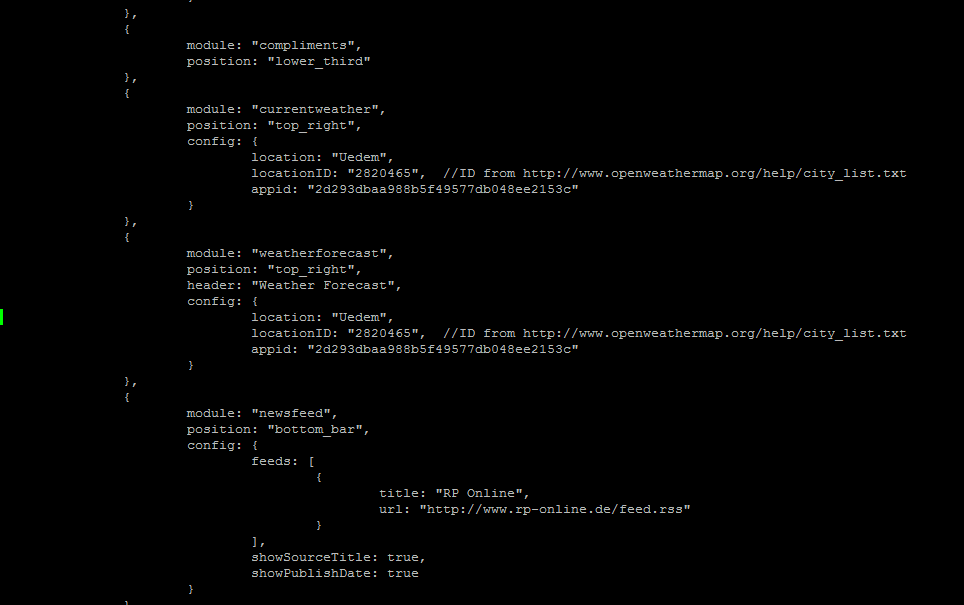
        Here is the full c&p from my config.js if that helps:
        (just removed the link to my private calender…)

        /* Magic Mirror Config Sample
        *

        • By Michael Teeuw http://michaelteeuw.nl
        • MIT Licensed.
          */

        var config = {
        port: 8080,
        ipWhitelist: [“127.0.0.1”, “::ffff:127.0.0.1”, “::1”], // Set [] to allow all IP addresses.

            language: "de",
            timeFormat: 24,
            units: "metric",
        
            modules: [
                    {
                            module: "alert",
                    },
                    {
                            module: "updatenotification",
                            position: "top_bar"
                    },
                    {
                            module: "clock",
                            position: "top_left"
                    },
                    {
                            module: "calendar",
                            header: "Termin Diana und Ingo",
                            position: "top_left",
                            config: {
                                    calendars: [
                                            {
                                                    symbol: "calendar-check-o ",
                                                    url: ""
                                            }
                                    ]
                            }
                    },
                    {
                           module: "compliments",
                            position: "lower_third"
                    },
                    {
                            module: "currentweather",
                            position: "top_right",
                            config: {
                                    location: "Uedem",
                                    locationID: "2820465",  //ID from http://www.openweathermap.org/help/city_list.txt
                                    appid: "2d293dbaa988b5f49577db048ee2153c"
                            }
                    },
                    {
                            module: "weatherforecast",
                            position: "top_right",
                            header: "Weather Forecast",
                            config: {
                                    location: "Uedem",
                                    locationID: "2820465",  //ID from http://www.openweathermap.org/help/city_list.txt
                                    appid: "2d293dbaa988b5f49577db048ee2153c"
                            }
                    },
                    {
                            module: "newsfeed",
                            position: "bottom_bar",
                            config: {
                                    feeds: [
                                            {
                                                    title: "RP Online",
                                                    url: "http://www.rp-online.de/feed.rss"
                                            }
                                    ],
                                    showSourceTitle: true,
                                    showPublishDate: true
                            }
                    },
            ]
        

        };

        /*************** DO NOT EDIT THE LINE BELOW ***************/
        if (typeof module !== “undefined”) {module.exports = config;}

        Newbie… but the willingness to learn :-)

        D Mykle1M 2 Replies Last reply Reply Quote 0
        • D Offline
          davidrq7 @corsaless
          last edited by

          @corsaless this config looks fine. Check more in modules mby somewhere there you have mistake?

          1 Reply Last reply Reply Quote 0
          • hartattackH Offline
            hartattack
            last edited by

            Not sure if this will answer it, but I had to create a new API Key after I installed the first time. The first one wouldnt work, but the second one worked great!

            Mykle1M 1 Reply Last reply Reply Quote 0
            • Mykle1M Offline
              Mykle1 Project Sponsor Module Developer @hartattack
              last edited by

              @hartattack said in Missing the weather after new installation:

              Not sure if this will answer it

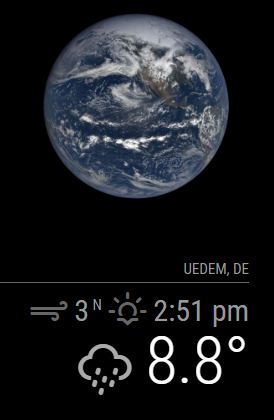
              His API key and his locationID are fine.

              The proof:
              0_1493232368613_Capture.JPG

              Create a working config
              How to add modules

              1 Reply Last reply Reply Quote 1
              • Mykle1M Offline
                Mykle1 Project Sponsor Module Developer @corsaless
                last edited by Mykle1

                @corsaless

                However, jshint.com basically reported that your config was a mess. Rather than tell you the things that were wrong, I went ahead and fixed it for you. The only thing missing from this config now is a url for your calendar module and your API key for weather that you already have. You simply have to insert them.
                Peace!

                var config = {
                	port: 8080,
                	ipWhitelist: ["127.0.0.1", "::ffff:127.0.0.1", "::1"], // Set [] to allow all IP addresses.
                
                	language: "de",
                	timeFormat: 24,
                	units: "metric",
                
                    modules: [
                            {
                                    module: "alert",
                            },
                            {
                                    module: "updatenotification",
                                    position: "top_bar"
                            },
                            {
                                    module: "clock",
                                    position: "top_left"
                            },
                            {
                                    module: "calendar",
                                    header: "Termin Diana und Ingo",
                                    position: "top_left",
                                    config: {
                                            calendars: [
                                                    {
                                                            symbol: "calendar-check-o ",
                                                            url: ""
                                                    }
                                            ]
                                    }
                            },
                            {
                                   module: "compliments",
                                    position: "lower_third"
                            },
                            {
                                    module: "currentweather",
                                    position: "top_right",
                                    config: {
                                            location: "Uedem",
                                            locationID: "2820465",  //ID from http://www.openweathermap.org/help/city_list.txt
                                            appid: "YOUR API KEY"
                                    }
                            },
                            {
                                    module: "weatherforecast",
                                    position: "top_right",
                                    header: "Weather Forecast",
                                    config: {
                                            location: "Uedem",
                                            locationID: "2820465",  //ID from http://www.openweathermap.org/help/city_list.txt
                                            appid: "YOUR API KEY"
                                    }
                            },
                            {
                                    module: "newsfeed",
                                    position: "bottom_bar",
                                    config: {
                                            feeds: [
                                                    {
                                                            title: "RP Online",
                                                            url: "http://www.rp-online.de/feed.rss"
                                                    }
                                            ],
                                            showSourceTitle: true,
                                            showPublishDate: true
                                    }
                            },
                    ]
                };
                
                
                /*************** DO NOT EDIT THE LINE BELOW ***************/
                if (typeof module !== "undefined") {module.exports = config;}
                

                Create a working config
                How to add modules

                brobergB 1 Reply Last reply Reply Quote 0
                • brobergB Offline
                  broberg Project Sponsor @Mykle1
                  last edited by

                  @Mykle1 Wrong quotations again, I’m guessing the built in word-editor in pixel is to blame here. (that automaticly change " to “ )

                  Mykle1M 1 Reply Last reply Reply Quote 1
                  • Mykle1M Offline
                    Mykle1 Project Sponsor Module Developer @broberg
                    last edited by

                    @broberg

                    Yup, it was just easier to fix it than explain

                    Create a working config
                    How to add modules

                    1 Reply Last reply Reply Quote 0

                    Hello! It looks like you're interested in this conversation, but you don't have an account yet.

                    Getting fed up of having to scroll through the same posts each visit? When you register for an account, you'll always come back to exactly where you were before, and choose to be notified of new replies (either via email, or push notification). You'll also be able to save bookmarks and upvote posts to show your appreciation to other community members.

                    With your input, this post could be even better 💗

                    Register Login

                    • 1 / 1
                    • First post
                      Last post
                    Enjoying MagicMirror? Please consider a donation!
                    MagicMirror created by Michael Teeuw.
                    Forum managed by Sam, technical setup by Karsten.
                    This forum is using NodeBB as its core | Contributors
                    Contact | Privacy Policy