MagicMirror Forum
    • Recent
    • Tags
    • Unsolved
    • Solved
    • MagicMirror² Repository
    • Documentation
    • 3rd-Party-Modules
    • Donate
    • Discord
    • Register
    • Login
    A New Chapter for MagicMirror: The Community Takes the Lead
    Read the statement by Michael Teeuw here.

    How do you get the taskbar to show over the Magic Mirror?

    Scheduled Pinned Locked Moved Troubleshooting
    10 Posts 4 Posters 9.1k Views 3 Watching
    Loading More Posts
    • Oldest to Newest
    • Newest to Oldest
    • Most Votes
    Reply
    • Reply as topic
    Log in to reply
    This topic has been deleted. Only users with topic management privileges can see it.
    • P
      PhilsterM9
      last edited by

      I’d like to set the mirror so you can see the taskbar over the mirror so I can access it more easily.

      Thanks in advance!

      A Mykle1M 2 Replies Last reply
      Reply Quote 0
      • A
        Anhalter42 @PhilsterM9
        last edited by

        @PhilsterM9 So you mean you’d the mirror not to be fullscreen?!

        P 1 Reply Last reply
        Reply Quote 0
        • Mykle1M
          Mykle1 Project Sponsor Module Developer @PhilsterM9
          last edited by

          @PhilsterM9 said in How do you get the taskbar to show over the Magic Mirror?:

          I’d like to set the mirror so you can see the taskbar over the mirror so I can access it more easily.

          When MM is running, you can simply press your Alt key to bring down the menu bar. From there you can Exit, Minimize, run dev tools, etc…

          Create a working config
          How to add modules

          B 1 Reply Last reply
          Reply Quote 1
          • B
            broberg Project Sponsor @Mykle1
            last edited by broberg

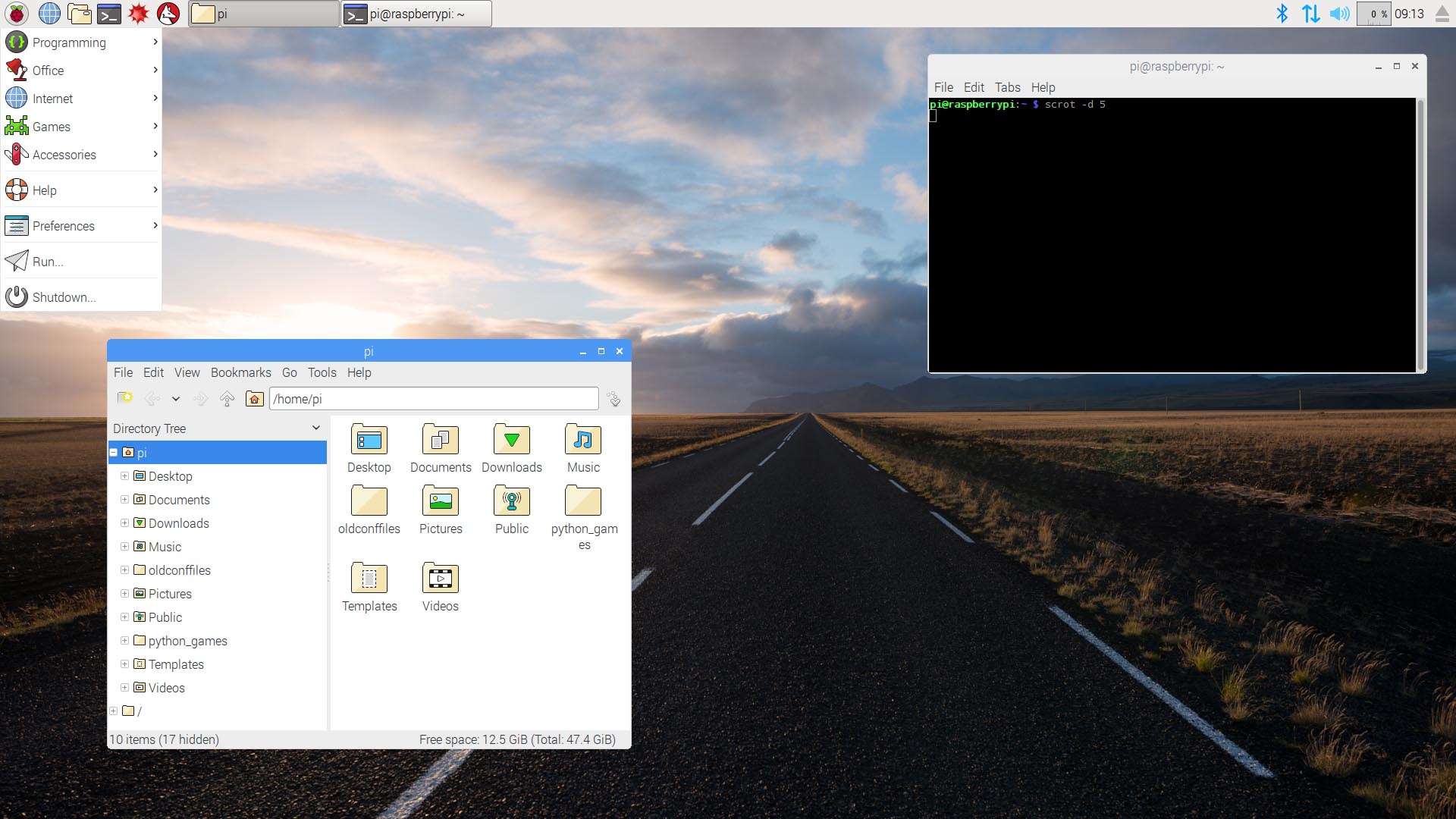
            @Mykle1 I think he means the pixel desktop taskbar
            alt text

            Don’t really know how to format it but electron can be run in window-mode and still maximized

            maybe this will work :

            electronOptions: { fullscreen: false, width: 1080, height: 1840 }
            
            Mykle1M P 2 Replies Last reply
            Reply Quote 1
            • Mykle1M
              Mykle1 Project Sponsor Module Developer @broberg
              last edited by

              @broberg said in How do you get the taskbar to show over the Magic Mirror?:

              @Mykle1 I think he means the pixel desktop taskbar

              In which case he could easily press Alt, then click Window, and then click Minimize.

              or, a single step while MM is running: Press Ctrl + M.

              I guess it’s a matter of preference. He has many options now. :-)

              Create a working config
              How to add modules

              1 Reply Last reply
              Reply Quote 0
              • P
                PhilsterM9 @Anhalter42
                last edited by

                @Anhalter42 No, I’d like the mirror to stay fullscreen but the top taskbar menu to stay over the top and have a nice and polished look rather than go to the desktop to access it.

                1 Reply Last reply
                Reply Quote 0
                • P
                  PhilsterM9 @broberg
                  last edited by

                  @broberg Is there a way I don’t have to minimize the mirror and still be able to access the taskbar?

                  B 1 Reply Last reply
                  Reply Quote 0
                  • B
                    broberg Project Sponsor @PhilsterM9
                    last edited by broberg

                    @PhilsterM9 did you try the electronoption in the config file?

                    electronOptions: { fullscreen: false, width: 1080, height: 1840 }
                    

                    This works on my mirror. (this is given that you are running the mirror in portrait mode and with a resolution of 1920x1080px)

                    P 1 Reply Last reply
                    Reply Quote 0
                    • P
                      PhilsterM9 @broberg
                      last edited by

                      @broberg It does work but it shows the blue bar which makes it look bad and untidy. I can hide it but I turn my mirror off every night (to save power) and when it’s turned on, it comes back again. Is there a way to maybe get rig of the blue bar permanently? Or even still have the MM fully maximised and have the taskbar shown over the top?

                      Thanks

                      B 1 Reply Last reply
                      Reply Quote 0
                      • B
                        broberg Project Sponsor @PhilsterM9
                        last edited by

                        @PhilsterM9 don’t know
                        These are the electron options.

                        https://github.com/electron/electron/blob/master/docs/api/browser-window.md#new-browserwindowoptions

                        1 Reply Last reply
                        Reply Quote 0

                        Hello! It looks like you're interested in this conversation, but you don't have an account yet.

                        Getting fed up of having to scroll through the same posts each visit? When you register for an account, you'll always come back to exactly where you were before, and choose to be notified of new replies (either via email, or push notification). You'll also be able to save bookmarks and upvote posts to show your appreciation to other community members.

                        With your input, this post could be even better 💗

                        Register Login

                        • 1 / 1
                        • First post
                          Last post
                        Enjoying MagicMirror? Please consider a donation!
                        MagicMirror created by Michael Teeuw.
                        Forum managed by Sam, technical setup by Karsten.
                        This forum is using NodeBB as its core | Contributors
                        Contact | Privacy Policy