MagicMirror Forum
    • Recent
    • Tags
    • Unsolved
    • Solved
    • MagicMirror² Repository
    • Documentation
    • 3rd-Party-Modules
    • Donate
    • Discord
    • Register
    • Login
    A New Chapter for MagicMirror: The Community Takes the Lead
    Read the statement by Michael Teeuw here.

    My display so far...

    Scheduled Pinned Locked Moved Showcase
    66 Posts 18 Posters 91.7k Views 22 Watching
    Loading More Posts
    • Oldest to Newest
    • Newest to Oldest
    • Most Votes
    Reply
    • Reply as topic
    Log in to reply
    This topic has been deleted. Only users with topic management privileges can see it.
    • J Offline
      j.e.f.f Project Sponsor Module Developer @rudibarani
      last edited by

      @rudibarani thanks. I’ll take a look tonight when I get home from work.

      1 Reply Last reply Reply Quote 0
      • J Offline
        j.e.f.f Project Sponsor Module Developer @rudibarani
        last edited by

        @rudibarani Ok try pulling the latest commit. I indeed broke the default timeFormat setting. I didn’t notice because my config was using an explicit configuration option.

        rudibaraniR 1 Reply Last reply Reply Quote 0
        • rudibaraniR Offline
          rudibarani Project Sponsor @j.e.f.f
          last edited by rudibarani

          @j.e.f.f Now its working again, but the timeformat still does not show up in the 24h format:
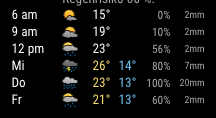
          0_1498621210581_871b9421-b2c6-4e7e-b9e5-2d5f3b066b4b-image.png

          Thanks a lot and greetings from Germany.

          J 1 Reply Last reply Reply Quote 0
          • brandongomezB Offline
            brandongomez
            last edited by

            I’m sure there’s a way to do this in css but not sure how. I want to make the icon and temperature smaller.
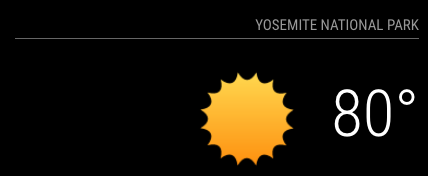
            0_1498765163780_Screen Shot 2017-06-29 at 11.47.35 AM.png

            J 1 Reply Last reply Reply Quote 0
            • J Offline
              j.e.f.f Project Sponsor Module Developer @rudibarani
              last edited by

              @rudibarani in your config, set the timeFormat to HH:mm and you shoudl see 24-hour format.

              I just tried this. My config looks like this:

                  {
                      module: 'MMM-MyWeather',
                      position: 'top_right',
                      classes: 'default everyone',
                      config: {
                        apikey: '...', // private; don't share!
                        pws: 'pws:IONTORON421', //Toronto Beaches
                        units: 'metric',
                        // other configs omitted for clarity 
                        timeFormat: 'HH:mm',  //Set this here
                      }
                  },


              And it looks like this:
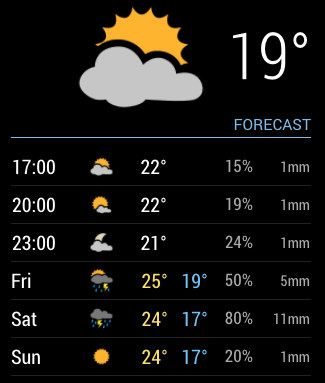
              0_1498766827572_Screen Shot 2017-06-29 at 4.03.28 PM.png

              rudibaraniR 1 Reply Last reply Reply Quote 0
              • J Offline
                j.e.f.f Project Sponsor Module Developer @brandongomez
                last edited by

                @brandongomez You can target both of these in CSS as follows:

                /* Icon */
                .MMM-MyWeather .currentWeatherIconWrapper .currentWeatherIcon {
                  max-width: 140px;
                  max-height: 140px; /* play with these two values to get the size you want */
                }
                
                /* temperature text */
                .MMM-MyWeather div.large span.bright {
                  font-size: 65px;
                  line-height: 65px; /* play with these two numbers to adjust text size */
                }
                brandongomezB 1 Reply Last reply Reply Quote 0
                • rudibaraniR Offline
                  rudibarani Project Sponsor @j.e.f.f
                  last edited by

                  @j.e.f.f Ah - you are using the moments-timeformat. Now it works :)
                  I was confused, as the timeformat in the config.js was either “12” or “24”.
                  Thanks for the clarification!

                  J 1 Reply Last reply Reply Quote 0
                  • J Offline
                    j.e.f.f Project Sponsor Module Developer @rudibarani
                    last edited by j.e.f.f

                    @rudibarani Yeah I like using the Moment.js format since it gives you the ultimate flexibility with how you want to display time.

                    Glad it’s working for you now! :)

                    1 Reply Last reply Reply Quote 0
                    • brandongomezB Offline
                      brandongomez @j.e.f.f
                      last edited by

                      @j.e.f.f Thanks for the quick response!

                      1 Reply Last reply Reply Quote 0
                      • pjkoelemanP Offline
                        pjkoeleman
                        last edited by

                        @j-e-f-f
                        In MMM-MyWeather …
                        I just saw that the clock for the sunset / sunrise is not displayed in the 24 hour format. Is there any option for setting this? Well searched but not found in the config options.

                        J 1 Reply Last reply Reply Quote 0
                        • J Offline
                          j.e.f.f Project Sponsor Module Developer @pjkoeleman
                          last edited by

                          @pjkoeleman Let me look into this. Likely overlooked in the code.

                          pjkoelemanP 1 Reply Last reply Reply Quote 1
                          • pjkoelemanP Offline
                            pjkoeleman @j.e.f.f
                            last edited by

                            @j.e.f.f
                            Thanks in advance

                            J 1 Reply Last reply Reply Quote 0
                            • J Offline
                              j.e.f.f Project Sponsor Module Developer @pjkoeleman
                              last edited by

                              @pjkoeleman Try now. It’s a bit hacky… basically if your time format has a capital H in it, then it formats it in 24 hour time HH:mm, otherwise it will use 12 hour time h:mm a.

                              I should probably make this a separate time format config parameter, but this should do for now.

                              pjkoelemanP 1 Reply Last reply Reply Quote 1
                              • pjkoelemanP Offline
                                pjkoeleman @j.e.f.f
                                last edited by

                                @j.e.f.f
                                Thanks, is working now like it should be doing.

                                So the module is not using ‘timeFormat’ as set in the main part of config.js
                                I thought that it would look and use the settings of ‘language’ and ‘timeFormat’ in the global settings of config.js

                                J 1 Reply Last reply Reply Quote 0
                                • J Offline
                                  j.e.f.f Project Sponsor Module Developer @pjkoeleman
                                  last edited by

                                  @pjkoeleman not directly, no, as it specifically comes down to how I have it configured. My time format for the forecast table is “h a” (e.g.: “9 pm”). This time format has no minutes, which is fine for the hourly forecast, but doesn’t work for sunrise/sunset. So when rendering the sunrise/sunset time it looks for the presence of a capital “H” in the time format config. If present, sunrise sunset is rendered as “HH:mm” (i.e.: 24 hour time format). Otherwise it is rendered as “h:mm a” (12 hour time format).

                                  The right thing to do is separate sunrise/sunset time format out to its own configuration parameter.

                                  pjkoelemanP 1 Reply Last reply Reply Quote 1
                                  • pjkoelemanP Offline
                                    pjkoeleman @j.e.f.f
                                    last edited by

                                    @j.e.f.f
                                    Thanks for clearing us up.

                                    1 Reply Last reply Reply Quote 0
                                    • B Offline
                                      brendyburgers
                                      last edited by

                                      would it be possible to have a copy of your program have been trying for a while now to come up with something like this, and does it work with touch???

                                      J 1 Reply Last reply Reply Quote 0
                                      • J Offline
                                        j.e.f.f Project Sponsor Module Developer @brendyburgers
                                        last edited by

                                        @brendyburgers much of the above have now become modules. Which one were you interested in?

                                        Sorry to say but none of my modules are touch enabled.

                                        1 Reply Last reply Reply Quote 0
                                        • R Offline
                                          rrrene @j.e.f.f
                                          last edited by

                                          @j.e.f.f

                                          Hi Jeff, I just put your CSS code in my custom.css.

                                          Unforunately for one Module the line below the header stays the „old“ grey color and won‘t change to your great blue.

                                          What did I do wrong?

                                          Best regards,
                                          René

                                          J 1 Reply Last reply Reply Quote 0
                                          • J Offline
                                            j.e.f.f Project Sponsor Module Developer @rrrene
                                            last edited by

                                            @rrrene said in My display so far...:

                                            What did I do wrong?

                                            Most likely nothing :)

                                            If the issue is with just one module, then likely my custom CSS is being overridden with that module’s CSS. You need to inspect the markup to see what styles are being applied to that particular module and then write more specific CSS to override that.

                                            You can access the inspector by starting MM in dev mode npm start dev.

                                            R V 2 Replies Last reply Reply Quote 1

                                            Hello! It looks like you're interested in this conversation, but you don't have an account yet.

                                            Getting fed up of having to scroll through the same posts each visit? When you register for an account, you'll always come back to exactly where you were before, and choose to be notified of new replies (either via email, or push notification). You'll also be able to save bookmarks and upvote posts to show your appreciation to other community members.

                                            With your input, this post could be even better 💗

                                            Register Login

                                            • 1
                                            • 2
                                            • 3
                                            • 4
                                            • 3 / 4
                                            • First post
                                              Last post
                                            Enjoying MagicMirror? Please consider a donation!
                                            MagicMirror created by Michael Teeuw.
                                            Forum managed by Sam, technical setup by Karsten.
                                            This forum is using NodeBB as its core | Contributors
                                            Contact | Privacy Policy