Read the statement by Michael Teeuw here.
MMM-Memo - Add some memos on your page and manage them through HTTP request
-
Description:
Hi all,
I just uploaded a module I created for my MagicMirror implementation.
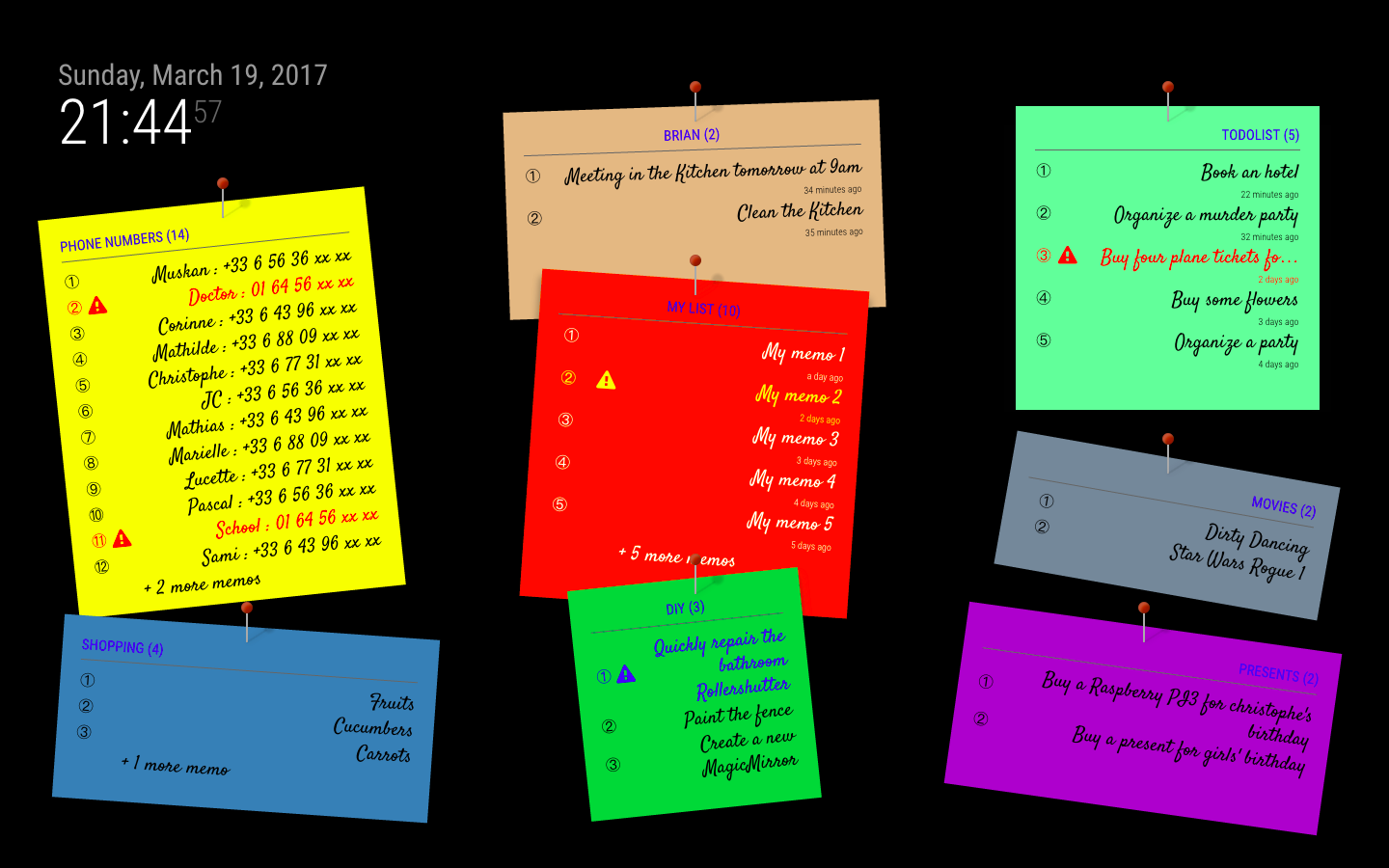
The aim of the module is to add one or many notes on the screen and to manage them using HTTP requests.
I created with module because I use a voice control solution (Jarvis) and I wanted to automatically add a note on the screen by saying to Jarvis “Add the memo ‘Don’t forget to buy eggs’ on Peter’s profile”.
The README description includes details… Let’s play…Screenshot:
Download:
[card:schnibel/MMM-Memo]
-
Wow, really nice and usefull! Will try it out tonight!
-
For someone who needs lists… this is awesome!
-
@schnibel Awesome module!
-
Hi guys,
Thank you for your messages.
I also wanted to tell you that I added the “Display” functionalities using the default alert module. So you just have to ‘git pull’ :)Don’t hesitate to propose any suggestions.
Christophe -
-
@schnibel Hi! Thank you for this module! I’m currently using it in a quiet different way. :) I’m a frequent flyer (fly 4 times a week) so, from time to time I have to message my wife to tell that a flight is late (or canceled). So, to get around this problem I set up a new gmail-account for my Mirror, then I joined “Flight Aware” with that account. On the site, you can set to be sent information mails for specific flight-numbers. I set up to get mails on start, land and changes for my “flights”. These mails then are picked up with a python-script that parse them and send a “refined” version of the information to a “memo” on the mirror, that then “popup” automatically. So, now my wife only have to glance at the mirror to know when I will land and if there are any changes in the schedule. All automatically. :)
Thank you for making it possible. :)
-
@Snille
This is so 100% nerdy :D
But I like the idea! -
@Snille Awesome ! I love the idea !
-
I love this module, but have a few requests:
-
I’d like to get rid of the pin. I want to make it more professional looking.
-
What css should I use in custom.css to left-align the text in the memos? I can’t figure out what to use.
-
You should add a different font option. I had to override it custom.css.
-
-
Hi all! Thank you for this module, it looks awesome!
I’d have just one question, on my mirror when I do this command
http://192.168.0.137:8080/DisplayMemo?memoTitle=SHOPPING&item=ALL
it only stays 3 seconds. Is there more options, to display it longer?
Thank you for your help =) -
-
@strawberry-3.141 Hi, Thank you for your quick reply =)
I am sorry I read this already, but I didn’t understand how to make my memo stay longer… :/
I have only one module with “memoDisplayNotification” set to “true”.
I understand the alert module is managing this with:
self.sendNotification(“SHOW_ALERT”, {});
But how to integrate this into the command
http://192.168.0.137:8080/DisplayMemo?memoTitle=SHOPPING&item=ALL
Thank you again! -
@ceddirr add the config option
display_timeto the alert module https://github.com/MichMich/MagicMirror/tree/master/modules/default/alert#configuration-options -
Riiight, thank you very much! :D
-
Hi all,
Thank you again for your answer last time, playing with the option display_time from the alert module.
However, if you modify it, every alert would be modified. For exemple, if I want to set my memo to keep displayed for at least 30 secondes, I go modify the display_time from the alert module. But, all alerts like for example “welcome back Mr Blabla” when I switch profile will stay longer than usual.
The question is how do I have to do to only change the MMM-Memo alerts please?
Many thanks,
Cedric ;) -
Hi guys,
Just came back on the Internet, and I saw your messages.
@ceddirr, I’m sorry, but I didn’t develop a specific module for alerts as the existing one is quite nice… But I understand your problem.
When I had this DisplayMemo option, the idea was to temporarily display a long message, is it your case ? -
Hi, thank you for getting back to me =)
Yes, the idea is basically the same, but I would just like to see the memo a little bit longer than the regular alert’s configuration.
The problem for me is if I change the display_time setting directly on the alert module, it would be too long for the other alert like “nice to see you %profile%”, etc lol -
@schnibel easiest soluton would be to replace notifications with alerts, as they can have a duration parameter, but the downside is there can be just one alert per module at the same time.
https://github.com/schnibel/MMM-Memo/blob/master/MMM-Memo.js#L123
to
this.sendNotification("SHOW_ALERT", {title: ttl, message: msg, timer: 5000});for 5 seconds or make a config option for it -
This post is deleted!






Hello! It looks like you're interested in this conversation, but you don't have an account yet.
Getting fed up of having to scroll through the same posts each visit? When you register for an account, you'll always come back to exactly where you were before, and choose to be notified of new replies (either via email, or push notification). You'll also be able to save bookmarks and upvote posts to show your appreciation to other community members.
With your input, this post could be even better 💗
Register Login