Read the statement by Michael Teeuw here.
How to MANUALLY install MM on your Pi. For absolute beginners.
-
@fox said in How to MANUALLY install MM on your Pi. For absolute beginners.:
i saw that electron.js is already using the port. But i have a blank screen and nothing is shown. Also rebooted a couple of times.
Hmm, make sure you only have 1 terminal open when you run npm start from the pi@user/MagicMirror directory. Also, make sure the
address: "0.0.0.0",entry in your config is OUTSIDE the whitelist. If you’re running pm2 make sure that is not launching an instance of MM. Otherwise, is there anything else that you changed after the install? -
How do you apply after each module you try out? Is there a way or do you have to reboot every time?
-
@noorm91 said in How to MANUALLY install MM on your Pi. For absolute beginners.:
How do you apply after each module you try out? Is there a way or do you have to reboot every time?
You don’t have to reboot the Pi to launch MM after adding a module. Assuming you quit MM before you added the module, you simply launch MM as you normally would
-
@Mykle1
The MM autostarts when booting up the Pi, what’s the command you use to apply/run the config.js right after you save it? -
@noorm91 said in How to MANUALLY install MM on your Pi. For absolute beginners.:
The MM autostarts when booting up the Pi, what’s the command you use to apply/run the config.js right after you save it?
When the mirror is running, press your
Altkey to drop down a menu bar. ChooseMinimizefrom the Window menu. Assuming pm2 is autostarting for you, open a terminal and typepm2 stop mmto quit MM.You can start MM after saving your config in the terminal by typing
pm2 start mm, or if MM is still running, from the drop down menu, View, Reload -
The problem was the module watchdog !
Also with fresh install it throws errors with the newest update.Fixed for me. Thank you @Mykle1 !!!
Issues With MMM-WatchDog known?
https://forum.magicmirror.builders/post/29827
Useful for PIR-Sensor: https://forum.magicmirror.builders/post/21299
-
I don’t know if this is the right place for me to reply but I’m desperate.
I’m supposed to do a project for school with the MM but I can’t even seem to get it up and running.
I made an issue on the forum but so far I’ve gotten no replies :(I followed these steps to reinstall the MM but instead of making my own config file I used the one provided. When I run it, the screen is black and I can see in dev tools that the “moment” npm package is having some issues but I can’t find any info anywhere on how to solve it or anyone that has a similar issue.
-
@fox said in How to MANUALLY install MM on your Pi. For absolute beginners.:
Fixed for me. Thank you @Mykle1 !!!
You’re welcome, mate.
-
@axellejamous said in How to MANUALLY install MM on your Pi. For absolute beginners.:
I followed these steps to reinstall the MM but instead of making my own config file I used the one provided. When I run it, the screen is black and I can see in dev tools that the “moment” npm package is having some issues but I can’t find any info anywhere on how to solve it or anyone that has a similar issue.
I see that you have fixed your issue in another topic. Very good! Can I ask, are you saying you had this issue after a manual installation? The symptoms and fix you used are commonly associated with the automatic installer or version update. I’m just curious because I have not heard of this happening after a manual installation.
-
@Mykle1
I did luckily!
I indeed had the issue after manual installation. Fact is, the automatic installation script would actually get stuck on two of my Pi’s at the node modules installation.
So I had to manually install.In the issue that helped me find the answer, he did do a manual install as well and had the same problem.
But someone did mention “in the latest version there is a npm install task in the vendor folder as well which gets executed automatically after a successful install, yours wasn’t successful so this was never executed” which means I probably made a mistake in my manual installation, although I have no clue what it could’ve is as I followed the steps thoroughly on 2 different pi’s, getting the same result. -
@axellejamous said in How to MANUALLY install MM on your Pi. For absolute beginners.:
I probably made a mistake in my manual installation,
No sir, you made no mistake. You download the software and run npm install in the MagicMirror directory. If, and when that fails, it is no fault of yours.
I’m glad you solved your problem and thanks for the information. It’s good to know that in case anyone else encounters that problem with a manual installation.
-
@axellejamous I still got no luck making 2.1.3 works. the log said MM run without error. Unfortunately, got a black screen using default config.js (copy from config.js.sample). If I remove config.js, the MM display to create a config. Still no clue how to solve this.
-
@slametps said in How to MANUALLY install MM on your Pi. For absolute beginners.:
If I remove config.js, the MM display to create a config. Still no clue how to solve this.
You did a manual install and ran
npm installin the MagicMirror directory? He solved his problem by runningnpm installin the vendor directory. I don’t know if you have the same issue.But it seems to me if MM is reporting “Create a config” that MM is launching correctly. You could try getting a fresh copy of the config.js.sample (in case something is wrong with the one you have) and trying again.
Good luck
-
@Mykle1 said in How to MANUALLY install MM on your Pi. For absolute beginners.:
@slametps said in How to MANUALLY install MM on your Pi. For absolute beginners.:
If I remove config.js, the MM display to create a config. Still no clue how to solve this.
You did a manual install and ran
npm installin the MagicMirror directory? He solved his problem by runningnpm installin the vendor directory. I don’t know if you have the same issue.But it seems to me if MM is reporting “Create a config” that MM is launching correctly. You could try getting a fresh copy of the config.js.sample (in case something is wrong with the one you have) and trying again.
Good luck
Yap, I just copy config.js from config.js.sample, and got a black screen.
I will give a try, runningnpm installin vendor folder. -
You didn’t answer my question.
You didn’t try my suggestion.
You did the one thing that I said I didn’t know was your issue.Shrug
-
@Mykle1 said in How to MANUALLY install MM on your Pi. For absolute beginners.:
You didn’t answer my question.
You didn’t try my suggestion.
You did the one thing that I said I didn’t know was your issue.Shrug
Yap, I install MM manually refers to documentation you wrote (and backed up current running MM 2.1.0).
config. js I mentioned earlier, is a fresh copy from config.js.sample in config folder.
I didnpm-installin MM folder, but not in vendor yet. I’ll try later when I have access to my MM. -
@slametps said in How to MANUALLY install MM on your Pi. For absolute beginners.:
@Mykle1 said in How to MANUALLY install MM on your Pi. For absolute beginners.:
You didn’t answer my question.
You didn’t try my suggestion.
You did the one thing that I said I didn’t know was your issue.Shrug
Yap, I install MM manually refers to documentation you wrote (and backed up current running MM 2.1.0).
config. js I mentioned earlier, is a fresh copy from config.js.sample in config folder.
I didnpm-installin MM folder, but not in vendor yet. I’ll try later when I have access to my MM.Finally, MM 2.1.3 was installed successfully by executing:
cd /root/MagicMirror/vendor
npm install /root/MagicMirror
cd /root/MagicMirror/fonts
npm install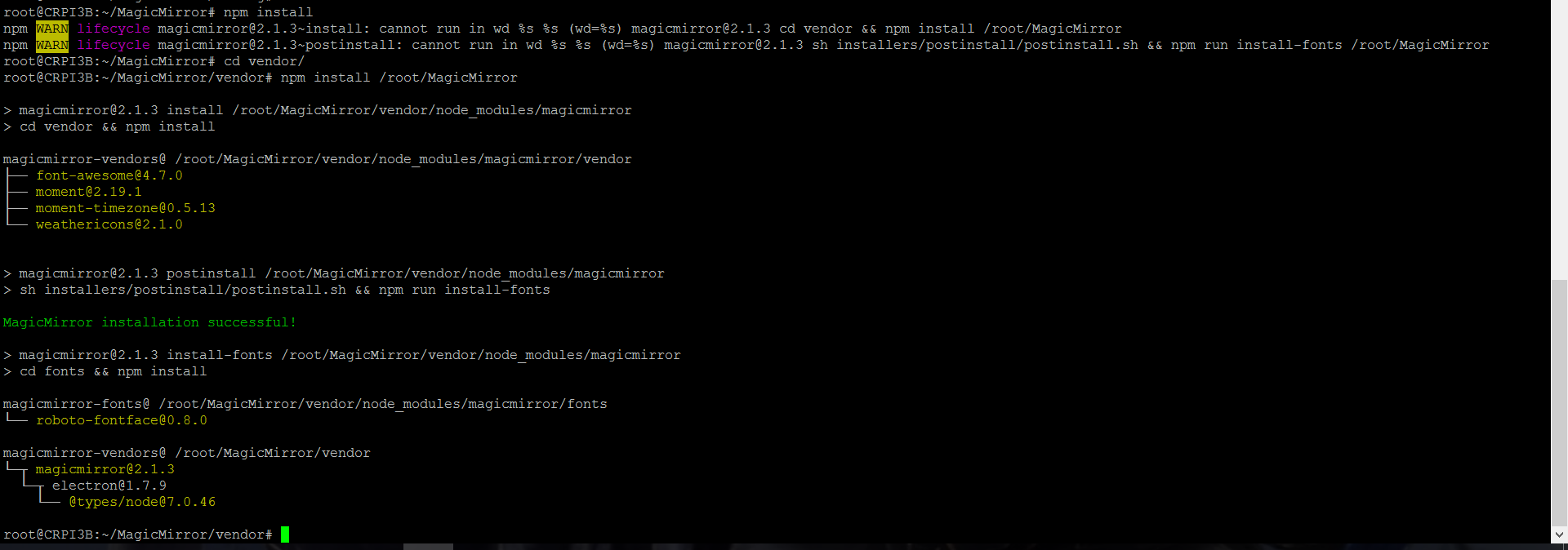
-
@slametps glad you found it! you basically had the same issue as me except I didn’t have the fonts one. It’s really odd.
-
@axellejamous said in How to MANUALLY install MM on your Pi. For absolute beginners.:
@slametps glad you found it! you basically had the same issue as me except I didn’t have the fonts one. It’s really odd.
@axellejamous You should try:
$ cd {your_magicmirror_folder}/fonts
$ npm install
it will install required fonts.
-
@slametps If you run it with
npm start, does it work for you?
For me that only solved my issue if I run it withnode serveronly.
Now there’s 0 errors so I have no clue why my screen still shows up black with npm start.



Hello! It looks like you're interested in this conversation, but you don't have an account yet.
Getting fed up of having to scroll through the same posts each visit? When you register for an account, you'll always come back to exactly where you were before, and choose to be notified of new replies (either via email, or push notification). You'll also be able to save bookmarks and upvote posts to show your appreciation to other community members.
With your input, this post could be even better 💗
Register Login