MagicMirror Forum
    • Recent
    • Tags
    • Unsolved
    • Solved
    • MagicMirror² Repository
    • Documentation
    • 3rd-Party-Modules
    • Donate
    • Discord
    • Register
    • Login
    A New Chapter for MagicMirror: The Community Takes the Lead
    Read the statement by Michael Teeuw here.

    MMM-NetworkScanner

    Scheduled Pinned Locked Moved Utilities
    networkscannerstatusmac address
    117 Posts 32 Posters 233.4k Views 33 Watching
    Loading More Posts
    • Oldest to Newest
    • Newest to Oldest
    • Most Votes
    Reply
    • Reply as topic
    Log in to reply
    This topic has been deleted. Only users with topic management privileges can see it.
    • Mykle1M Offline
      Mykle1 Project Sponsor Module Developer @zdenek
      last edited by

      @zdenek said in MMM-NetworkScanner:

      Any idea?

      I think @zeular is right when he said, " I think the phones turn off WiFi or use some energy saving mode because they log on and off all the time when they are passive/inactive, When I keep the screen ON, they are visible all the time. Therefore, the “KeepAlive” is a “must have”.

      So, try increasing the “KeepAlive” value

      Create a working config
      How to add modules

      zdenekZ 1 Reply Last reply Reply Quote 0
      • zdenekZ Offline
        zdenek @Mykle1
        last edited by

        @Mykle1 I also agree with @zeular but to increase KeepAlive (actually I´ve 5 minutes) will not give me accurate information. If person leaves, the system will give me wrong info for longer time). And as I said - weird is that to run Fing o iPad/iPhone and MyNet on Mac detects iPhone of my wife even module says she is offline. This module is perfect for me - when I came home I can immediately check, who is at home (I´ve quiet more kids than it´s common, so will be nice to know, who of them is at home) - so to get it works as good as possible is what I want…

        Mykle1M 1 Reply Last reply Reply Quote 0
        • zeularZ Offline
          zeular @Mykle1
          last edited by

          @Mykle1 said in MMM-NetworkScanner:

          @zeular said in MMM-NetworkScanner:

          But I would really like to hide devices that are not logged in, so you can > add other friends and family who do not need to be visible all the time.

          I would like that, too, but that is out of my hands. You could post an option request to the author. I understand he is away at the moment. Or, better still, you could fork the repo and develop that feature yourself. Then send a pull request to the author and he might add it permanently to the module.

          I wish a could develop it my self… But I’m too bad at this. :)

          Mykle1M 1 Reply Last reply Reply Quote 0
          • Mykle1M Offline
            Mykle1 Project Sponsor Module Developer @zdenek
            last edited by

            @zdenek said in MMM-NetworkScanner:

            so to get it works as good as possible is what I want…

            Well, knowing what we know about the phones, you could try disabling the power-saving feature on them so that their wifi doesn’t drop off the network. This way NetworkScanner won’t “lose” them, theoretically. However, you’ll likely see huge battery loss on the phones.

            Create a working config
            How to add modules

            zeularZ 1 Reply Last reply Reply Quote 0
            • Mykle1M Offline
              Mykle1 Project Sponsor Module Developer @zeular
              last edited by

              @zeular said in MMM-NetworkScanner:

              I wish a could develop it my self… But I’m too bad at this.

              You never know until you try

              Create a working config
              How to add modules

              1 Reply Last reply Reply Quote 0
              • zeularZ Offline
                zeular @Mykle1
                last edited by

                @Mykle1 said in MMM-NetworkScanner:

                Well, knowing what we know about the phones, you could try disabling the power-saving feature on them so that their wifi doesn’t drop off the network. This way NetworkScanner won’t “lose” them, theoretically. However, you’ll likely see huge battery loss on the phones.

                I have that disabled on my phone (Galaxy S7) and it didn’t work. Maybe it has something to do with the ARP on the PI, I cant see all of my things in ARP that is on my network either. Maybe you shouldn’t?

                @Mykle1 said in MMM-NetworkScanner:

                You never know until you try

                I have tried… Didn’t go well… ;)

                1 Reply Last reply Reply Quote 0
                • I Offline
                  ianperrin
                  last edited by

                  Hi all

                  Really sorry about the lack of progress/development on this module. I’ve been consumed by renovations at home and starting a new job.

                  There are clearly still issues with the module. Unfortunately I am not going to be able to look into them for some time yet. So, if there is someone who can pick up the baton and submit a pull request that would be great.

                  Ian

                  "Live as if you were to die tomorrow. Learn as if you were to live forever." - Mahatma Gandhi

                  1 Reply Last reply Reply Quote 0
                  • Hein-JanH Offline
                    Hein-Jan
                    last edited by

                    Hi,

                    I’am pleased with the module as it is, I just can’t seem to get the keepAlive working.

                    Part of my config:

                    {
                    			module: 'MMM-NetworkScanner',
                    			position: 'bottom_left',
                    			config: {
                    				devices: [
                    					{macAddress: "xx:xx:xx:xx:xx:xx", name: "Kleine iPad", icon:"mobile"},
                    					{macAddress: " xx:xx:xx:xx:xx:xx ", name: "Telefoon Hein-Jan", icon:"android"},
                    					{macAddress: " xx:xx:xx:xx:xx:xx ", name: "iPhone Nicole", icon:"phone"},
                    					{macAddress: " xx:xx:xx:xx:xx:xx ", name: "iPad Nicole werk", icon:"apple"},
                    					{macAddress: " xx:xx:xx:xx:xx:xx ", name: "Tesla", icon:"car"},
                    					{macAddress: " xx:xx:xx:xx:xx:xx ", name: "Grote iPad", icon:"tablet"},
                    					{macAddress: " xx:xx:xx:xx:xx:xx ", name: "iPhone Hein-Jan", icon:"phone-square"},
                    				],
                    				showUnknown: false,
                    				keepAlive: 300,
                    				showLastSeen: false
                    			}
                    		}


                    The keepAlive is in there, but if a device is detected (highlighted), it also “disappears” (un-highlighted) in aprox 5 seconds.
                    I was under the impression that the keep alive would keep it highlighted (alive) for at least 300 seconds (5 minutes).
                    Is my understanding wrong?

                    Kind regards,

                    Hein-Jan

                    Mykle1M 1 Reply Last reply Reply Quote 0
                    • Mykle1M Offline
                      Mykle1 Project Sponsor Module Developer @Hein-Jan
                      last edited by Mykle1

                      @Hein-Jan said in MMM-NetworkScanner:

                      Is my understanding wrong?

                      No, it’s not. I had the same problem when I was using MAC addresses instead of IP addresses. Also, I’m behind one or two commits on the version. Once I had it working to my liking I stopped updating it. I’ve had no trouble with it since.

                      {
                      	disabled: f,
                              module: 'MMM-NetworkScanner',
                              position: 'top_left', 
                              config: {
                      		debug: false,
                                  	devices: [
                                          	{ ipAddress: "192.168.1.2", name: "Dove", icon: "medkit"},
                      			{ ipAddress: "192.168.1.15", name: "BabyJesus", icon: "futbol-o"},
                                          	{ ipAddress: "192.168.1.8", name: "BottlePop", icon: "globe"},
                                          	{ ipAddress: "192.168.1.11", name: "Donna", icon: "venus"},
                      			{ ipAddress: "192.168.1.10", name: "Nikki", icon: "coffee"},
                      			{ ipAddress: "192.168.1.7", name: "Jason", icon: "fire-extinguisher"},
                      			{ ipAddress: "192.168.1.18", name: "MJD", icon: "child"}
                                      		],
                                  	showUnknown: false,
                                  	showOffline: true,
                      		showLastSeen: false,
                                  	keepAlive: 1200, // in seconds (20 min)
                                  	updateInterval: 30, // in seconds
                                  	residents: []
                      		}        
                       	},
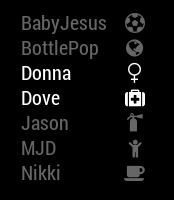
                      

                      0_1507476092497_11.JPG

                      Create a working config
                      How to add modules

                      1 Reply Last reply Reply Quote 0
                      • A Offline
                        amanzimdwini
                        last edited by

                        After a few hours of having fun with this module (wanted to track phones vs MAC), here is what finally worked for ME:
                        I added one “dummy” IP address (eg of my home NAS). Once the program saw the IP address, it also found all the MAC addresses.

                        NO idea why, so don’t knock this. Banged my head against it for hours.
                        [then again, maybe the black cat I sacrificed helped too]

                        Anyway, that’s my 2c.

                        K

                        Mykle1M 1 Reply Last reply Reply Quote 1
                        • Mykle1M Offline
                          Mykle1 Project Sponsor Module Developer @amanzimdwini
                          last edited by

                          @amanzimdwini said in MMM-NetworkScanner:

                          maybe the black cat I sacrificed helped too

                          Good one!

                          Create a working config
                          How to add modules

                          1 Reply Last reply Reply Quote 0
                          • B Offline
                            barnosch
                            last edited by

                            Is it somehow possible to sort the list of devices not by alphabet?
                            I would like to have it sorted, like it is set in the config.
                            (Only macaddresses are working in my case, with a IP in only get offline clients)

                            E 1 Reply Last reply Reply Quote 1
                            • R Offline
                              rak
                              last edited by

                              Hi guys,

                              I added a feature to show devices in different color. I created a pull request with all relevant changes.

                              Enjoy.

                              Thanks for this cool plugin.

                              Ralf

                              1 Reply Last reply Reply Quote 0
                              • NeodereksN Offline
                                Neodereks
                                last edited by

                                I have an error, but i dont know what is it.

                                0|mmserver | MMM-NetworkScanner received SCAN_NETWORK
                                0|mmserver | MMM-NetworkScanner is performing arp-scan
                                0|mmserver | Whoops! There was an uncaught exception...
                                0|mmserver | MagicMirror will not quit, but it might be a good idea to check why this happened. Maybe no internet connection?
                                0|mmserver | If you think this really is an issue, please open an issue on GitHub: https://github.com/MichMich/MagicMirror/issues
                                0|mmserver | TypeError: Cannot read property 'network' of undefined
                                0|mmserver |     at Class.scanNetworkMAC (/home/dietpi/MagicMirror/modules/MMM-NetworkScanner/node_helper.js:42:36)
                                0|mmserver |     at Class.socketNotificationReceived (/home/dietpi/MagicMirror/modules/MMM-NetworkScanner/node_helper.js:30:18)
                                0|mmserver |     at Socket. (/home/dietpi/MagicMirror/modules/node_modules/node_helper/index.js:113:11)
                                0|mmserver |     at Socket.emit (events.js:182:13)
                                0|mmserver |     at /home/dietpi/MagicMirror/node_modules/socket.io/lib/socket.js:513:12
                                0|mmserver |     at process._tickCallback (internal/process/next_tick.js:61:11)


                                That error repeat all time.

                                1 Reply Last reply Reply Quote 0
                                • B Offline
                                  barnosch
                                  last edited by barnosch

                                  cool @rak
                                  But as i see, its not yet commited from @ianperrin ?

                                  have you installed a the dependencies like described in the readme?

                                  1 Reply Last reply Reply Quote 0
                                  • E Offline
                                    epi @barnosch
                                    last edited by

                                    @barnosch

                                    in

                                           config: {
                                    

                                    use

                                    sort: false,
                                    
                                    1 Reply Last reply Reply Quote 0
                                    • A Offline
                                      AshDarko
                                      last edited by

                                      Hi there, hope you can help… i have tried everything and cannot get this to work. I just receive the “NO DEVICES ONLINE” message…(been working on it for two days)

                                      But as i was writing this message… and inserting my config code i noticed my config said “device:”

                                      Just changed it to “devices:” and now it works… god knows why i had “device”… i dont know if this is in some code somewhere haha

                                      If others are having trouble or getting error messages… just double check that haha… oh man feel like an idiot…

                                      I 1 Reply Last reply Reply Quote 0
                                      • A Offline
                                        AshDarko
                                        last edited by

                                        I do however get this from time to time…

                                        MMM-NetworkScanner received SCAN_NETWORK
                                        MMM-NetworkScanner is performing arp-scan
                                        Whoops! There was an uncaught exception...
                                        TypeError: Cannot read property 'network' of undefined
                                            at Class.scanNetworkMAC (/home/pi/MagicMirror/modules/MMM-NetworkScanner/node_helper.js:42:36)
                                            at Class.socketNotificationReceived (/home/pi/MagicMirror/modules/MMM-NetworkScanner/node_helper.js:30:18)
                                            at Socket.<anonymous> (/home/pi/MagicMirror/modules/node_modules/node_helper/index.js:113:11)
                                            at emitTwo (events.js:126:13)
                                            at Socket.emit (events.js:214:7)
                                            at /home/pi/MagicMirror/node_modules/socket.io/lib/socket.js:528:12
                                            at _combinedTickCallback (internal/process/next_tick.js:132:7)
                                            at process._tickCallback (internal/process/next_tick.js:181:9)
                                        MagicMirror will not quit, but it might be a good idea to check why this happened. Maybe no internet connection?


                                        Any ideas?

                                        I 1 Reply Last reply Reply Quote 0
                                        • I Offline
                                          ianperrin @AshDarko
                                          last edited by ianperrin

                                          @AshDarko said in MMM-NetworkScanner:

                                          Just changed it to “devices:” and now it works… god knows why i had “device”… i dont know if this is in some code somewhere haha

                                          Glad you got it sorted.

                                          I think all the documentation and code uses devices, but if you spot otherwise, please raise an issue.

                                          "Live as if you were to die tomorrow. Learn as if you were to live forever." - Mahatma Gandhi

                                          1 Reply Last reply Reply Quote 0
                                          • I Offline
                                            ianperrin @AshDarko
                                            last edited by

                                            @AshDarko said in MMM-NetworkScanner:

                                            Any ideas?

                                            Difficult to say without more information. If you are able to reproduce the error, please share more details.


                                            "Live as if you were to die tomorrow. Learn as if you were to live forever." - Mahatma Gandhi

                                            A 1 Reply Last reply Reply Quote 0

                                            Hello! It looks like you're interested in this conversation, but you don't have an account yet.

                                            Getting fed up of having to scroll through the same posts each visit? When you register for an account, you'll always come back to exactly where you were before, and choose to be notified of new replies (either via email, or push notification). You'll also be able to save bookmarks and upvote posts to show your appreciation to other community members.

                                            With your input, this post could be even better 💗

                                            Register Login

                                            • 1
                                            • 2
                                            • 3
                                            • 4
                                            • 5
                                            • 6
                                            • 5 / 6
                                            • First post
                                              Last post
                                            Enjoying MagicMirror? Please consider a donation!
                                            MagicMirror created by Michael Teeuw.
                                            Forum managed by Sam, technical setup by Karsten.
                                            This forum is using NodeBB as its core | Contributors
                                            Contact | Privacy Policy