Read the statement by Michael Teeuw here.
Button
-
What’s listening for the button? How is it configured? How is the GPIO pin configured?
Two possibilities:
a) the button is faulty
b) the button is leftFLOATINGA bit of lesson here:
In order for a button to get registered, the controller needs to be able to detect a voltage differential. Whether that’s 0V to 3.3V, or -5V to 0V. This means that the button needs to be at a known level compared to what the controller is set to register a trigger. If the controller is meant to detect aHIGH, or1, then the button must be referenced to ground, or 0V. If the controller is set to detect aLOW, or0, then the button must be referenced to the pin’s high voltage, 3.3V or 5V. This is called pulling the button UP or DOWN. When the button is pushed, it will then register the voltage difference that the controller will recognize.A button that has no reference to either a
LOWorHIGHis called aFLOATINGbutton. This is bad! A floating button will randomly trigger and the controller will “see” random triggers from it.So, how is the button set up, how is the GPIO set up, what’s the code that’s attempting to read the button?
-
And to complement @KirAsh4 comment: probably the cause is some voltage / EMI feedback, likely due to the wires and switches.
From what I see, the Pi does not have protective diodes on the inputs like the AVR chips (and Arduino) do. As a result, feedback to the Pi can probably cause the behaviour which you experienced. Try to switch on/off some lights and electrical devices and see the result.
To correct this condition, use a combination of current limiting, filtering and shielding.
You could use for current limiting, a 1K resistor in line with the switch, installed on a PCB inches from the Pi. Also use a low-pass filter made up of another pull-up / pull-down resistor and a capacitor alternatively to the build in PULL-UP and PULL-DOWN resistors of the PI.
Here are some additional links:
https://www.raspberrypi.org/forums/viewtopic.php?t=53548
http://www.digikey.com/en/articles/techzone/2012/apr/protecting-inputs-in-digital-electronics
-
Both, thank you for your answer. I will try to give you more informations. The following button from Ebay are used:
Art-Nr. 041
At first, I tryed the configuration from PtrBld´s howto:
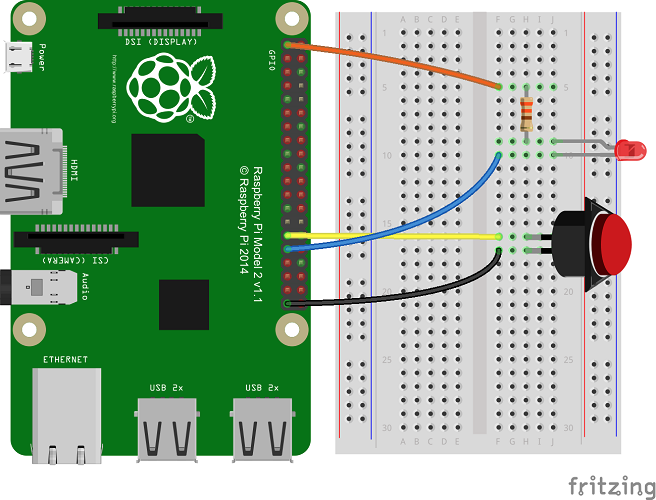
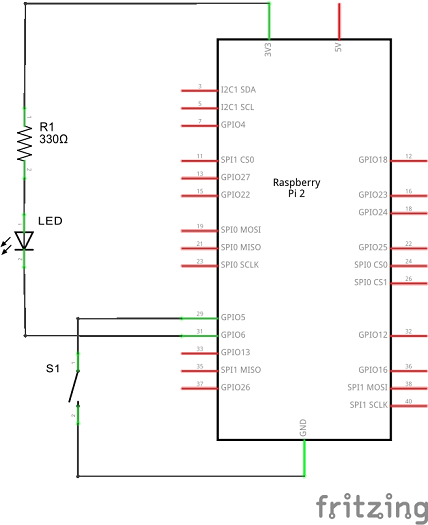
https://developer.microsoft.com/de-de/windows/iot/win10/samples/PushButton.htm
After the false positiv pressed buttons, I tryed the actually config:
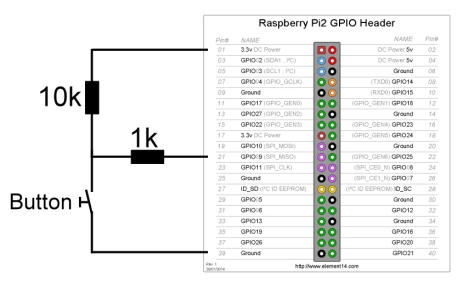 https://dracarysdiy.files.wordpress.com/2016/03/button.jpg?w=474
But the problem is always the same.
@CGabo, I will have a look to your links tomorrow. But I am not an electrican, so I hope to understand.
Thank you in advance!
-
Yeah, that’s a floating button. You need a pull-down on it, a known state, so the rpi can detect a change. You can either do that in software with RPi.GPIO and configuring it as such:
GPIO.setup(PIN, GPIO.IN, pull_up_down=GPIO.PUD_DOWN)Or through hardware:
https://www.cl.cam.ac.uk/projects/raspberrypi/tutorials/robot/buttons_and_switches/ -
Okay, now I have a script button.py which starts with rc.local after boot.
import RPi.GPIO as GPIO
import time

GPIO.setmode(GPIO.BCM)
GPIO.setup(9, GPIO.IN, pull_up_down=GPIO.PUD_DOWN)
GPIO.cleanup()           # clean up GPIO on normal exit
But it´s also not working. Did I miss something?
-
Different permissions. Your
rc.localruns with system privileges, however the MM² task runs as thepiuser. You need to have those GPIO setting in the script that thepiuser runs. -
Okay thanks, the script now starting as user pi.
Other question, has my button.py script to run in a loop?EDIT: Okay the message “button pressed” are coming when I turn the floor lights on 0o?
-
- Take out that
'GPIO.cleanup()'call that you have. That resets everything you just did above it. - Button getting triggered because you turning on the floor (?) lights is because that button is still floating, see #1 above.
- I’m assuming the rpi isn’t on the same circuit as the floor (??) lights, a voltage difference could also falsely trigger the button.
- Take out that
-
Yes it seems it is on the same circuit. The button is pressed when the light goes on and when the light goes off… :D unbelievable
-
So your rpi is then experiencing a dip in voltage, which is coming from whatever you have it connected to, I presume a wall adapter. What’s the output of that adapter? What’s the Amp rating on it? Is it a regulated or unregulated? The latter means with no load, it could very well be supplying ad much as 7-9V, and with a load it drops to 5V, however it also means it will dip rather low if something else comes on on the same circuit. Unfortunately there is no easy way to tell other than to measure its power output.
-
@dicker182
See my previous posting:Probably the cause is some voltage / EMI feedback, likely due to the wires and switches. Try to switch on/off some lights and electrical devices and see the result!
To correct this condition, use a combination of current limiting, filtering and shielding. ;-)Did you read the link?
https://www.raspberrypi.org/forums/viewtopic.php?t=53548Try following:
- Reduce the cable length to the switch.
- Detect either only the rising (GPIO.RISING) or falling event.
- Use bouncetime in ms (minimum time between two callbacks in milliseconds (intermediate events will be ignored))
- Use a capacitor, see folowing example.
http://raspberrypihobbyist.blogspot.ch/2014/11/debouncing-gpio-input.html
-
Hi,
after I install the module and type “pm2 restart mm” there is just a white screen. No UI loaded. Any idea? -
@All, sry for the lait answer, I followed all your guides, but I can´t solve the problem. I have to use another power circuit.
@cruunnerr, same here, you have to restart your pi. After the video starts for the first time, the bug is there. You can only reload mm when the video never starts in the same session.
-
Hi,
i tried to setup the button to watch the news with the MMM-Podcast module.
When i add the MMM-Button module to the config.js and start MM i only get an white screen.
With pm2 logs mm i get this#########################
Loading config …
mm-0 Loading module helpers …
mm-0 No helper found for module: alert.
mm-0 WARNING! Could not load config file. Starting with default configuration. Error found : Error: Module version mismatch. Expected 49, got 46.
mm-0 Loading module helpers …
mm-0 No helper found for module: alert.
mm-0 App threw an error during load
mm-0 Error: Module version mismatch. Expected 49, got 46.
mm-0 at Error (native)
mm-0 at process.module.(anonymous function) [as dlopen] (ELECTRON_ASAR.js:167:20)
mm-0 at Object.Module._extensions…node (module.js:568:18)
mm-0 at Object.module.(anonymous function) [as .node] (ELECTRON_ASAR.js:167:20)
mm-0 at Module.load (module.js:458:32)
mm-0 at tryModuleLoad (module.js:417:12)
mm-0 at Function.Module._load (module.js:409:3)
mm-0 at Module.require (module.js:468:17)
mm-0 at require (internal/module.js:20:19)
mm-0 at bindings (/home/pi/MagicMirror/modules/MMM-Button/node_modules/onoff/node_modu les/epoll/node_modules/bindings/bindings.js:76:44)
mm-0 Whoops! There was an uncaught exception…
mm-0 Error: Module version mismatch. Expected 49, got 46.
mm-0 at Error (native)
mm-0 at process.module.(anonymous function) [as dlopen] (ELECTRON_ASAR.js:167:20)
mm-0 at Object.Module._extensions…node (module.js:568:18)
mm-0 at Object.module.(anonymous function) [as .node] (ELECTRON_ASAR.js:167:20)
mm-0 at Module.load (module.js:458:32)
mm-0 at tryModuleLoad (module.js:417:12)
mm-0 at Function.Module._load (module.js:409:3)
mm-0 at Module.require (module.js:468:17)
mm-0 at require (internal/module.js:20:19)
mm-0 at bindings (/home/pi/MagicMirror/modules/MMM-Button/node_modules/onoff/node_modu les/epoll/node_modules/bindings/bindings.js:76:44)#############
Version mismatch from what?
Does someone know how to fix this? -
Have the Same Problem. Take a Look here and Tell me if anything helped you.
https://forum.magicmirror.builders/topic/707/mmm-button-doesn-t-work
-
Thanks for the link. I tried but the error is still there.
One thing changed.
Before:
Error: Module version mismatch. Expected 49, got 46
Now:
Error: Module version mismatch. Expected 50, got 46 -
Ok it is working now. I found this topic
linkNow when i prees the button i see the News on the screen.
Hope it will work for you too. -
Dear community,
how could i implement following scenario.
Connect a button to the MM and switch monitor on and off with it?



Hello! It looks like you're interested in this conversation, but you don't have an account yet.
Getting fed up of having to scroll through the same posts each visit? When you register for an account, you'll always come back to exactly where you were before, and choose to be notified of new replies (either via email, or push notification). You'll also be able to save bookmarks and upvote posts to show your appreciation to other community members.
With your input, this post could be even better 💗
Register Login