MagicMirror Forum
    • Recent
    • Tags
    • Unsolved
    • Solved
    • MagicMirror² Repository
    • Documentation
    • 3rd-Party-Modules
    • Donate
    • Discord
    • Register
    • Login
    A New Chapter for MagicMirror: The Community Takes the Lead
    Read the statement by Michael Teeuw here.

    Module Developer Challenge - I surrender!

    Scheduled Pinned Locked Moved Solved Development
    33 Posts 6 Posters 19.9k Views 5 Watching
    Loading More Posts
    • Oldest to Newest
    • Newest to Oldest
    • Most Votes
    Reply
    • Reply as topic
    Log in to reply
    This topic has been deleted. Only users with topic management privileges can see it.
    • N Offline
      ninjabreadman @Mykle1
      last edited by ninjabreadman

      @Mykle1 It doesn’t seem that pc-stats has all the info you require. You might consider switching to the systeminformation package.

      You can then use si.cpu() for your CPU stats and si.cpuTemperature() to retrieve an object that (if I read the docs right) looks like { main: 0, max: 0, cores: [0, 0] } with your core temps. You can then combine the two responses (or you may be able to have it return all within one request) and return those in a single sendNotification() call.

      Problem with config or JavaScript? Copy/paste it into JSHint.
      Check out the detailed walkthroughs on install, config, modules, etc.

      Mykle1M 1 Reply Last reply Reply Quote 1
      • Mykle1M Offline
        Mykle1 Project Sponsor Module Developer @ninjabreadman
        last edited by

        @ninjabreadman

        You know, I started out with that package but had some trouble with it. Likely, the problem was me, but I moved to the pc-stats package and had no problems. However, as you saw, that package doesn’t offer the cpu temps. I then tried unsuccessfully to use other packages along with pc-stats to get the temps but my knowledge and abilities are woefully inadequate. For whatever reason, I was able to get a return from pc-stats. That’s no small miracle where I’m concerned. I do like the data that the return gives me, especially the multicore support.

        Anyway, I did give it more than a few days and more than a few attempts but I will look at systeminformation again in the hopes that I can stumble across some success. Really, I am not qualified to be doing any of this. I just find it so fascinating that I keep trying until I get something right. And then there are the few special people that have taken pity on me and taught me what I needed to know at any given moment. They have my deepest gratitude and respect.

        Thanks for pointing me back to where I should have been all along. :-)

        Create a working config
        How to add modules

        N 1 Reply Last reply Reply Quote 0
        • N Offline
          ninjabreadman @Mykle1
          last edited by

          @Mykle1 Depending on the style/implementation you’re using, you may want to read up on Promises in JS.

          Also, see this note here about the lm-sensors package.

          Alternatively, have a look at MMM-SystemStats which uses vcgencmd on the CLI to retrieve the system temp, which would be far easier to integrate into your current module.

          Problem with config or JavaScript? Copy/paste it into JSHint.
          Check out the detailed walkthroughs on install, config, modules, etc.

          Mykle1M 1 Reply Last reply Reply Quote 1
          • Mykle1M Offline
            Mykle1 Project Sponsor Module Developer @ninjabreadman
            last edited by

            @ninjabreadman said in Module Developer Challenge - I surrender!:

            Alternatively, have a look at MMM-SystemStats which uses vcgencmd on the CLI to retrieve the system temp, which would be far easier to integrate into your current module.

            Thanks ninja. I will give this a shot first. In fact, I’m going to look at that right now.

            Create a working config
            How to add modules

            N 1 Reply Last reply Reply Quote 1
            • N Offline
              ninjabreadman @Mykle1
              last edited by ninjabreadman

              @Mykle1 Hmm, it may be that vcgencmd is specific to the RPi. You can try these; acpi seems like a contender, as does lm-sensors.

              Problem with config or JavaScript? Copy/paste it into JSHint.
              Check out the detailed walkthroughs on install, config, modules, etc.

              Mykle1M 2 Replies Last reply Reply Quote 0
              • Mykle1M Offline
                Mykle1 Project Sponsor Module Developer @ninjabreadman
                last edited by

                @ninjabreadman said in Module Developer Challenge - I surrender!:

                Hmm, it may be that vcgencmd is specific to the RPi.

                Ha! I see. Ok, on to the others. :-)

                Create a working config
                How to add modules

                N 1 Reply Last reply Reply Quote 0
                • N Offline
                  ninjabreadman @Mykle1
                  last edited by

                  @Mykle1 It actually might be best to run cat /sys/class/thermal/thermal_zone*/type to see if they’re already populating on your Ubuntu install. If so, you can run cat /sys/class/thermal/thermal_zone*/temp to get all the values, or just cat a specific one. Should be to three decimal places (i.e. 64000 means 64.000°C).

                  You might run it a few times to see that the values change, and if they do, then use the same exec() method from MMM-SystemStats with the right command and some math.

                  Problem with config or JavaScript? Copy/paste it into JSHint.
                  Check out the detailed walkthroughs on install, config, modules, etc.

                  1 Reply Last reply Reply Quote 0
                  • Mykle1M Offline
                    Mykle1 Project Sponsor Module Developer @ninjabreadman
                    last edited by

                    @ninjabreadman said in Module Developer Challenge - I surrender!:

                    acpi seems like a contender, as does lm-sensors.

                    Made some progress with lm-sensors which gives me great hope. I can see the return in the terminal but not in the node_helper. Still, I’m encouraged. I’ll continue to work on it tomorrow. I’m feeling a bit tired tonight.

                    Sockets connected & modules started ...
                    Launching application.
                    { 'nouveau-pci-0100': { 'PCI adapter': { temp1: [Object] } },
                      'coretemp-isa-0000': 
                       { 'ISA adapter': 
                          { 'Core 0': [Object],
                            'Core 1': [Object],
                            'Core 2': [Object],
                            'Core 3': [Object] } } }
                    Whoops! There was an uncaught exception...
                    TypeError: this.sendSocketNotification is not a function
                        at /home/pop/MagicMirror/modules/MMM-PC-Stats/node_helper.js:32:9
                        at /home/pop/MagicMirror/modules/MMM-PC-Stats/node_modules/sensors.js/lm-sensors.js:96:12
                        at ChildProcess.exithandler (child_process.js:209:7)
                        at emitTwo (events.js:106:13)
                        at ChildProcess.emit (events.js:194:7)
                        at maybeClose (internal/child_process.js:899:16)
                        at Socket. (internal/child_process.js:342:11)
                        at emitOne (events.js:96:13)
                        at Socket.emit (events.js:191:7)
                        at Pipe._handle.close [as _onclose] (net.js:510:12)
                    

                    Create a working config
                    How to add modules

                    E 1 Reply Last reply Reply Quote 0
                    • E Offline
                      E3V3A @Mykle1
                      last edited by

                      @Mykle1 Not sure what you’re doing in your code. But…

                      1. You’ll get a temp reading for each cpu core, so you need to choose|add|average…, and
                      2. How do you execute the script? Did you give it proper permissions?
                      3. I’m you already know, but you also need to allow the external file to be read from node_helper.js.

                      "Everything I do (here) is for free – altruism is the way!"
                      MMM-FlightsAbove, MMM-Tabulator, MMM-Assistant (co-maintainer)

                      Mykle1M 1 Reply Last reply Reply Quote 0
                      • Mykle1M Offline
                        Mykle1 Project Sponsor Module Developer @E3V3A
                        last edited by

                        @E3V3A said in Module Developer Challenge - I surrender!:

                        Not sure what you’re doing in your code. But…

                        Neither am I. :-)

                        Create a working config
                        How to add modules

                        strawberry 3.141S 1 Reply Last reply Reply Quote 0
                        • strawberry 3.141S Offline
                          strawberry 3.141 Project Sponsor Module Developer @Mykle1
                          last edited by

                          @Mykle1 you might want to upload your current version to a github branch so we can see what your doing

                          Please create a github issue if you need help, so I can keep track

                          1 Reply Last reply Reply Quote 0
                          • cowboysdudeC Offline
                            cowboysdude Module Developer
                            last edited by

                            He can’t it’s a secret HAHHAHAHAHHA

                            Mykle1M 1 Reply Last reply Reply Quote 0
                            • Mykle1M Offline
                              Mykle1 Project Sponsor Module Developer
                              last edited by Mykle1

                              I would like to thank everyone that gave me suggestions and advice. I really do appreciate the support.

                              I ended up using a combination of 2 npm packages. pc-stats and sensors.js. My first time building a module from an npm package, and then adding a second to the same module confused me quite a bit. That, and my lack of any real coding experience, found me at a standstill.

                              Well, once again, @cowboysdude took pity on me. He took the time to teach me where I went wrong, and what I was missing, and what I didn’t need. Maybe I won’t retain everything that he taught me but I will certainly remember his kindness and generosity. His patience is astonishing. :-)

                              https://github.com/mykle1/MMM-PC-Stats

                              Now I just need some formatting if anyone cares to assist me with that. Anyway, here’s a quick shot. Ideally, I would like to move the Core temps to right, just under the video card temp
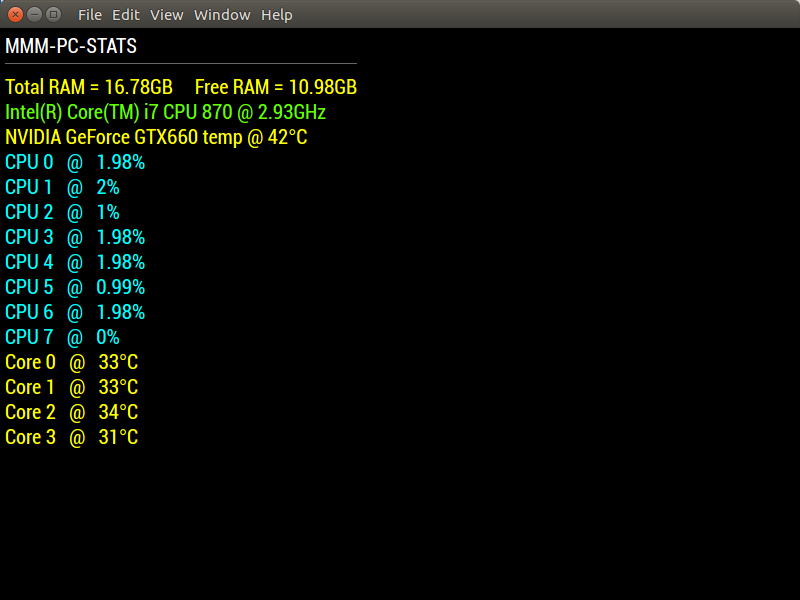
                              0_1518838594897_1.png

                              Create a working config
                              How to add modules

                              N 1 Reply Last reply Reply Quote 1
                              • Mykle1M Offline
                                Mykle1 Project Sponsor Module Developer @cowboysdude
                                last edited by

                                @cowboysdude said in Module Developer Challenge - I surrender!:

                                He can’t it’s a secret HAHHAHAHAHHA

                                My code (if you can even call it that) is never a secret. It’s more like an embarrassing teenager moment. ;-)

                                However, I do enjoy learning and I do appreciate you taking the time to teach me. You’re a damn good dude! :-)

                                Create a working config
                                How to add modules

                                E 1 Reply Last reply Reply Quote 1
                                • N Offline
                                  ninjabreadman @Mykle1
                                  last edited by

                                  @Mykle1 Glad to hear you got it working!

                                  Is this your dev environment? Or do you really have an i7 780, GTX 660 and 16Gb running MM? At least it can run MMM-Globe!

                                  Problem with config or JavaScript? Copy/paste it into JSHint.
                                  Check out the detailed walkthroughs on install, config, modules, etc.

                                  Mykle1M 1 Reply Last reply Reply Quote 0
                                  • Mykle1M Offline
                                    Mykle1 Project Sponsor Module Developer @ninjabreadman
                                    last edited by

                                    @ninjabreadman said in Module Developer Challenge - I surrender!:

                                    Glad to hear you got it working!

                                    Thanks ninja. Your suggestions pointed me in the right direction, but even then I was at a loss on how to proceed. @cowboysdude deserves all the credit, though. He took the time to explain things to me.

                                    Is this your dev environment? Or do you really have an i7 780, GTX 660 and 16Gb running MM? At least it can run MMM-Globe!

                                    This is my dev machine. It dual boots Windows and ubuntu. I found it on craigslist, although it came with 8GB of RAM. Luckily for me, it wouldn’t boot when I went to buy it so I stole it for $80 and had it up and running in minutes after getting it home.

                                    MMM-Globe! Yes, very nice module. Stunning graphics. But I prefer MMM-EARTH with an animation speed of 0 and a rotate interval of 1000. Also challenging for a Pi but the laptop boards I use handle it nicely and I get the most recent images of Earth. I’ve seen hurricanes develop and an eclipse. Pretty spectacular stuff. :-)

                                    Create a working config
                                    How to add modules

                                    1 Reply Last reply Reply Quote 1
                                    • E Offline
                                      E3V3A @Mykle1
                                      last edited by E3V3A

                                      @Mykle1 I love seeing all the progress and work you put into your module development. I must say, as an old time computer fanatic, I’m very impressed with your progress. I’m totally new to MM and still find the node/electron/express framework a rather challenging learning experience. I’ve done some fair amount of rather advanced R&D and bare-metal programming and hacking, and never expected that something based on JS, would be the thing to slow me down! Boy was I wrong and full respect to all those dev’s here, who are able to produce such nice work. I guess it again proves that technical skills without creativity is useless.

                                      As for the Module, IMHO each individual core Temp is not a very interesting parameter, because of load-balancing. Unless you have a faulty core or are explicitly telling your machine to be running certain processes on a single core. In addition, because of how heat is distributed rather evenly throughout the chip dye, you’d never see much difference than a few degrees, so I would rather average the core temps into one, and possibly show the divergence of them. (I.e. the greatest % difference from the average.)

                                      "Everything I do (here) is for free – altruism is the way!"
                                      MMM-FlightsAbove, MMM-Tabulator, MMM-Assistant (co-maintainer)

                                      cowboysdudeC Mykle1M 2 Replies Last reply Reply Quote 1
                                      • cowboysdudeC Offline
                                        cowboysdude Module Developer @E3V3A
                                        last edited by

                                        @E3V3A That’s the beauty of a module. A developer builds how he wants it to work for himself then shares it with others :) The BEST thing about that is it’s open source so anyone can modify it to fit their own needs… I’ve done that several times and that’s what makes this so much fun! :)

                                        Mykle1M 1 Reply Last reply Reply Quote 1
                                        • Mykle1M Offline
                                          Mykle1 Project Sponsor Module Developer @E3V3A
                                          last edited by

                                          @E3V3A said in Module Developer Challenge - I surrender!:

                                          I’m very impressed with your progress.

                                          I appreciate that. Frankly, I’m amazed that I’ve gotten any of my modules to work. I joined this forum 13 months ago without the slightest idea of what linux or a raspberry pi even was. I realized quickly enough that I wanted to learn how things worked and started reading and asking questions. With the help of some very nice people I was able to make my first module, MMM-Cocktails. At this point, I was totally hooked. It’s still magic to me and I enjoy every minute of the learning process.

                                          Create a working config
                                          How to add modules

                                          cowboysdudeC 1 Reply Last reply Reply Quote 0
                                          • Mykle1M Offline
                                            Mykle1 Project Sponsor Module Developer @cowboysdude
                                            last edited by

                                            @cowboysdude said in Module Developer Challenge - I surrender!:

                                            that’s what makes this so much fun! :)

                                            Damn good fun, bro! :-)

                                            Create a working config
                                            How to add modules

                                            Mykle1M 1 Reply Last reply Reply Quote 1

                                            Hello! It looks like you're interested in this conversation, but you don't have an account yet.

                                            Getting fed up of having to scroll through the same posts each visit? When you register for an account, you'll always come back to exactly where you were before, and choose to be notified of new replies (either via email, or push notification). You'll also be able to save bookmarks and upvote posts to show your appreciation to other community members.

                                            With your input, this post could be even better 💗

                                            Register Login

                                            • 1
                                            • 2
                                            • 2 / 2
                                            • First post
                                              Last post
                                            Enjoying MagicMirror? Please consider a donation!
                                            MagicMirror created by Michael Teeuw.
                                            Forum managed by Sam, technical setup by Karsten.
                                            This forum is using NodeBB as its core | Contributors
                                            Contact | Privacy Policy