Read the statement by Michael Teeuw here.
[MMM-RTSPStream] - Video Streaming from Live Feeds & Security Cameras
-
@Vauxdvihl – when you open the stream in your browser, do you need any special plugins to view it?
Without digging too deep, it looks like this is a MJPEG stream, which can be viewed without any special software in the browser. For these kind of streams it’s easiest to just use the MMM-iframe module to show the stream.
If you don’t want to show the controls the page generates, you can find the link directly to the camera image by viewing the source of the camera stream page.
-
@shbatm
THANKS A LOT
Thumbs up to you
It works -
@shbatm
It works. But I have issue with global zoom.With the zoom value 1.5, the module size is enlarged by 1.5 while the actual video feed is not.
How do I fix this ?
Thanks
-
@nagaculun You’ll have to set the width and height of the stream manually because and OMXPlayer should resize the video for you. It’s a bit trial and error, but you should be able to get it lined up very close.
Refer to the README and the
moduleOffsetmodule setting andwidth,height, andabsPositionstream settings.Let me know if you have issues getting it to work.
-
I need some help with this module. I can see the RTSP stream without issues BUT when I use it with the MMM-Wallpaper then the stream doesn’t show. Any suggestions?
-
Hello,
I have been playing with MagicMirror for 2 weeks now and am slowly getting the hang of it.
It was the MMM-RTSPStream that sparked it all and made me decide to dedicate a monitor for all the other nice modules.Now I have a question concerning MMM-RTSPStream.
The streams are ordered from left to right and then from top to bottom, all depending on the size of the windows.
I would like to have a bit more control, like with tables.
My goal for now is to have a bigger window on the left and 2 little windows on the right.I have no idea how to place a picture, so I try to place a link to a picture.
This shows the current implementation, with 2 streams.Current implementation - 2 streams
Any idea where and how to achieve that (if possible at all) ??
I guess the MMM-RTSPStream.css is a place to start, but for the moment I fail to understand it to be able to make the wanted changes.
Due to a lack of knowledge of css, but I am willing to learn.Thanks in advance and best regards,
Erik-Jan
-
@evroom said in [MMM-RTSPStream] - Video Streaming from Live Feeds & Security Cameras:
I guess the MMM-RTSPStream.css is a place to start
@evroom – First of all welcome to the community.
You should be able to do what you’re asking by manipulating the CSS (or another way I’ll mention below).
For CSS:
First, you should put all customizations in the
~/MagicMirror/css/custom.cssfile so they don’t get overwritten by any module or MagicMirror updates.Try adding this to
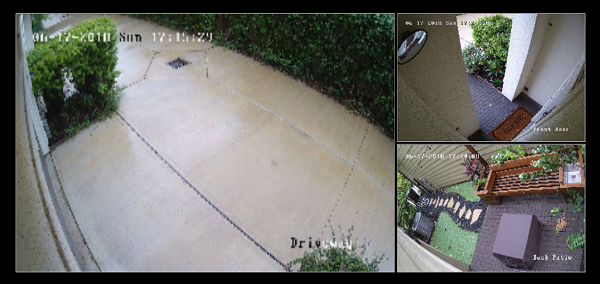
custom.css:.MMM-RTSPStream .innerWrapper { float: left; }Without float (original):
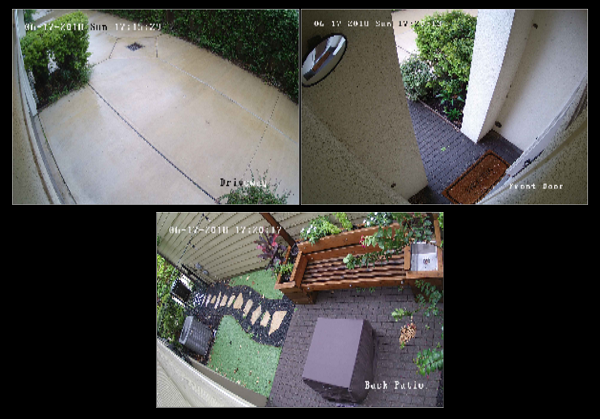
With float (and reducing the size of the other two streams by half and the moduleWidth settings in my config):
Background if needed for further changes: the MMM-RSTPStream draws all of the streams inside of a single, outer
divwith the"MMM-RTSPStream wrapper"classes. Each stream consists of an"MMM-RTSPStream innerWrapper"-classeddivblock which contains all the controls, canvas, and screenshot for each stream. This is the tag you’ll need to manipulate to get it to do what you want. If you need to override one particular stream’s size/container, you can reference it in CSS by using it’s ID, which ends in the stream number. For example, something like this:#iw_stream1 { width: 123px; }Additional option If you’re using Raspberry Pi directly attached to the monitor and using OMXPlayer to play the streams, you can also turn off the borders and send exact sizes and locations for each stream on the monitor using the
absPositionparameter. See the README on GitHub for more details. This will break any thumbnail or remote playback, though. -
@shbatm said in [MMM-RTSPStream] - Video Streaming from Live Feeds & Security Cameras:
.MMM-RTSPStream .innerWrapper {
    float: left;
}@shbatm
Thanks a lot! Works just fine.
A bit of calculating and adjusting the margin, and it does what I wanted. -
Hi,
Quite happy with MMM-RTSPStream so far; thx to those that contributed to it.
Next thing I am trying to use MMM-RTSPStream for, is streaming sat-tv from a Dreambox & VU+ receivers.
I am able to stream a channel using:omxplayer --vol -3000 --win “0 0 480 320” --live http://192.168.178.28:8001/1:0:19:283D:3FB:1:C00000:0:0:0:
It is not a rtsp stream, but it can use omxplayer for streaming.
When I try to use MMM-iFrame, I can add the URL, but then it tries to open a program that can play mpg (and MagicMirror won’t start).
When I use it to stream using my browser (on my PC), I have it open VLC player, but installing VLC on Raspberry (using HW acceleration) is quite an act, so I would prefer to use omxplayer.Could this be done ?
I am not so familiar with JavaScript and CCS (yet), more a Perl guy, but am willing to assist and test-drive.
-
Hi,
To come back to my own request.
The line that works from the command line is:
omxplayer --vol -3000 --win “0 0 480 320” --live http://192.168.178.28:8001/1:0:19:283D:3FB:1:C00000:0:0:0:
When I look at the code
https://github.com/shbatm/MMM-RTSPStream/blob/master/node_helper.jsI notice following:
–vol : not present, not really necessary, yet
–win : present
–live : present
–avdict rtsp_transport:tcp : present, needed ?
-–video_queue 4 : present, needed ?
–fps 30 : present, needed ?When home I will try:
$ omxplayer --avdict rtsp_transport:tcp --win “0 0 480 320” --live -–video_queue 4 --fps 30 http://192.168.178.28:8001/1:0:19:283D:3FB:1:C00000:0:0:0:
And I will try:
node_helper.js :
if (this.config[s.name].protocol == “http”) {
args.unshift(“–vol 3000”);
} -
Okay, it is actually quite simple.
It works without any modifications.stream1: { url: 'http://192.168.178.28:8001/1:0:19:2B66:3F3:1:C00000:0:0:0:', // ZDF HD //url: 'http://192.168.178.28:8001/1:0:19:283D:3FB:1:C00000:0:0:0:', // ARD HD protocol: "tcp", width: 590, height: 332 } 2|mm | Starting stream stream1 with args: [ 2|mm | "--avdict", 2|mm | "rtsp_transport:tcp", 2|mm | "--win", 2|mm | "4, 608, 594, 940", 2|mm | "--live", 2|mm | "--video_queue", 2|mm | "4", 2|mm | "--fps", 2|mm | "30", 2|mm | "http://192.168.178.28:8001/1:0:19:2B66:3F3:1:C00000:0:0:0:" 2|mm | ] 2|mm | Starting PM2 for omx_stream1 2|mm | PM2 started for omx_stream1It is just that the Raspberry Pi 3 Model 3 and omxplayer only can handle 1 TS stream, as it appears to be the case.
Simular like the max. 3 RTSP camera streams.So, if you do not use omxplayer for something else and you want to use MMM-RTSPStream for streaming just the one TS channel, it can be used.
-
Hi @shbatm & others! After install (followed your guide here https://github.com/shbatm/MMM-RTSPStream), I see a black frame with a white border, without the stream. I tried both mine stream url and samples. My sample works great via VLC. Can you help me to find an issue?
{ module: 'MMM-RTSPStream', position: 'middle_center', config: { autoStart: true, moduleWidth: 354, moduleHeight: 240, localPlayer: 'omxplayer', stream1: { name: 'Test Stream', url: 'rtsp://192.168.2.237:554/user=USERNAME&password=PASSWORD&channel=1&stream=0.sdp', snapshotUrl: '', snapshotRefresh: 10, // Seconds frameRate: "30", port: 9999, } } },update, after a few commas in the config I managed to get test stream up&running, but not my webcam. Any solution available? :)
-
@epi said in [MMM-RTSPStream] - Video Streaming from Live Feeds & Security Cameras:
rtsp://192.168.2.237:554/user=USERNAME&password=PASSWORD&channel=1&stream=0.sdp
I assume issue is in my stream URL either localPlayer. Any suggestions?
-
pi@raspberrypi:~ $ pm2 logs
[TAILING] Tailing last 15 lines for [all] processes (change the value with --lines option) /home/pi/.pm2/pm2.log last 15 lines: PM2 | [2018-09-21T20:42:51.125Z] PM2 log: App [omx_stream1] with id [1] and pid [6551], exited with code [1] via signal [SIGI NT] PM2 | [2018-09-21T20:42:51.132Z] PM2 log: Starting execution sequence in -fork mode- for app name:omx_stream1 id:1 PM2 | [2018-09-21T20:42:51.159Z] PM2 log: App name:omx_stream1 id:1 online PM2 | [2018-09-21T20:42:53.221Z] PM2 log: App [omx_stream1] with id [1] and pid [6582], exited with code [1] via signal [SIGI NT] PM2 | [2018-09-21T20:42:53.234Z] PM2 log: Starting execution sequence in -fork mode- for app name:omx_stream1 id:1 PM2 | [2018-09-21T20:42:53.253Z] PM2 log: App name:omx_stream1 id:1 online PM2 | [2018-09-21T20:42:59.249Z] PM2 log: Stopping app:mm id:0 PM2 | [2018-09-21T20:42:59.562Z] PM2 log: App [mm] with id [0] and pid [6136], exited with code [0] via signal [SIGINT] PM2 | [2018-09-21T20:42:59.632Z] PM2 log: pid=6136 msg=process killed PM2 | [2018-09-21T20:42:59.635Z] PM2 log: Starting execution sequence in -fork mode- for app name:mm id:0 PM2 | [2018-09-21T20:42:59.651Z] PM2 log: App name:mm id:0 online PM2 | [2018-09-21T20:43:35.020Z] PM2 log: Stopping app:omx_stream1 id:1 PM2 | [2018-09-21T20:43:35.054Z] PM2 error: Process with pid 6613 already exists PM2 | [2018-09-21T20:43:35.174Z] PM2 log: App [omx_stream1] with id [1] and pid [6613], exited with code [1] via signal [SIGI NT] PM2 | [2018-09-21T20:43:35.193Z] PM2 log: pid=6613 msg=process killed /home/pi/.pm2/logs/omx-stream1-error.log last 15 lines: /home/pi/.pm2/logs/mm-error.log last 15 lines: 0|mm | WARNING! Could not validate config file. Please correct syntax errors. Starting with default configuration. 0|mm | [885:0919/041827.726584:FATAL:bus.cc(1152)] D-Bus connection was disconnected. Aborting. 0|mm | WARNING! Could not validate config file. Please correct syntax errors. Starting with default configuration. 0|mm | [10472:0919/213258.329193:FATAL:bus.cc(1152)] D-Bus connection was disconnected. Aborting. 0|mm | TypeError: `port` or a `server` must be provided 0|mm | at new WebSocketServer (/home/pi/MagicMirror/modules/MMM-RTSPStream/node_modules/node-rtsp-stream-es6/node_modules/ ws/lib/WebSocketServer.js:44:11) 0|mm | at VideoStream.startListener (/home/pi/MagicMirror/modules/MMM-RTSPStream/node_modules/node-rtsp-stream-es6/src/vid eoStream.js:32:24) 0|mm | at Class.startListener (/home/pi/MagicMirror/modules/MMM-RTSPStream/node_helper.js:49:32) 0|mm | at Class.socketNotificationReceived (/home/pi/MagicMirror/modules/MMM-RTSPStream/node_helper.js:257:22) 0|mm | at Socket.<anonymous> (/home/pi/MagicMirror/modules/node_modules/node_helper/index.js:113:11) 0|mm | at emitTwo (events.js:126:13) 0|mm | at Socket.emit (events.js:214:7) 0|mm | at /home/pi/MagicMirror/node_modules/socket.io/lib/socket.js:513:12 0|mm | at _combinedTickCallback (internal/process/next_tick.js:131:7) 0|mm | at process._tickCallback (internal/process/next_tick.js:180:9) /home/pi/.pm2/logs/mm-out.log last 15 lines: 0|mm | Starting stream stream1 with args: [ 0|mm | "--avdict", 0|mm | "rtsp_transport:tcp", 0|mm | "--win", 0|mm | "800, 421, 1120, 661", 0|mm | "--live", 0|mm | "--video_queue", 0|mm | "4", 0|mm | "--fps", 0|mm | "30", 0|mm | "rtsp://192.168.2.237:554/user=USERNAME&password=PASSWORD&channel=1&stream=0" 0|mm | ] 0|mm | PM2: omx_stream1 already running. Stopping old instance... 0|mm | Starting PM2 for omx_stream1 0|mm | PM2 started for omx_stream1 -
@epi said in [MMM-RTSPStream] - Video Streaming from Live Feeds & Security Cameras:
/user=USERNAME&password=PASSWORD&channel=1&stream=0.sdp
Looking at the logs it looks like it’s trying to launch everything correctly. Just to confirm:
- The stream works correctly in VLC using the URL you have above.
- Since you’re using OMXPlayer – you are testing on the mirror with the RPi connected (not with VNC/Remote Desktop, etc). You won’t see playback from OMXPlayer on anything but the monitor connected to the RPi.
You can try:
- Make sure the stream works with OMXPlayer by testing with the command line (shut down Magic Mirror first):
omxplayer --avdict rtsp_transport:tcp --win 800, 421, 1120, 661 --live --video_queue 4 --fps 30 rtsp://192.168.2.237:554/user=USERNAME&password=PASSWORD&channel=1&stream=0.sdp - Test the above with and without
.sdpat the end of the path. I noticed in your log above for some reason it didn’t pass the extension.sdp. I don’t know if this is the issue or not. You can also try without the--winargument to test it full screen. - Using
UDPinstead ofTCP, putprotocol: "udp"in your stream config (to test from command line, remove thertsp_transport:tcpargument. - Using
stream=1to test the lower resolution sub-stream. Sometimes OMXPlayer just refuses to do anything (without any errors) if it doesn’t have enough video memory–I’ve only seen it happen trying to play 3 streams at once though. - Try adding a
?at the end of the stream url. Just something I saw while googling your url format to find out what kind of camera you have.
-
This post is deleted! -
@shbatm said in [MMM-RTSPStream] - Video Streaming from Live Feeds & Security Cameras:
Looking at the logs it looks like it’s trying to launch everything correctly. Just to confirm:
- The stream works correctly in VLC using the URL you have above.
- Since you’re using OMXPlayer – you are testing on the mirror with the RPi connected (not with VNC/Remote Desktop, etc). You won’t see playback from OMXPlayer on anything but the monitor connected to the RPi.
- Yes, it does work in VLC.
- I control RPi via SSH & VNC, but it is connected via HDMI to monitor and I don’t see any output on the actual screen neither via VNC, nor actual screen.
Testing:
- By making tests I encounter an error:
pi@raspberrypi:~ $ sudo reboot login as: pi pi@192.168.2.111's password: Linux raspberrypi 4.14.50-v7+ #1122 SMP Tue Jun 19 12:26:26 BST 2018 armv7l The programs included with the Debian GNU/Linux system are free software; the exact distribution terms for each program are described in the individual files in /usr/share/doc/*/copyright. Debian GNU/Linux comes with ABSOLUTELY NO WARRANTY, to the extent permitted by applicable law. Last login: Mon Sep 24 01:55:35 2018 SSH is enabled and the default password for the 'pi' user has not been changed. This is a security risk - please login as the 'pi' user and type 'passwd' to set a new password. pi@raspberrypi:~ $ pm2 stop mm [PM2] Applying action stopProcessId on app [mm](ids: 0) [PM2] [mm](0) ✓ ┌──────────┬────┬──────┬─────┬─────────┬─────────┬────────┬─────┬────────┬──────┬──────────┐ │ App name │ id │ mode │ pid │ status │ restart │ uptime │ cpu │ mem │ user │ watching │ ├──────────┼────┼──────┼─────┼─────────┼─────────┼────────┼─────┼────────┼──────┼──────────┤ │ mm │ 0 │ fork │ 0 │ stopped │ 0 │ 0 │ 0% │ 0 B │ pi │ disabled │ └──────────┴────┴──────┴─────┴─────────┴─────────┴────────┴─────┴────────┴──────┴──────────┘ Use `pm2 show <id|name>` to get more details about an app pi@raspberrypi:~ $ omxplayer --avdict rtsp_transport:tcp --win 800, 421, 1120, 661 --live --video_queue 4 --fps 30 rtsp://192.168.2.237:554/user=USER&password=PASS&channel=1&stream=0.sdp [1] 1084 [2] 1085 [3] 1086 pi@raspberrypi:~ $ File "421," not found. pi@raspberrypi:~ $- Did not work
- Also did not work, this time another file is not being found
omxplayer --avdict 421, 1120, 661 --live --video_queue 4 --fps 30 rtsp://192.168.2.237:554/user=USER&password=PASS&channel=1&stream=0 [7] 1213 [8] 1214 [9] 1215 [4] Exit 1 omxplayer --avdict 421, 1120, 661 --live --video_queue 4 --fps 30 rtsp://192.168.2.237:554/user=USERNAME [5] Done password=PASSWORD [6] Done channel=1 pi@raspberrypi:~ $ File "1120," not found.- 5., Did not work
pi@raspberrypi:~ $ File "421," not found. -
@epi My fault: for command line you have to fix the window command line argument:
... --win 800,421,1120,661 ...or... --win '800 421 1120 661' ...and I think put the URL in quotes.You can test it without that whole argument (should play full screen). This is what I meant in #2 above. Here’s some combos to try:
# Option 1 -- Should be full screen (if it works): omxplayer --avdict rtsp_transport:tcp --live --video_queue 4 --fps 30 "rtsp://192.168.2.237:554/user=USERNAME&password=PASSWORD&channel=1&stream=0.sdp" # Option 2: omxplayer --avdict rtsp_transport:tcp --live --video_queue 4 --fps 30 "rtsp://192.168.2.237:554/user=USERNAME&password=PASSWORD&channel=1&stream=0" # Option 3 Sub-stream: omxplayer --avdict rtsp_transport:tcp --live --video_queue 4 --fps 30 "rtsp://192.168.2.237:554/user=USERNAME&password=PASSWORD&channel=1&stream=1.sdp" # Option 4 UDP: omxplayer --live --video_queue 4 --fps 30 "rtsp://192.168.2.237:554/user=USERNAME&password=PASSWORD&channel=1&stream=0.sdp" -
I did a fresh install of RPI OS & MM all addons
Option one: freeze, then after a wait console available again
pi@raspberrypi:~/MagicMirror/modules/MMM-RTSPStream $ omxplayer --avdict rtsp_transport:tcp --live --video_queue 4 --fps 30 "rtsp://192.168.2.237:554/user=USER&password=PASS&channel=1&stream=0.sdp"
Video codec omx-h264 width 1280 height 960 profile 77 fps 30.000000
Audio codec pcm_alaw channels 1 samplerate 8000 bitspersample 8
Subtitle count: 0, state: off, index: 1, delay: 0
V:PortSettingsChanged: 1280x960@30.00 interlace:0 deinterlace:0 anaglyph:0 par:1.00 display:0 layer:0 alpha:255 aspectMode:0
have a nice day ;)
Option two: many lines
COMXVideo::Decode timeoutOption three: same as first one, freeze then
Video codec omx-h264 width 704 height 576 profile 77 fps 30.000000
Audio codec pcm_alaw channels 1 samplerate 8000 bitspersample 8
Subtitle count: 0, state: off, index: 1, delay: 0
V:PortSettingsChanged: 704x576@30.00 interlace:0 deinterlace:0 anaglyph:0 par:1.00 display:0 layer:0 alpha:255 aspectMode:0
Option four:
pi@raspberrypi:~ $ omxplayer --live --video_queue 4 --fps 30 "rtsp://192.168.2.2 37:554/user=USER&password=PASS&channel=1&stream=0.sdp" Video codec omx-h264 width 1280 height 960 profile 77 fps 30.000000 Audio codec pcm_alaw channels 1 samplerate 8000 bitspersample 8 Subtitle count: 0, state: off, index: 1, delay: 0 -
Hi @shbatm I am playing with your module to see TV programs from a Vu+ Duo² (a DVB-S2+DVB-T Linux/Enigma2 decoder).
The only thing I can’t succed is to see HD TV programs.
I’ve tried to use bothurland
hdUrl, but those streams won’t start (while normal SD programs are working just fine).
This is my current script by the way (the HD channel has been disabled in the meantime):
{
		    module: "MMM-RTSPStream",
		    position: "bottom_right",
		    // header: "Sky TG24",
		        config: {
		        autoStart: true,
		        rotateStreams: false,
		        rotateStreamTimeout: 10,
		        moduleWidth: 390,
		        moduleHeight: 219,
		        localPlayer: 'omxplayer',
		        remotePlayer: 'none',
		        showSnapWhenPaused: false,
		        remoteSnaps: false,
		        stream1: {
		            // name: 'Sky TG24',
		            // url: 'http://192.168.1.6:8001/1:0:1:5:7918:217C:EEEE0000:0:0:0:',
		            name: 'RAI 3 TGR Puglia',
		            url: 'http://192.168.1.6:8001/1:0:1:D4B:8800:13E:EEEE0000:0:0:0:',
		            // name: 'RAI 3 HD',
		            // hdUrl: 'http://192.168.1.6:8001/1:0:1:2191:5:13E:EEEE0000:0:0:0:',
		            protocol: "tcp",
		            frameRate: 'undefined',
		            width: 390,
		            height: 219,
		            }
		        }
		},


Hello! It looks like you're interested in this conversation, but you don't have an account yet.
Getting fed up of having to scroll through the same posts each visit? When you register for an account, you'll always come back to exactly where you were before, and choose to be notified of new replies (either via email, or push notification). You'll also be able to save bookmarks and upvote posts to show your appreciation to other community members.
With your input, this post could be even better 💗
Register Login