Read the statement by Michael Teeuw here.
Microphone/MMM-voice Help
-
Hi everyone!
Absolute newbie with no real coding background here so thanks in advance for the patience and help!
So I’ve built a MM for my wife and I’ve also installed google AIY so that it functions as both a MM and google assistant. I would also like to be able to use the microphone for MMM-voice and everything appears to have installed properly, however, when I load MM it will not change from “Initializing”. I have a feeling that this is because the microphone is only “ON” when I am running one of the AIY demo.py’s AND giving the command “Hello, Google” or OK, Google but, again, I am a noob and could be completely wrong. Do you have any advice for getting the PI/MM/MMM-voice to initialize the microphone/voice-HAT?
Thanks in advance!
-
I could be wrong (I often am) but I don’t think the microphone can be shared. It’s one module or another.
-
Thanks for the response, @Mykle1 . @strawberry-3-141 asked me to debug and I added debug:true to the config file but am not sure where the debug log data is stored. Any help on finding the debug data?
It almost hurts to ask that question :(
Thanks!
-
@tnp0327 minimize the mirror window (alt-spacebar, n) and the terminal windows used to start the mirror will be shown… the debug is in that window…
least thats how I do it!..
this debugs the node_helper
ctrl-shift-i will open the mirror debug window (select console tab) this will show the module level debug -
@tnp0327 the file that gets generated is located at
modules/MMM-voice/debug.log -
@strawberry-3-141 here is a snapshot of the directory. I do not see a debug.log file. Do you know why this could happen?

Thanks
-
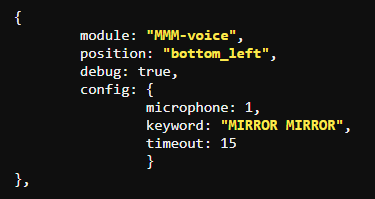
@tnp0327 can you show me the mmm-voice part of your config js
-
@strawberry-3-141 I originally had it in the config section but moved it up below “position”. However, I am still not seeing a debug.log file. I rebooted and still nothing.
-
@tnp0327 it needs to be in the config section
-
@strawberry-3-141 thanks! I moved it to the config section.
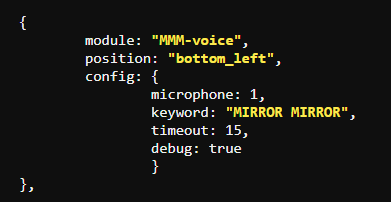
I still do not see a debug.log file.

When I run MM, the MMM-voice area (bottom left) says Initialising… and underneath that it says undefined.
-
have u restarted the mirror a few times, without reboot?
the sound process does NOT get restarted…
get back to the commandline and do
ps -ef | grep pocket
and then kill that process so it can be restarted…
or reboot…
i created this little script for a prior mirror runtime that I use here too
#!/bin/bash ps -ef | grep pocket | grep -v "color=auto" | awk '{print $2}' | xargs sudo kill -9 ps -ef | grep node | grep -v "color=auto" | awk '{print $2}' | xargs sudo kill -9 -
@sdetweil I have restarted the MM process and rebooted the PI - still no debug.log file.
-
@tnp0327 can u minimize the mirror and look at the console log of the terminal window… maybe there is some other error…
minimize = alt-spacebar, n
-
@sdetweil @strawberry-3-141 so I did not find a debug file but was able to follow the instructions to look at the console log and the only message I am seeing regarding MMM-voice is:
Starting module: MMM-voice MMM-voice.js:82
MMM-voice is waiting for voice command registrations. MMM-voice.js:85 -
@tnp0327 before the modules is the startup of the node_helpers… if u can scroll back up the console window, you might find something else…
have u tested to make sure the mic is working? with the rec command?
rec somefile.wav
on the bottom of the console window should be a meter like bar that moves when u speak…
then you can control-z out of the rec command and then play somefile.wav to see how it sounds… -
OMW to work now - will run it again later and update with my feedback. Thanks for the help so far.
-
@tnp0327 I am going through same thing,it displays mic flashing symbol and just says initialising and undefined at bottom(if degug:true).Did you resolve it?please let me how to make it work?
Thanks -
@abhilash1368 do you have content in your debug log file?
-
@strawberry-3-141 I don’t see any content,but its working now.Initially I have my own custom twitter module loaded along with MMM-voice(my twitter.js is not modified yet to support MMM-voice). Once after making changes to my twitter.js according to “Hey Lucy” documentation to receive voice notifications,then it is started working. Thanks
-
@strawberry-3-141 Ok so i have a very similar situation i have AlexaPi (and MMM-AlexaPi for visual feedback) and want to use MMM-voice and Hello-Lucy. I have 2 USB microphones (a webcam that i talk to AlexaPI and a USB sound card that i want to use for MMM-voice)
On the config.js i have assigned microphone id of 2 for MMM-voice ( arecord -l and the install of MMM-voice show that alsa as 0 USB webcam as card 1 and USB sound card as card 2)
when i start magic mirror MMM-voice says “initializing” than briefly “Waiting for module commands” than settles on “error”
My questions are:- and i am pretty sure i have an answer for this is that AlexaPi and MMM-voice can they use the same mic or not … most likely not .
- why isn’t using microphone #2 straight forward do i have to twitch anything on alsa config, etc will pulse audio be better and what is the difference ?? how do we mitigate this problem??
I have tested and confirmed that both usb microphones work when they are plugged each by themselves but not when they are both simultaneously plugged in only the webcam would record … i am not sure if i am putting the right parameter here “arecord hw:1,0 -d 10 /tmp/test-mic.wav”
Please any help will be greatly appreciated
Denis



Hello! It looks like you're interested in this conversation, but you don't have an account yet.
Getting fed up of having to scroll through the same posts each visit? When you register for an account, you'll always come back to exactly where you were before, and choose to be notified of new replies (either via email, or push notification). You'll also be able to save bookmarks and upvote posts to show your appreciation to other community members.
With your input, this post could be even better 💗
Register Login